Botframework-solutions: LUIS 2.6.2- cannot import LUIS JSON - Missing phraselist features field
What project is affected?
LUIS
What language is this in?
Powershell
Modules versions
@microsoft/botframework-cli/4.11.1 win32-x64 node-v11.6.0
Luis - 2.6.2
What happens?
We are trying to update the LUIS model and the below step is giving an exception
($output = luis import version `
        --appId $appId `
        --authoringKey $authoringKey `
        --subscriptionKey $subscriptionKey `
        --versionId $version `
        --region $region `
        --cloud $cloud `
        --in $outFile `
        --wait 2>&1) >> $log
Below is the exception
Successfully wrote LUIS model to D:\Workspace\Ecolab\EVA-IT\IT_EVA\deployment\release\LU\en-us\common.json
Missing phraselist features field.
LUIS Command Line Interface - © 2018 Microsoft Corporation
Imports a new version into a LUIS application.
Usage:
luis import version --in luisApp.json
Command arguments are:
--in (required) The object to send in the body of the request
{
"intents": [
{
"name": "Greeting"
}
],
"entities": [
{
"name": "userName",
"roles": []
}
],
"composites": [],
"closedLists": [],
"regex_entities": [],
"model_features": [],
"regex_features": [],
"utterances": [
{
"text": "Hi",
"intent": "Greeting",
"entities": []
}
],
"patterns": [],
"patternAnyEntities": [],
"prebuiltEntities": [],
"luis_schema_version": "3.0.0",
"versionId": "0.1",
"name": "test1",
"desc": "",
"culture": "en-us"
}
--appId <string> The application ID.
(required)
--versionId <string> The new versionId to import. If not specified, the versionId will be read from the imported object.
Configuration and Overrides:
--appId Specifies the public LUIS application id. Overrides the .luisrc value and the LUIS_APP_ID environment variable.
--authoringKey Specifies the LUIS authoring key (from luis.ai portal user settings page). Overrides the .luisrc value and the LUIS_AUTHORING_KEY environment variable.
--subscriptionKey Specifies the LUIS subscriptionKey. Overrides the .luisrc value and the LUIS_SUBSCRIPTION_KEY environment variable.
--versionId Specifies the version id. Overrides the .luisrc value and the LUIS_VERSION_ID environment variable.
--region Specifies the authoring region for all requests. [westus|westeurope|australiaeast] Overrides the .luisrc value and the LUIS_REGION environment variable.
--cloud Specifies the cloud region for all requests. [com|us] Overrides the .luisrc value and the LUIS_CLOUD environment variable.
--stdin Pull in service keys from stdin in the format of that is the output of: msbot get service
--prefix Appends [luis-apis] prefix to all messages
Global Arguments:
--help, -h Prints this help file.
--version, -v Prints the version of this cli tool
--force, -f Do not prompt for confirmation, force the operation
--! Dumps all documented commands to the console with descriptions
[31m Model [39m[31m Type [39m[31m StatusId [39m[31m Status [39m[31m [39m
Cancel Intent Classifier 2 UpToDate
Confirm Intent Classifier 2 UpToDate
DirectionalReference Entity Extractor 2 UpToDate
displayName Entity Extractor 2 UpToDate
endLiveChat Intent Classifier 2 UpToDate
Escalate Intent Classifier 2 UpToDate
givenName Entity Extractor 2 UpToDate
greeting Intent Classifier 2 UpToDate
Logout Intent Classifier 2 UpToDate
None Intent Classifier 2 UpToDate
OnboardingHelp Intent Classifier 2 UpToDate
prodInfoType Entity Extractor 2 UpToDate
provideFeedback Intent Classifier 2 UpToDate
providePreference Intent Classifier 2 UpToDate
Reject Intent Classifier 2 UpToDate
signIn Intent Classifier 2 UpToDate
StartOver Intent Classifier 2 UpToDate
surName Entity Extractor 2 UpToDate
zipCode Entity Extractor 2 UpToDate
Failed to load the trained application package. Please re-train your application version.
LUIS Command Line Interface - © 2018 Microsoft Corporation
Publishes a specific version of the application.
Usage:
luis publish version --in applicationPublishObject.json --appId <string> --versionId <version> --staging
Command arguments are:
--in (required) The object to send in the body of the request
{
"versionId": "0.1",
"isStaging": false,
"region": "westus"
}
--appId <string> The application ID.
(required)
Configuration and Overrides:
--appId Specifies the public LUIS application id. Overrides the .luisrc value and the LUIS_APP_ID environment variable.
--authoringKey Specifies the LUIS authoring key (from luis.ai portal user settings page). Overrides the .luisrc value and the LUIS_AUTHORING_KEY environment variable.
--subscriptionKey Specifies the LUIS subscriptionKey. Overrides the .luisrc value and the LUIS_SUBSCRIPTION_KEY environment variable.
--versionId Specifies the version id. Overrides the .luisrc value and the LUIS_VERSION_ID environment variable.
--region Specifies the authoring region for all requests. [westus|westeurope|australiaeast] Overrides the .luisrc value and the LUIS_REGION environment variable.
--cloud Specifies the cloud region for all requests. [com|us] Overrides the .luisrc value and the LUIS_CLOUD environment variable.
--stdin Pull in service keys from stdin in the format of that is the output of: msbot get service
--prefix Appends [luis-apis] prefix to all messages
Global Arguments:
--help, -h Prints this help file.
--version, -v Prints the version of this cli tool
--force, -f Do not prompt for confirmation, force the operation
--! Dumps all documented commands to the console with descriptions
We have created VA template in Typescript language and here you can see the function which we are trying to use to update the LUIS model
https://github.com/microsoft/botframework-solutions/blob/master/templates/typescript/samples/sample-assistant/deployment/scripts/luis_functions.ps1 - function name UpdateLUIS
What were you expecting to happen?
It should update the LUIS model.
Thanks,
Sreekanth (Ecolab)
 SreekanthOAuth
All 18 comments
Hi @SreekanthOAuth, this script appears to be out of date. To get you unblocked, try taking the LUIS functions file here instead: https://github.com/microsoft/botframework-solutions/blob/master/samples/csharp/assistants/virtual-assistant/VirtualAssistantSample/Deployment/Scripts/luis_functions.ps1
@Batta32 - can you help make sure the TypeScript scripts are up to date with the ones in the VA sample project?
 lauren-mills
on 3 Mar 2021
lauren-mills
on 3 Mar 2021
Sure @lauren-mills, we will check this and update the TypeScript scripts of master.
Just to mention, the 1.0 TypeScript bots contains the updated scripts 😊.
 Batta32
on 3 Mar 2021
Batta32
on 3 Mar 2021
@lauren-mills - Thanks for the response.
Could you please let us know about the endPoint attribute? What value do we need to pass?
refer: luis_functions.ps1 - UpdateLUIS
Is it in https://
Please confirm.
Thanks,
Sreekanth
SreekanthOAuth
on 5 Mar 2021
Hi @SreekanthOAuth, you can find the endpoint value checking the value of the endpoint property of your languageModels in the cognitiveModels.json. And yes, it's the one with https://.cognitiveservices.azure.com/ format.
The endpoint property is the LUIS endpoint hostname, which is the endpoint for deploying and managing LUIS application.
Check these documents:
- bf luis:version:list documentation
- luisEndpoint
@lauren-mills - we created the PR #3775 updating the deployment scripts of TypeScript with the ARM templates.
_endpoint value_

Batta32
on 8 Mar 2021
@Batta32 - Thanks for the update. I'll try and let you know the outcome.
Thanks,
Sreekanth
SreekanthOAuth
on 8 Mar 2021
@Batta32 - Getting error at below step
$luisApp = bf luis:application:show `
        --appId $appId `
        --endpoint $endpoint `
        --subscriptionKey $subscriptionKey | ConvertFrom-Json
Error is - Failed to retrieve application data: Error: Access Denied
I did login by az login and still same error.
Thanks,
Sreekanth
SreekanthOAuth
on 9 Mar 2021
Hi @SreekanthOAuth, can you confirm that the values you are assigning are the following taken from the languageModels property of your cognitiveModels.json?
appId: it's theappIdendpoint: it's theendpointsubscriptionKey: it's theauthoringKey
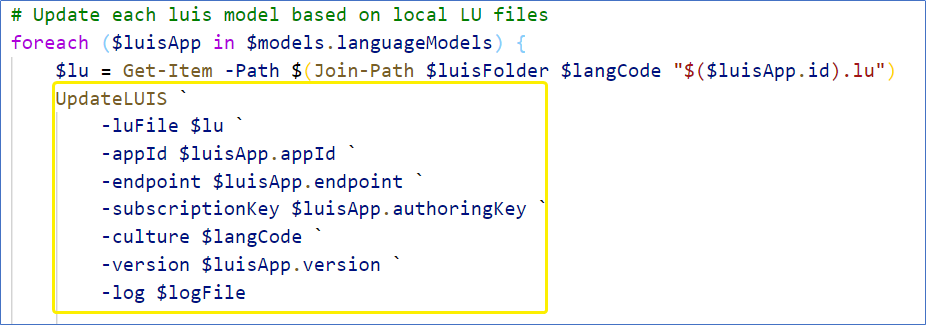
The UpdateLUIS receives those values from the update_cognitive_models script which iterates for each model of your languageModel.
_Values for bf luis:application:show script_

_Call of UpdateLUIS from update_cognitive_models script_
Batta32
on 9 Mar 2021
@Batta32 - Yeah, I have cross-checked and all the values are sending as expected.

SreekanthOAuth
on 9 Mar 2021
@SreekanthOAuth - the BF-CLI creates a request to the cognitive service in order to consume the deployed app, can you check if you have permissions to consume that application? For this follow these steps:
- Create the following endpoint:
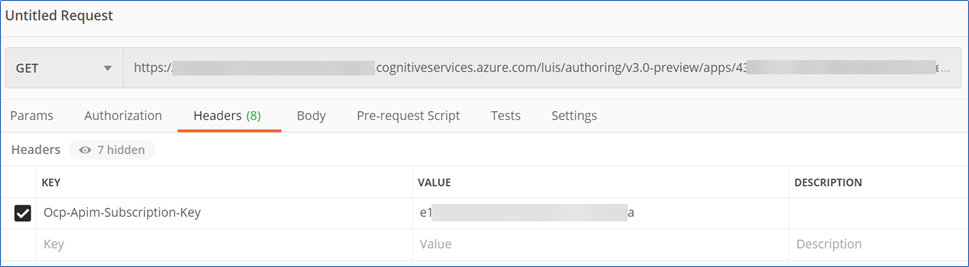
$endpoint/luis/authoring/v3.0-preview/apps/$appId(for example: https://bot-luisauthoring-xxxxxx.cognitiveservices.azure.com/luis/authoring/v3.0-preview/apps/000000000-0000-0000-0000-000000000000) - Open Postman
- Add a
Ocp-Apim-Subscription-Keyheader with thesubscriptionKeyvalue (theauthoringKeyof yourlanguageModels) - Send a GET request
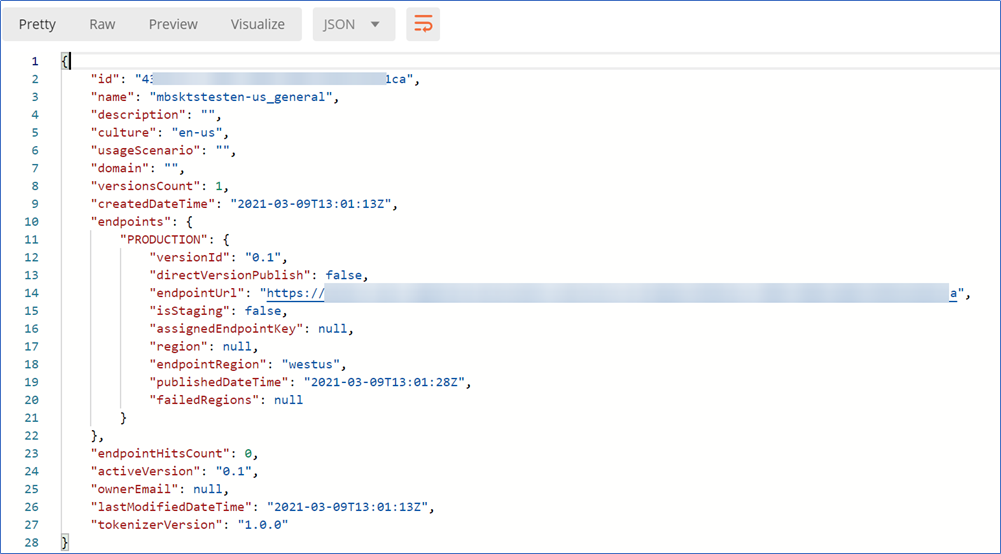
- Check the result
The endpoint is created in BF-CLI, appending the endpoint with and urlPath and assigning the appId. After that, it will execute a GET request adding the subscriptionKey header
_Request in Postman_
_Expected result_
Batta32
on 9 Mar 2021
@Batta32 , I need clarification on endPoint.
I'm using prediction resources since the authoring resource is the same for regions specific. In my case it's https://westus.api.cognitive.microsoft.com/.
Getting below error,
{"error":{"code":"401","message":"Access denied due to invalid subscription key or wrong API endpoint. Make sure to provide a valid key for an active subscription and use a correct regional API endpoint for your resource."}}
It seems there is an issue with the endpoint and the keys are not matching.
cURL is
curl --location --request GET 'https://[prediction resource name].cognitiveservices.azure.com/luis/authoring/v3.0-preview/apps/[app_id]' \
--header 'Ocp-Apim-Subscription-Key: [authoringKey]'
Please let me know where I'm missing?
SreekanthOAuth
on 9 Mar 2021
@SreekanthOAuth - the endpoint should be the authoringEndpoint as you need to handle the published applications, instead of the prediction one.
- _Authoring Resource_: allows to create, manage, train, test and publish applications. There is one tier available for the LUIS Authoring Resource (F0). The kind of this Cognitive service is LUIS.Authoring.
- _Prediction Resource_: allows to query prediction endpoint requests. There are two tiers available for the prediction resource (F0 and S0). The kind of this Cognitive service is LUIS.
Check this documentation
Batta32
on 9 Mar 2021
@Batta32 - Sorry for the late reply.
We are able to update both LUIS & QnA models by using scripts from the personal machines.
But when we try running the scripts from DevOps, the process not going after the below step
$luisApp = bf luis:application:show `
        --appId $appId `
        --endpoint $endpoint `
        --subscriptionKey $subscriptionKey | ConvertFrom-Json
The next step after the above step is
bf luis:convert `
        --in $luFile `
        --out $outFile `
        --name $appName `
        --culture $culture `
        --force 2>> $log | Out-Null
If we remove the 2>> $log | Out-Null from the above step then we are able to run the scripts from DevOps. We removed where ever we have 2>> $log | in scripts.
Could you please check and let us know.
SreekanthOAuth
on 17 Mar 2021
Thanks @SreekanthOAuth, we will check the script using DevOps and we will let you know the updates here.
Just to mention, we found that the issue #3712 is similar to this one. Check this comment if this helps you.
Batta32
on 17 Mar 2021
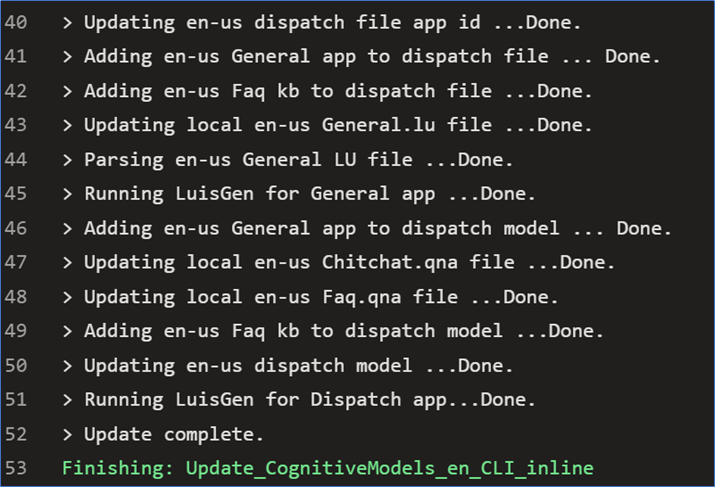
Hi @SreekanthOAuth, we confirmed that the update_cognitive_models.ps1 correctly works in DevOps and the bf commands are correctly executed too.
Check these things of your pipeline:
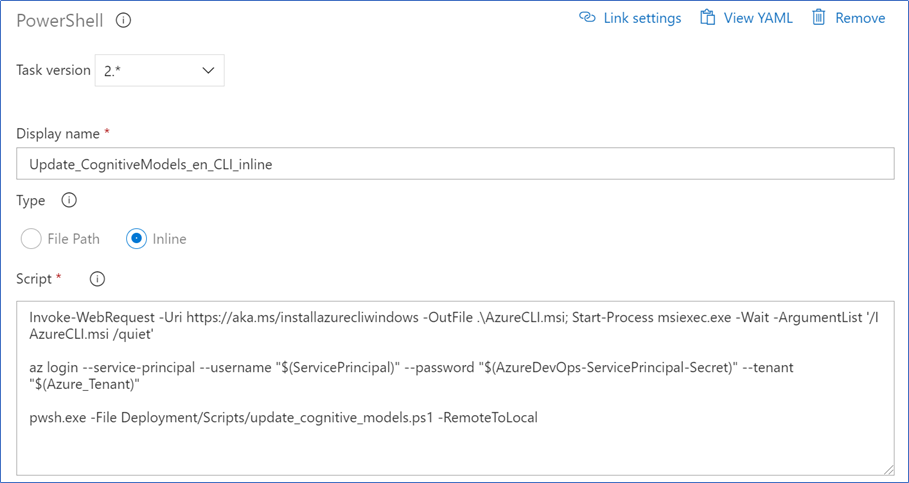
- Use PowerShell tasks to execute the
update_cognitive_models.ps1script: we think that this was the root cause that the execution was taking so much time to be finished. - Add a task to install Node version 12.16.1: we added this task to avoid the INVALID_ALT_NUMBER warning (see microsoft/botframework-cli#1059).
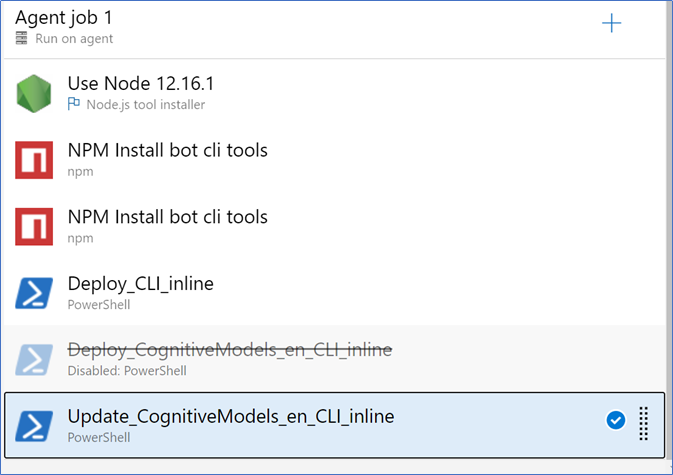
We configured our pipeline as follows:
Node.js tool installertask to install Node version 12.16.1npmtask to install latestbotdispatchandbotframework-clitoolsnpmtask to install latestbotskillstoolsPowerShell v2task to execute thedeploy.ps1PowerShell v2task to execute theupdate_cognitive_models.ps1
Let us know if this helps you 😊
_update_cognitive_models script correctly executed_
_Configuration of the step_
_Entire pipeline_
Batta32
on 18 Mar 2021
@Batta32 - Thanks for the inputs. I have followed them and able to update the LUIS models even with 2>> $log | Out-Null.
But not able to refresh the dispatcher, it's failing below step.
dispatch refresh
--gov $useGov
--version $dispatch.version
--dispatch $(Join-Path $dispatchFolder $langCode "$($dispatch.name).dispatch")
--dataFolder $(Join-Path $dispatchFolder $langCode) 2>> $logFile | Out-Null
Please find the below screen shot,
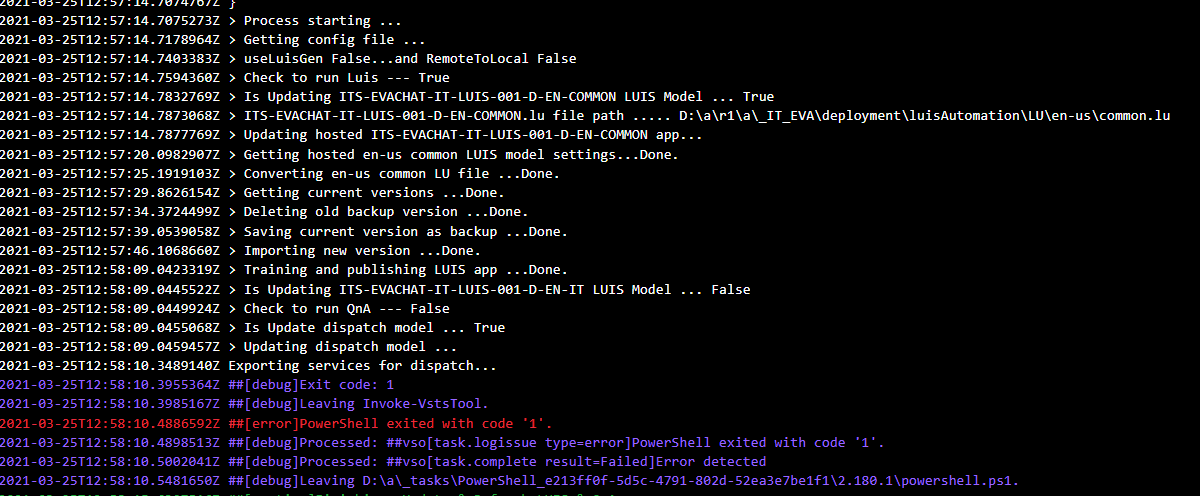
Could you please assist me with this.
SreekanthOAuth
on 26 Mar 2021
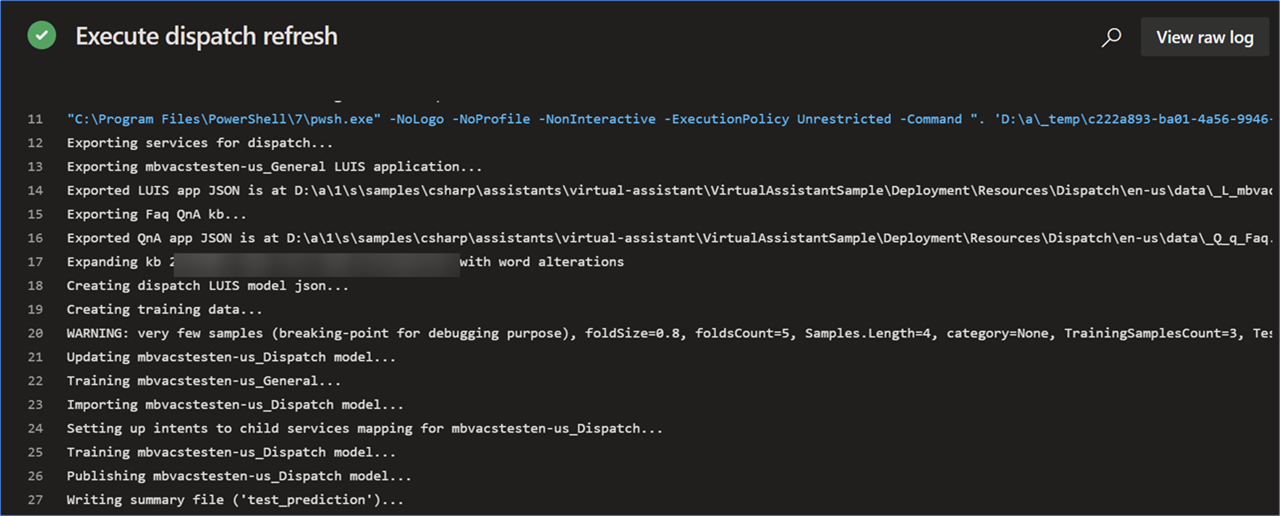
Hi @SreekanthOAuth, we confirmed that the dispatch refresh command correctly works in DevOps executing the update_cognitive_models.ps1 script and also, isolating it to a separated task.
We came up with some questions for you:
- Can you confirm if separating the logic of the
dispatch refreshcommand the pipeline fails? Create the PowerShell task executing the following script just like theupdate_cogntive_models.ps1does - Can you attach the configuration of the task that executes the
update_cognitive_models.ps1? - Have you tested it locally?
- Can you attach the output of the error/problem?
We think that it's something related to the pipeline, not a problem of the scripts/commands.
Let us know if this helps you :blush:.
_update_cognitive_models script working_
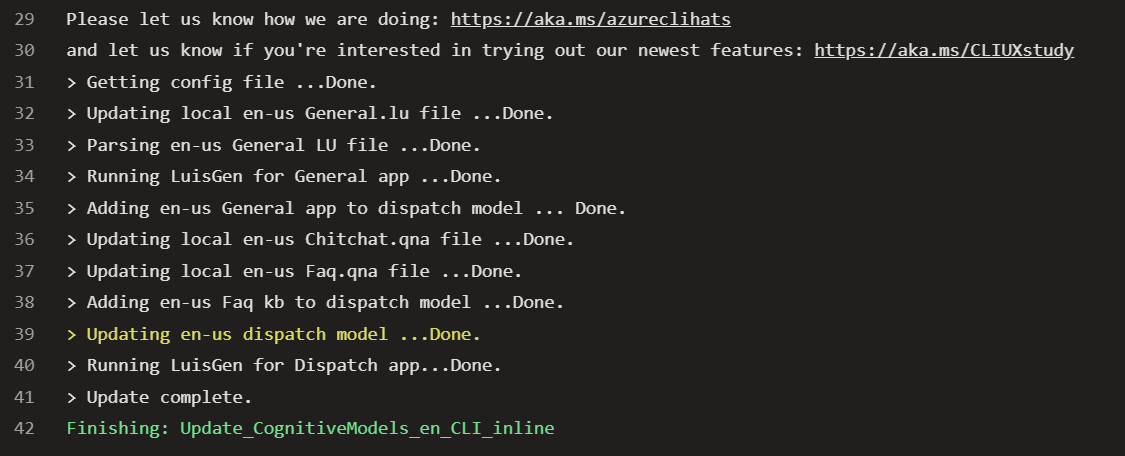
_dispatch refresh command isolated_
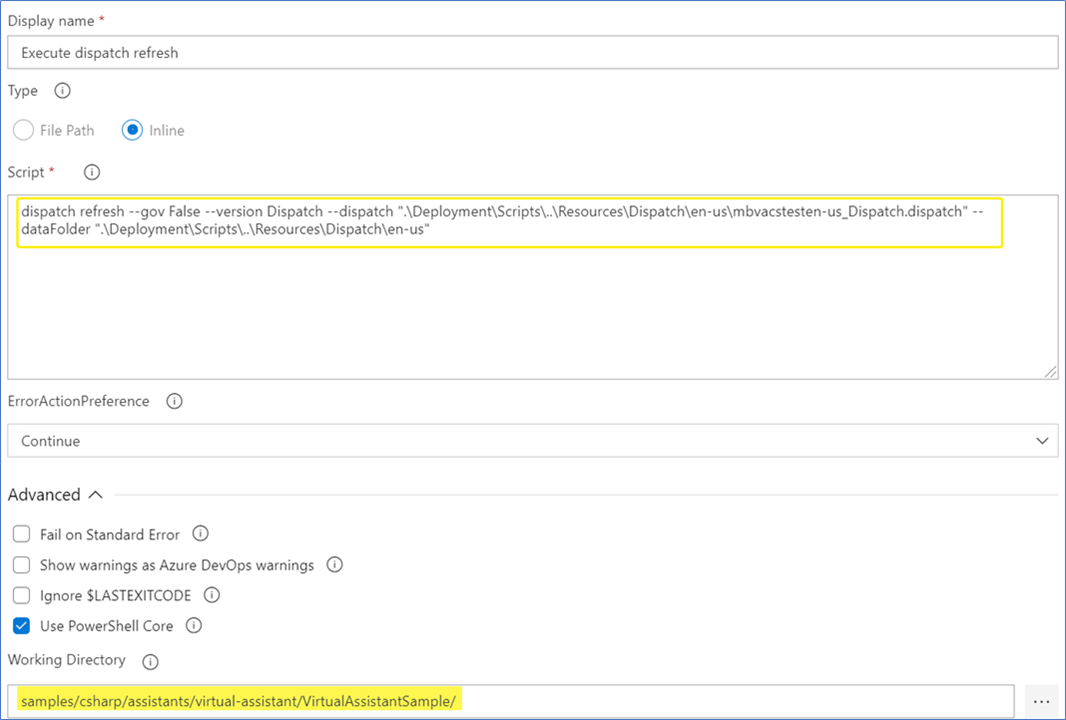
_Entire script working_
Batta32
on 29 Mar 2021
@Batta32, sorry for the late reply. I'm yet to test this case. Was busy with production activities.
SreekanthOAuth
on 9 Apr 2021
Closing due to inactivity, please reopen if needed
 pavolum
on 19 Apr 2021
pavolum
on 19 Apr 2021
Related issues
 nestoralonsovina
·
4Comments
nestoralonsovina
·
4Comments
 edemehmetcan
·
3Comments
edemehmetcan
·
3Comments
 BillStrait
·
3Comments
BillStrait
·
3Comments
 jbonet07
·
4Comments
jbonet07
·
4Comments
 hansmbakker
·
3Comments
hansmbakker
·
3Comments