Botframework-solutions: Deploy cognitive models script not working in azure devops pipeline
What project is affected?
VA
What language is this in?
En
What happens?
Times out
What are the steps to reproduce this issue?
Execute the VA deploy cognitive models PS1 file in azure CLI task
What were you expecting to happen?
Luis and qna deployment sucess
Can you share any logs, error output, etc.?
No logs, pipeline executes for half ab hour no logs at all times out in pipeline.
Any screenshots or additional context?
Tried executing in azure powershell task it executes partially the input parameters are not captured correctly
Referred this but no success.
Note : I am executing deploy cognitive models script directly
https://stackoverflow.com/questions/56267466/deploy-virtual-assistant-using-azure-devops-pipelines-and-releases
 SSanjeevi
All 5 comments
Thanks @SSanjeevi for reporting this issue! We came up with some questions for you:
- Have you updated the
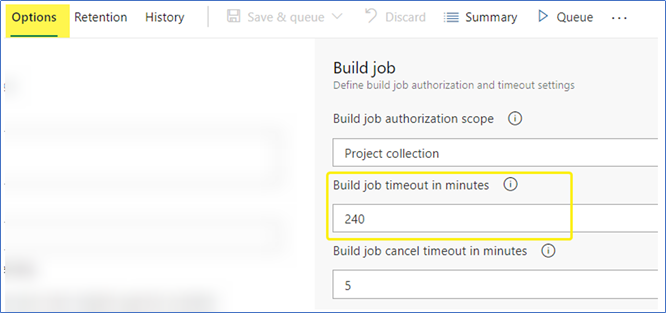
Build job timeout in minutesof your Azure DevOps Pipeline? Try improving the amount of minutes for the job - Have you tested the execution of the
deploy_cognitive_models.ps1script locally?
We will be reviewing this issue and as soon as we have any update, we will back to you 😊
_Set 240 minutes for Build job timeout in minutes_
 Batta32
on 20 Nov 2020
Batta32
on 20 Nov 2020
Will it run for 240 minutes?
I kept for 90 minutes in pipeline and it didn't gave any cli msg till that and times out .
Will test by keeping 240 minutes on Monday.
Local it completes in 15 mins I seen.
SSanjeevi
on 20 Nov 2020
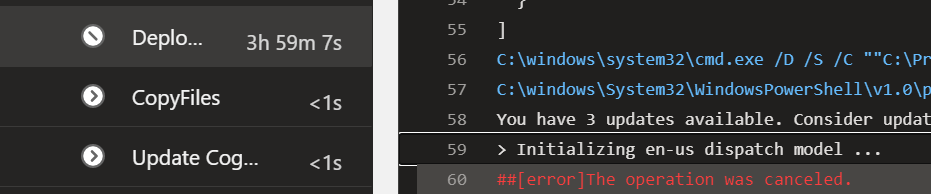
@Batta32 - i tried setting for 240 minutes and it got timed out at 240 minutes and only one line came in cli:
"Initializing en-us dispatch model"
screenshot below.
do you want me to further increase the timeout? - then i must try in non office hours like yesterday.
SSanjeevi
on 24 Nov 2020
Hi @SSanjeevi, it's not necessary to increase the timeout as the script should not be executed for a long time.
- Can you share the tasks/commands that you are executing in the Azure Pipeline? So we can replicate it in our environment
- Which versions of botdispatch and botframework-cli are you installing in the Azure Pipeline?
- Have you tried to execute another deployment script? For example the
deploy.ps1instead of thedeploy_cognitive_models.ps1. Which was the result?
We will work on this issue this week, so as soon as we have any update for you we will let you know here.
Batta32
on 24 Nov 2020
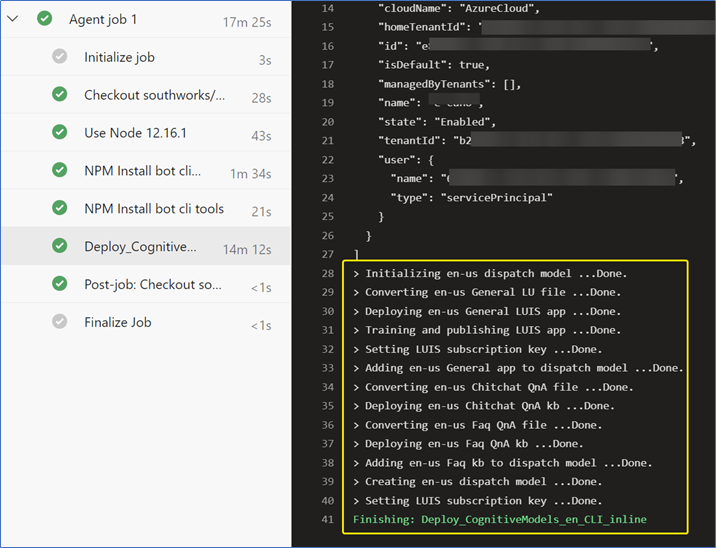
Hi @SSanjeevi, as we discussed over email, we managed to reproduce and solve the issue using an Azure DevOps Pipeline and the YML file you attached in the email.
We applied the following changes using the YML file you attached:
- Add a task to install Node version 12.16.1: we added this task to avoid the INVALID_ALT_NUMBER warning (see microsoft/botframework-cli#1059).
- Replace the AzureCLI@2 task for a PowerShell one: we think that this was the root cause that the execution was taking so much time to be finished.
If you are ok, we can close this issue 😊.
_Correct YML file successfully working_
Batta32
on 4 Dec 2020
Related issues
 kendomen
·
4Comments
kendomen
·
4Comments
 ericmaino
·
3Comments
ericmaino
·
3Comments
 darrenj
·
3Comments
darrenj
·
3Comments
 igor17400
·
4Comments
igor17400
·
4Comments
 edemehmetcan
·
3Comments
edemehmetcan
·
3Comments