Botframework-solutions: Errors in deployment of Virtual Assistant template project
What project is affected?
Project created from Virtual Assistant template in VS Community 2019 (16.7.6)
What language is this in?
C#
What happens?
Failures occur during QnA cognitive model deployment, Azure resources and steps were successful up to this point. Continued failures with retry occured during the QnA steps, I cancelled the deployment script and checked the logs.
What are the steps to reproduce this issue?
Followed steps here exactly:
https://microsoft.github.io/botframework-solutions/virtual-assistant/tutorials/create-assistant/csharp/1-intro/
- Running Windows 10
- Installed Virtual_Assistant_and_Skill_Templates.4.9.1.2.vsix
- Commands run in an elevated PS window (7.0.3), Azure CLI 2.14.0
What were you expecting to happen?
Deployment to complete without errors...
Can you share any logs, error output, etc.?
From deploy_cognitive_models_log.txt:
AZ CLI passes minimum version. Current version is 2.14.0
test-virtual-assistant-boten-us_Dispatch.dispatch created
[ERROR] Error happened when parsing qna section: Invalid regular expression: /^(markdown)?\r*\n(?<answer>(.|\n|\r\n|\t| )*)\r?\n.*?$/: Invalid group
ENOENT: no such file or directory, lstat 'C:\Users\andre\source\repos\VirtualAssistant1\VirtualAssistant1\VirtualAssistant1\Deployment\Resources\QnA\en-usChitchat.json'
ENOENT: no such file or directory, lstat 'C:\Users\andre\source\repos\VirtualAssistant1\VirtualAssistant1\VirtualAssistant1\Deployment\Resources\QnA\en-usChitchat.json'
ENOENT: no such file or directory, lstat 'C:\Users\andre\source\repos\VirtualAssistant1\VirtualAssistant1\VirtualAssistant1\Deployment\Resources\QnA\en-usChitchat.json'
ENOENT: no such file or directory, lstat 'C:\Users\andre\source\repos\VirtualAssistant1\VirtualAssistant1\VirtualAssistant1\Deployment\Resources\QnA\en-usChitchat.json'
ENOENT: no such file or directory, lstat 'C:\Users\andre\source\repos\VirtualAssistant1\VirtualAssistant1\VirtualAssistant1\Deployment\Resources\QnA\en-usChitchat.json'
[ERROR] Error happened when parsing qna section: Invalid regular expression: /^(markdown)?\r*\n(?<answer>(.|\n|\r\n|\t| )*)\r?\n.*?$/: Invalid group
ENOENT: no such file or directory, lstat 'C:\Users\andre\source\repos\VirtualAssistant1\VirtualAssistant1\VirtualAssistant1\Deployment\Resources\QnA\en-us\Faq.json'
ENOENT: no such file or directory, lstat 'C:\Users\andre\source\repos\VirtualAssistant1\VirtualAssistant1\VirtualAssistant1\Deployment\Resources\QnA\en-us\Faq.json'
ENOENT: no such file or directory, lstat 'C:\Users\andre\source\repos\VirtualAssistant1\VirtualAssistant1\VirtualAssistant1\Deployment\Resources\QnA\en-us\Faq.json'
Any screenshots or additional context?
Confirmed those json files referenced in errors do not exist - there are .qna files present in those directories however.
 veatcha
All 4 comments
Hi @veatcha, thanks for reporting this issue. We came up with some questions in order to narrow the problem as we couldn't reproduce the issue currently.
- Are you using @microsoft/[email protected]?
- Have you tested to deploy the C# Virtual Assistant again?
- Do you face this issue in every attempt to deploy?
- Are you executing the
deploy.ps1being in the root folder of the C# Virtual Assistant? - Is this issue only present in the C# Virtual Assistant?
- Have you tried to deploy a C# Skill?
The .json files are created after executing bf qnamaker:convert in qna_functions.ps1 having the collection of .qna files present in Deployment\Resources\QnA\<language>.
As soon as we have any update, we will back to you later 😊.
_.json files created from .qna files during deployment_

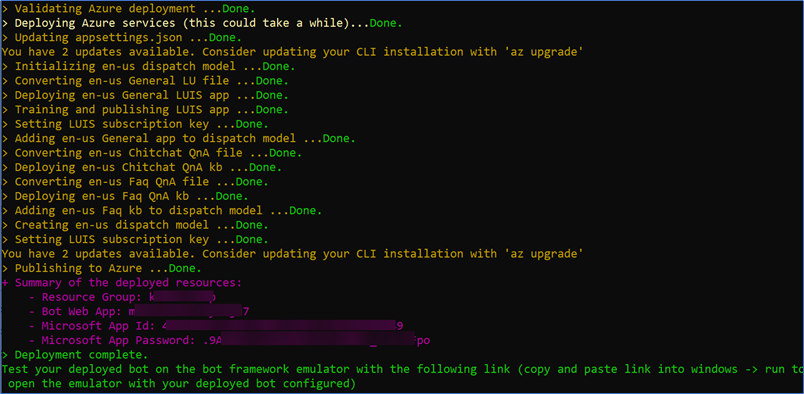
_Successful deployment of a C# Virtual Assistant created from the VSIX_
 Batta32
on 29 Oct 2020
Batta32
on 29 Oct 2020
Hi - Thanks for the followup -
- Confirmed I am on botframework cli 4.10.1
- I have tried 3 times now, and have had the same result each time (I've copied the output from most recent run below)
- I am executing the deployment command from the project folder - that's shown below as well. The obnoxious folder nesting is the repo folder/solution folder/project folder all with same name.
- I have not tried deploying a different bot template or a skill project yet, but can.
Trying to follow the thread of the error message regarding the RegEx with an invalid group but can't find where that Regex is maintained in this repo...
botframework cli version:

Command output:

veatcha
on 29 Oct 2020
@Batta32 - found the issue here. My node version was set to less than the required version for the botframework cli, and it looks like that was impacted RegEx behaviors. Thanks.
veatcha
on 2 Nov 2020
Hi @veatcha, thanks for let us know, we found the issue microsoft/botframework-cli#865 which had the same error message as you described above, and the response was to update the Node version as bf-cli requires node version >= 10.14.1.
Thank you for your time. 🙂
 VictorGrycuk
on 2 Nov 2020
VictorGrycuk
on 2 Nov 2020
Related issues
 lauren-mills
·
3Comments
lauren-mills
·
3Comments
 waqarghani
·
3Comments
waqarghani
·
3Comments
 hansmbakker
·
3Comments
hansmbakker
·
3Comments
 jbonet07
·
4Comments
jbonet07
·
4Comments
 edemehmetcan
·
3Comments
edemehmetcan
·
3Comments