Botframework-solutions: Creating Visual Studio 2019 Project using the Virtual Assistant Template fails
I was following the tutorial in order to create a Virtual Assistant. I downloaded and installed all necessary resources as described here:
In the nextstep one is asked here
to create a Virtual Assistant project in Visual Studio using the Virtual Assistant template. The creation fails with an error message that the project file cannot be migrated.
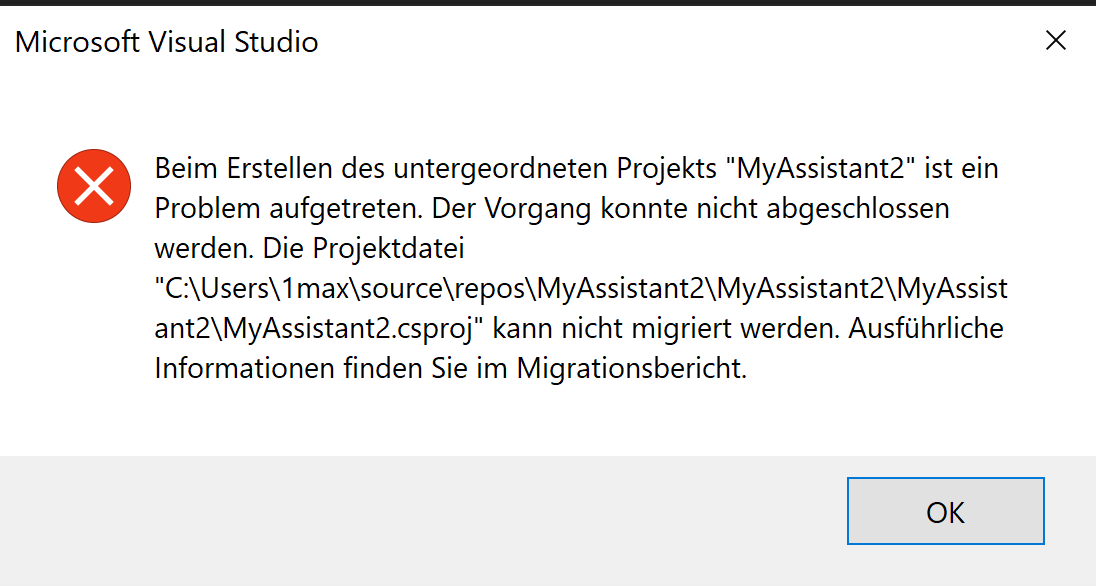
A similar issue is described here:
https://github.com/microsoft/botframework-solutions/issues/2635
Hence I installed the additional Microsoft.NETCore.App as described there - to no avail...
As it seemed to be a problem connected with Visual Studio I opened then a thread in the Visual Studio Community, see:
Jeff Kelly from Microsoft analysed the error logs and said that VS cannot find the .NET Core SDK installed on my machine.

But the resources are there, see this output from powershell commands "dotnet --info" and "node -v":

Jeff assumes that there is something wrong with the template and recommended to open a new issue here...
Thanks for your help!
 MHeadroom
All 7 comments
Thanks @MHeadroom for reporting this issue. In order to narrow your environment, we came up with some questions:
- Which version of the VSIX have you installed?
- Have you checked this comment of the similar issue you attached #2635?
- Have you checked if this issue happens using another version of VS?
We will be reviewing this trying to reproduce the environment and the issue, also reviewing the issue you raised, as soon as we have any update we will back to you 😊.
 Batta32
on 30 Sep 2020
Batta32
on 30 Sep 2020
Hi there, thanks for the quick reply. In answer to your questions:
- Here's all information on my Visual Studio version and installed extensions (copied from VS menu / Help / Info about Microsoft Visual Studio):
Microsoft Visual Studio Community 2019
Version 16.7.5
VisualStudio.16.Release/16.7.5+30523.141
Microsoft .NET Framework
Version 4.8.03752
Installierte Version: Community
Visual C++ 2019 00435-60000-00000-AA067
Microsoft Visual C++ 2019
C#-Tools 3.7.0-6.20459.4+7ee7c540e3bf19765695b1331c946ddf986d1516
C#-Komponenten, die in der IDE verwendet werden. Abhängig von Ihrem Projekttyp und den zugehörigen Einstellungen kann eine andere Version des Compilers verwendet werden.
IntelliCode-Erweiterung 1.0
Detaillierte Informationen zur IntelliCode Visual Studio-Erweiterung
Microsoft JVM Debugger 1.0
Provides support for connecting the Visual Studio debugger to JDWP compatible Java Virtual Machines
Microsoft MI-Based Debugger 1.0
Provides support for connecting Visual Studio to MI compatible debuggers
Microsoft Visual C++-Assistenten 1.0
Microsoft Visual C++-Assistenten
NuGet-Paket-Manager 5.7.0
NuGet-Paket-Manager in Visual Studio. Weitere Informationen zu NuGet finden Sie unter https://docs.nuget.org/.
ProjectServicesPackage Extension 1.0
ProjectServicesPackage Visual Studio Extension Detailed Info
VC-Paket für Microsoft Visual Studio 1.0
VC-Paket für Microsoft Visual Studio
Visual Basic-Tools 3.7.0-6.20459.4+7ee7c540e3bf19765695b1331c946ddf986d1516
Visual Basic-Komponenten, die in der IDE verwendet werden. Abhängig von Ihrem Projekttyp und den zugehörigen Einstellungen kann eine andere Version des Compilers verwendet werden.
Visual Studio-Tools für Unity 4.7.1.0
Visual Studio-Tools für Unity
Visual Studio Code-Debugadapter-Hostpaket 1.0
Interopebene zum Hosten der Visual Studio Code-Adapter in Visual Studio
- Yes, I've checked this last comment. @MersGitHub updated to the newest version of the .NET Core SDK (3.0.100 in his case) and after that installed additionally .NET Core 2.2.402.
In my case the newest version is .NET Core SDK 3.1.402 and I installed additionally exactly the same older version, i.e. .NET Core 2.2.402.
The newest version is different, but the older version, which made things work for @MersGitHub, is exactly the same, see:

- No, I've not yet tried another version of VS. What version would you recommend?
MHeadroom
on 30 Sep 2020
I'll take a look to see if I can reproduce this.
 dmvtech
on 1 Oct 2020
dmvtech
on 1 Oct 2020
Hi @MHeadroom Unfortunately I haven't been able to reproduce this yet. It should not be dealing with the tools or anything like that at this point (those are for a later point in the development/deployment process). If it's failing at just creating the project/solution, then it is something with the package, VS or the environment.
Can you verify the version of the visx template? For example, i'm using 4.9.1.2

The only other thing I can think of it is something to do with localization. I can try and see if I can reproduce when running with German instead of English.
dmvtech
on 6 Oct 2020
Hi @MHeadroom, we were unable to reproduce this issue so far.
We would like to join in on @dmvtech request and also ask for the VSIX version you are using.
Aside from that:
- There's extra data you attached in the VS Community report that we don't have access to. It would be very useful if you could send us that data. Also, send us if you have it the
UpgradeLog.htmthat should be in the project root according to the error message (the "migration report") . - Have you tried generating a Skill using the same marketplace extension? You had any errors?
We attempted to replicate your setting by having, among others:
- Microsoft Visual Studio Community 2019
 Version 16.7.5
 VisualStudio.16.Release/16.7.5+30523.141
 IntelliCode Extension   1.0
 NuGet Package Manager   5.7.0
 Visual Studio Tools for Unity   4.7.1.0
- Virtual Assistant and Skill templates marketplace extension. Since we weren't sure of what version you had, we tried the following:
- version 4.9.1.2 (latest)
- version 4.8.0
- version 4.7.0
In all cases the .sln and the .csproj were generated correctly, with no error or migration messages.
We'll be attentive to any replies from you.
 matiasroldan6
on 6 Oct 2020
matiasroldan6
on 6 Oct 2020
Hi @dmvtech and @matiasroldan6,
thanks for your help. I could create the Virtual Assistant now.
In answer to your questions: I had installed the visx template in version 4.9.1.2 and Visual Studio in version 16.7.5 all along from the first attempt.
But here's what I did:
I repaired my Visual Studio installation using the Visual Studio Installer. Creation failed.
As @dmvtech guessed that it could have something to do with the localization I added the English language package using the Visual Studio Installer. Creation failed.
I deinstalled and reinstalled Visual Studio using the Visual Studio Installer, this time only in the English Version. Creation succeeded.
Weird, but it looks like it has really something to do with the International Settings in Visual Studio.
Thanks again and let me now if you still need anything to reproduce this...
MHeadroom
on 7 Oct 2020
Great to hear @MHeadroom that you managed to create the C# Virtual Assistant using [email protected]!
If you agree, we can close this issue but feel free to raise an issue if you have a problem.
Last, but not least, we still couldn't replicate the issue following same environment that you mentioned using the German language version.
Thanks again for reporting :blush:
matiasroldan6
on 7 Oct 2020
Related issues
 VladPapacostea-SM
·
3Comments
VladPapacostea-SM
·
3Comments
 waqarghani
·
3Comments
waqarghani
·
3Comments
 manish-95
·
3Comments
manish-95
·
3Comments
 esoler-sage
·
3Comments
esoler-sage
·
3Comments
 lauren-mills
·
3Comments
lauren-mills
·
3Comments