Botframework-solutions: Publish script is broken
What project is affected?
Virtual Assistant
What language is this in?
C#
What happens?
The publish script is broken.
What are the steps to reproduce this issue?
Try to use the publish script from a random directory.
What were you expecting to happen?
I expected it to work.
Can you share any logs, error output, etc.?
PS C:\Users\ericc\source\repos\> dotnet publish -c release -o $publishFolder
Microsoft (R) Build Engine version 16.5.0+d4cbfca49 for .NET Core
Copyright (C) Microsoft Corporation. All rights reserved.

MSBUILD : error MSB1003: Specify a project or solution file. The current working directory does not contain a project or solution file.
Any screenshots or additional context?
The dotnet publish command requires a project or solution.
 ericchansen
All 8 comments
Can you share more on the error message that you get please? I can’t repro with the latest bits and dot net publish called in the directory works OK? Could you also confirm the .netcore version you have installed please and whether the VA project (trying to be published) builds without any errors (dotnet build or build in VS)
 darrenj
on 20 May 2020
darrenj
on 20 May 2020
I'll try to get back to you on these other check boxes when I get a bit more time---probably tomorrow.
EDIT: @darrenj I got your updates.
Can you share more on the error message that you get please?
- [x] Yes, but I don't have time to run it right now. Will edit this to update. EDIT: Updated.
PS C:\Users\ericc\source\repos\xxx-test\EricNewerBot\EricNewerBot\EricNewerBot> .\Deployment\Scripts\deploy.ps1 -name EricNewerBot -resourceGroup EricNewerBot -appPassword O1!Z!mL!YzbYhofjXMWQ                                              ? Azure resource group region: westus                                                                                   ? Create a new LUIS Authoring Resource? [y/n]: y                                                                        ? LUIS Authoring Region (westus, westeurope, or australiaeast): westus                                                  > Creating resource group ...Done.
> Validating Azure deployment ...Done.
> Deploying Azure services (this could take a while)...Done.
> Updating appsettings.json ...Done.
> Initializing en-us dispatch model ...Done.
> Converting en-us General LU file ...Done.
> Deploying en-us General LUIS app ...Done.
> Training and publishing LUIS app ...Done.
> Setting LUIS subscription key ...Done.
> Adding en-us General app to dispatch model ...Done.
> Converting en-us Chitchat QnA file ...Done.
> Deploying en-us Chitchat QnA kb ...Done.
> Converting en-us Faq QnA file ...Done.
> Deploying en-us Faq QnA kb ...Done.
> Adding en-us Faq kb to dispatch model ...Done.
> Creating en-us dispatch model ...Done.
> Setting LUIS subscription key ...Done.
> Publishing to Azure ...Done.
+ Summary of the deployed resources:
    - Resource Group: EricNewerBot
    - Bot Web App: EricNewerBot-6ohegrt
    - Microsoft App Id: 91acf6d0-fcd5-4487-96bb-0c7b60b1f583
    - Microsoft App Password: O1!Z!mL!YzbYhofjXMWQ
> Deployment complete.
Test your deployed bot on the bot framework emulator with the following link (copy and paste link into windows -> run to open the emulator with your deployed bot configured)
bfemulator://livechat.open?botUrl=https://EricNewerBot-6ohegrt.azurewebsites.net/api/messages&msaAppId=91acf6d0-fcd5-4487-96bb-0c7b60b1f583&msaAppPassword=O1!Z!mL!YzbYhofjXMWQ
PS C:\Users\ericc\source\repos\xxx-test\EricNewerBot\EricNewerBot\EricNewerBot> .\Deployment\Scripts\publish.ps1
? Bot Web App Name: EricNewerBot-6ohegrt
? Bot Resource Group: EricNewerBot
> Publishing to Azure ...Done.
PS C:\Users\ericc\source\repos\xxx-test\EricNewerBot\EricNewerBot\EricNewerBot> cd ~
PS C:\Users\ericc> .\source\repos\xxx-test\EricNewerBot\EricNewerBot\EricNewerBot\Deployment\Scripts\publish.ps1 -projFolder C:\Users\ericc\source\repos\xxx-test\EricNewerBot\EricNewerBot\EricNewerBot\
? Bot Web App Name: EricNewerBot-6ohegrt
? Bot Resource Group: EricNewerBot
! Could not deploy automatically to Azure. Review the log for more information.
! Log: C:\Users\ericc\source\repos\xxx-test\EricNewerBot\EricNewerBot\EricNewerBot\Deployment\Scripts\..\publish_log.txt
PS C:\Users\ericc>
Contents of publish_log.txt are below.
Microsoft (R) Build Engine version 16.6.0+5ff7b0c9e for .NET Core
Copyright (C) Microsoft Corporation. All rights reserved.

MSBUILD : error MSB1003: Specify a project or solution file. The current working directory does not contain a project or solution file.
I can’t repro with the latest bits and dot net publish called in the directory works OK?
[x] Exactly! It works just fine when you execute
publish.ps1from the directory containing the*.csproj, but it doesn't work from any other directory becausedotnet publishcan't automatically locate the project or solution file.This is troublesome because
publish.ps1accepts aprojFolderargument, which makes you think that you should be able to runpublish.ps1from theoretically any directory. This behavior is also desireable to make it easier to setup CI/CD pipelines in Azure DevOps.Anyway, this approach fails for the reason mentioned above,
dotnet publishcan't automatically locate the project or solution file.
Could you also confirm the .netcore version you have installed please and whether the VA project (trying to be published) builds without any errors (dotnet build or build in VS)
- [x] Yes and I'll update this ASAP. EDIT: Updated.
PS C:\Users\ericc> dotnet --list-sdks
3.1.300 [C:\Program Files\dotnet\sdk]
PS C:\Users\ericc> dotnet --list-runtimes
Microsoft.AspNetCore.All 2.1.18 [C:\Program Files\dotnet\shared\Microsoft.AspNetCore.All]
Microsoft.AspNetCore.App 2.1.18 [C:\Program Files\dotnet\shared\Microsoft.AspNetCore.App]
Microsoft.AspNetCore.App 3.1.4 [C:\Program Files\dotnet\shared\Microsoft.AspNetCore.App]
Microsoft.NETCore.App 2.1.18 [C:\Program Files\dotnet\shared\Microsoft.NETCore.App]
Microsoft.NETCore.App 3.1.4 [C:\Program Files\dotnet\shared\Microsoft.NETCore.App]
Microsoft.WindowsDesktop.App 3.1.4 [C:\Program Files\dotnet\shared\Microsoft.WindowsDesktop.App]
PS C:\Users\ericc>
VA project builds without any errors.
@darrenj Nice talk at Build by the way. I wish there was a template to simply deploy what you demoed live, in particular, the adaptive dialogs.
P.S. Line 213 of deploy.ps1 is also broken.
$timestamp = Get-Date -f MMddyyyyHHmmss
should be
$timestamp = Get-Date -Format MMddyyyyHHmmss
I'll create a separate issue if I get time.
ericchansen
on 20 May 2020
Also, here's what happens when you accept the changes in my PR #3390.
PS C:\Users\ericc> .\source\repos\xxx-test\EricNewerBot\EricNewerBot\EricNewerBot\Deployment\Scripts\publish.ps1 -projFolder C:\Users\ericc\source\repos\xxx-test\EricNewerBot\EricNewerBot\EricNewerBot\
? Bot Web App Name: EricNewerBot-6ohegrt
? Bot Resource Group: EricNewerBot
> Publishing to Azure ...Done.
Everything works!
ericchansen
on 21 May 2020
Thanks @ericchansen
On the Get-Date issue - it works fine for me with powershell core? Can you confirm the version your running?
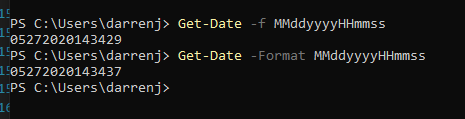
darrenj
on 27 May 2020
Change looks good, thanks for your contribution! 🙏
darrenj
on 27 May 2020
@darrenj Looks like I'm using 7.1.0 locally.
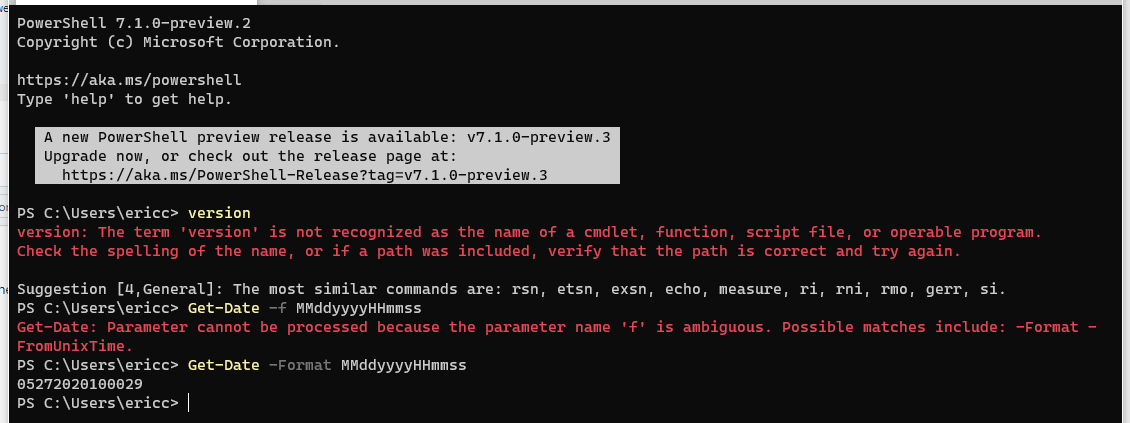
What's more important is what Azure DevOps supports out of the box. Here are some pics of my release pipeline.
The PowerShell inline code.
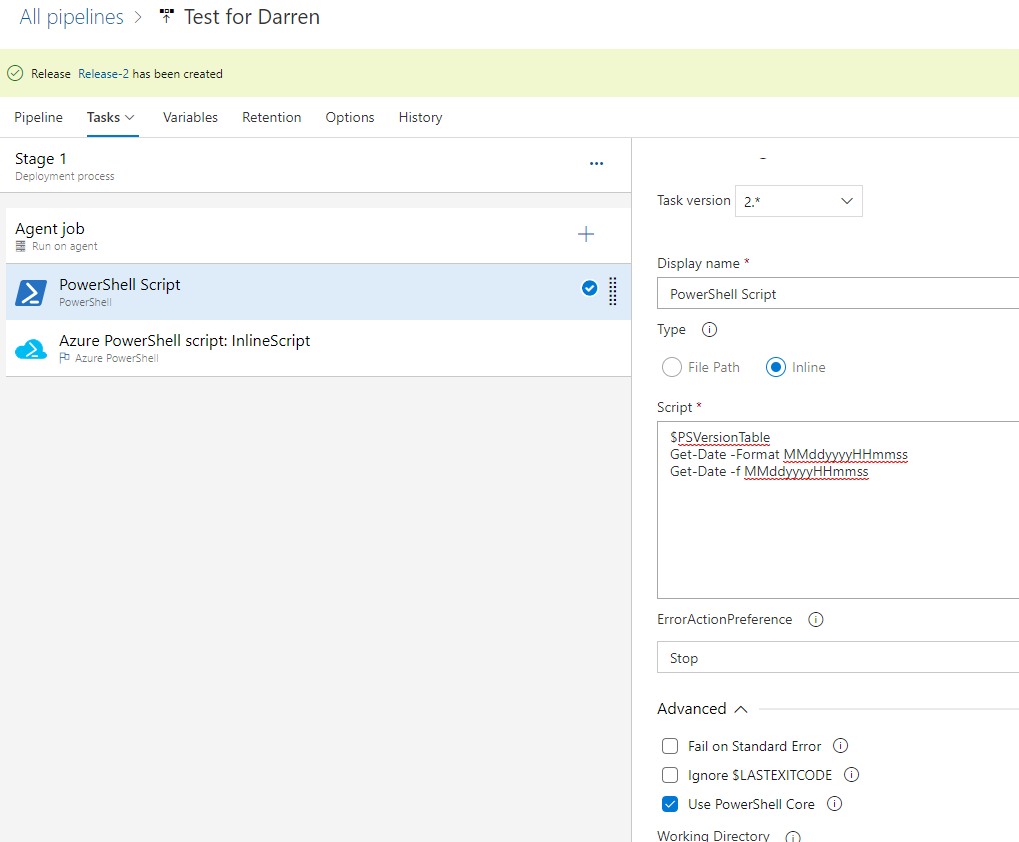
Looks like it works. It's using PS 7.0.1 by default.
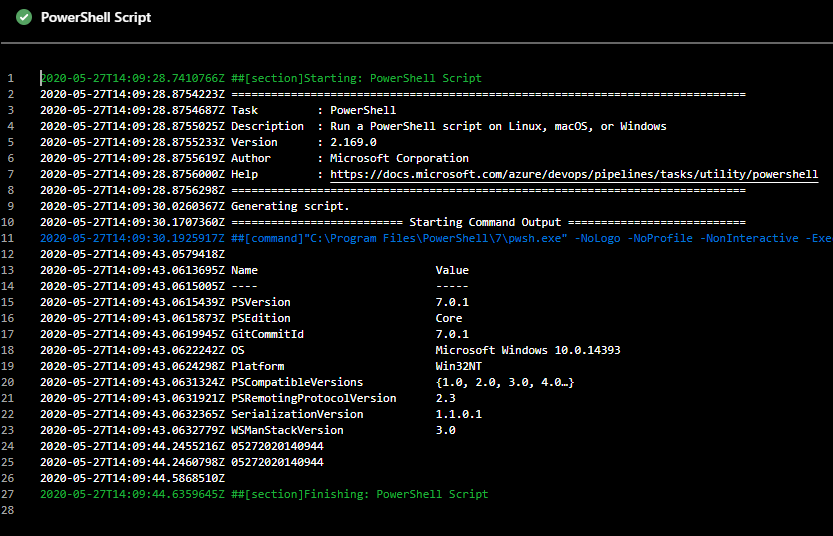
The Azure PowerShell inline code.
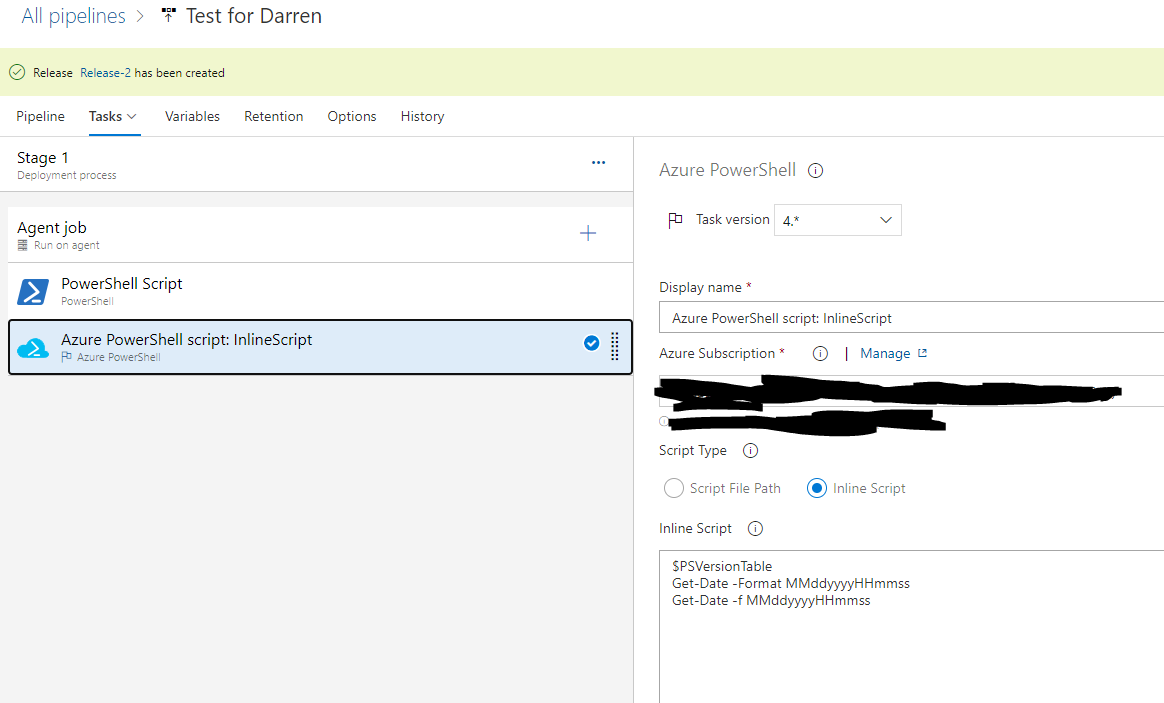
Also works. It's using 5.1.x by default.

So I'm guessing that going from PowerShell 7.0.x to 7.1 is when this thing breaks. Maybe we should make the change from -f to -Format so that we're future proof.
ericchansen
on 27 May 2020
Indeed - let me check tomorrow and see if is a pwsh bug?
darrenj
on 27 May 2020
Thanks @ericchansen - from looking at these docs it seems -f was undocumented so can't really raise an issue on pwsh for this.
Raised a PR to merge this change into next branch. With a new update to SDK pending we will update VSIXs to incorporate this and merge into master at that point.
darrenj
on 28 May 2020
Related issues
 BillStrait
·
3Comments
BillStrait
·
3Comments
 gabog
·
3Comments
gabog
·
3Comments
 hansmbakker
·
3Comments
hansmbakker
·
3Comments
 manish-95
·
3Comments
manish-95
·
3Comments
 lauren-mills
·
3Comments
lauren-mills
·
3Comments