Botframework-solutions: Response manager keeps data in new conversations
What project is affected?
Botbuilder Solutions
Response Manager here
What language is this in?
Typescript
What happens?
When using the tokens parameter to inject data into the response, it overwrites the message template stored in the object. For example if i have messageTemplate that is "Hello, {name}" and a token that maps [["name", "1234"]], then the template is overwritten (passed by reference) to "Hello, 1234". When i start a new conversation with a new map, say [["name", "4567"]], then messageTemplate="Hello, 1234".
What are the steps to reproduce this issue?
Following code pieces:
Used the empty bot as a base and added the following code:
The following bot will use the incoming user's id to say hello. This is a random uuid on every new conversation. This will demonstrate that the first uuid create persists across conversations.
* bot.ts *
import { ActivityHandler } from 'botbuilder';
import { ResponseManager } from 'botbuilder-solutions';
import { Responses } from './responses';

export class EmptyBot extends ActivityHandler {
    constructor(responder: ResponseManager) {
        super();
        this.onMembersAdded(async (context, next) => {
            const membersAdded = context.activity.membersAdded;
            for (const member of membersAdded) {
                if (member.id !== context.activity.recipient.id) {
                    await context.sendActivity(responder.getResponse(Responses.welcomeMessage, new Map([['name', member.id]])));
                }
            }
            // By calling next() you ensure that the next BotHandler is run.
            await next();
        });
    }
}
* responses.ts *
export class Responses implements IResponseIdCollection {
    // tslint:disable-next-line: member-ordering
    public static pathToResource?: string = join(__dirname, 'resources');
    public static readonly welcomeMessage: string = 'WelcomeMessage';
    public name: string = Responses.name;
}
* resources/responses.json *
{
    "WelcomeMessage": {
        "replies": [
            {
                "text": "Hello! {name}",
                "speak": "Hello! {name}"
            }
        ],
        "suggestedActions": [],
        "inputHint": "acceptingInput"
    }
}
* index.ts *
// Copyright (c) Microsoft Corporation. All rights reserved.
// Licensed under the MIT License.

import * as restify from 'restify';

// Import required bot services.
// See https://aka.ms/bot-services to learn more about the different parts of a bot.
import { BotFrameworkAdapter } from 'botbuilder';

// This bot's main dialog.
import { ResponseManager } from 'botbuilder-solutions';
import i18next from 'i18next';
import { EmptyBot } from './bot';
import { Responses } from './responses';

i18next.init({
    lng: 'en'
});

// Create HTTP server.
const server = restify.createServer();
server.listen(process.env.port || process.env.PORT || 3978, () => {
    console.log(`\n${server.name} listening to ${server.url}`);
});

// Create adapter.
// See https://aka.ms/about-bot-adapter to learn more about adapters.
const adapter = new BotFrameworkAdapter({
    appId: process.env.MicrosoftAppID,
    appPassword: process.env.MicrosoftAppPassword
});

// Catch-all for errors.
adapter.onTurnError = async (context, error) => {
    // This check writes out errors to console log .vs. app insights.
    // NOTE: In production environment, you should consider logging this to Azure
    //       application insights.
    console.error(`\n [onTurnError] unhandled error: ${error}`);

    // Send a trace activity, which will be displayed in Bot Framework Emulator
    await context.sendTraceActivity(
        'OnTurnError Trace',
        `${error}`,
        'https://www.botframework.com/schemas/error',
        'TurnError'
    );

    // Send a message to the user
    await context.sendActivity('The bot encountered an error or bug.');
    await context.sendActivity('To continue to run this bot, please fix the bot source code.');
};

// Create the main dialog.
const responder: ResponseManager = new ResponseManager(['en', 'es', 'en-US'], [Responses]);
const myBot = new EmptyBot(responder);

// Listen for incoming requests.
server.post('/api/messages', (req, res) => {
    adapter.processActivity(req, res, async (context) => {
        // Route to main dialog.
        await myBot.run(context);
    });
});
What were you expecting to happen?
I expect response manager to inject the new uuid for the new users starting the conversation. For example, the bot will respond with Hello, 4567.
Potential fix
Change here
let result: string = messageTemplate; tp let result: string =Object.assign({}, messageTemplate);
Can you share any logs, error output, etc.?
No because the ResponseManager is running as currently designed. This is a flaw in the logic in inject new data.
Any screenshots or additional context?
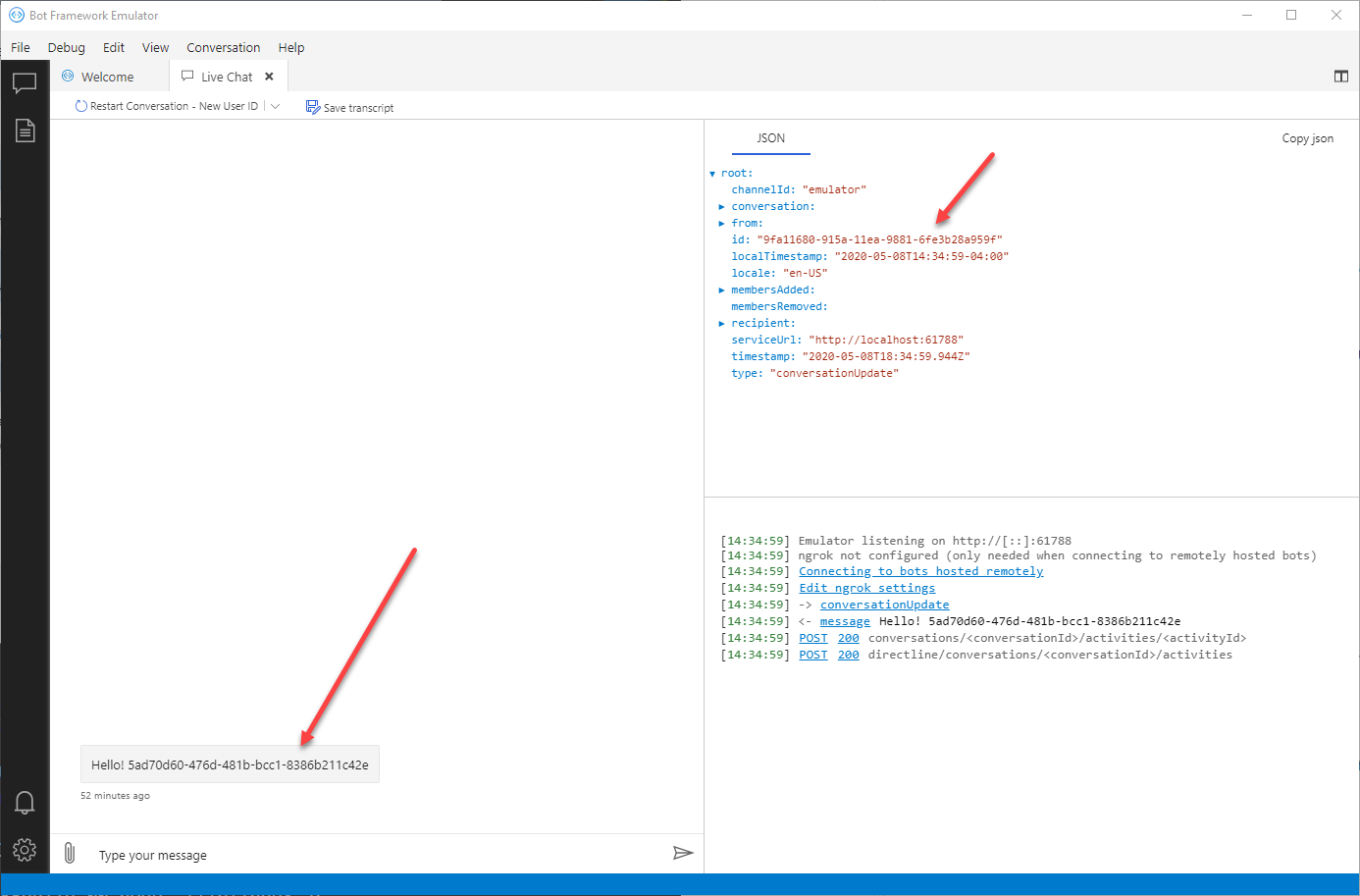
 trashcanmonster8
All 10 comments
Alternative fix for our use case that solved the problem in ResponseManager:
import { ResponseManager, ResponseTemplate } from "botbuilder-solutions";
import { Activity, ActivityTypes, ActionTypes } from "botbuilder";
import i18next from "i18next";

export class TempResponseManager extends ResponseManager {

    getResponse(templateId: string, tokens?: Map<string, string>): Partial<Activity> {
        const locale: string = i18next.language;
        const template: ResponseTemplate = this.getResponseTemplate(templateId, locale);
        // create the response the data items
        if (!template.reply) {
            throw new Error("There is no reply in the ResponseTemplate");
        }
        return this.tempParseResponse(template.reply.text, template.reply.speak, template.inputHint, template.suggestedActions, tokens);
    }
    tempParseResponse(
        replyText: string,
        replySpeak: string,
        inputHint: string,
        suggestedActions: string[],
        data?: Map<string, string>
    ): Partial<Activity> {
        if (replyText) {
            replyText = this.format(replyText, data);
        }
        if (replySpeak) {
            replySpeak = this.format(replySpeak, data);
        }
        const activity: Partial<Activity> = {
            type: ActivityTypes.Message,
            text: replyText,
            speak: replySpeak,
            inputHint
        };
        if (suggestedActions !== undefined && suggestedActions.length > 0) {
            activity.suggestedActions = {
                actions: [],
                to: []
            };
            suggestedActions.forEach((action: string) => {
                if (activity.suggestedActions) {
                    activity.suggestedActions.actions.push({
                        type: ActionTypes.ImBack,
                        title: action,
                        value: action
                    });
                }
            });
        }
        activity.attachments = [];
        return activity;
    }
}
Hi @trashcanmonster8, thanks for reporting the issue. We will be reviewing it and we will back to you later 😊.
 Batta32
on 8 May 2020
Batta32
on 8 May 2020
Hi @trashcanmonster8!
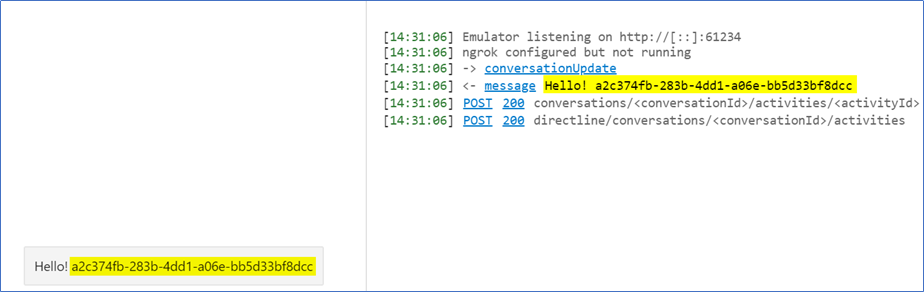
We successfully reproduced the scenario that you mentioned with the _Response Manager_.
Currently, we will test the potential fix that you mentioned in Botbuilder-Solutions specifically in the Response manager and verify other possible scenarios to prevent this issue, we will back to you later with the latest updates about this 😊.
_Response manager keeps data_
 DiegoCardozo94
on 12 May 2020
DiegoCardozo94
on 12 May 2020
ResponseManager is an older approach to response management using JSON files. We now have Language Generation which is a more sophisticated way of managing responses which would be great to get you transitioned onto - could you confirm the VA version your using and we can help point at at docs to help a transition if that would help?
 darrenj
on 27 May 2020
darrenj
on 27 May 2020
We are currently using [email protected] and [email protected].
trashcanmonster8
on 3 Jun 2020
Hi @trashcanmonster8, sorry for the delay.
We want to validate with you the following questions:
- Do you want to migrate to the
LanguageGenerationfunctionality and use the last version of bot-solutions? If you are okay, we can help you with this transition. - Have you customized your
ResponseManagerclass and the JSON files? If so, what are the differences between the one of the bot-solutions library?
As it was mentioned, ResponseManager is an older approach to response management using JSON file. Currently, LanguageGeneration is the way to manage the responses.
DiegoCardozo94
on 16 Jun 2020
Yes, would love to do the migration to lg! How do we start?
trashcanmonster8
on 16 Jun 2020
Thanks @trashcanmonster8! We will be collecting the necessary information and documents so you can accomplish the transition to lg.
We will back to you ASAP.
DiegoCardozo94
on 16 Jun 2020
Hi @trashcanmonster8, please follow these steps to introduce the LanguageGeneration and replace the ResponseManager functionality:
- Remove the
package-lock.jsonfile andnode_modulesfolder from your bot - Install [email protected] and [email protected] in your bot to have the last version of the SDK packages with the LG functionality
- Create a
.lgfile adding the responses you want - In the class where you want to consume the
lgfiles, import the LocaleTemplateManager and introduce a property to use it
```typescript
import { LocaleTemplateManager } from 'bot-solutions';
private templateManager: LocaleTemplateManager;
```
- Initialize the
LocaleTemplateManagerwith the responses you established
``typescript // Configure localized responses const localizedTemplates: Map<string, string> = new Map<string, string>(); const templateFile = 'AllResponses'; const supportedLocales: string[] = ['en-us', 'de-de', 'es-es', 'fr-fr', 'it-it', 'zh-cn']; supportedLocales.forEach((locale: string) => { // LG template for en-us does not include locale in file extension. const localTemplateFile = locale === 'en-us' ? join(__dirname, 'responses',${ templateFile }.lg) : join(__dirname, 'responses',${ templateFile }.${ locale }.lg`);
localizedTemplates.set(locale, localTemplateFile);
});
const localeTemplateManager: LocaleTemplateManager = new LocaleTemplateManager(localizedTemplates, botSettings.defaultLocale || 'en-us');
```
- Use of the
LocaleTemplateManagerproperty to generate an Activity with the response. Also, you can send a data to replace the response's value
typescript const activity: Partial<Activity> = this.templateManager.generateActivityForLocale(<TEMPLATE_NAME>, <DATA>); - You have implemented
LanguageGeneration!
Here you have some documents/samples for further information:
- Language Generation Introduction
- Language Generation in JS
- botbuilder-lg
- TypeScript Virtual Assistant Sample with responses folder (lg files), initialization and use of
LocaleTemplateManager
Hope this helps to you, and we will be attentive to your answer 😊.
Batta32
on 19 Jun 2020
Hi @trashcanmonster8, we are closing this issue due to inactivity. Please, feel free to reopen it if have a problem in the LanguageGeneration transition 😊.
Batta32
on 29 Jun 2020
Related issues
 VladPapacostea-SM
·
3Comments
VladPapacostea-SM
·
3Comments
 hansmbakker
·
3Comments
hansmbakker
·
3Comments
 lauren-mills
·
3Comments
lauren-mills
·
3Comments
 manish-95
·
3Comments
manish-95
·
3Comments
 esoler-sage
·
3Comments
esoler-sage
·
3Comments
Most helpful comment
Yes, would love to do the migration to lg! How do we start?