Botframework-solutions: Skill A dialog doesn't end and hence doesn't go to "Skill B" or back to "VA" after upgrading to "4.7.0"
What project is affected?
VA and Skill
What language is this in?
Type Script
What happens?
The context inside the skill doesn't get cleared inside a skill and hence the control remains inside the skill and doesn't come back to VA in an VA-Skill Architect Bot.
This results into, the VA is able to identify the right Skill intent but it is not able to call the Skills's or the dialogs in the VA.
What are the steps to reproduce this issue?
Deploy the sample
VA using the "botbuilder": "^4.7.0" or the latest versions
Skill using "botbuilder-skills": "^4.4.9", using the typescript bot sdk.
What were you expecting to happen?
When the Skill A dialogs ends the bot must be able to end the conversation and clear the context to call the next requested dialog of VA or the other **Skill B'.
 Edwardfelix08
All 10 comments
Hi @Edwardfelix08!
We will look into this and get back at you.
 VictorGrycuk
on 29 Jan 2020
VictorGrycuk
on 29 Jan 2020
Hi @Edwardfelix08,
We were able to reproduce your scenario by using the BotBuilder Skill Sample and Sample Assistant in the master branch. We also tried the same steps using the next branch and the issue was not found.
To confirm whether the control was being given back to the assistant or not after the execution of the skill, we added a second sample skill and tried to call it after the execution of the first skill.
- Deploy a Sample Virtual Assistant
- Deploy a Sample Skill
- Create a Sample Skill, but make sure to use different utterances, questions, and answers to difference it from the first skills, such as:
- After the Virtual Assistant and Skills are deployed, start them and execute the
run sample dialogutterance of the first skill. - After completing the waterfall dialog, the control will not be given back to the Virtual Assistant. Even sending the utterance for the second skill will not work.
As can be seen in the image below, we interacted with the first skill and then tried to execute the second one (with the utterance alternative) but it was not successful.
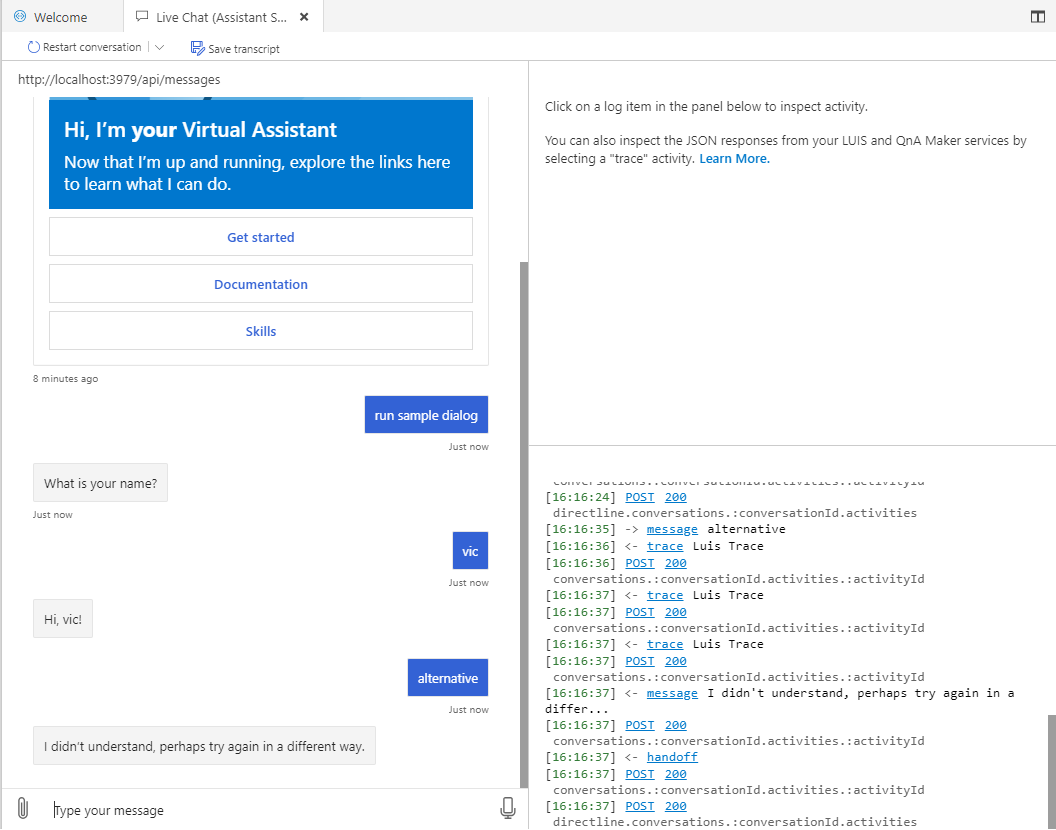
Also, the complete event of the assistant was not reached.
We tried the same steps using the next branch, and on this branch the control was indeed given back to the Virtual Assistant:
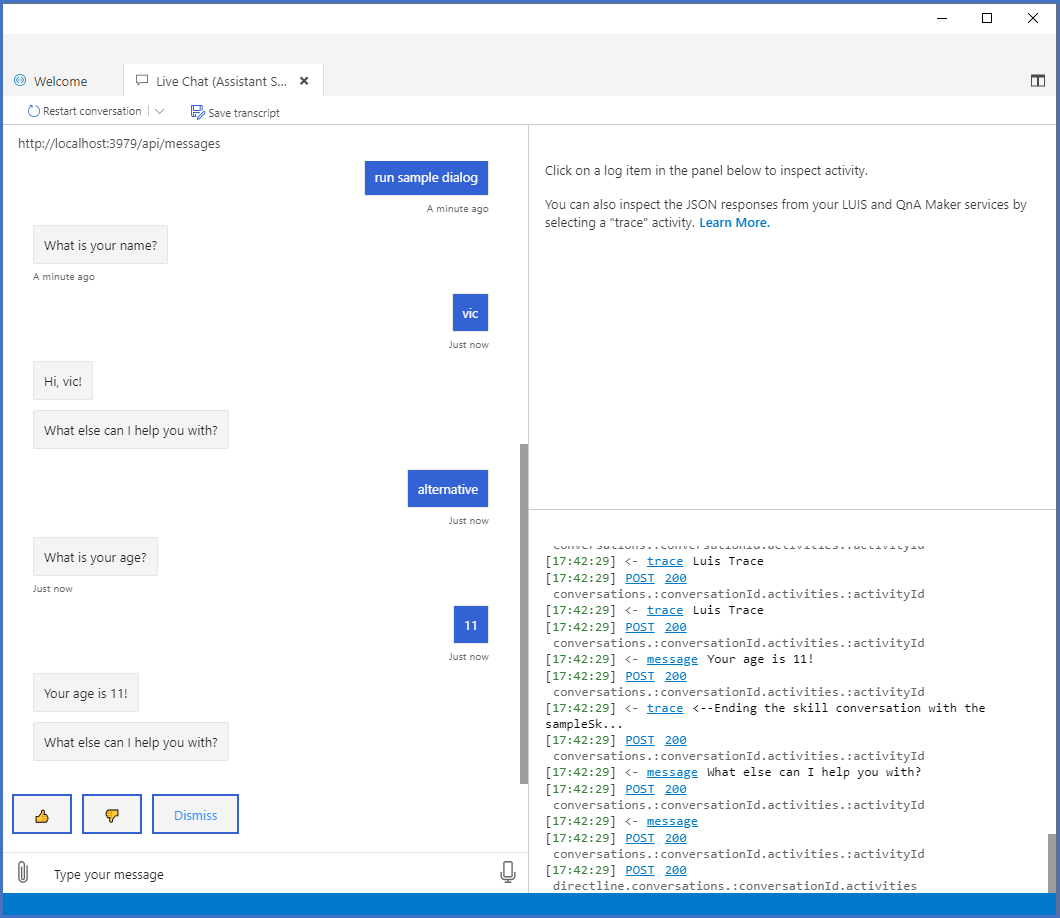
As seen in the image above, we interacted with the first Sample Skill, and after its completion we run the second Sample Skill (again, denoted with the utterance alternative), and it was executed successfully.
Note: To use the next branch, it is necessary to build the BotBuilder Solutions and BotBuilder Skills locally, and update the package.json of both the Virtual Assistant and Skill to use the local .tgz files, as they are not released yet.
Could you please confirm us that this is the behavior that you encountered?
VictorGrycuk
on 30 Jan 2020
Hi @VictorGrycuk,
Thanks for replying to us.
Could you please confirm us that this is the behavior that you encountered?
Yes it the same behavior which we encountered, and we have not tried to use the next branch.
When can we expect to this issue been resolved.
Thanks,
Edward
Edwardfelix08
on 31 Jan 2020
Hi @Edwardfelix08,
The next branch has been merged with the master branch.
Please test again with the newly implemented changes and let us know if the issue persist
VictorGrycuk
on 5 Feb 2020
hey @VictorGrycuk , does the 4.7.2 release include this fix already or should we still build from source?
 marawanshalaby
on 10 Feb 2020
marawanshalaby
on 10 Feb 2020
Hi @marawanshalaby,
The problem has been fixed on the master branch of BotBuilder Solutions (not in [email protected]), you will have to build from source.
VictorGrycuk
on 10 Feb 2020
hey @VictorGrycuk , was the fix related to the change from handoff -> EndOfConversation? Because that's the only change we had to do on our skill side (without building anything from source) and it works now:
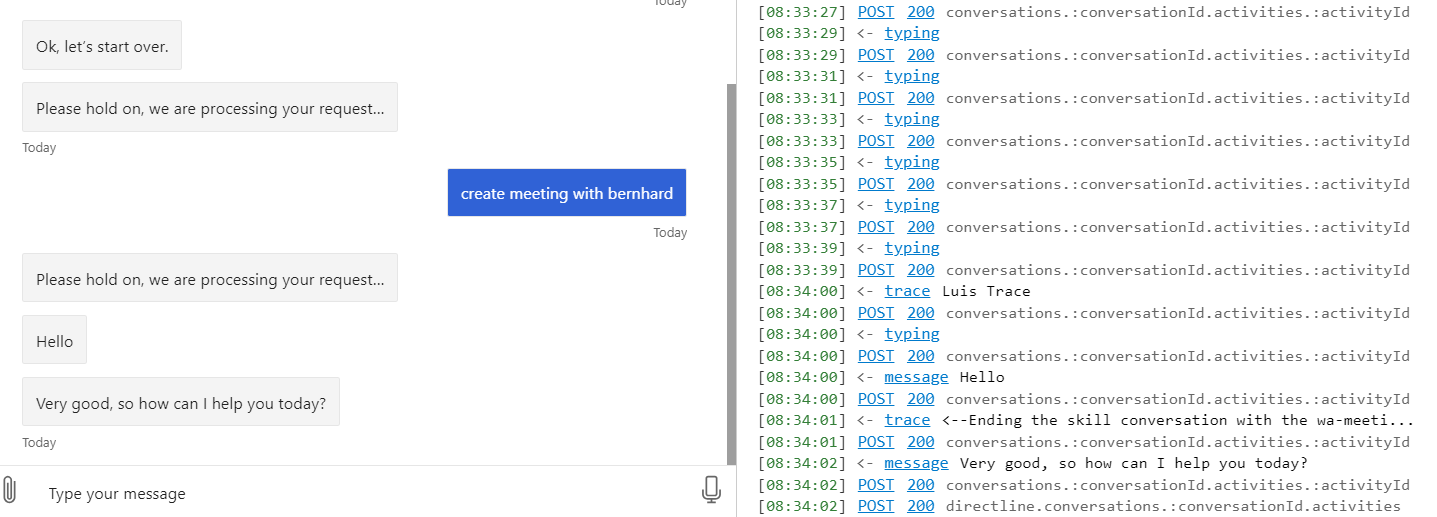
The "Hello" message is a message generated by the skill, then we send the EndOfConversation activity from the skill which terminates the skill on the VA side and then we are back interacting directly with the VA
marawanshalaby
on 10 Feb 2020
Hi @VictorGrycuk, When can we expect this to be released because we are highly dependent on this update.
We will try it out with the master branch and see if it's working fine.
Thanks,
Edward
Edwardfelix08
on 11 Feb 2020
Hi @marawanshalaby,
This was solved with the modifications that were introduced with the merge of the next branch, specifically on the PR #2842 Parity to release 0.6Beta.
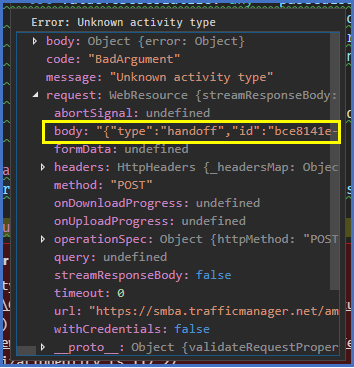
This PR replaced EndOfConversation for Handoff:
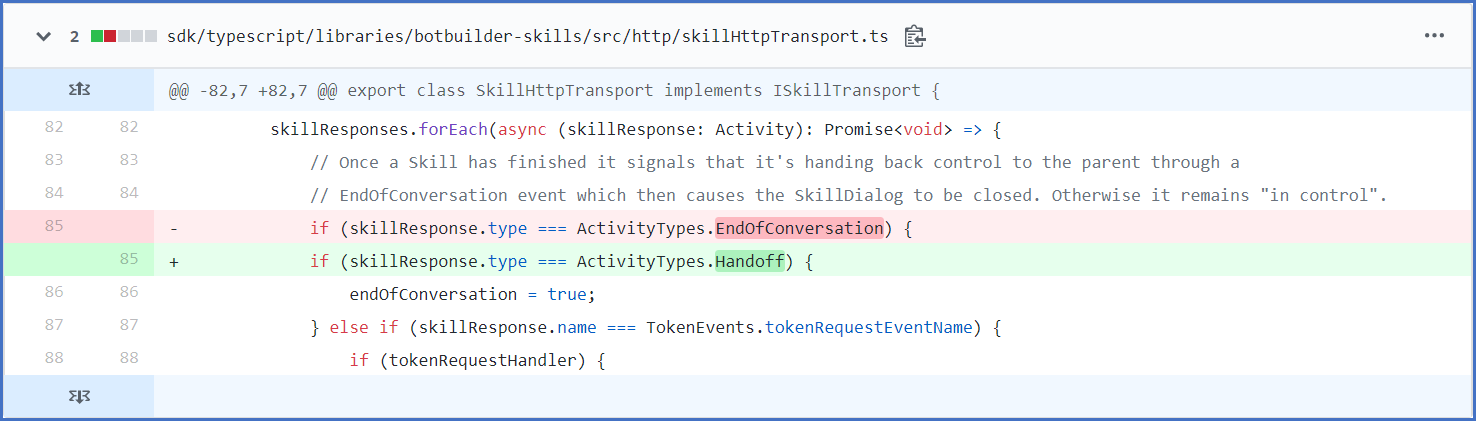
Prior to this PR, the Skill's mainDialog was sending a Handoff, but this caused the Virtual Assistant to throw an exception to unknown activity type:
VictorGrycuk
on 11 Feb 2020
hi @VictorGrycuk understood, thank you very much
marawanshalaby
on 13 Feb 2020
Related issues
 edemehmetcan
·
3Comments
edemehmetcan
·
3Comments
 esoler-sage
·
3Comments
esoler-sage
·
3Comments
 nestoralonsovina
·
4Comments
nestoralonsovina
·
4Comments
 lauren-mills
·
4Comments
lauren-mills
·
4Comments
 gabog
·
3Comments
gabog
·
3Comments
Most helpful comment
Hi @Edwardfelix08,
We were able to reproduce your scenario by using the BotBuilder Skill Sample and Sample Assistant in the
masterbranch. We also tried the same steps using thenextbranch and the issue was not found.To confirm whether the control was being given back to the assistant or not after the execution of the skill, we added a second sample skill and tried to call it after the execution of the first skill.
run sample dialogutterance of the first skill.As can be seen in the image below, we interacted with the first skill and then tried to execute the second one (with the utterance

alternative) but it was not successful.Also, the complete event of the assistant was not reached.
We tried the same steps using the

nextbranch, and on this branch the control was indeed given back to the Virtual Assistant:As seen in the image above, we interacted with the first Sample Skill, and after its completion we run the second Sample Skill (again, denoted with the utterance
alternative), and it was executed successfully.Note: To use the
nextbranch, it is necessary to build the BotBuilder Solutions and BotBuilder Skills locally, and update thepackage.jsonof both the Virtual Assistant and Skill to use the local.tgzfiles, as they are not released yet.Could you please confirm us that this is the behavior that you encountered?