Botframework-solutions: Getting a "Parsing Error" at updating the cognitive Models
What project is affected?
Microsoft VA
What language is this in?
Powershell
What happens?
when i update the KB and dispatch files via
-> .\Deployment\Scripts\update_cognitive_models.ps1 -RemoteToLocal
What are the steps to reproduce this issue?
Follow the steps at
1:1.
What were you expecting to happen?
no Errors :-)
Can you share any logs, error output, etc.?
(in the screenshot)
Any screenshots or additional context?

 danieldangler
All 13 comments
@danieldangler I tried wrong config file or empty luis app, none of them reproduce your situation. Do you add some special character in your luis app?
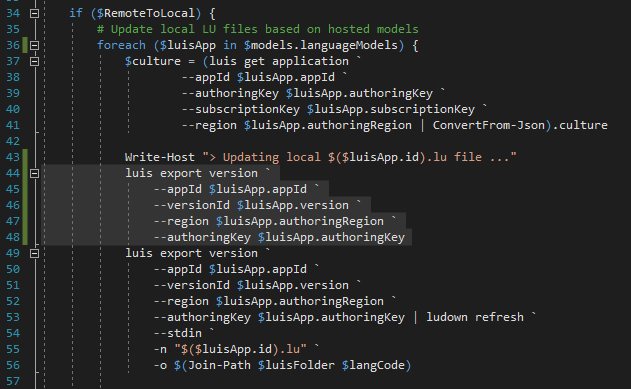
Maybe you could try to add the following lines to see the result of luis export:
 xieofxie
on 13 Nov 2019
xieofxie
on 13 Nov 2019
These are the steps i did:
(My goal was to connect a new KnowledgeBase)
- I created a new KnowledgeBase via the Browser, added one QnA-Pair, trained and published it.
- I added the KB-Information in cognitivemodels.js
- I went to my project directory and called the command:
-> ./Deployment/Scripts/update_cognitive_models.ps1 -RemoteToLocal
(FYI. I changed nothing in the Script, i`ve set the bot to german) - I added the KB in maindialog.cs
The problem is that nothing changes in the webinterface of LUIS.
I hope you can help me out with that :-)
ps. i tried to insert the four lines of code inside the Script but nothing happens. It just lists all of my Intents/utterances
danieldangler
on 13 Nov 2019
@danieldangler maybe it is caused by encoding. You could try run $OutputEncoding = [Console]::OutputEncoding before running the script.
xieofxie
on 14 Nov 2019
@xieofxie sadly this wont help.
I searched a bit more in the Issue Tab and found another User with the same (or similar) problem in
1430 https://github.com/microsoft/botframework-solutions/issues/1430
(But i dont get the Error with an invalid Subscription Key etc. by the way)
Could this be a region Problem?
UPDATE: If i change something in the KnowledgeBase and execute the command to update my cognitivemodels, LUIS is getting updated aswell, but inside the chat i get a Error if i want to ask a question from the connected KB. Strange strange strange.
danieldangler
on 14 Nov 2019
What version of the tools are you running? Specifically dispatch, but also luis (run dispatch-v) and other tools would be good to know.
What OS are you running on?
 dmvtech
on 14 Nov 2019
dmvtech
on 14 Nov 2019
Hi @danieldangler since General is also working wrongly, I would suggest a tedious way to check it..

It happens here, so first, check out the output of first part whether it is a valid json (same as General.luis when you deploy):
luis export version --appId $luisApp.appId --versionId $luisApp.version --region $luisApp.authoringRegion --authoringKey $luisApp.authoringKey
Then save it to file via
luis export version --appId $luisApp.appId --versionId $luisApp.version --region $luisApp.authoringRegion --authoringKey $luisApp.authoringKey | Out-File temp.json -Encoding OEM
(or any of the encoding until it looks right). They may be different because console and Out-File use different encodings.
Last refresh it to see if it could be refreshed as the original General.lu.
ludown refresh -i temp.json -n "$($luisApp.id).lu"
If any of these steps could not be right, please report the locale of General you used and your system language region.
xieofxie
on 15 Nov 2019
Same exact issue here.
 jason-hunt
on 16 Nov 2019
jason-hunt
on 16 Nov 2019
Same exact issue here.
I got around this for now by changing the script to output to JSON files in a temp directory and then calling ludown refresh on them, instead of reading from stdin.
jason-hunt
on 17 Nov 2019
I am also having the same issue with Luis and Qna files. @jason-hunt I also found that outputting to a temporary json file worked.
 lucascrandle
on 20 Nov 2019
lucascrandle
on 20 Nov 2019
I have updated the update_cognitive_models script in the VA template to resolve this issue. You can find it here: https://github.com/microsoft/botframework-solutions/blob/master/templates/Virtual-Assistant-Template/csharp/Sample/VirtualAssistantSample/Deployment/Scripts/update_cognitive_models.ps1
 lauren-mills
on 22 Nov 2019
lauren-mills
on 22 Nov 2019
@lauren-mills Thanks for updating the script.
As a sidenote I also have to edit the exported json file created because the depreciation error for the tools is added to the top of the file. Ex:
-----------------------------------------------------------
 NOTICE:
 This tool has been deprecated.
 All functionality was ported over to the new BF CLI.
 To learn more visit https://aka.ms/NewBFCLI
-----------------------------------------------------------


  "qnaDocuments": [
    {
      "id": 1,
This causes the ludown refresh command to fail parsing the json. I only have this problem for the qna maker export and not the luis one.
(This depreciation error is also kind of annoying because the new bf tool has not implemented an export command yet, unless I'm not looking in the right place?)
lucascrandle
on 22 Nov 2019
Ah perfect! this works for me. Thank you :)
danieldangler
on 22 Nov 2019
Looks like the removal for qnamaker is in the works: https://github.com/microsoft/botbuilder-tools/commit/c61cb62e7b2e02be3520e854102b477ec5c8856f
dmvtech
on 7 Dec 2019
Related issues
 BillStrait
·
3Comments
BillStrait
·
3Comments
 waqarghani
·
3Comments
waqarghani
·
3Comments
 darrenj
·
3Comments
lauren-mills
·
3Comments
darrenj
·
3Comments
lauren-mills
·
3Comments
 samaea
·
3Comments
samaea
·
3Comments
Most helpful comment
@lauren-mills Thanks for updating the script.
As a sidenote I also have to edit the exported json file created because the depreciation error for the tools is added to the top of the file. Ex:
This causes the ludown refresh command to fail parsing the json. I only have this problem for the qna maker export and not the luis one.
(This depreciation error is also kind of annoying because the new bf tool has not implemented an export command yet, unless I'm not looking in the right place?)