Botframework-solutions: [TypeScript] "SkillMiddleware" class should accept three parameters instead of two.
What project is affected?
Microsoft botframework V4, Custom Skill.
What language is this in?
Typescript
What happens?
The Skill is unable to receive the information passed from the Virtual Assistant via SkillContext
What are the steps to reproduce this issue?
Step 1: Generate the VA using "https://botbuilder.myget.org/feed/aitemplates/package/npm/botbuilder-solutions"
Step 2: Generate the skill using the skill generator command
"https://botbuilder.myget.org/feed/aitemplates/package/npm/botbuilder-skills"
Step 3: Added skill manifest file with slot parameter
Step 4: Set the SkillContext with slot parameter value.
Step 5: try to access the SkillContext value at Skill.
What were you expecting to happen?
The object set in SkillContext should be accessible by the skill if the "slot" attribute matched.
But the skill is not able to get the SkillContext.
"SkillMiddleware" should support skillContextAccessor and populate the SkillContext with slot parameters.
Can you share any logs, error output, etc.?
After doing some work around found out that the CustomSkillAdapter is populated with "skillContextAccessor" value.
Current Code:
export class CustomSkillAdapter extends SkillHttpBotAdapter {
constructor(
telemetryClient: TelemetryClient,
conversationState: ConversationState,
skillContextAccessor: StatePropertyAccessor
dialogStateAccessor: StatePropertyAccessor
...
) {
super(telemetryClient);
[...]
this.use(new SkillMiddleware(conversationState, dialogStateAccessor));
[...]
}
}
Expected Code as per this "https://microsoft.github.io/botframework-solutions/howto/skills/skillenablingav4bot/"
export class CustomSkillAdapter extends SkillHttpBotAdapter {
constructor(
telemetryClient: TelemetryClient,
conversationState: ConversationState,
skillContextAccessor: StatePropertyAccessor
dialogStateAccessor: StatePropertyAccessor
...
) {
super(telemetryClient);
[...]
this.use(new SkillMiddleware(conversationState, skillContextAccessor, dialogStateAccessor));
[...]
}
}
Thanks,
Edward
 Edwardfelix08
All 13 comments
Hi @Edwardfelix08, apologies for the delay on the answer.
We reviewed the documentation for enabling a V4 Bot as a Skill (doc structure changed, previous link returned 404) and realized it wasn't updated correctly following some changes in the code, so we'll update that documentation.
Following your repro steps, we understand that you have some information on your Virtual Assistant and you save this information in the SkillContext in the Virtual Assistant, and when the Skill receives the message, you want to retrieve this information from the SkillContext. Is this correct?
 dfavretto
on 5 Nov 2019
dfavretto
on 5 Nov 2019
Hi @dfavretto.
yes it is correct.
Edwardfelix08
on 12 Nov 2019
Hi @Edwardfelix08, we've been testing this scenario, and created a guide on how to make this work. Take into account that the sample-assistant isn't ready out-of-the-box to use in this scenario, so we are providing three steps to some minor modifications needed to accomplish this:
- [Virtual Assistant] Save information in SkillContext
- [botbuilder-skills] SkillContext information is filtered and saved into Activity's SemanticAction
- [Skill] Populate SkillState with the Activity's SemanticAction information
[Virtual Assistant] Save information in SkillContext
First of all, you have to save the desired information inside the Skill Context in order to retrieve it later. This must be done before forwarding your message to the Skill. There's no need to do it immediately before, this information could have been saved at any other stage.
Inside the mainDialog you have to use the skillContextAccessor to retrieve the SkillContext corresponding to your context. This can be done with the following lines:
const sc: SkillContext = await this.skillContextAccessor.get(dc.context, new SkillContext());
const skillContext: SkillContext = Object.assign(new SkillContext(), sc);
Now that you have your SkillContext saved in a variable, you can get or set any value. Don't forget the values inside the SkillContext are a key-value pair, so make sure your keys are unique if you don't want to overwrite your values. Now you can save anything, i.e. a location value:
skillContext.setObj('location', locationObj);Finally, set your SkillContext using the skillContextAccessor so this information is saved in your userState:
await this.skillContextAccessor.set(dc.context, skillContext);
[botbuilder-skills] SkillContext information is filtered and saved into Activity's SemanticAction
After saving the information in the SkillContext, it's fine to forward the message to the Skill, but before the message reaches the Skill, the SkillDialog inside botbuilder-skills will process the SkillContext during the onBeginDialog method, which is only executed once when the Skill is called for the first time.
This method will automatically do the following steps:
- Gets the SkillContext the same way we did in our first step.
- The SkillManifest is consumed to get the slots, and then this information is sent to the matchSkillContextToSlots method.
- Inside the matchSkillContextToSlots method, the SkillContext is evaluated to find any key matching the Slots key. Each key matched is used to save that SkillContext's key-value pair into the SemanticAction.
- The Activity with the SemanticAction (information retrieved from the SkillContext that matches the Slots) is forwarded to the corresponding Skill.
[Skill] Populate SkillState with the Activity's SemanticAction information
The third and last step is to populate the SkillState with the information sent from the Virtual Assistant with these steps:
- In the Skill, inside the mainDialog, there's a method called populateStateFromSemanticAction. This method is commented, and was a little bit outdated. We created [PR #2669] (already merged) to update this method.
- Make sure to update your SkillState, adding the necessary properties.
- Modify the populateStateFromSemanticAction as needed to take all the properties from the SemanticAction and save them in the SkillState. Right now, the method is looking for a 'Location' property as an example, this can be changed to any property you want to access:
typescript if (semanticAction !== undefined && Object.keys(semanticAction.entities) .find((key: string) => key === "location")) - Now you can access your SkillState inside your Skill from any place.
Hope these steps are useful 😊
dfavretto
on 19 Nov 2019
Hey @lauren-mills could you check if this approach seems correct? 😁
dfavretto
on 19 Nov 2019
Thanks @dfavretto will give this a try to see if it works.
Edwardfelix08
on 21 Nov 2019
Hi @dfavretto I have tried the above solution but it didn't work. I still see that there is no update or code change in "CustomSkillAdapter" class
Edwardfelix08
on 22 Nov 2019
@Edwardfelix08 could you share with us exactly what is the problem you are facing? Also, here are some guiding questions to better determine how we can help you:
- Could you manage to save information in the
SkillContextin your Virtual Assistant? - Is your
SkillManifestupdated with the necessary Slots? - Do the Slot's key match the key used to save the information in the
SkillContext? - Is the method
populateStateFromSemanticActionin your Skill uncommented?
Also, regarding the CustomSkillAdapter, there was no need to change that class for this case scenario.
dfavretto
on 22 Nov 2019
Hi @dfavretto,
The below is the code used
Could you manage to save information in the SkillContext in your Virtual Assistant?
VA MainDialog.
const sk: SkillContext = await this.skillContextAccessor.get(dc.context, new SkillContext());
const skillContext: SkillContext = Object.assign(new SkillContext(), sk);
skillContext.setObj('userState', userProfile);
await this.skillContextAccessor.set(dc.context, skillContext);Is your SkillManifest updated with the necessary Slots?
skill.json in VA
"slots": [{
"name": "userState",
"type": ["IUserState"]
}],SkillManifest
"slots": [{
"name": "userState",
"type": ["IUserState"]
}],Do the Slot's key match the key used to save the information in the SkillContext?
code inside populateStateFromSemanticAction
if (skillContext.ContainsKey('userState')) {
......
......
}Is the method populateStateFromSemanticAction in your Skill uncommented?
yes, I have uncomment the code form populateStateFromSemanticAction method inside botSkill.
What will be the bot frame version we should be using ?
We are using the below packages.
    "botbuilder": "^4.5.3",
    "botbuilder-ai": "^4.5.3",
    "botbuilder-applicationinsights": "^4.5.3",
    "botbuilder-azure": "^4.5.3",
    "botbuilder-core": "^4.5.3",
    "botbuilder-dialogs": "^4.5.3",
    "botbuilder-skills": "^4.4.6",
    "botbuilder-solutions": "^4.4.6",
    "botframework-config": "^4.5.3",
    "botframework-connector": "^4.5.3",
    "botframework-schema": "^4.5.3",
@Edwardfelix08, I see you are trying to get the value userState from the skillContext in the method populateStateFromSemanticAction. I'd like to point out that the skillContext you filled in the Virtual Assistant is no longer the same you have in your Skill.
For leveraging this situation, the data from the Virtual Assistant's skillContext is copied to the Activity's semanticAction. The Activity is the only element sent from the Virtual Assistant to the Skill, and then it can be evaluated to get this information.
Here is an example of the populateStateFromSemanticAction that would get your userState value from the Activity's semanticAction:
protected async populateStateFromSemanticAction(context: TurnContext): Promise<void> {
        // Example of populating local state with data passed through semanticAction out of Activity
        const activity: Activity = context.activity;
        const semanticAction: SemanticAction | undefined = activity.semanticAction;
        if (semanticAction !== undefined && Object.keys(semanticAction.entities).find((key: string) => key === "userState")) {

            const userState: any = semanticAction.entities["userState"];
            const userStateObj = userState.properties["userState"];
            const state: SkillState = await this.stateAccessor.get(context, new SkillState());
            state.userState = userStateObj !== undefined ? userStateObj : userState;
            await this.stateAccessor.set(context, state);
        }
    }
@dfavretto sorry for replying late.
I have tried the same but still I am not able to get the value.
Value for activity.semanticAction is undefined.
Edwardfelix08
on 3 Dec 2019
Hi @Edwardfelix08, we made some validations and we couldn't repro your scenario, as the SemanticAction is always defaulted with some value, so it shouldn't be undefined.

Just to confirm, in your Virtual Assistant, are you invoking your Skill as follows?
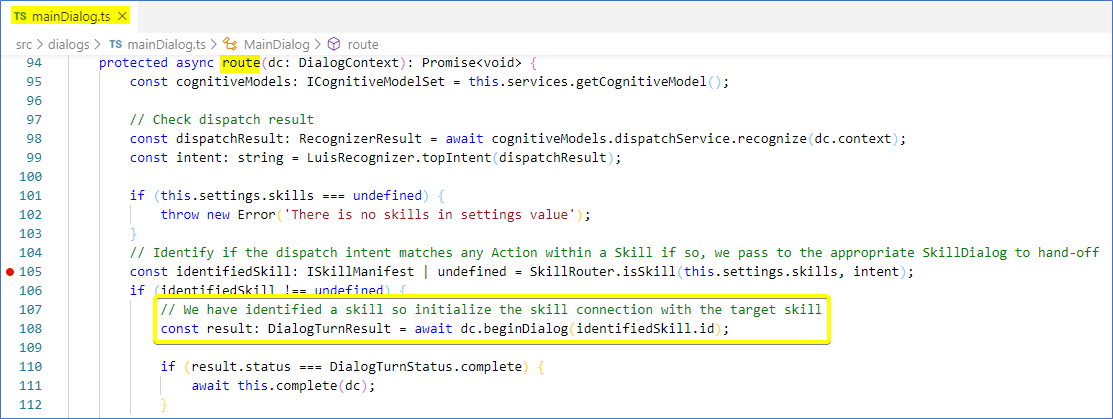
@darrenj - should we add the Support team so they can help approach this issue from another perspective? Since it doesn't seem to have nothing to do with the TypeScript implementation itself, but with the specific scenario it's being implemented here.
dfavretto
on 6 Dec 2019
Hi @dfavretto,
Sorry for replying late. We were able to get this working, Thanks to you. We were referring to the old version of the framework once updated and crossed checked with your code and there were difference in "populateStateFromSemanticAction", Updated the code to the proposed one and it started to work like a charm.
Thank you for helping us on this.
Edwardfelix08
on 10 Dec 2019
Awesome to hear that! Glad that I could help you with this 😊
dfavretto
on 10 Dec 2019
Related issues
 esoler-sage
·
3Comments
esoler-sage
·
3Comments
 ericmaino
·
3Comments
ericmaino
·
3Comments
 waqarghani
·
3Comments
waqarghani
·
3Comments
 gabog
·
3Comments
gabog
·
3Comments
 kendomen
·
4Comments
kendomen
·
4Comments
Most helpful comment
Awesome to hear that! Glad that I could help you with this 😊