Botframework-solutions: [C#][Skills] HTTP transport is not enable in the skills
What project is affected?
Skills (we used the Sample Skill specifically)
What language is this in?
C#
What happens?
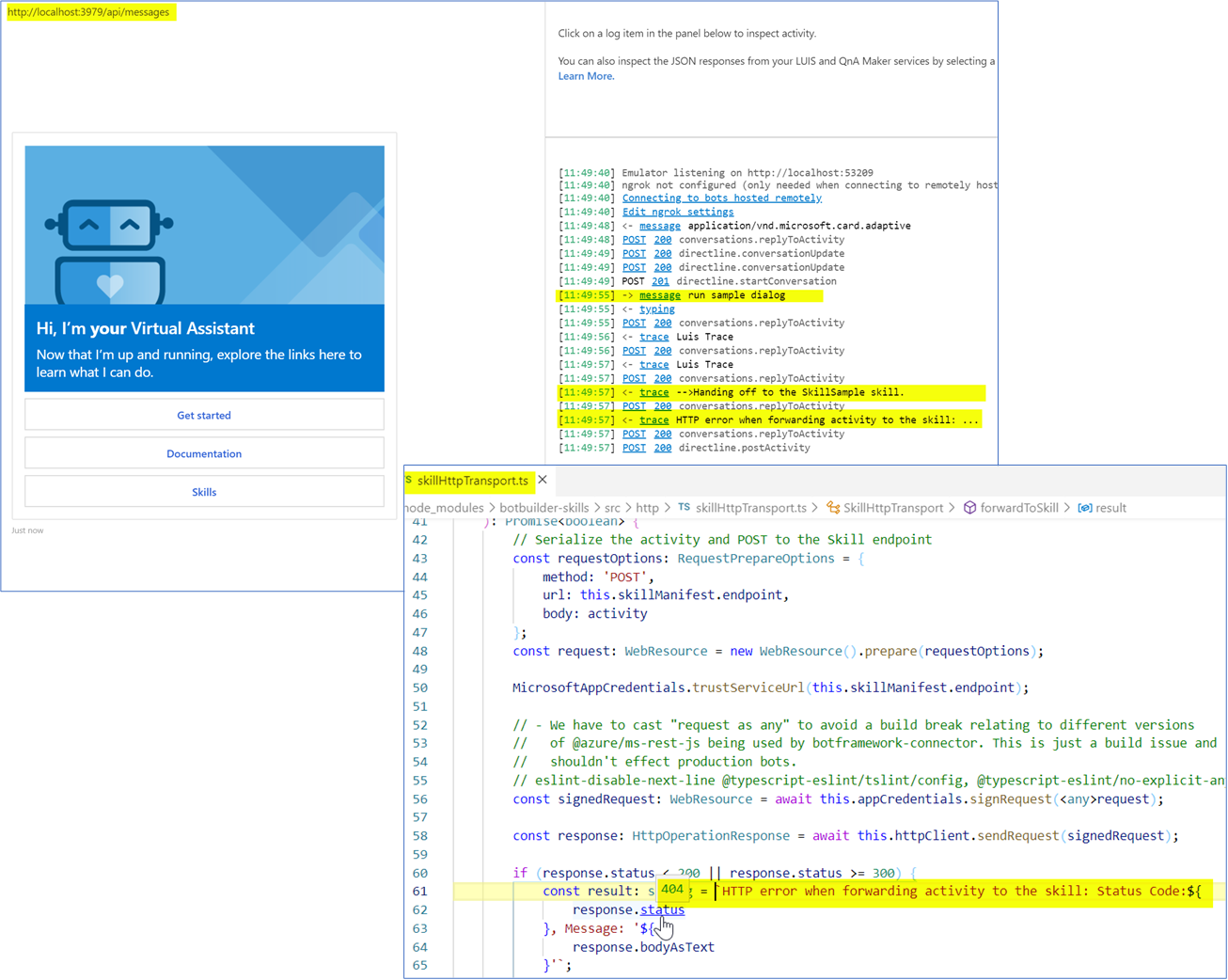
During the communication between a Virtual Assistant in TypeScript and a Skill in C#, we noticed a 404 HTTP error initiating the Skill dialog.
Also, we reviewed that in the SkillController is missing a POST endpoint for api/skill/messages, so the communication via HTTP transport won't be successful because the botbuilder-skills library will prepare a request using the POST method.
What are the steps to reproduce this issue?
Using the Sample Assistant in TypeScript and the Sample Skill in C#
- Deploy the Sample Assistant and the Sample Skill
- Using
Botskills CLI Tool, connect the VA to the Skill - Start both solutions and initiate the Virtual Assistant in the Bot Framework Emulator
- Send the
run sample dialogutterance to initiate the Sample Skill dialog - Check that a HTTP error was raised with 404 Status
What were you expecting to happen?
The Sample Skill in C# receives the intent correctly and starts the corresponding dialog.
Can you share any logs, error output, etc.?
Any screenshots or additional context?
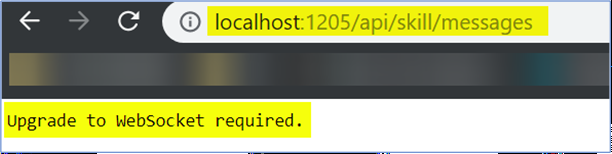
There is a GET endpoint for api/skill/messages in the SkillController which is handled with the WebSocket functionality.
 Batta32
All 5 comments
Thanks - I've dropped you a mail. WebSockets/Streaming extensions (via /api/skill/messages) is the only supported protocol. i.e. not HTTP. We can discuss later :)
 darrenj
on 18 Sep 2019
darrenj
on 18 Sep 2019
Hi,
we have a different scenario.
we have VA developed in C# and the skill in typescript. the typescript skill is working individually but when connected to VA we are getting the below error:- websocket is enabled too. Appreciate your help.
"Unable to connect to the remote server"
text: " at System.Net.WebSockets.WebSocketHandle.ConnectAsyncCore(Uri uri, CancellationToken cancellationToken, ClientWebSocketOptions options)
at System.Net.WebSockets.ClientWebSocket.ConnectAsyncCore(Uri uri, CancellationToken cancellationToken)
at Microsoft.Bot.Protocol.WebSockets.WebSocketClient.ConnectAsync(IDictionary2 requestHeaders)
at Microsoft.Bot.Builder.Skills.SkillWebSocketTransport.ForwardToSkillAsync(ITurnContext turnContext, Activity activity, Action1 tokenRequestHandler)
at Microsoft.Bot.Builder.Skills.SkillDialog.ForwardToSkillAsync(DialogContext innerDc, Activity activity)
at Microsoft.Bot.Builder.Skills.SkillDialog.ForwardToSkillAsync(DialogContext innerDc, Activity activity)
at Microsoft.Bot.Builder.Skills.SkillDialog.OnBeginDialogAsync(DialogContext innerDc, Object options, CancellationToken cancellationToken)
at Microsoft.Bot.Builder.Dialogs.ComponentDialog.BeginDialogAsync(DialogContext outerDc, Object options, CancellationToken cancellationToken) in d:\a\1\s\libraries\Microsoft.Bot.Builder.Dialogs\ComponentDialog.cs:line 60
at Microsoft.Bot.Builder.Dialogs.DialogContext.BeginDialogAsync(String dialogId, Object options, CancellationToken cancellationToken) in d:\a\1\s\libraries\Microsoft.Bot.Builder.Dialogs\DialogContext.cs:line 113
at Novtar.Core.Dialogs.MainDialog.RouteAsync(DialogContext dc, CancellationToken cancellationToken) in C:\Users\MAKTHKU1\Novatar\NovatarV4\NewCode\NovatarMasterV4\Novtar.Core\Novtar.Core\Dialogs\MainDialog.cs:line 193
at Microsoft.Bot.Builder.Solutions.Dialogs.RouterDialog.OnContinueDialogAsync(DialogContext innerDc, CancellationToken cancellationToken)
at Microsoft.Bot.Builder.Dialogs.ComponentDialog.ContinueDialogAsync(DialogContext outerDc, CancellationToken cancellationToken) in d:\a\1\s\libraries\Microsoft.Bot.Builder.Dialogs\ComponentDialog.cs:line 86
at Microsoft.Bot.Builder.Dialogs.DialogContext.ContinueDialogAsync(CancellationToken cancellationToken) in d:\a\1\s\libraries\Microsoft.Bot.Builder.Dialogs\DialogContext.cs:line 160
at Novtar.Core.Bots.DialogBot`1.OnTurnAsync(ITurnContext turnContext, CancellationToken cancellationToken) in C:\Users\MAKTHKU1\Novatar\NovatarV4\NewCode\NovatarMasterV4\Novtar.Core\Novtar.Core\Bots\DialogBot.cs:line 43
at Microsoft.Bot.Builder.AutoSaveStateMiddleware.OnTurnAsync(ITurnContext turnContext, NextDelegate next, CancellationToken cancellationToken) in d:\a\1\s\libraries\Microsoft.Bot.Builder\AutoSaveStateMiddleware.cs:line 60
at Microsoft.Bot.Builder.Solutions.Middleware.EventDebuggerMiddleware.OnTurnAsync(ITurnContext turnContext, NextDelegate next, CancellationToken cancellationToken)
at SetLocaleMiddleware.OnTurnAsync(ITurnContext turnContext, NextDelegate next, CancellationToken cancellationToken) in C:\Users\MAKTHKU1\Novatar\NovatarV4\NewCode\NovatarMasterV4\Novtar.Core\Novtar.Core\SetLocaleMiddleware.cs:line 64
at Novtar.Core.Common.Middleware.LanguageDetectionMiddleware.OnTurnAsync(ITurnContext turnContext, NextDelegate next, CancellationToken cancellationToken) in C:\Users\MAKTHKU1\Novatar\NovatarV4\NewCode\NovatarMasterV4\Novtar.Core\Novtar.Core.Common\Middleware\LanguageDetectionMiddleware.cs:line 58
at Microsoft.Bot.Builder.ShowTypingMiddleware.OnTurnAsync(ITurnContext turnContext, NextDelegate next, CancellationToken cancellationToken) in d:\a\1\s\libraries\Microsoft.Bot.Builder\ShowTypingMiddleware.cs:line 71
at Microsoft.Bot.Builder.TelemetryLoggerMiddleware.OnTurnAsync(ITurnContext context, NextDelegate nextTurn, CancellationToken cancellationToken) in d:\a\1\s\libraries\Microsoft.Bot.Builder\TelemetryLoggerMiddleware.cs:line 109
at Microsoft.Bot.Builder.TranscriptLoggerMiddleware.OnTurnAsync(ITurnContext turnContext, NextDelegate nextTurn, CancellationToken cancellationToken) in d:\a\1\s\libraries\Microsoft.Bot.Builder\TranscriptLoggerMiddleware.cs:line 108
at Microsoft.Bot.Builder.BotFrameworkAdapter.TenantIdWorkaroundForTeamsMiddleware.OnTurnAsync(ITurnContext turnContext, NextDelegate next, CancellationToken cancellationToken) in d:\a\1\s\libraries\Microsoft.Bot.Builder\BotFrameworkAdapter.cs:line 995
at Microsoft.Bot.Builder.MiddlewareSet.ReceiveActivityWithStatusAsync(ITurnContext turnContext, BotCallbackHandler callback, CancellationToken cancellationToken) in d:\a\1\s\libraries\Microsoft.Bot.Builder\MiddlewareSet.cs:line 55
at Microsoft.Bot.Builder.BotAdapter.RunPipelineAsync(ITurnContext turnContext, BotCallbackHandler callback, CancellationToken cancellationToken) in d:\a\1\s\libraries\Microsoft.Bot.Builder\BotAdapter.cs:line 167"
 Kumar3010
on 22 Sep 2019
Kumar3010
on 22 Sep 2019
@darrenj could you please help us here.
Kumar3010
on 23 Sep 2019
@Kumar3010 Apologies, we didn't notice this comment on a development work-item so didn't fall into our customer tracking. As per this item we have only just recently received the WebSocket streaming extension library for javascript and are integrating it to unblock this scenario (e.g. expose a JS skill) enabling callers to invoke.
This is why your typescript skill can't be invoked from a C# Bot (C# skill would be fine)
We are working on the changes and the above work item is the one to get updates, we'll hopefully have a daily build that can be used to track updates.
darrenj
on 8 Oct 2019
Tracked by #2489. Please customize notifications to get updates.
darrenj
on 8 Oct 2019
Related issues
 lauren-mills
·
3Comments
lauren-mills
·
3Comments
 hansmbakker
·
3Comments
hansmbakker
·
3Comments
 ericmaino
·
3Comments
ericmaino
·
3Comments
 esoler-sage
·
3Comments
esoler-sage
·
3Comments
 manish-95
·
3Comments
manish-95
·
3Comments
Most helpful comment
Thanks - I've dropped you a mail. WebSockets/Streaming extensions (via /api/skill/messages) is the only supported protocol. i.e. not HTTP. We can discuss later :)