Botframework-solutions: Deployment Fails to Complete - Hangs on Publishing to Azure...
What project is affected?
Virtual Assistant Template
What language is this in?
C#
What happens?
It hangs on publishing to Azure, it does seem to update the bot in Azure but neither locally nor in Azure can I get a response from the bot.
What are the steps to reproduce this issue?
Deploy the bot.
What were you expecting to happen?
Deployment and publish script complete successfully and able to access the virtual assistant bot in Emulator and in Azure Test in Webchat.
Can you share any logs, error output, etc.?
Yes, I can.
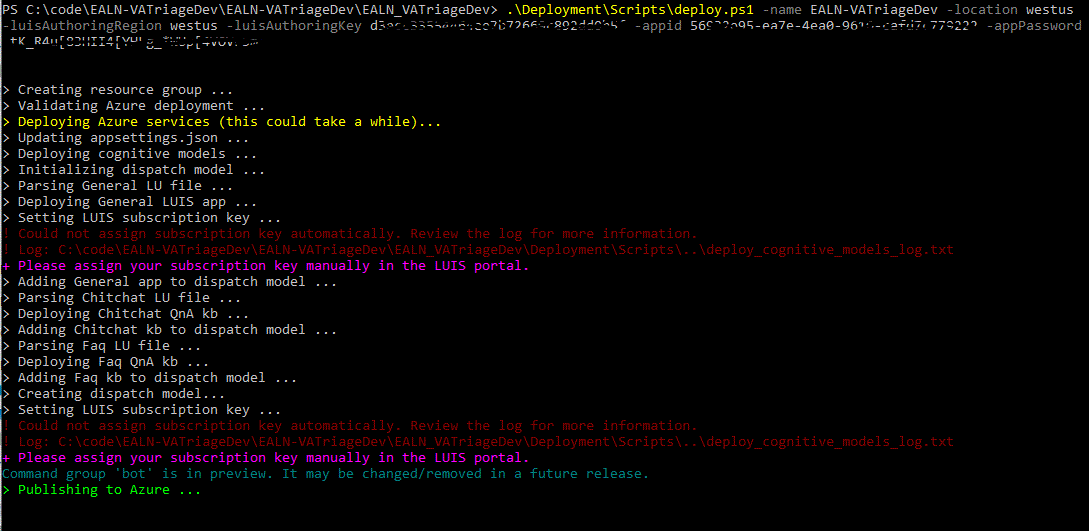
deploy_log.txt
publish_log.txt
deploy_cognitive_models_log.txt
Any screenshots or additional context?
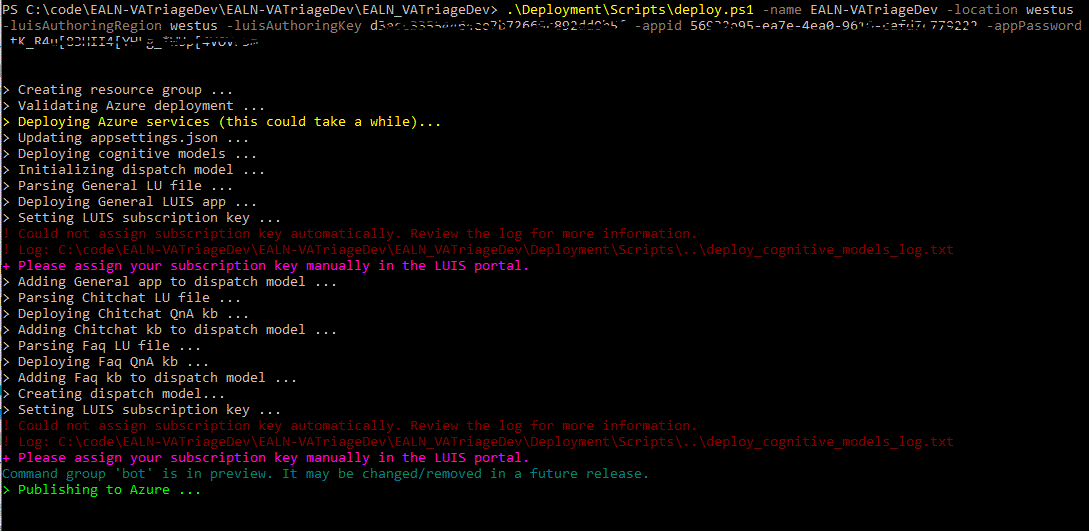
 mlipinski
All 21 comments
Update, I can get to the bot via VS and the emulator after removing appid and apppw from the emulator and the appsettings.json file.
mlipinski
on 14 Aug 2019
Hi - the script uses the standard azure web app publishing mechanism, could you let us know the AZ version you are using please?
C:\Users\darrenj>az -v
azure-cli                         2.0.65 *
This will help us try and repro if there is a change in behaviour for az publish.
That said, creation of the azure resources has succeeded. One thing you can try to repro the issue would be to run publish directly, e.g. from powershell run the following and see if that works, if not can you share the publish_log.txt ?
```
deployment\scripts\publish.ps1 -name EALN_VATriageDev -resourceGroup EALN_VATriageDev
 darrenj
on 16 Aug 2019
darrenj
on 16 Aug 2019
Darren,
I put the publish log and the deploy log in the github issue when I created it.
[cid:[email protected]]
Matt…
mlipinski
on 16 Aug 2019
The logs don't show anything particularly wrong and I've just performed a full deployment to validate:
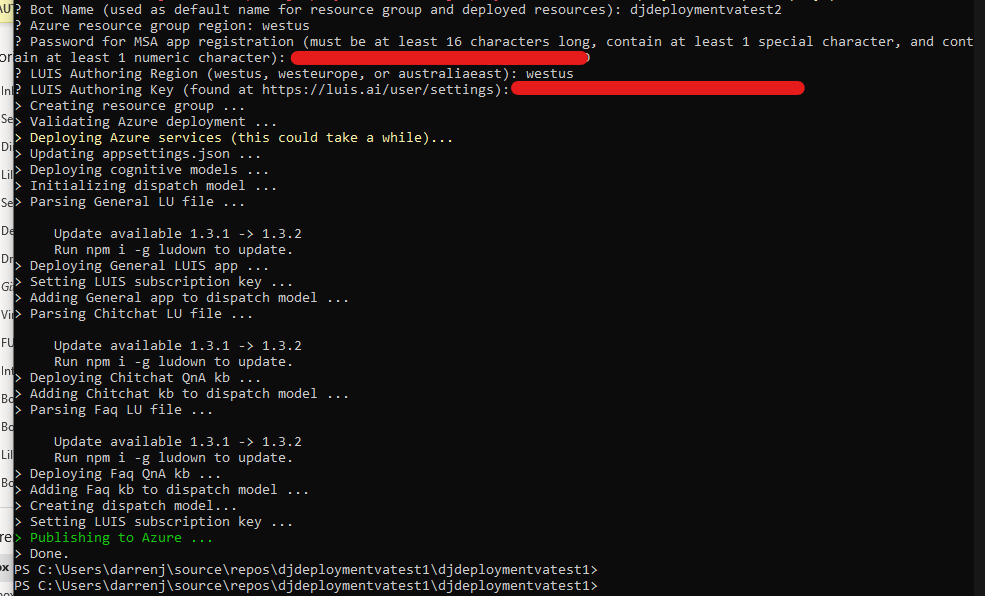
I have just noticed this warning in your log above command group bot is in preview it may be changed/removed in a future release - This I'm 99.9% sure relates to you having a very old AZ version.
Can I confirm that you followed all the pre-requsities specifically in this case the AZ version?
Also ensure you have the latest CLI tools as per the npm commands provided.
darrenj
on 16 Aug 2019
Darren,
I am confused on how this is a very old version.
https://docs.microsoft.com/en-us/cli/azure/install-azure-cli-windows?view=azure-cli-latest
This shows 2.0.71 is the most current version and I am on 2.0.70.
What am I missing here?
Yes, I did follow the pre-requisites before I deployed all this only a week ago.
Matt…
mlipinski
on 16 Aug 2019
I've seen issues where PowerShell won't quite refresh the terminal when it's done (often happening with other, external commands). I've worked around this before by putting another command after it, such as:
deployment\scripts\publish.ps1 -name EALN_VATriageDev -resourceGroup EALN_VATriageDev;Write-Host "The publishing should be complete now"
But I don't quite think this is the case here as your bot doesn't actually work/respond.
How much time have you given the publishing step to complete?
 dmvtech
on 16 Aug 2019
dmvtech
on 16 Aug 2019
I have left it for at least 45 minutes or more, I know it shouldn’t take that long.
From: Dana V notifications@github.com
Sent: Friday, August 16, 2019 3:02 PM
To: microsoft/botframework-solutions botframework-solutions@noreply.github.com
Cc: Lipinski, Matt T. (RET-DAY) Matt.Lipinski@relx.com; Author author@noreply.github.com
Subject: Re: [microsoft/botframework-solutions] Deployment Fails to Complete - Hangs on Publishing to Azure... (#2116)
* External email: use caution *
I've seen issues where PowerShell won't quite refresh the terminal when it's done (often happening with other, external commands). I've worked around this before by putting another command after it, such as:
deployment\scripts\publish.ps1 -name EALN_VATriageDev -resourceGroup EALN_VATriageDev;Write-Host "The publishing should be complete now"
But I don't quite think this is the case here as your bot doesn't actually work/respond.
How much time have you given the publishing step to complete?
—
You are receiving this because you authored the thread.
Reply to this email directly, view it on GitHubhttps://github.com/microsoft/botframework-solutions/issues/2116?email_source=notifications&email_token=ABMHDSW5K4IKTEYUTO3SNN3QE32TFA5CNFSM4ILU5B32YY3PNVWWK3TUL52HS4DFVREXG43VMVBW63LNMVXHJKTDN5WW2ZLOORPWSZGOD4POCSY#issuecomment-522117451, or mute the threadhttps://github.com/notifications/unsubscribe-auth/ABMHDSWPPMXHAACI2RSHVOTQE32TFANCNFSM4ILU5B3Q.
mlipinski
on 16 Aug 2019
I have 2.0.71 az CLI. And, I see the same problem. It goes till "publishing to Azure", and then an hour passes but "done" message never appears for "deploy.ps1" - both virtual assistant/ skills deployment. However, we can forcefully exit command line session and do the normal debug work as it is. I am not sure where the problem is. Any idea why it could be happening?
 PurnaChandraPanda
on 19 Aug 2019
PurnaChandraPanda
on 19 Aug 2019
I would like to deploy a few more bots but kind of on hold until I get this issue resolved.
mlipinski
on 19 Aug 2019
Can you try running the deployment in _prompt mode_? i.e. instead of giving it each value for each parameter for one line, just run deploy.ps1 and then supply each value as it prompts for them. This is not a solution, but as a troubleshooting step. I'm curious to see if we can get more information by going that route.
dmvtech
on 20 Aug 2019
Could you also confirm the PowerShell Core version you have (pwsh -v). I've just double checked by upgrading to the latest AZ CLI to see if there was a regression and it's completed OK (within seconds).
Another potential workaround whilst we investigate what has regressed here is to right click and publish your solution to Azure via Visual Studio. Select the app-service that's been created and it should publish fine.
The publish script is a pretty simple wrapper around these two commands:
az bot prepare-deploy --lang Csharp --code-dir $projFolder --proj-file-path $projFile.name --output json | Out-Null
az webapp deployment source config-zip `
        --resource-group $resourceGroup `
        --name $name `
        --src $zipPath `
        --output json
If you have time you could try running the second command from the project directory manually - you should already have a code.zip file present and this will enable you to run against the az webapp command directly.
darrenj
on 20 Aug 2019
6.2.2 for Powershell
This only seems to happen when you include the App registration id as a parameter and not when its auto generated. I don’t always have rights to auto generate, but yesterday I did. This completed just fine with those rights. When I have an app-id as a parameter it seems to hang.
--appid
Matt…
From: Darren Jefford notifications@github.com
Sent: Tuesday, August 20, 2019 7:30 AM
To: microsoft/botframework-solutions botframework-solutions@noreply.github.com
Cc: Lipinski, Matt T. (RET-DAY) Matt.Lipinski@relx.com; Author author@noreply.github.com
Subject: Re: [microsoft/botframework-solutions] Deployment Fails to Complete - Hangs on Publishing to Azure... (#2116)
* External email: use caution *
Could you also confirm the PowerShell Core version you have (pwsh -v). I've just double checked by upgrading to the latest AZ CLI to see if there was a regression and it's completed OK (within seconds).
Another potential workaround whilst we investigate what has regressed here is to right click and publish your solution to Azure via Visual Studio. Select the app-service that's been created and it should publish fine.
The publish script is a pretty simple wrapper around these two commands:
az bot prepare-deploy --lang Csharp --code-dir $projFolder --proj-file-path $projFile.name --output json | Out-Null
az webapp deployment source config-zip `
           --resource-group $resourceGroup `

           --name $name `

           --src $zipPath `

    --output json
If you have time you could try running the second command from the project directory manually - you should already have a code.zip file present and this will enable you to run against the az webapp command directly.
—
You are receiving this because you authored the thread.
Reply to this email directly, view it on GitHubhttps://github.com/microsoft/botframework-solutions/issues/2116?email_source=notifications&email_token=ABMHDSSBXLVHKXDQA4OIBT3QFPISPA5CNFSM4ILU5B32YY3PNVWWK3TUL52HS4DFVREXG43VMVBW63LNMVXHJKTDN5WW2ZLOORPWSZGOD4V6URI#issuecomment-522971717, or mute the threadhttps://github.com/notifications/unsubscribe-auth/ABMHDSXY3YM7PYN4QLPUGJTQFPISPANCNFSM4ILU5B3Q.
mlipinski
on 20 Aug 2019
Thanks - this helps. I've just gone through with latest pwsh and az CLI and not able to repro so rules out something with AZ CLI I suspect.
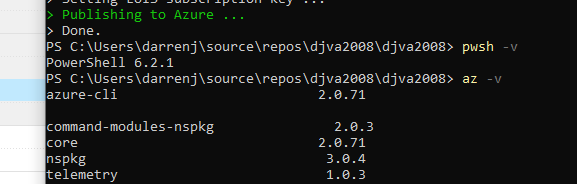
I'm just re-testing with a manually created AppId. @PurnaChandraPanda can you confirm if you are also using the AppId and AppPassword parameter when running the deployment script?
darrenj
on 20 Aug 2019
Odd, using .\Deployment\Scripts\deploy.ps1 -appId APP_ID -appPassword PASSWORD worked for me. I'll install pwsh 6.2.2 (from my 6.2.1) to see if that makes any difference.
I'd also like to verify your publish.ps1 script is the same as this. It should be if you downloaded the template within the last month or so but wanted to double check.
If not, see this
darrenj
on 20 Aug 2019
One other aspect that I want to highlight when your testing a Bot deployment. If you've had to create your own AppId it's imperative to ensure the tenant configuration is correct otherwise you will get AppId/Secret issues. This shouldn't affect deployment though!
See these instructions for the configuration required for manually created Azure Applications - specifically Accounts in any organizational directory
darrenj
on 20 Aug 2019
I am not sure I chose “Accounts in any organizational directory”,
I typically select the first one in the list as I recall, but since I no longer have those rights I don’t recall which one that is.
Matt…
From: Darren Jefford notifications@github.com
Sent: Tuesday, August 20, 2019 9:32 AM
To: microsoft/botframework-solutions botframework-solutions@noreply.github.com
Cc: Lipinski, Matt T. (RET-DAY) Matt.Lipinski@relx.com; Author author@noreply.github.com
Subject: Re: [microsoft/botframework-solutions] Deployment Fails to Complete - Hangs on Publishing to Azure... (#2116)
* External email: use caution *
One other aspect that I want to highlight when your testing a Bot deployment. If you've had to create your own AppId it's imperative to ensure the tenant configuration is correct otherwise you will get AppId/Secret issues. This shouldn't affect deployment though!
See these instructionshttps://microsoft.github.io/botframework-solutions/reference/knownissues/#my-microsoft-app-registration-could-not-be-automatically-provisioned for the configuration required for manually created AppIds - specifically Accounts in any organizational directory
—
You are receiving this because you authored the thread.
Reply to this email directly, view it on GitHubhttps://github.com/microsoft/botframework-solutions/issues/2116?email_source=notifications&email_token=ABMHDSROMNLTY7GAROIDIX3QFPW4JA5CNFSM4ILU5B32YY3PNVWWK3TUL52HS4DFVREXG43VMVBW63LNMVXHJKTDN5WW2ZLOORPWSZGOD4WJPNQ#issuecomment-523016118, or mute the threadhttps://github.com/notifications/unsubscribe-auth/ABMHDSQRQUP2K46B7YXBBULQFPW4JANCNFSM4ILU5B3Q.
mlipinski
on 20 Aug 2019
Yes, now I will say. I copied and pasted that file to update it. I am not 100% sure when I ran it the first time that it was the same version.
Matt…
From: Darren Jefford notifications@github.com
Sent: Tuesday, August 20, 2019 9:18 AM
To: microsoft/botframework-solutions botframework-solutions@noreply.github.com
Cc: Lipinski, Matt T. (RET-DAY) Matt.Lipinski@relx.com; Author author@noreply.github.com
Subject: Re: [microsoft/botframework-solutions] Deployment Fails to Complete - Hangs on Publishing to Azure... (#2116)
* External email: use caution *
Odd, using .\Deployment\Scripts\deploy.ps1 -appId APP_ID -appPassword PASSWORD worked for me. I'll install pwsh 6.2.2 (from my 6.2.1) to see if that makes any difference.
I'd also like to verify your publish.ps1 script is the same as thishttps://github.com/microsoft/botframework-solutions/blob/master/templates/Virtual-Assistant-Template/csharp/Sample/VirtualAssistantSample/Deployment/Scripts/publish.ps1. It should be if you downloaded the template within the last month or so but wanted to double check.
—
You are receiving this because you authored the thread.
Reply to this email directly, view it on GitHubhttps://github.com/microsoft/botframework-solutions/issues/2116?email_source=notifications&email_token=ABMHDSRF3YR72OPLCGNV3C3QFPVKFA5CNFSM4ILU5B32YY3PNVWWK3TUL52HS4DFVREXG43VMVBW63LNMVXHJKTDN5WW2ZLOORPWSZGOD4WIDBA#issuecomment-523010436, or mute the threadhttps://github.com/notifications/unsubscribe-auth/ABMHDSWQYOEIZ6G4GYQFO2TQFPVKFANCNFSM4ILU5B3Q.
mlipinski
on 20 Aug 2019
OK, to update - pwsh 6.2.2 worked fine for me on Windows 10 when specifying an appid and password to the deployment script. I'm not quite sure what else could be causing the publishing "hang" that you are experiencing. Also validated this on a Max/OSx.
So this is what I'd propose as next steps:
[ ] Ensure "Accounts in any organizational directory" must be set on a manually created Azure AD application otherwise the Azure Bot Service will not be able to validate AppId/Secret. https://aka.ms/vamanualappcreation
[ ] Validate the local project builds successfully.
[ ] Go to the Kudu site for your deployment - https://YOUR_BOT.scm.azurewebsites.net/DebugConsole. Click Site, Deployment and the most recent GUID to get the log file (share if possible)
[ ] Publish manually via Visual Studio (selecting your Azure Web App in the Resource Group) and see if that works. If the Azure AD Application tenant setting discussed above is set, you should find Test in Web Chat (Azure Portal) and Emulator works as expected.
[ ] Ensure you do have the latest deployment scripts
[ ] Identify if executing
deployment\scripts\publish.ps1 -name EALN_VATriageDev -resourceGroup EALN_VATriageDevdirectly repros the "hang issue" (this is called by the deploy script)[ ] If so, try adding
--verboseto theaz webapp deployment source config-zipline in publish.ps1 to see if that yields anything further and share the log file if so. Alternatively you can execute the az command interactively within a powershell console.
darrenj
on 20 Aug 2019
I am, also getting the exact same issue, I have followed all the pre-requisites did everything today so definitely latest versions.
I will give the steps above a try.
 mickallen
on 20 Aug 2019
mickallen
on 20 Aug 2019
Closing due to inactivity. Please reopen as needed.
 lauren-mills
on 4 Sep 2019
lauren-mills
on 4 Sep 2019
Not sure this is still relevant, but I went through the same issue and, in my case, what I found out was that there was a bunch of files created under {ProjectName}/Properties/PublishProfiles, most of them with the same name as the publish profile I was trying to create, which kind of indicates a failed attempt to create a publish profile and got stuck during the process.
What solved my issue was to manually delete all of those files and then the publish profile got created almost instantly. It looks like a file conflict issue that the Publish creation tool wasn't able to resolve.
 hiramfernandes
on 20 Jan 2020
hiramfernandes
on 20 Jan 2020
Related issues
 BillStrait
·
3Comments
BillStrait
·
3Comments
 edemehmetcan
·
3Comments
edemehmetcan
·
3Comments
 elaine-chang
·
4Comments
elaine-chang
·
4Comments
 VladPapacostea-SM
·
3Comments
VladPapacostea-SM
·
3Comments
 ericmaino
·
3Comments
ericmaino
·
3Comments
Most helpful comment
I am, also getting the exact same issue, I have followed all the pre-requisites did everything today so definitely latest versions.
I will give the steps above a try.