Botframework-solutions: Virtual Assistant Deployment - Multiple failures
Document reference: (Step 2)
https://github.com/microsoft/botframework-solutions/blob/master/docs/tutorials/csharp/virtualassistant.md#deploy-your-assistant
See the screenshot:
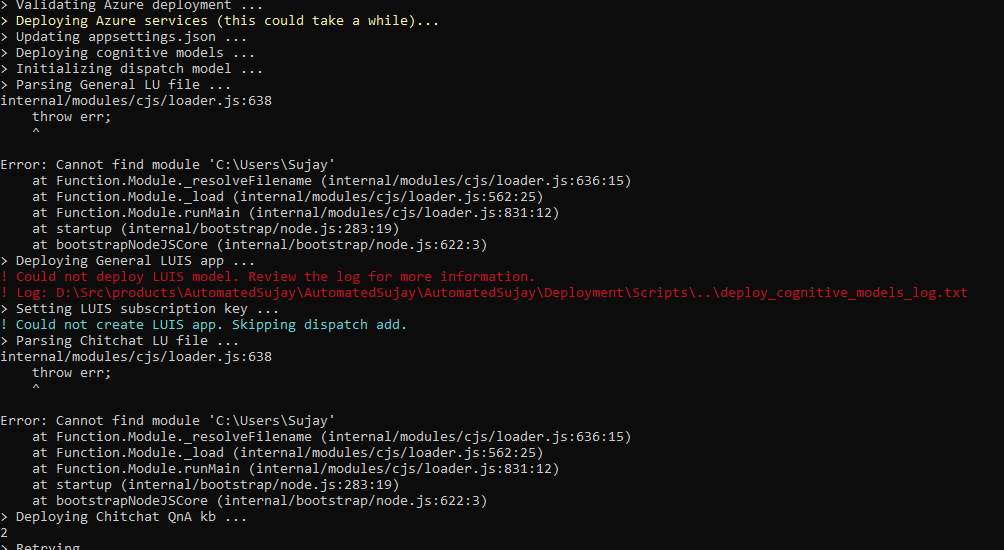
I looked in the deploy_cognitive_models_log.txt log file and found entries saying that the script could not find files with .luis and .qna file extensions. These files are all there, only they are present with the .lu file extension.
For example:
Looking for |Actual file name
-------------|----------------------------------
Deployment\Resources\LU\en\General.luis|General.lu
Deployment\Resources\QnA\en\Chitchat.qna|Chitchat.lu
Deployment\Resources\QnA\en\Faq.qna|Faq.lu
Please fix.
 sujayvsarma
All 19 comments
Are you on a mac?
 jwiley84
on 13 Aug 2019
jwiley84
on 13 Aug 2019
Windows 10.
sujayvsarma
on 13 Aug 2019
Hi @sujayvsarma,
Could you share with us the command you are using for executing the script, along with the deploy_cognitive_models_log.txt? Also, by any chance, does your path to the .lu file has any space in it?
Regarding the message
Could not deploy LUIS model.
This error is commonly seen when there's already a LUIS model deployed with the same name, make sure there's no resources deployed. If you tried deploying before and it failed, you should have deleted all the resources before trying to deploy again.
 dfavretto
on 13 Aug 2019
dfavretto
on 13 Aug 2019
@dfavretto:
1) The command is I ran .\Deployment\Scripts\deploy.ps1 from PowerShell Core 6. I tried this in normal mode as well as in elevated mode, but the results are the same.
2) Logs: deploy_cognitive_models_log.txt
3) Existing LUIS model: None exist. I have verified. I also retried the deployment after clearing everything from Azure (including the App Registration in the AD).
Now...
The error message (visible in the above screenshot as well) says:
Error: Cannot find module 'C:\Users\Sujay'
That set me thinking. C:\Users\Sujay is not a valid path. My user profile's disk name is Sujay Sarma. And indeed the corresponding disk path is C:\Users\Sujay Sarma. This has a space in it.
So basically the Node.js component is failing looking for something in my user profile folder?
Can you guys fix this? Because wherever I login, Windows is going to create the exact same path again.
sujayvsarma
on 14 Aug 2019
I'm looking at this currently. I should be able to reproduce and look into options.
 dmvtech
on 15 Aug 2019
dmvtech
on 15 Aug 2019
With a more deeper observation on the screenshot you shared, and evaluating the deployment scripts, I see both times the error
Error: Cannot find module 'C:\Users\Sujay'
the command that was being executed is LUDown, so my initial guess would be that the cause of this issue is with that tool.
Adding to this, you are reporting and error which says the files that can't be found are the ones with extension .luis and .qna, and LUDown is the responsible of parsing the files with extension .lu to files with extension .luis and .qna, so that enforces my belief in LUDown being the cause of your problems.
Could you share with us the version of LUDown you have installed?
dfavretto
on 16 Aug 2019
I have VS 2019 Community edition (on the preview branch, latest) + I installed the Bot Framework kit (the emulator installer) + the VSIX extension that installs the Virtual Assistant template (from VS marketplace).
I haven't installed any "ludown" manually.
regards.
sujayvsarma
on 16 Aug 2019
@sujayvsarma Please see the link here, for the steps on installing ludown, etc tools that are needed for Virtual Assistant.
I am still looking into the issue regarding a space in the path.
dmvtech
on 16 Aug 2019
@dmvtech - Where is the link?
sujayvsarma
on 17 Aug 2019
Sorry about that, link added.
dmvtech
on 19 Aug 2019
Can't you make all of those things into a single installer? Too many things to install !!!! And if something screws up, it's megapain.
ps: for example, i have no idea how to fix npm installation issues.
sujayvsarma
on 19 Aug 2019
@sujayvsarma I think they could be put into one package (all being dependents of that package). But there is current movement to move most/all these tools into one single tool, so would be really moot at that point. Please see here if you're curious.
dmvtech
on 20 Aug 2019
@sujayvsarma I think they could be put into one package (all being dependents of that package). But there is current movement to move most/all these tools into one single tool, so would be really moot at that point. Please see here if you're curious.
Sounds promising 👍
sujayvsarma
on 20 Aug 2019
@dmvtech - I finally got the time to run the remaining commands. I ran it as a single line:
npm install -g botdispatch ludown luis-apis qnamaker [email protected] botskills
Installation was successful. However, I noticed during that installation that I somehow had "luisgen" version 2.2.0 already installed. The NPM command uninstalled that one and installed the (older) 2.0.2 version. If the scripts can use the newer 2.2.0 version, then the docs need to be updated.
sujayvsarma
on 20 Aug 2019
As per the documentation we recommend running the installation of botskills as a seperate line (hence it's provided that way) due to npm dependencies. It's really important to follow the pre-requisites as we bring together a number of technologies including az CLI.
Are you now able to complete deployment?
 darrenj
on 20 Aug 2019
darrenj
on 20 Aug 2019
So do you want me to undo everything and try ? If so, I would need the relevant commands because I know nothing about NPM.
sujayvsarma
on 20 Aug 2019
You should be fine to be sure, run npm uninstall -g botskills and then run npm install -g botskills. You should then be good to go.
darrenj
on 20 Aug 2019
Let us know if you still have issues after installing the pre-requsities as documented here
darrenj
on 22 Aug 2019
Thank you for your help. I don't have time to continue this experiment at the moment. I shall do this later. I am closing this issue -- will open a new one if I run into further problems or need help.
sujayvsarma
on 22 Aug 2019
Related issues
 lauren-mills
·
3Comments
lauren-mills
·
3Comments
 nestoralonsovina
·
4Comments
nestoralonsovina
·
4Comments
 jbonet07
·
4Comments
jbonet07
·
4Comments
 igor17400
·
4Comments
darrenj
·
3Comments
igor17400
·
4Comments
darrenj
·
3Comments