Botframework-solutions: TodoSkill - issues in connect with virtual assistant
I have TodoSkill deployed in Azure. Then, had to integrate the skill to virtual assistant app. It failed in AAD integration part.
PS E:\BotSamples\virtual-assistant\cs\MyAssistant1\MyAssistant1\MyAssistant1> botskills connect --botName myassistant1-lu7hdxd --remoteManifest "https://todoskill1-4khiws3.azurewebsites.net/api/skill/manifest" --luisFolder "E:\BotSamples\virtual-assistant\cs\TodoSkill1\todoskill\Deployment\Resources\LU\en\" --cs

..
..
Please review your updated dispatch model in E:\BotSamples\virtual-assistant\cs\MyAssistant1\MyAssistant1\MyAssistant1\Deployment\Resources\Dispatch\en\Summary.html
Running LuisGen...
Executing luisgen for the myassistant1en_Dispatch file
Successfully refreshed Dispatch model
You need to re-publish your Virtual Assistant in order to have these changes available for Azure based testing
Appending 'ToDo Skill' manifest to your assistant's skills configuration file.
Successfully appended 'ToDo Skill' manifest to your assistant's skills configuration file!
Configuring bot auth settings
Checking for authentication settings ...
Configuring Azure AD connection ...
Checking for existing aad connections
Could not configure authentication connection automatically.
There was an error while executing the following command:
        az bot authsetting list -n myassistant1-lu7hdxd -g myassistant1-lu7hdxd${err}
You must configure one of the following connection types MANUALLY in the Azure Portal:
        Azure Active Directory v2
For more information on setting up the authentication configuration manually go to:
https://github.com/microsoft/botframework-solutions/blob/master/docs/howto/assistant/linkedaccounts.md#authentication-configuration
The link seems to be old.
Ask
- Could you please confirm if the link for settings is accurate?
- What permissions that be enabled for the app here?
- What is the app for which permission needs to be added (i.e. todoskill or virtualassistant or a new one)?
- Do I need to be tenant admin to enable those scope permissions?
 PurnaChandraPanda
All 17 comments
I'm taking a look at this now. At this point I don't know any of those answers off the top of my head.
 dmvtech
on 9 Aug 2019
dmvtech
on 9 Aug 2019
Either you could try to repro on your end, or I can show the problem at my end. I have a bit of urgency. If you could confirm on the next steps, it would be great.
PurnaChandraPanda
on 10 Aug 2019
@PurnaChandraPanda did you try manually add the "Azure Active Directory v2" connect setting?
 bobokids
on 12 Aug 2019
bobokids
on 12 Aug 2019
No, I did not try any manual entry for AAD v2. Could you please help me where it should be done (todoskill or virtual assistant level)?
PurnaChandraPanda
on 13 Aug 2019
Hi,
Open your Web App Bot in Azure
-> settings
In 'Oauth Connection Settings'
-> Add seeting
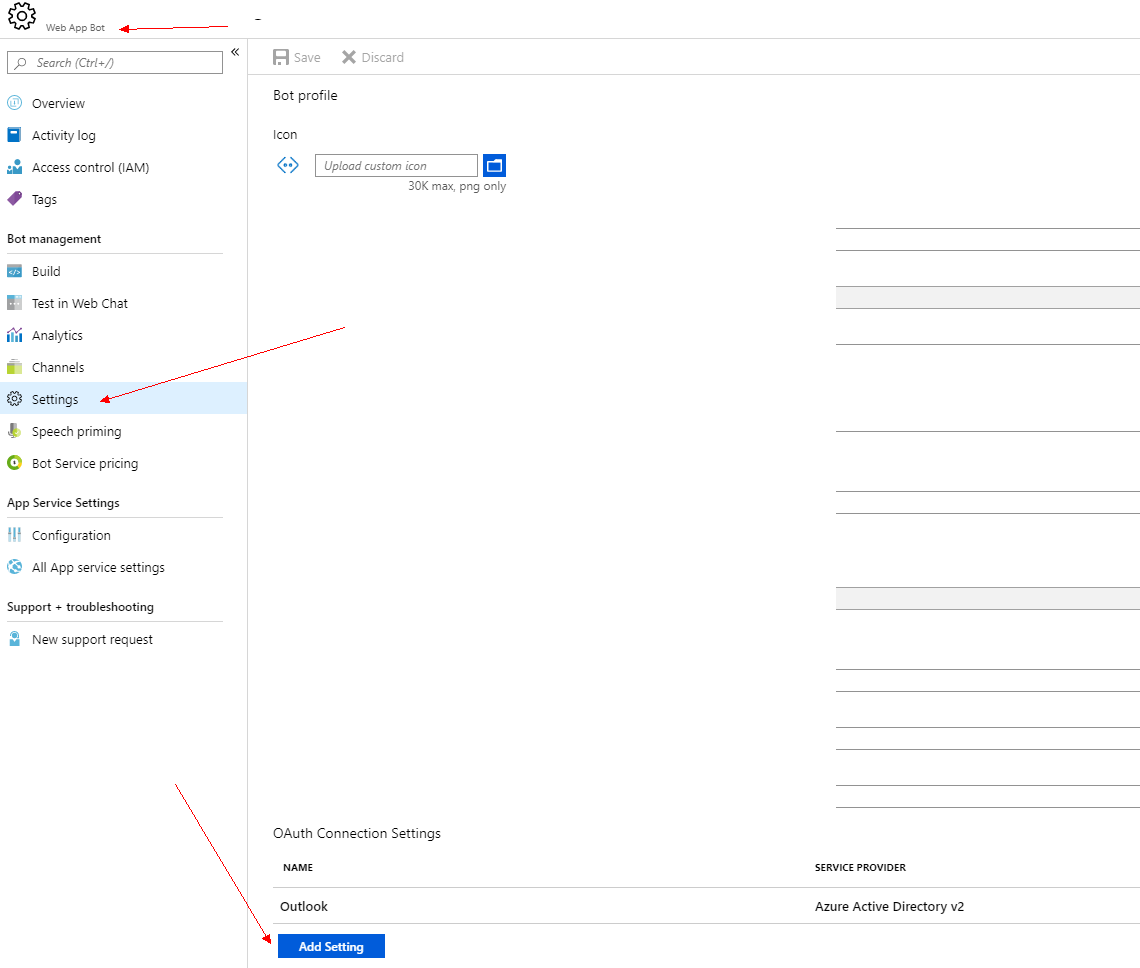
This Name property should correspond with what your config in appsetting.json:
"oauthConnections": [
{
"name": "Outlook",
"provider": "Azure Active Directory v2"
}
 ssss141414
on 13 Aug 2019
ssss141414
on 13 Aug 2019
When going for new setting under "OAuth Connection Settings" and aad v2 provider is being picked, it asks for client ID. So, created a new app registration with appserviceuri/signin-oidc. However, I am not clear what permission that i should pick here. Can you please help?
PurnaChandraPanda
on 13 Aug 2019
For the scopes, you can see this doc:
https://github.com/microsoft/botframework-solutions/blob/master/docs/reference/skills/productivity-todo.md#authentication-connection-settings
ssss141414
on 14 Aug 2019
The link resulted in 404 - not found!
PurnaChandraPanda
on 16 Aug 2019
We published a new documentation site yesterday, here is the updated link: https://microsoft.github.io/botframework-solutions/reference/skills/productivity-todo/
Also the link to the guide on manually setting auth is here: https://aka.ms/vamanualauthsteps (the CLI tool link has been updated)
 darrenj
on 16 Aug 2019
darrenj
on 16 Aug 2019
Here is what I tried to integrate TodoSkill with virtual assistant bot:
- [todoskill] is deployed to Azure
- another AAD app registration created for oauth and added permissions under Graph - Notes.ReadWrite Tasks.ReadWrite User.ReadBasic.All
- the todoskill bot is updated with oauth setting the app registration created
- same setting is updated in appsettings.json for [todoskill], and deployed again
"oauthConnections": [
{
"name": "Outlook",
"provider": "Azure Active Directory v2"
}
],
- using botskills connect CLI integrated virtual assistant with todoskill azure resource
- same steps as 3 and 4 are followed for [virtual assistant]
- when ran the virtual assistant in local debug + ngrok URI, typed the text "add some items to shopping notes"
- as per traces, todoskill is invoked, and oauth is prompted
- but, failed on admin consent part
Questions
- Did I follow the steps for integration correctly?
- For scopes Notes.ReadWrite Tasks.ReadWrite User.ReadBasic.All, it does not require any admin consent. So, why does the bot app access for tenant admin consent?
- I assume for other skills as calendar, email also, it would need to have tenant admin consent. Can we have some confirmation please?
PurnaChandraPanda
on 18 Aug 2019
any comments on my above comment?
PurnaChandraPanda
on 20 Aug 2019
When you invoke skill from VA, it is unnecessary to set oauthConnections for skill.
Work accounts from Microsoft are not allowed.. Use this instead https://cdx.transform.microsoft.com/my-tenants
 xieofxie
on 20 Aug 2019
xieofxie
on 20 Aug 2019
@PurnaChandraPanda Were you using a Microsoft.com account to authenticate? If so, as per xieofxie this not allowed as per policy. You can use a custom o365 tenant or a personal MSA. Let us know.
All Apps at Microsoft require admin consent for graph scopes.
darrenj
on 20 Aug 2019
Yes, I was using microsoft.com account to authenticate. By following the link with my email id, created a custom tenant. I think next task would be to associate an Azure subscription. How is it done?
PurnaChandraPanda
on 21 Aug 2019
You should be able to just login using credentials from your tenant.
darrenj
on 21 Aug 2019
Closed - original issue was that link provided in the botskills output to manually setup auth connection wasn't followed. Have followed up to try and see if we can provide more guidance as to why the configuration cannot be done automatically - typically security restrictions on a tenant.
Also moved to an aka.ms link in botskills (if you update botskills you'll see this)
darrenj
on 22 Aug 2019
@PurnaChandraPanda if you have time it would be really helpful if you updated botskills npm update -g botskills and re-ran it - it should now give you a full error message to explain the root cause on why you had to do it manually.
Alternatively you can just run this
az bot authsetting list -n myassistant1-lu7hdxd -g myassistant1-lu7hdxd
Related issues
 jbonet07
·
4Comments
jbonet07
·
4Comments
 samaea
·
3Comments
darrenj
·
3Comments
samaea
·
3Comments
darrenj
·
3Comments
 edemehmetcan
·
3Comments
edemehmetcan
·
3Comments
 igor17400
·
4Comments
igor17400
·
4Comments