Botframework-solutions: Virtual Assistant template does not generate necessary files
What project is affected?
Virtual Assistant template
What language is this in?
C#
What happens?
When creating a project using the virtual assistant template,
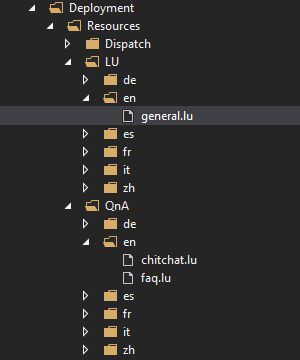
When creating the project with the template, it does not create the Deployment\Resources\LU\en\general.luis,
Deployment\Resources\QnA\en\chitchat.qna, and
Deployment\Resources\QnA\en\faq.qna,
files.
The deploy_cognitive_models_log.txt file says these files are not found but they were not created in the first place.
I also get a "cannot find module" error. Appears to not break at space in the path variable.
What are the steps to reproduce this issue?
following
https://github.com/microsoft/botframework-solutions/blob/master/docs/tutorials/csharp/virtualassistant.md
instructions.
What were you expecting to happen?
Create and deploy a bot using Virtual assistant template
Can you share any logs, error output, etc.?
I pasted the files from another project created in my organization.
Any screenshots or additional context?
 threeyay
All 14 comments
Those files are created as part of the deployment process:
$id = $lu_file.BaseName
    $outFile = "$($id).qna"
    $outFolder = $lu_file.DirectoryName

    # Parse LU file
    Write-Host "> Parsing $($id) LU file ..."
    ludown parse toqna `
        --in $lu_file `
        --out_folder $outFolder `
        --out $outFile
How are you deploying the bot?
 jwiley84
on 24 Jul 2019
jwiley84
on 24 Jul 2019
Hi @threeyay, can you please acknowledge?
 CoHealer
on 29 Jul 2019
CoHealer
on 29 Jul 2019
I've just run into the same or similar issue running the Virtual Assistant on macos.
There are a couple of issues with the deploy scripts related to paths.
In deploy_cognitive_models.ps1, when it tries to parse the .lu file it is failing for both luis and qna maker.
The generated code is:
ludown parse toluis `
        --in $lu_file `
        --luis_culture $language `
        --out_folder $outFolder `
        --out $outFile
Adding some debug output:
    Write-Host "> lu_file $($lu_file)"
    Write-Host "> language $($language)"
    Write-Host "> outFolder $($outFolder)"
    Write-Host "> outFile $($outFile)"
Outputs:
> lu_file general.lu
> language en-us
> outFolder /Users/<username>/Documents/<Path to project>/deployment/Resources/LU/en
> outFile general.luis
If i change the generated code to
$inFile = "$($lu_file.DirectoryName)/$($lu_file.BaseName).lu"
ludown parse toluis `
        --in $inFile `
        --luis_culture $language `
        --out_folder $outFolder `
        --out $outFile
The code then succeeds in parsing.
I need to do likewise for the QnA but i suspect a similar fix will fix it. (not suggesting my hack is good or robust powershell btw!)
 nathanlindorff
on 1 Aug 2019
nathanlindorff
on 1 Aug 2019
I will bring it up with the script author tomorrow that it doesn't work as expected on MacOS. Thank you for letting us know.
jwiley84
on 1 Aug 2019
I just realised ludown has a --lu_folder option that would be far better than my poor string join
nathanlindorff
on 1 Aug 2019
Hi @threeyay, @nathanlindorff It looks like the .ps1 files have been updated. Can you go ahead and test them for me again? I ran them today, using the most up-to-date version of everything, and have had no issues.
jwiley84
on 6 Aug 2019
@jwiley84 What is the best way to update the template? As far as i can see npm hasn't been updated yet.
nathanlindorff
on 6 Aug 2019
Since what's we're mostly concerned with is the powershell deployment files, I would simply replace those from this repo, and then rerun your deployment.
jwiley84
on 7 Aug 2019
@nathanlindorff , do you still require assistance?
CoHealer
on 12 Aug 2019
My apologies, i haven't had a chance to properly test it just yet. I will let you know later today
nathanlindorff
on 13 Aug 2019
I have tested it with the preview 65 as per #2007 and it no longer has issues reading the .lu files.
nathanlindorff
on 13 Aug 2019
I see that you were working with Martin and Darren on the above mentioned thread. Are we good to go to close this?
jwiley84
on 13 Aug 2019
I can't speak for the OP (@threeyay) but I have no objections as my issues have been solved. Thanks!
nathanlindorff
on 14 Aug 2019
For future reference here are the steps to update deployment scripts (which did address space/path issues previously) https://microsoft.github.io/botframework-solutions/reference/virtual-assistant/deploymentscripts/#how-do-i-update-my-local-deployment-scripts-with-the-latest
 darrenj
on 16 Aug 2019
darrenj
on 16 Aug 2019
Related issues
 lauren-mills
·
3Comments
lauren-mills
·
3Comments
 elaine-chang
·
4Comments
elaine-chang
·
4Comments
 nestoralonsovina
·
4Comments
nestoralonsovina
·
4Comments
 manish-95
·
3Comments
manish-95
·
3Comments
 hansmbakker
·
3Comments
hansmbakker
·
3Comments
Most helpful comment
For future reference here are the steps to update deployment scripts (which did address space/path issues previously) https://microsoft.github.io/botframework-solutions/reference/virtual-assistant/deploymentscripts/#how-do-i-update-my-local-deployment-scripts-with-the-latest