Botframework-solutions: Deployment script validation error
What project is affected?
botframework-solutions Virtual Assistant
What language is this in?
Typescript
What happens?
When running deployment\scripts\deploy.ps1 the error attached occurs.
What are the steps to reproduce this issue?
Built bot from yeoman generator and run the deploy script after sign-in to Azure
What were you expecting to happen?
Azure Deployment completes without error
Can you share any logs, error output, etc.?
deploy_log.txt is empty, error is as attached.
Any screenshots or additional context?
Tested this with the typescript VA deploy and C#
 Koxzi95
All 10 comments
Hi @Koxzi95,
We reviewed the bot-error.txt file you attached and we found that it was an issue on the way that it's parsing some arguments.
Please, can you provide us the following information:
- A capture of your terminal with the execution log
- Are you using PowerShell? Which version?
 Batta32
on 22 Jul 2019
Batta32
on 22 Jul 2019
Hi there @Batta32. I've attached a PowerShell transscript with app/secret/LUIS key omitted.
EDIT: with verbose looks the same:
deploy-issue-verbose-ts.txt
It's worth noting that upon running yo botbuilder-assistant I get the below with latest python w/ Windows Build Tools installed.
C:\Users\tomcox\ava-bot-001\sample-assistant\node_modules\dtrace-provider>if not defined npm_config_node_gyp (node "C:\Program Files\nodejs\node_modules\npm\node_modules\npm-lifecycle\node-gyp-bin\\..\..\node_modules\node-gyp\bin\node-gyp.js" rebuild )  else (node "C:\Program Files\nodejs\node_modules\npm\node_modules\node-gyp\bin\node-gyp.js" rebuild )
gyp ERR! configure error
gyp ERR! stack Error: Command failed: C:\Users\tomcox\AppData\Local\Programs\Python\Python37\python.EXE -c import sys; print "%s.%s.%s" % sys.version_info[:3];
gyp ERR! stack   File "<string>", line 1
gyp ERR! stack     import sys; print "%s.%s.%s" % sys.version_info[:3];
gyp ERR! stack                                ^
gyp ERR! stack SyntaxError: invalid syntax
gyp ERR! stack
gyp ERR! stack     at ChildProcess.exithandler (child_process.js:294:12)
gyp ERR! stack     at ChildProcess.emit (events.js:198:13)
gyp ERR! stack     at maybeClose (internal/child_process.js:982:16)
gyp ERR! stack     at Process.ChildProcess._handle.onexit (internal/child_process.js:259:5)
gyp ERR! System Windows_NT 10.0.17763
gyp ERR! command "C:\\Program Files\\nodejs\\node.exe" "C:\\Program Files\\nodejs\\node_modules\\npm\\node_modules\\node-gyp\\bin\\node-gyp.js" "rebuild"
gyp ERR! cwd C:\Users\tomcox\ava-bot-001\sample-assistant\node_modules\dtrace-provider
gyp ERR! node -v v10.16.0
gyp ERR! node-gyp -v v3.8.0
gyp ERR! not ok
Koxzi95
on 22 Jul 2019
@Batta32 apologies added verbose in the EDIT. No change in output
Koxzi95
on 22 Jul 2019
Thanks @Koxzi95,
Don’t worry about that, it's a python transient error.
In the case of the deployment issue, actually we couldn't replicate it.
- Which version of the generator are you using? If you don't have the latest, can you reinstall it and try again?
> npm uninstall --global generator-botbuilder-assistant
npm install --global [email protected] --registry https://botbuilder.myget.org/F/aitemplates/npm - If you try to use deploy.ps1 of C#, does it work or do you have the same issue?
- Is the
resource groupcreated in the portal after the deploy fails? - If you execute the following command replacing the
microsoftAppIdandmicrosoftAppPasswordwith your related values, do you see any malformed JSON from the output?
> az group deployment validate --resource-group "AVABot001" --template-file "C:/Users/tomcox/ava-bot-001/deployment/resources/template.json" --parameters name="AVABot001" microsoftAppId=microsoftAppPassword=
Batta32
on 23 Jul 2019
@Batta32 I was getting the same error with C# as well on the same and a new environment (VM, Windows Server 2019)
I'm installing the generator-botbuilder-assistant by copying the command from the TS instructions.
I've just attempted the deployment with a new environment and I'm getting the same error. That's after installing the generator from the provided command above.
The Azure resources/services do build successfully. Nothing in LUIS/missing config etc.
Upon validation I receive the following:
Result CorrelationId
Succeeded 347885b1-b767-42e0-a2b4-aa73854928b0
Koxzi95
on 23 Jul 2019
Thanks @Koxzi95,
I'm using the latest version (2.0.69) of Azure CLI, the output of the validation command is a _JSON_ which takes the output format of your az settings (by default uses json, but it's configurable).
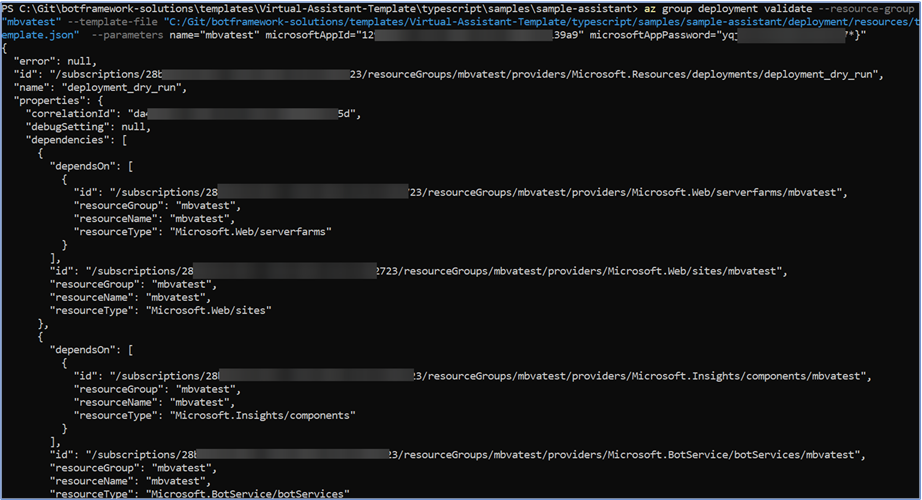
Then, I executed the validation command using --output table and I could replicate your output format.
I checked that there are many output formats for Azure CLI commands, so I deduce that in your user configuration the output format is in table.
Can you check it executing az configure?
@lauren-mills, should we update the scripts to use the --output json when its needed to avoid this kind of issues?
Batta32
on 24 Jul 2019
@Batta32 for the command then should I be running in the JSON config not table?
Koxzi95
on 24 Jul 2019
Exactly @Koxzi95!, this is due to the script is parsing the output from the validation command to an object using ConvertFrom-Json PowerShell method.
Try updating your user settings using az configure, setting json as output format and execute the deploy.ps1 script again. Check this tutorial
Batta32
on 24 Jul 2019
That has worked perfectly! Seems my Azure CLI config was the blocker, deployment has worked past the resources stage so I assume this issue can be closed :) Thanks all!!
Koxzi95
on 25 Jul 2019
Awesome @Koxzi95!, it was a pleasure to help you.
We will close the issue because you could make it work! Feel free to reopen it!
Batta32
on 25 Jul 2019
Related issues
 VladPapacostea-SM
·
3Comments
VladPapacostea-SM
·
3Comments
 jbonet07
·
4Comments
jbonet07
·
4Comments
 ericmaino
·
3Comments
ericmaino
·
3Comments
 hansmbakker
·
3Comments
hansmbakker
·
3Comments
 kendomen
·
4Comments
kendomen
·
4Comments