Botframework-solutions: Error deploying Virtual Assisant
Project
Name: Virtual Assistant
Language: C#
Description
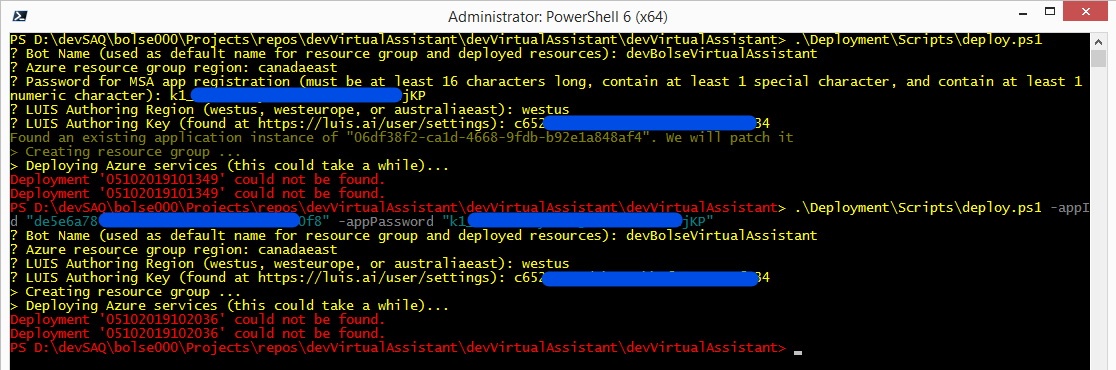
I'm trying to deploy the virtual assistant with those steps and i'm always getting a error after the « Deploying Azure services (this could take a while)... » step occur.
Here is the error : Deployment '05102019101349' could not be found.
To Reproduce
- Run PowerShell Core (pwsh.exe) and change directory to the project directory of your assistant/skill.
- Run the following command: .\Deployment\Scripts\deploy.ps1
I even run the command with the 2 arguments -appId and -appPassword, always the same result : Deployment '05102019102036' could not be found.
Expected behavior
The deployment should occur.
Screenshots
Additional context
I'm on a server 2012 R2, with Visual Studio 2019
 JackStrap
All 10 comments
I experienced the same issue at least once while trying to deploy. Unfortunately, many different things seemed to have went wrong, so I never diagnosed the cause of this problem. I just had to delete the entire solution, resources, registration, etc., recreate it all (a few times) and eventually it worked.
 ericchansen
on 10 May 2019
ericchansen
on 10 May 2019
Could you share the deploy log file in the deployment directory please?
 darrenj
on 10 May 2019
darrenj
on 10 May 2019
If your reusing a name you've tried before, make sure you've completely removed the resource group and all resources (particularly CosmoDB - it takes forever). Also, the name you choose needs to be globally unique (based on my experience).
 mekinney
on 10 May 2019
mekinney
on 10 May 2019
Your region could also be causing issues. Some resources are not available in all regions, notably AppInsights, LUIS, QnA Maker.
Try providing the parameters.template.json file (more info here) to override the regions for those services.
 lauren-mills
on 10 May 2019
lauren-mills
on 10 May 2019
Thanks Lauren - I faced a similar issue because QnAMaker does not exist as a service in westeurope, which I believe is linked to https://github.com/Microsoft/botbuilder-tools/issues/525. Using the parameters.template.json resolved the issue. However, I had to delete the resource group and redeploy to resolve the "_Deployment X could not be found_" error messages.
TIP: If using westeurope for LUIS, use the authoring key obtained from eu.luis.ai (for European regions) and not www.luis.ai (focused on other publishing regions such as US, Asia, etc), otherwise you will be faced with additional deployment issues. More information around this:- https://docs.microsoft.com/en-us/azure/cognitive-services/luis/luis-reference-regions.
 samaea
on 11 May 2019
samaea
on 11 May 2019
Thanks all of you for your responses, i'm going to close this issue because, i was finally able to make it work after many many many tries ;) with the -parametersFile argument.
Ok, my problem was the location i was using : canadacentral. If you use the default way to deploy your bot .\Deployment\Scripts\deploy.ps1 and use canadacentral as the azure resource group region it will fail, the only way i was able to make it work with the default script was to use westus as the region.
If i use the parameters.template.json i'm able to deploy it in Canada Central, by changing all the location to canadacentral except qnaServiceLocation i have to leave it to westus.
Here are the parameters i used in my parameters.template.json file
"location": { "value": "canadacentral" },
"appInsightsLocation": { "value": "canadacentral" },
"contentModeratorLocation": { "value": "canadacentral" },
"luisServiceLocation": { "value": "canadacentral" },
"qnaServiceLocation": { "value": "westus" },
"qnaMakerSearchSku": { "value": "basic" }
and i invoke the script like this : .\Deployment\Scripts\deploy.ps1 -appId 'YOUR-APP-ID' -appPassword 'YOUR-APP-PASSWORD' -parametersFile .\Deployment\Resources\parameters.template.json
By the way if you plan to use the -resourceGroup parameter, you will need to change the deploy.ps1 script at the line 97 because it gets created with the name of the bot not the resource group and it will fail with cannot find resource group.
Original line:
(az group create --name $name --location $location) 2>> $logFile | Out-Null
Change it like this :
(az group create --name $resourceGroup --location $location) 2>> $logFile | Out-Null
Hope it can help some else and thanks again for your quick responses!
Jack
JackStrap
on 13 May 2019
Thanks @JackStrap - really useful and appreciate your persistence! I've re-opened to see if we can do more to help out in the scenarios where not all services are in the DC. I'm wondering whether az group deployment validate might give us a way to catch an error before deployment is attempted thus making it easier for people to know they need to use the parameters file.
If so we can then direct the user to the parameters file approach and a aka.ms link to the docs.
@lauren-mills could you take a look later this week?
We fixed a resource-group issue last week in #1334, you can update your deployment file with this if you like.
darrenj
on 13 May 2019
Thanks @JackStrap , you save me hours! I can confirm the same issue exist for australia east and QnA. @darrenj It would be great if you can catch the error before provisioning.
 vui211
on 14 May 2019
vui211
on 14 May 2019
Good news - I have just tried a quick test of az group deployment validate and can confirm it does appear to help resolve the issue before failing mid-way through creation.
Adding this line
az group deployment validate `
    --resource-group $resourcegroup `
    --template-file "$(Join-Path $PSScriptRoot '..' 'Resources' 'template.json')" `
    --parameters microsoftAppId=$appId microsoftAppPassword="`"$($appPassword)`""
Generates this error:
{
  "error": {
    "code": "LocationNotAvailableForResourceType",
    "details": null,
    "message": "The provided location 'canadaeast' is not available for resource type 'Microsoft.CognitiveServices/accounts'. List of available regions for the resource type is 'global,australiaeast,brazilsouth,westus,westus2,westeurope,northeurope,southeastasia,eastasia,westcentralus,southcentralus,eastus,eastus2,canadacentral,japaneast,centralindia,uksouth,japanwest,koreacentral,francecentral,northcentralus,centralus'.",
    "target": null
  },
  "properties": null
}
This would more clearly highlight the issue and we can guide the user through aka.ms link to docs on how to use the parameters file.
darrenj
on 14 May 2019
@JackStrap Thanks for your feedback PR #1374 will address the core issue you had with the script not being clear ahead of deployment that a service (e.g. qnamaker is not in the deployment region) and provide guidance on how to resolve.
darrenj
on 20 May 2019
Related issues
 jbonet07
·
4Comments
jbonet07
·
4Comments
 elaine-chang
·
4Comments
lauren-mills
·
3Comments
elaine-chang
·
4Comments
lauren-mills
·
3Comments
 manish-95
·
3Comments
manish-95
·
3Comments
 waqarghani
·
3Comments
waqarghani
·
3Comments