Botframework-sdk: Authorization has been denied for this request (Skype REST API)
Good evening, community experts.
I was integrating my application with Skype using the REST API (Bot Framework). Everything worked perfectly until today.
In the morning, while checking the functionality of the application, I noticed that the bot's response did not displayed in Skype. I decided to send a message through «Postman», and I received the following response:
{
    "message": "Authorization has been denied for this request."
}
I thought there might be a problem with token. Through the request below, I got a new one, but it didn't help:
curl -k -X POST https://login.microsoftonline.com/botframework.com/oauth2/v2.0/token -d "grant_type=client_credentials&client_id=<APP ID>&client_secret=<APP PASWORD>&scope=https%3A%2F%2Fapi.botframework.com%2F.default"
Here are my «Postman» POST HTTPS query settings:
URL:
https://smba.trafficmanager.net/apis/v3/conversations/<CONVERSATION ID>/activities/<MESSAGE ID>

HEADERS:
Postman-Token: <calculated when request is sent>
Content-Lenght: <calculated when request is sent>
Host: <calculated when request is sent>
Content-Type: application/json
Authorization: Bearer 0SzRndyIsImtpZCI6ImppYk5ia0ZTU2JteFBZck45Q0...

BODY:
{
    "type": "message",
    "from": {
        "id": <BOT ID>,
        "name": <BOT NAME>
    },
   "recipient": {
        "id": <USER ID>,
        "name": <USER NAME>
    },
    "text": <MESSAGE>
}
Please tell me what the problem might be? Everything worked fine yesterday! Could there be a problem with the SSL certificate? Or should the Authorization parameter be passed in some other way? Thank you in advance!
 pborisovich94
All 17 comments
As you may know bots within Skype are (are being) deprecated. Skype is scaling down their integration and support for bots. It's possible that they changed something on their backend as part of their regression. Ultimately, because we (Bot Framework) aren't in their pipeline, we have no knowledge what that might have been, _if anything_. I would suggest sending an email to [email protected] with the MSA App ID and name of your bot, referencing this github issue and hopefully the Skype folks can look into it.
Nothing has changed in the SDK that would cause something like this.
 dmvtech
on 25 Aug 2020
dmvtech
on 25 Aug 2020
As you may know bots within Skype are (are being) deprecated. Skype is scaling down their integration and support for bots. It's possible that they changed something on their backend as part of their regression. Ultimately, because we (Bot Framework) aren't in their pipeline, we have no knowledge what that might have been, _if anything_. I would suggest sending an email to [email protected] with the MSA App ID and name of your bot, referencing this github issue and hopefully the Skype folks can look into it.
Nothing has changed in the SDK that would cause something like this.
Hello! Thanks for the answer.
Unfortunately, I faced the problem of inability to send a letter to [email protected] due to the fact that the skypebotsupport group only accepts messages from people in its organization or on its allowed senders list, and my email address isn't on the list.
pborisovich94
on 26 Aug 2020
Thanks @pborisovich94
the skypebotsupport group only accepts messages from people in its organization
Ah, bummer. Sorry about that. Ok, let me see if I can find any other route/information for you.
dmvtech
on 28 Aug 2020
Still working on it. Stand by.
dmvtech
on 8 Sep 2020
Hello @pborisovich94,
Please share your botid or precise time of the request so that we could correlate it in our logs.
Thank you!
 konstlut
on 11 Sep 2020
konstlut
on 11 Sep 2020
Hello @pborisovich94,
Please share your botid or precise time of the request so that we could correlate it in our logs.
Thank you!
Hello @konstlut,
Here is my botid: 28:47a93344-8ffc-4bd7-aa90-c63b61d1bb3e
pborisovich94
on 11 Sep 2020
Thank you, @pborisovich94. Would it be possible to reproduce the problem today? I was checking the logs from Aug, 24 but didn't find any calls made from this bot.
konstlut
on 11 Sep 2020
@konstlut Just now I tried to send an HTTP request (from Postman) and I got an 401 error again

pborisovich94
on 11 Sep 2020
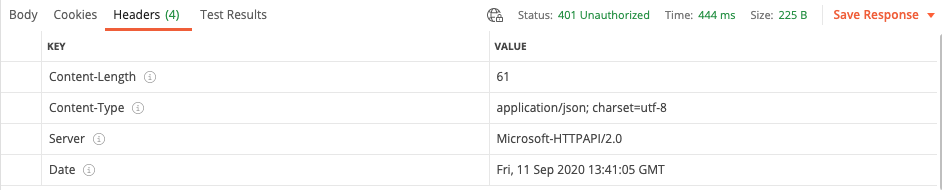
Could you you please post here the complete http request/response from Postman including headers (but excluding the authorization header). Thanks
konstlut
on 11 Sep 2020
@konstlut
Everything is the same as in the message header:
URL:
https://smba.trafficmanager.net/apis/v3/conversations/<CONVERSATION ID>/activities/<MESSAGE ID>

HEADERS:
Postman-Token: <calculated when request is sent>
Content-Lenght: <calculated when request is sent>
Host: <calculated when request is sent>
Content-Type: application/json
Authorization: Bearer 0SzRndyIsImtpZCI6ImppYk5ia0ZTU2JteFBZck45Q0...

BODY:
{
    "type": "message",
    "from": {
        "id": <BOT ID>,
        "name": <BOT NAME>
    },
   "recipient": {
        "id": <USER ID>,
        "name": <USER NAME>
    },
    "text": <MESSAGE>
}
@pborisovich94 I would appreciate the response headers.
konstlut
on 11 Sep 2020
@konstlut
Oh, sorry. Here they are:
pborisovich94
on 11 Sep 2020
@konstlut Hi! I apologize for distracting. Is there any information? Is there something missing in my request? Thank you in advance!
pborisovich94
on 16 Sep 2020
@pborisovich94 , please accept my apologies for the delay. We were studying the problem from our backend logs. Is it possible that the jwt token supplied with the request in Authorization header is missing an important part - the jwt header. Can you please doublecheck the token that is being sent with the request. Ideally you could share an example of the expired token (tokens are issued for 1 hour) here.
konstlut
on 16 Sep 2020
@konstlut God, I'm so embarrassed that I became a user who didn't bother to generate a new JWT token and test it`s work before screaming for help.
I am wildly sorry for wasting your precious time on a mediocre man like me. Through cURL, the request generated a new token, put it in the request and everything worked!
Before lagging behind you, I ask you to answer a few questions:
- It turns out that this token needs to be replaced with a new one every 55-60 minutes when sending messages?
- How do you assess the future of the Bot Framework and work on the REST API? Will this way of interaction continue to live? Unfortunately, the SDK does not fit our application.
Thanks a lot!
pborisovich94
on 18 Sep 2020
Hello @pborisovich94, I am happy to find you were able to resolve the issue.
It turns out that this token needs to be replaced with a new one every 55-60 minutes when sending messages?
Yes.
How do you assess the future of the Bot Framework and work on the REST API? Will this way of interaction continue to live? Unfortunately, the SDK does not fit our application.
This is the contract and as of now it is not planned to be incompatibly changed or retired.
konstlut
on 18 Sep 2020
Closing as resolved. Thanks @konstlut!
dmvtech
on 22 Sep 2020
Related issues
 akakoychenko
·
3Comments
akakoychenko
·
3Comments
 mattlanham
·
3Comments
mattlanham
·
3Comments
 Arimov
·
3Comments
Arimov
·
3Comments
 vaditya04
·
3Comments
vaditya04
·
3Comments
 RaoVenka
·
3Comments
RaoVenka
·
3Comments