Botframework-sdk: [Auth, Teams] Magic Number generation
Hi team,
I'm trying to login using OAuth Card within MS-Teams.
I developed a WebApp and BotChannelsRegistration and this was working fine till some days in the past, when a I try to get the Magic Number, the window is automatically closed.
Using Fiddler I can see this:
The GET /api/oauth/PostSignInCallback returns the magic number and this script, which close automatically the window, so the final users cannot type it in the Team's chat:
setTimeout(() => {
document.getElementById('instructionText').style.display = 'initial';
}, 5000);
microsoftTeams.initialize();
microsoftTeams.authentication.notifySuccess('236841');
Could you please help me?
Thanks in advance.
 rodrigomoro
All 36 comments
Does this fix your issue? Possible duplicate.
If not, can you share:
- Your Teams
manifest.json - The code related to displaying the OAuth Card
- Any code in
OnMessageorOnTurn - A link to your whole code would be preferred, but the above code would help still
You may also want to try Signing Out in Teams and then signing back in (not just closing the app/window, but actually signing out). That has fixed a surprising number of issues for me.
 mdrichardson
on 30 Jul 2019
mdrichardson
on 30 Jul 2019
After many tests, I have realized that the Magic Number is shown properly in Teams desktop app. The issue only happens when opening Teams in the web browser view. When I do login a new browser window is opened to show the Magic Number, but that is closed instantaneously.
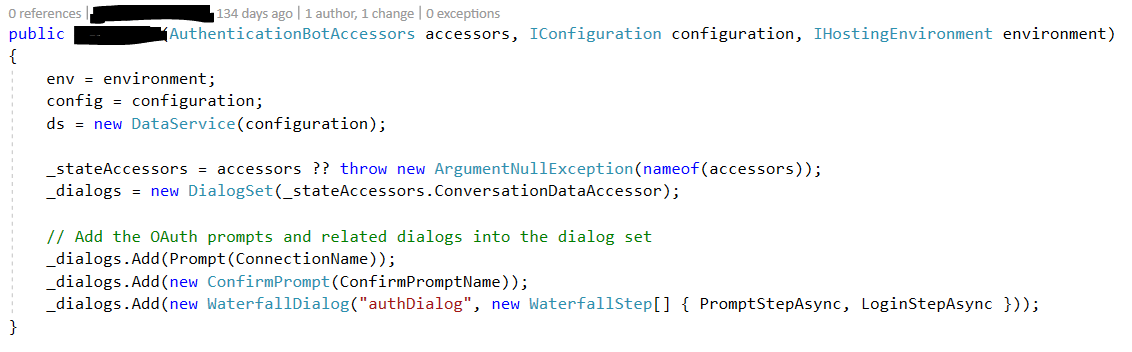
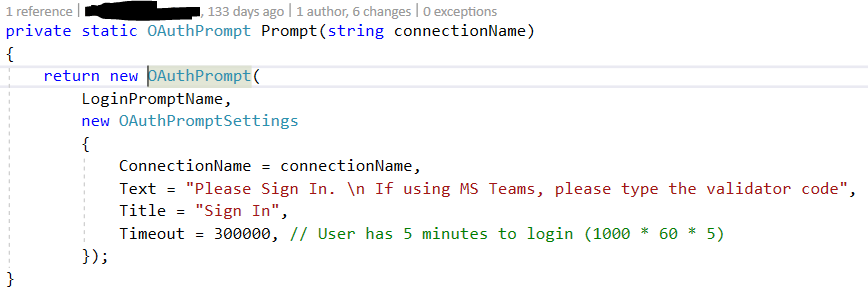
I send the AuthCard using Dialogs:
rodrigomoro
on 1 Aug 2019
@rodrigomoro It sounds like this might be more of a Teams issue. I will still attempt to support, but haven't been able to replicate this. What OAuth provider are you using?
mdrichardson
on 1 Aug 2019
Hi @mdrichardson,
I am using a Generic OAuth 2 service provider in the Bot Channels Registration connection. This uses ADFS (Active Directory Federation Services).
So, I click on the OAuthCards, It opens a new browser window (Chrome) with token.botframework.com URL and redirectes to the ADFS login. After I type my credentials this is redirected to token.botframework.com URL /api/oauth/PostSignInCallback.
And the window closes with no time to copy the Magic Number.
Hope these steps are useful.
I appreciate your support :)
rodrigomoro
on 2 Aug 2019
@rodrigomoro Does ADFS (Active Directory Federation Services) need special OAuth settings for the botframework redirect URLs? Many of them do.
mdrichardson
on 2 Aug 2019
@mdrichardson I configured the "redirect valid domains". And that is doing well, after I have logged in, the ADFS redirects to token.botframework.com which has the Magic Number.
I think this is not about the ADFS configuration because the problematic step is after loading the token.botframework.com page which automatically close itself when using the Teams web app.
I have tried using Microsoft Edge. As you can see, the web site is trying to close itself. I feel that site is executing some code in background:

rodrigomoro
on 4 Aug 2019
@rodrigomoro I'll continue looking into this. Can you confirm that after the window closes, you're not logged in, right?
mdrichardson
on 5 Aug 2019
I'm able to repro this in with Slack OAuth. Teams reports a 501 error. You likely have the same thing happening. Let me see if I can find the appropriate people to get involved with this.
mdrichardson
on 5 Aug 2019
@rodrigomoro I'll continue looking into this. Can you confirm that after the window closes, you're not logged in, right?
No, I'm not. If I try to type something again, the AuthCard appears again asking me for sign in. It makes sense because I had no chance to type the validator number yet.
rodrigomoro
on 5 Aug 2019
@rodrigomoro Understood. I've sent an email out to the Teams support guys to see if they can track down the issue on their end. I'll keep you updated.
mdrichardson
on 5 Aug 2019
@rodrigomoro Just to keep you updated, the Teams team and I have exchanged a few emails and are working on this. This is a difficult issue to debug, however.
mdrichardson
on 6 Aug 2019
@mdrichardson Thank you very much. I really appreciate it.
rodrigomoro
on 6 Aug 2019
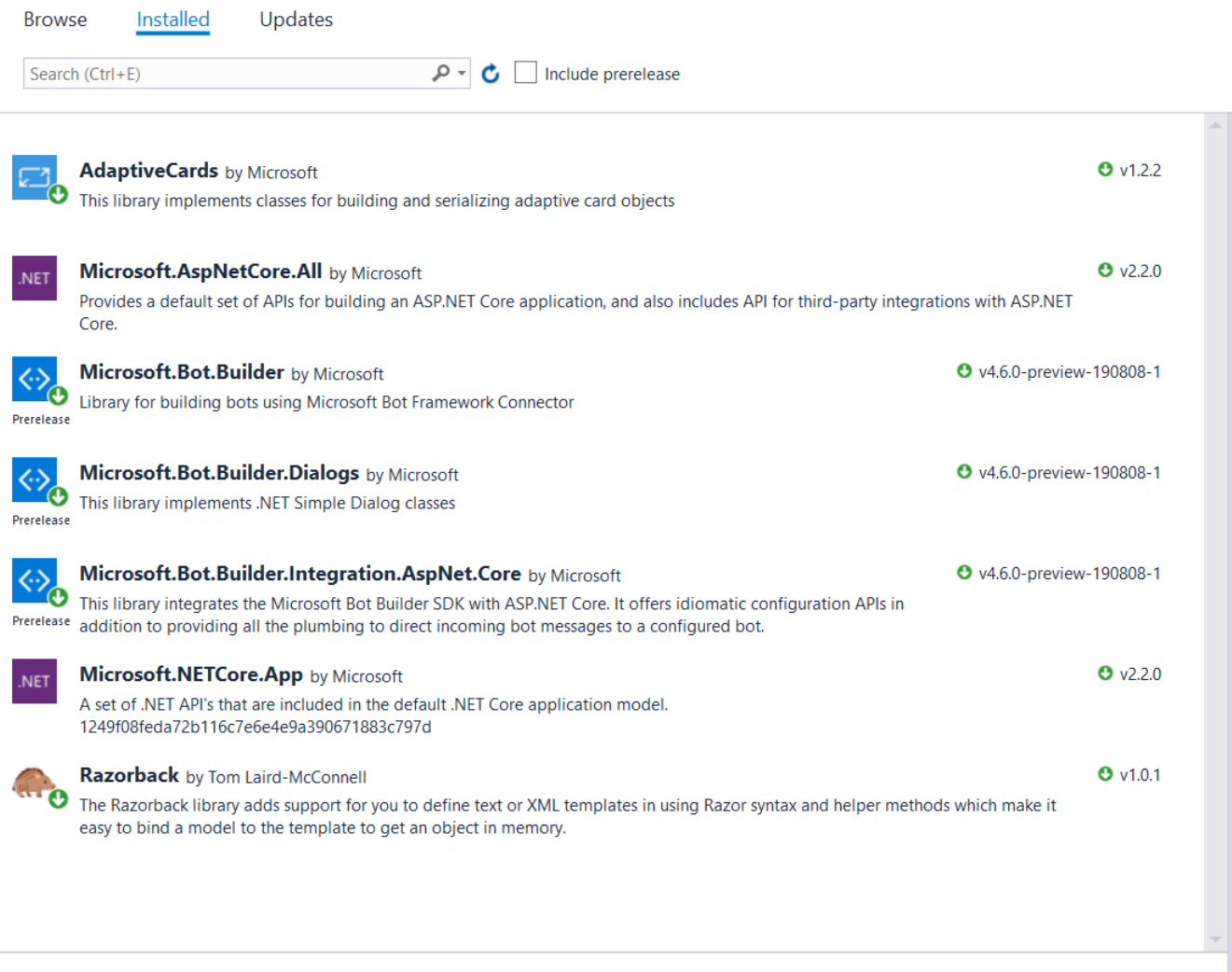
@rodrigomoro Still working on this. The Teams guys are having trouble reproducing it. If you switch to Microsoft.Bot.Builder 4.6.0-preview-190808-1 SDK, do you still experience the issue? I do, but the Teams support guys do not. Worth a shot while we do more testing.
mdrichardson
on 12 Aug 2019
Hi @mdrichardson I face the same behavior with that version.
rodrigomoro
on 14 Aug 2019
@rodrigomoro That was my experience as well. Still investigating.
mdrichardson
on 14 Aug 2019
@rodrigomoro I don't know much about ADFS, but does this relate to and/or solve your issue (scroll down to the following section):
https://docs.microsoft.com/en-us/microsoftteams/known-issues
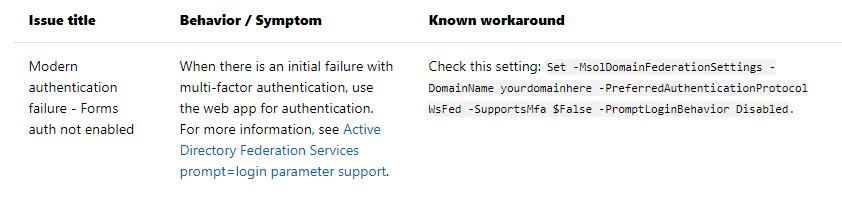
I have a feeling that it doesn't, but again, worth a shot.
mdrichardson
on 14 Aug 2019
@rodrigomoro I tried reproducing this issue for half an hour's worth of messages, each today and yesterday and was unable to reproduce (unlike before). Are you still experiencing this?
mdrichardson
on 15 Aug 2019
@mdrichardson yes, I am experiencing the same. If using the Teams app (mobile or desktop) it works fine and the web page with the validator code stay, but using the Teams web the web page with the validator code auto-closes itself. Perhaps I can document this better with screenshots, fiddler logs, etc. I am not doing anything out of the box.
rodrigomoro
on 15 Aug 2019
As this seems to be difficult to repro, the more you can document, the better.
mdrichardson
on 15 Aug 2019
mdrichardson
on 17 Aug 2019
That is not related. In that case, the issue is about getting the auth token from the emulator.
In my case, everything works fine in the emulator and in the Teams desktop/mobile app which open the login popup properly and then the token.botframework.com web site shows the validator code.
The issue is about using the Teams web app that when showing the validator code auto-closes the web page (as in the Edge browser screenshot above).
rodrigomoro
on 17 Aug 2019
@rodrigomoro Just FYI: In Teams, the window is supposed to pop-up then auto-close...it basically sends the magic number for you. I think I may have been treating this as a different issue...
When your window auto-closes (which is intentional), you're unable to log in? If you have the dev console running (F12), are there any errors displayed in either the Console or Network tabs?
mdrichardson
on 19 Aug 2019
@rodrigomoro - Authentication pop-up is expected to open inside Teams context like this:

Could you please try this Sample Auth Bot manifest and let us know if you are still facing the same issue?
 Wajeed-msft
on 21 Aug 2019
Wajeed-msft
on 21 Aug 2019
@rodrigomoro In addition to Wajeed's request, it if you can send a .har .saz (Fiddler) file, that might help.
mdrichardson
on 22 Aug 2019
@rodrigomoro @Wajeed-msft
I'm not able to repro this consistently when everything is connected. Again, the window should auto-close after clicking the "Allow" button:
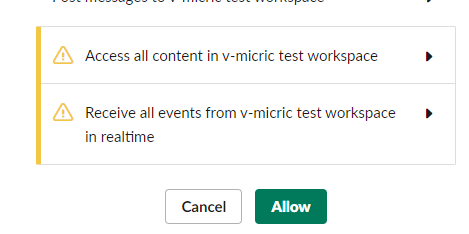
The only time I experienced an auto-close and then not being logged in was when the invoke call would return a 502:
{"errorCode":1008,"message":"<BotError>Bot returned unsuccessful status code NotFound"}
I'm able to repro this every time by running the bot locally, getting it to display the Sign-In button, shutting the bot off completely, then trying to Sign In.
This leads me to believe that @rodrigomoro can connect to his Web App Bot's OAuth settings, but either:
- Not the bot itself, or
- Not the redirect URL
@rodrigomoro: Can you post all of your settings (and the locations of them) that are related to Endpoints and Redirect URLs? You'd find them in:
- appsettings.json
- App Service > Overview
- Web App Bot (or Bot Channels Registration) > Settings
- Web App Bot (or Bot Channels Registration) > Settings > OAuth Connection Settings
- App Registrations > Your App > Authentication
Are you behind any kind of proxy or firewall? How is your bot hosted?
I could also see this being a service issue, unless you can repro it every time. What Azure locations are you using, specifically for your App Service and Bot Channels Registration/Web App Bot?
mdrichardson
on 23 Aug 2019
@rodrigomoro, do you still require assistance? We need activity on the thread in order to keep the issue open.
 CoHealer
on 26 Aug 2019
CoHealer
on 26 Aug 2019
Hi @Wajeed-msft - In my solution, the authentication popup is opened like a new browser tab (see the screenshot I posted 23 days ago showing the Edge browser).
@mdrichardson my solution was built like 4-5 months ago. I have compared the code with the one posted in your samples and is has become quite different because the yours has been evolving. https://github.com/microsoft/BotBuilder-Samples/tree/master/samples/csharp_dotnetcore/46.teams-auth
I am going to try to rebuild that auth application layer again with the latest published samples. That will take time...
Thanks,
rodrigomoro
on 27 Aug 2019
@CoHealer @mdrichardson I am having the same problem as well with MS Teams auto closing the browser which contain the Magic Code. This is happening in both MS Teams web and desktop.
No problem when i test on Bot Emulator and Azure Web Chat.
I am using:
Microsoft Teams Version 1.2.00.21068 (64-bit)
Microsoft.Bot.Builder.Dialogs is 4.5.1
 tlohyk
on 27 Aug 2019
tlohyk
on 27 Aug 2019
I'll list down some weird scenario I have encountered so far:
Web App Bot - OAuth Connection Settings
- I am using Azure AD v2. For the Tenant ID, if i use the value of my domain (e.g. domain.com) or my tenant id, the sign-in browser will auto-close immediately on MS Teams. If change the value to "common", it will at least show the login.microsoftonline.com signin page and only auto-close when it try to redirect to token.botframework.com
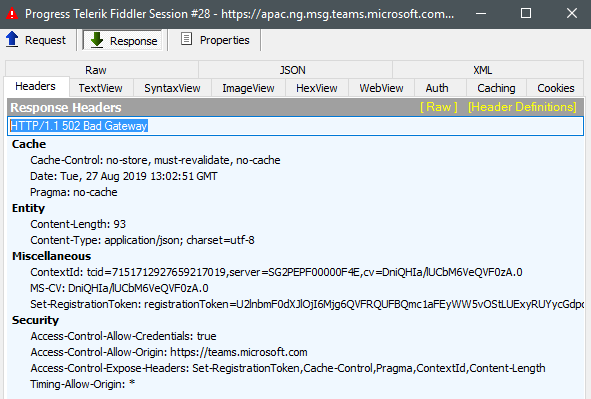
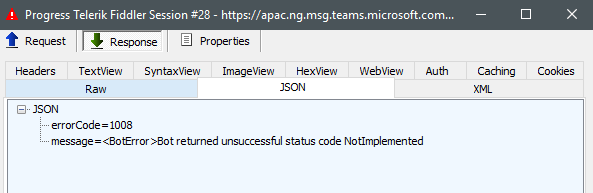
Using Fiddler, i can see that the PostSignInCallBack did happen and the response is the magic-code being return. But after that there's this HTTP POST to https://apac.ng.msg.teams.microsoft.com and it was responded with 502 Bad Gateway. Not sure is this why it caused it to auto-close
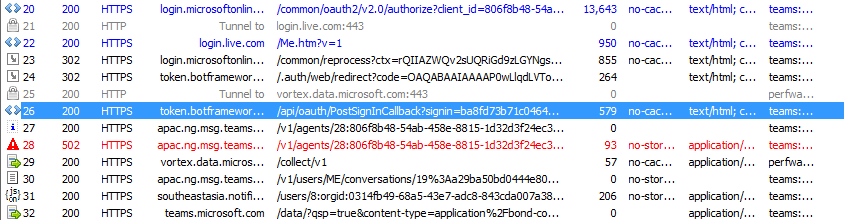
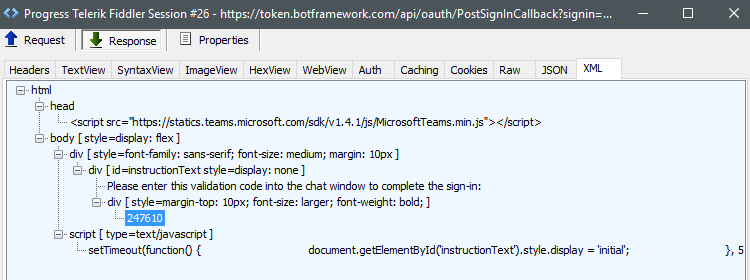
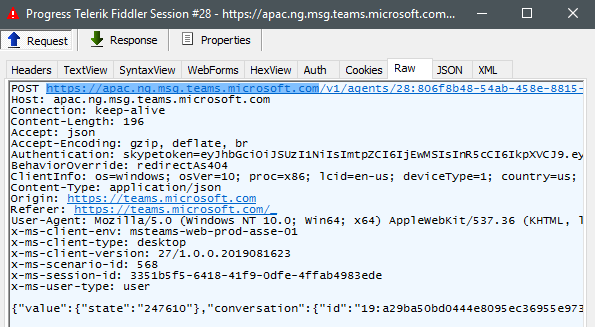
tlohyk
on 27 Aug 2019
@rodrigomoro Understood. If you can link to your repo with your current code, I might be able to help troubleshoot and see if that's the problem. Please remove any sensitive info.
Otherwise, try the Teams Auth Sample with your OAuth connection to see if it works.
@tlohyk My understanding is that the window should auto-close when the magic code is presented as Teams will auto-send it in the background. When you use the "common" tenant, are you able to log in?
The <BotError>Bot returned unsuccessful status code NotImplemented is interesting. Is your bot based off of the Teams Auth Sample. There's some special Teams-specific auth code that's needed until we roll Teams into the SDK better.
If you could also link to your repo, I might be able to help troubleshoot more. Please remove any sensitive information.
mdrichardson
on 27 Aug 2019
Hi @mdrichardson
Yes, my code is based on the Teams Auth Sample.
Below is my repo, for troubleshooting.
https://github.com/tlohyk/teamsbot
Thank you.
tlohyk
on 28 Aug 2019
@tlohyk I tested the code from your repo and experienced the same error as you. I tested the Teams Auth Sample and it worked fine. Therefore the error is in your code. The only changes I made to either one were in appsettings (and configuring the port in yours). I'll work on tracking down the issue in your code.
mdrichardson
on 28 Aug 2019
@tlohyk Your issue is in Startup.cs:
// Create the bot as a transient. In this case the ASP Controller is expecting an IBot.
services.AddTransient<IBot, TeamsBot<MainDialog>>();

// Create the bot as a transient. In this case the ASP Controller is expecting an IBot.
services.AddTransient<IBot, AuthBot<MainDialog>>();
You can't use two different bots that call the same dialog like that. I commented out the second one and it worked fine. Please adjust your code to be more in line with the Teams Auth Sample.
As this is no longer a bug for you, please post to Stack Overflow if you have any questions about how to fix this up.
@rodrigomoro This is a great example of how posting your code can help debug this. Please post your code and I'm sure we can fix this very quickly. You can also email it, if you'd like: vDASHmicricATmicrosoftDOTcom (replace all-caps with appropriate character)
mdrichardson
on 28 Aug 2019
@tlohyk Your issue is in
Startup.cs:// Create the bot as a transient. In this case the ASP Controller is expecting an IBot. services.AddTransient<IBot, TeamsBot<MainDialog>>(); // Create the bot as a transient. In this case the ASP Controller is expecting an IBot. services.AddTransient<IBot, AuthBot<MainDialog>>();You can't use two different bots that call the same dialog like that. I commented out the second one and it worked fine. Please adjust your code to be more in line with the Teams Auth Sample.
As this is no longer a bug for you, please post to Stack Overflow if you have any questions about how to fix this up.
@rodrigomoro This is a great example of how posting your code can help debug this. Please post your code and I'm sure we can fix this very quickly. You can also email it, if you'd like: vDASHmicricATmicrosoftDOTcom (replace all-caps with appropriate character)
Hi @mdrichardson you're right. I have commented the line of code as you have suggested and it is working fine now.
Thanks for the help.
tlohyk
on 29 Aug 2019
@rodrigomoro Have you had a chance to adjust your code or try Sample 46? This issue will be closed if it doesn't stay active.
mdrichardson
on 2 Sep 2019
Closing due to lack of activity.
@rodrigomoro If you still have this issue, please try Sample 46. If that works, it's something wrong with your bot code, in which case, post on Stack Overflow with your code, preferably a link to your repo.
mdrichardson
on 5 Sep 2019
Related issues
 verdysh
·
3Comments
verdysh
·
3Comments
 mattlanham
·
3Comments
mattlanham
·
3Comments
 arpan14
·
3Comments
arpan14
·
3Comments
 Arimov
·
3Comments
Arimov
·
3Comments
 peterbozso
·
3Comments
peterbozso
·
3Comments