Botframework-sdk: Reset functionality not resetting all fields in a Formflow
Bot Info
- SDK Platform: .NET
- SDK Version: 3.15.3
- Active Channels: Skype
- Deployment Environment: Azure
Issue Description
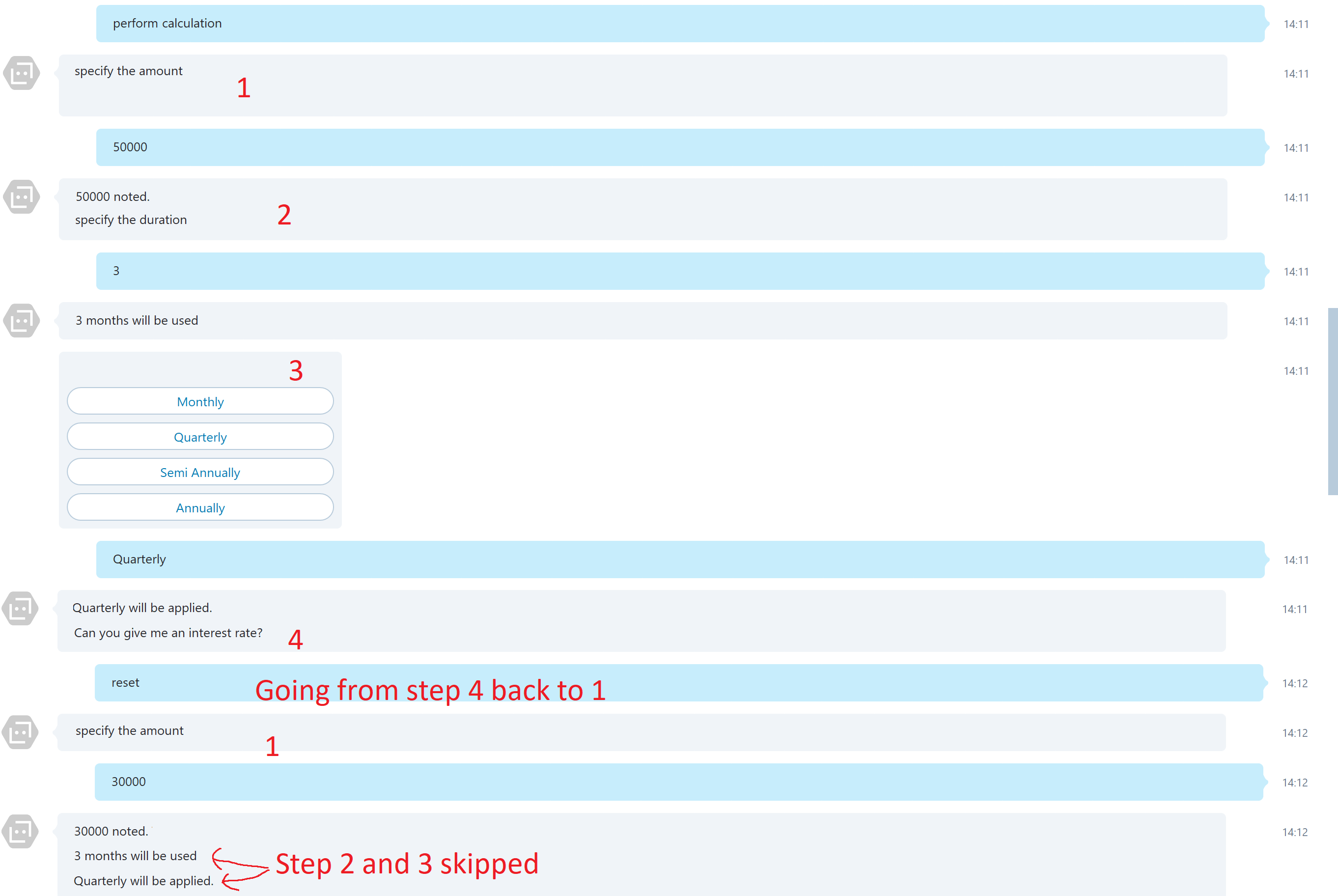
We're currently using a formflow to request a number of fields when doing a calculation. However when you type in Reset after filling out 3 of the 4 fields it returns to the first field. (As expected).
When you then enter a value for this field the it looks like the bot framework suddenly remembers what was filled in in field 2 and 3 and skips them:
Code Example
        public IForm<CalculationV2Form> BuildForm()
        {
            Trace.TraceInformation($"{DateTime.Now} Building new form");

            return new FormBuilder<CalculationV2Form>()
                .Field(new FieldReflector<CalculationV2Form>(nameof(SalePrice))
                    .SetType(typeof(string))
                    .SetValidate(async (state, value) =>
                    {
                        Trace.TraceInformation(DateTime.Now + " Verifying SalePrice: " + value.ToString());
                        return CalculationV2Validation.ValidatePaymentAmount(state, value);
                    }))
                    .Message(FormFlowResponses.FormEchoSalePrice, condition: (form) => shouldFormEcho)
                 .Field(new FieldReflector<CalculationV2Form>(nameof(NumberOfMonths))
                    .SetType(typeof(string))
                    .SetValidate(async (state, value) =>
                    {
                        Trace.TraceInformation(DateTime.Now + " Verifying NumberOfMonths: " + value.ToString());
                        return CalculationV2Validation.ValidateNumberOfMonths(state, value);
                    }))
                    .Message(FormFlowResponses.FormEchoNumberOfMonths, condition: (form) => shouldFormEcho)
                .Field(new FieldReflector<CalculationV2Form>(nameof(PaymentFrequency))
                    .SetType(null)
                    .SetValidate(async (state, value) =>
                    {
                        Trace.TraceInformation(DateTime.Now + " Verifying Payment Frequency " + value.ToString());
                        return new ValidateResult() { IsValid = true, Value = value };
                    }))
                    .Message(FormFlowResponses.FormEchoPaymentFrequency, condition: (form) => shouldFormEcho)
                .Field(new FieldReflector<CalculationV2Form>(nameof(InterestRate))
                    .SetType(typeof(string))
                    .SetValidate(async (state, value) =>
                    {
                        Trace.TraceInformation(DateTime.Now + " Verifying InterestRate: " + value.ToString());
                        return CalculationV2Validation.ValidateInterestRate(state, value);
                    }))
                    .Message(FormFlowResponses.FormEchoInterestRate, condition: (form) => shouldFormEcho)
                .Build();
        }
Reproduction Steps
See code above
Expected Behavior
All fields to be cleared
Actual Results
See above
 devedse
All 6 comments
I just confirmed that this bug appears to apply to the "reset" command in general (reproducible in other formflow instances). Going to look into this further.
So the reason that these fields are populated at all is that the "reset" functionality is meant to keep the previous entries as the default value for the form, but start over from the top. However currently these default values are being recognized as the actual entry. I am working on figuring out a fix/workaround for this.
 nyxsys
on 31 Jul 2018
nyxsys
on 31 Jul 2018
Ok, what would be the date this fix can be expected to be released? (As we'd like to go live with our bot soon).
devedse
on 1 Aug 2018
I've created a pull request with a fix for this issue here: https://github.com/Microsoft/BotBuilder/pull/4923
However if you'd like to implement a hotfix for this issue right now, update the sdk and then at line 769 within the file FormDialog include this loop:
 foreach (var step in _form.Steps)
                    {
                        if (step.Type == StepType.Field) {
                            step.Field.SetValue(_state, null);
                        }
                    }
This will be overwritten if you pull the sdk again before the pull request is merged, but it should work as a fix.
nyxsys
on 1 Aug 2018
Let's hope the pull request will be merged soon then :smile:.
devedse
on 6 Aug 2018
Any updates on whether this will be implemented?
 Rufus1123
on 5 Sep 2018
Rufus1123
on 5 Sep 2018
Thank you for opening an issue against the Bot Framework SDK v3. As part of the Bot Framework v4 release, we’ve moved all v3 work to a new repo located at https://github.com/microsoft/botbuilder-v3. We will continue to support and offer maintenance updates to v3 via this new repo.
From now on, https://github.com/microsoft/botbuilder repo will be used as hub, with pointers to all the different SDK languages, tools and samples repos.
As part of this restructuring, we are closing all tickets in this repo.
For defects or feature requests, please create a new issue in the new Bot Framework v3 repo found here:
https://github.com/microsoft/botbuilder-v3/issues
For Azure Bot Service Channel specific defects or feature requests (e.g. Facebook, Twilio, Teams, Slack, etc.), please create a new issue in the new Bot Framework Channel repo found here:
https://github.com/microsoft/botframework-services/issues
For product behavior, how-to, or general understanding questions, please use Stackoverflow.
https://stackoverflow.com/search?q=bot+framework
Thank you.
The Bot Framework Team
 johnataylor
on 1 Oct 2018
johnataylor
on 1 Oct 2018
Related issues
 mattlanham
·
3Comments
mattlanham
·
3Comments
 Vigneshramkumar
·
3Comments
Vigneshramkumar
·
3Comments
 peterbozso
·
3Comments
peterbozso
·
3Comments
 Prybe
·
3Comments
Prybe
·
3Comments
 jschristophe
·
3Comments
jschristophe
·
3Comments
Most helpful comment
I just confirmed that this bug appears to apply to the "reset" command in general (reproducible in other formflow instances). Going to look into this further.
So the reason that these fields are populated at all is that the "reset" functionality is meant to keep the previous entries as the default value for the form, but start over from the top. However currently these default values are being recognized as the actual entry. I am working on figuring out a fix/workaround for this.