Botframework-sdk: [.NET SDK, Facebook] Single Image Hero Card defaults to "Options" as the title
Bot Info
- SDK Platform: .NET
- SDK Version: 3.15
- Active Channels: Facebook Messenger
- Deployment Environment: local dev
Issue Description
When I create an attachment like so:
        private async Task MessageReceivedAsync(IDialogContext context, IAwaitable<object> result)
        {
            var activity = await result as Activity;

            Activity reply = activity.CreateReply();
            HeroCard heroCard = new HeroCard
            {
                Images = new List<CardImage>
                {
                    new CardImage
                    {
                        Url = "https://hips.hearstapps.com/amv-prod-cad-assets.s3.amazonaws.com/images/media/688559/2017-honda-civic-type-r-performance-and-driving-impressions-review-car-and-driver-photo-688565-s-original.jpg",
                    }
                }
            };
            reply.Attachments = new List<Attachment>
            {
                heroCard.ToAttachment()
            };

            await context.PostAsync(reply);
        }
I get this in messenger:
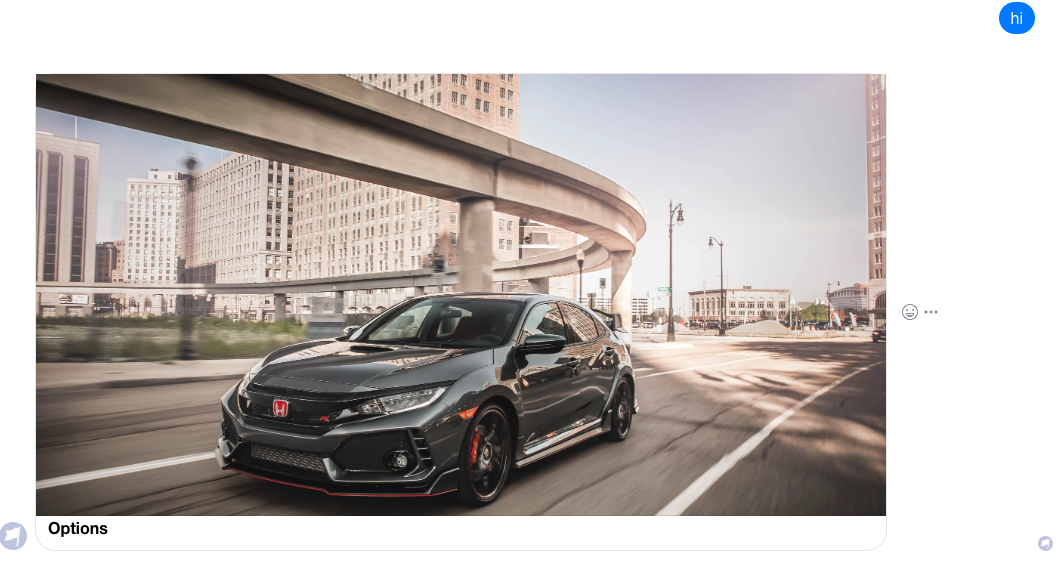
Why does the title default to "Options"
What if I just want to show an image with no title, subtitle or text.
 odannyc
All 14 comments
Interesting, I have never seen this before but was able to reproduce. Let me Look into this and get back to you when I find something. I was also unable to get rid of the word options by doing this:
HeroCard heroCard = new HeroCard
                {
                    Title = string.Empty,
                    Subtitle = string.Empty,
                    Text = string.Empty,
                    Images = new List<CardImage>
                    {
                        new CardImage
                        {
                            Url = "https://hips.hearstapps.com/amv-prod-cad-assets.s3.amazonaws.com/images/media/688559/2017-honda-civic-type-r-performance-and-driving-impressions-review-car-and-driver-photo-688565-s-original.jpg",
                        }
                    }
                };
 JasonSowers
on 7 Jun 2018
JasonSowers
on 7 Jun 2018
@odannyc I took a look at the Facebook API to see if this was a limitation on their end after i tried to send Title =" " as the title and got an error. It looks like Title is a required field for facebook templates, which is what our hero cards translate into. I still don't understand where "Options" comes from, but it does not seem to be something we are doing on our end.
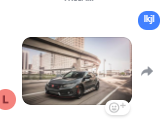
I was thinking about this and since you do not want to use any of the other features of a hero card except the image. You should consider sending the image as an attachment instead of as a card. This code:
            Activity reply = activity.CreateReply();
            reply.Attachments = new List<Attachment>();
            reply.Attachments.Add(new Attachment
            (
                contentType: "Image/jpg",
                contentUrl: "https://hips.hearstapps.com/amv-prod-cad-assets.s3.amazonaws.com/images/media/688559/2017-honda-civic-type-r-performance-and-driving-impressions-review-car-and-driver-photo-688565-s-original.jpg"
            ));
            await context.PostAsync(reply);
Will render as this in facebook:
Let me know if this helps or you have any more questions
JasonSowers
on 8 Jun 2018
@odannyc does this work for you?
JasonSowers
on 25 Jun 2018
can we display long title in hero card ??
 sagarmodhavaniya
on 25 Jun 2019
sagarmodhavaniya
on 25 Jun 2019
Each channel has limitations on the length of hero card text length. The hero card is bound by these restrictions set by the individual channel. So in short, no depending on how long the title is and what channel(s) you are using.
JasonSowers
on 25 Jun 2019
Each channel has limitations on the length of hero card text length. The hero card is bound by these restrictions set by the individual channel. So in short, no depending on how long the title is and what channel(s) you are using.
Messenger i am using
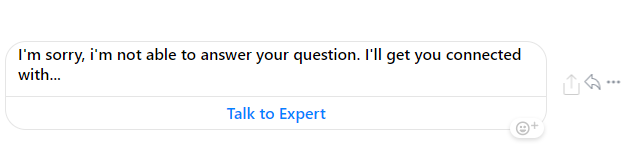
like this i am title get
i need to show full text in title
sagarmodhavaniya
on 26 Jun 2019
Messenger is limiting to 80 chars, From facebook documentation:
title | String | The title to display in the template. 80 character limit.
-- | -- | --
subtitle | String | Optional. The subtitle to display in the template. 80 character limit.
There is nothing that can be done from within your bot or bot framework that can change the length allowed, this policy is set by facebook.
JasonSowers
on 26 Jun 2019
Messenger is limiting to 80 chars, From facebook documentation:
title String The title to display in the template. 80 character limit.
subtitle String Optional. The subtitle to display in the template. 80 character limit.
There is nothing that can be done from within your bot or bot framework that can change the length allowed, this policy is set by facebook.
thank you bro
sagarmodhavaniya
on 27 Jun 2019
any other option to display full string
right now i am using the session.send("String here")
then use hero Card to display it in webchat there is no problem if we are not define text
but in messenger if we are not define text there default text coming option on title
WEBCHAT
session.send("I'm sorry, i'm not able to answer your question. I'll get you connected with one of our Patient Concierge Representatives.");
let msg = new builder.Message(session);
msg.attachmentLayout(builder.AttachmentLayout.carousel);
msg.attachments([
new builder.HeroCard(session)
.buttons([
builder.CardAction.openUrl(session,''url here', "Talk to Expert",)
])
]);
session.send(msg);
}
Facebook Messenger
let msg = new builder.Message(session);
msg.attachmentLayout(builder.AttachmentLayout.carousel);
msg.attachments([
new builder.HeroCard(session)
.text("Title Text here") here we are if not write text in messenger default Option text are coming is any solution to remove that
.buttons([
builder.CardAction.openUrl(session,'url text', "Talk to Expert",)
])
]);
session.send(msg)
sagarmodhavaniya
on 27 Jun 2019
To be honest, its been a while since I have worked with bot framework so I do not have a solution off the top of my head for you, maybe @zerryth can help.
JasonSowers
on 27 Jun 2019
@sagarmodhavaniya
This thread has been closed for almost a year. If you ask your question on Stack Overflow, using the [botframework] tag, a member of the community or support team will be able to assist you with this.
 jwiley84
on 27 Jun 2019
jwiley84
on 27 Jun 2019
okay thank you @jwiley84 And @JasonSowers and thank for informaction
sagarmodhavaniya
on 28 Jun 2019
To be honest, its been a while since I have worked with bot framework so I do not have a solution off the top of my head for you, maybe @Zerryth can help.
hello @Zerryth can you help me to resolved this problem
sagarmodhavaniya
on 28 Jun 2019
This issue is closed. The team does not actively monitor closed issues. In the future, please ask questions on Stack Overflow. The Bot Framework Team prefers to use the GitHub repository for Bug reports and Feature Requests.
jwiley84
on 28 Jun 2019
Related issues
 hailiang-wang
·
3Comments
hailiang-wang
·
3Comments
 Arimov
·
3Comments
Arimov
·
3Comments
 akakoychenko
·
3Comments
akakoychenko
·
3Comments
 verdysh
·
3Comments
verdysh
·
3Comments
 Prybe
·
3Comments
Prybe
·
3Comments
Most helpful comment
Each channel has limitations on the length of hero card text length. The hero card is bound by these restrictions set by the individual channel. So in short, no depending on how long the title is and what channel(s) you are using.