Botframework-sdk: [Node.js, Adaptive Cards] Alternative for imback in adaptive cards
Bot Info
- SDK Platform: Node.js
- SDK Version: Latest Version
- Active Channels: Web Chat
- Deployment Environment:Azure Bot Service
Issue Description
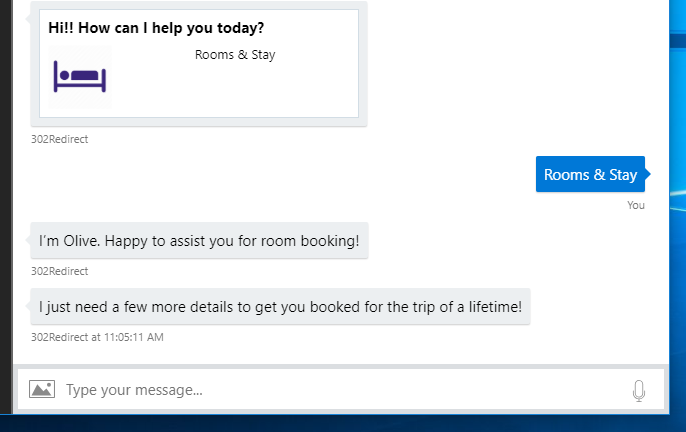
I have designed a menu in adaptive cards. PFA image.Instead of showing a reply of chosen option,it should reply from the user's side that the user has chosen that option.Just like the same functionality of _imback_ of image card.

__
 SethiPriy
All 6 comments
Hi @SethiPriy, can you provide more detail as to what functionality you are looking to have happen? I'm not clear on what the desired flow is.
 stevkan
on 24 Apr 2018
stevkan
on 24 Apr 2018
Hi @stevkan ,
When a user clicks on Rooms and stay, it should perform same behaviour like imback in cards.
Here in image, user clicks on book then a message comes from user side i would like to book a room. We want same functionality in adaptive cards. When user clicks on Rooms and stay (refer above image ), a message should come from user-Rooms and stay.(Basically we want to tell user that he has selected rooms and stay option in menu.)

SethiPriy
on 26 Apr 2018
Hi @SethiPriy,
This should answer the problem you are facing. The code below is an example based on the images you provided above. It doesn't include any formatting.
In this example, the user can click on the 'Rooms & Stay' which produces an imBack response and begins the next dialog. The 'Rooms & Stay' is a icon and text block (in a ColumnSet) wrapped in a container. The container takes the .selectAction action where you can assign Action.Submit. The 'data' value must be a string in order to receive an imBack. If you set 'data' to an object then it will return a postBack which the user won't see. The next dialog is initiated with a .triggerAction() matching the imBack response.
You can reference information on adaptive cards here.
Hope this helps!
Steve.
bot.dialog('/', [
    function (session) {

        var card = {
              "contentType": "application/vnd.microsoft.card.adaptive",
              "content": {
                  "$schema": "http://adaptivecards.io/schemas/adaptive-card.json",
                  "type": "AdaptiveCard",
                  "version": "1.0",
                  "body": [
                        {
                            "type": "TextBlock",
                            "text": "Hi!! How can I help you today?",
                            "weight": "bolder",
                            "size": "medium"
                        },
                        {
                            "type": "Container",
                            "items": [
                                {
                                    "type": "ColumnSet",
                                    "columns": [
                                        {
                                            "type": "Column",
                                            "items": [
                                                {
                                                    "type": "Image",
                                                    "url": "https://cdn4.iconfinder.com/data/icons/medical-icons-normal/1000/modules_IP.png",
                                                    "imageSize": "small"
                                                }
                                            ]
                                        },
                                        {
                                            "type": "Column",
                                            "items": [
                                                {
                                                    "type": "TextBlock",
                                                    "text": "Rooms & Stay",
                                                    "horizontalAlignment": "left"
                                                }
                                            ]
                                        }
                                    ]
                                }
                            ],
                            "selectAction": {
                                "type": "Action.Submit",
                                "title": "Submit action with imBack",
                                "data": "Rooms & Stay"
                            }
                        }
                  ]
              }
          };

        var msg = new builder.Message(session).addAttachment(card);
        session.send(msg);
    }
]);

bot.dialog('/nextDialog', [
    function (session) {
        session.send("I'm Olive. Happy to assist you for room booking!");
        session.send("I just need a few more details to get you booked for the trip of a lifetime!");
    }
]).triggerAction({
    matches: /Rooms.*&.*Stay/i
});
stevkan
on 3 May 2018
Hi @stevkan , Thanks it is working fine.
SethiPriy
on 3 May 2018
How can we achieve both imBack and capture data to pass on to the next dialog? This is important since we have a product list in adaptive cards carousal and when user click on any of the product then we would like to query the data based on the data.productId?
We need this support for
MS Team and WebChat/Directline
 amistry79
on 2 Aug 2019
amistry79
on 2 Aug 2019
I left a +1 on @amistry79 post, but having a 'hybrid' imBack/postBack for a button would be useful in situations where you want to show the user they have clicked/'Said something' but also want to send additional context back. I believe we had customised something like this in webchat v3, but are hoping not to have to customise webchat v4 as much.
 nathanlindorff
on 14 Aug 2019
nathanlindorff
on 14 Aug 2019
Related issues
 Arimov
·
3Comments
Arimov
·
3Comments
 arpan14
·
3Comments
arpan14
·
3Comments
 jschristophe
·
3Comments
jschristophe
·
3Comments
 Vigneshramkumar
·
3Comments
Vigneshramkumar
·
3Comments
 hailiang-wang
·
3Comments
hailiang-wang
·
3Comments
Most helpful comment
How can we achieve both imBack and capture data to pass on to the next dialog? This is important since we have a product list in adaptive cards carousal and when user click on any of the product then we would like to query the data based on the data.productId?
We need this support for
MS Team and WebChat/Directline