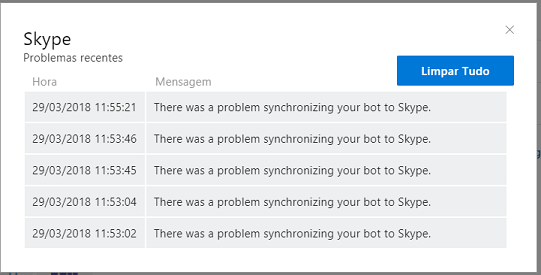
Botframework-sdk: [Deploy] There was a problem synchronizing your bot to Skype.
Bot Info
- SDK Platform: .NET
- SDK Version: Latest version
- Active Channels: Skype
- Deployment Environment: Azure Bot Channels Registration
- MS App ID: 695a11fe-a820-4490-be1a-4940b810edb2
Issue Description
My bot is working when I test it using Azure's "test in web chat" function.
Unfortunately, whenever I add Skype as a channel I get this error and my bot won't work.
Reproduction Steps
- Skype channel is added in Channels
- Click on 'Health'
- Shows the warning
Expected Behavior
Skype channel should be added correctly and bot should respond.
Actual Results
Skype channel Health shows 'There was a problem synchronizing your bot to Skype.' error
 yasmimp
All 11 comments
@yasmimp I recently ran into this issue myself and have a query out to the Skype team for help, I will let you know when I get an answer what the solution is.
 JasonSowers
on 22 Mar 2018
JasonSowers
on 22 Mar 2018
Just to Update you i am still working with the skype team to investigate this. Will update you ASAP
JasonSowers
on 27 Mar 2018
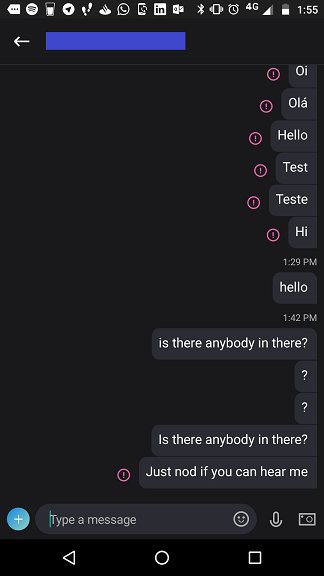
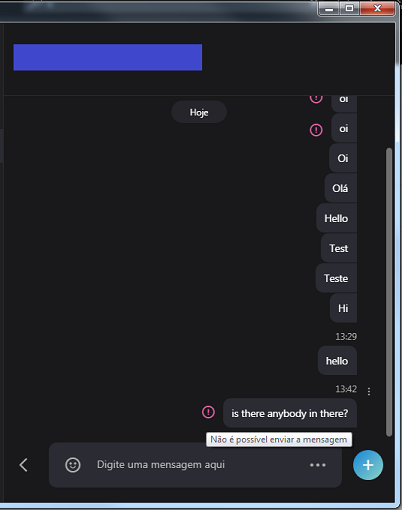
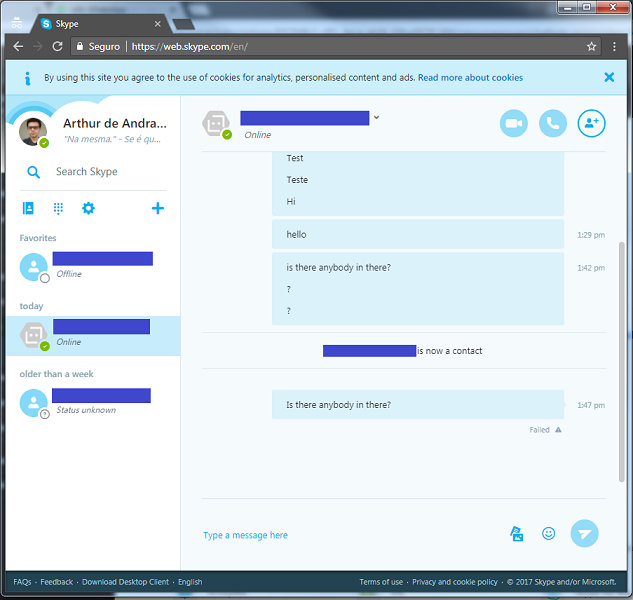
Same problem here. Webchat works fine, Slack works fine, but Skype doesn't. It display this "There was a problem synchronizing your bot to Skype." warning in the health screen. In the Skype client the messages I try to send are marked as "not sent". Same for the embedded version.
 rogerweb
on 29 Mar 2018
rogerweb
on 29 Mar 2018
I'm having the same issue.
 alvaarengaaa
on 29 Mar 2018
alvaarengaaa
on 29 Mar 2018
I'm also facing the same issue. I created a new chatbot from scratch, just the basic echo application from the Bot Builder template, and deployed it to Azure and the Bot Channel Connector. Tried on the classic Skype application for Windows 7, the new Skype application for Windows 10 , via web and and Android app, every Skype client failed to deliver the messages.

 ItsMeArthur
on 29 Mar 2018
ItsMeArthur
on 29 Mar 2018
I've deleted and re-created the Bot Channels Registration resource and now the Skype channel is working. Unable to identify the root cause though.
rogerweb
on 2 Apr 2018
@rogerweb Good to know. I was also able to create a Skype Chatbot successfully last Friday. However I can't just delete the Bot Channels Registration for my bots in production...
ItsMeArthur
on 2 Apr 2018
Still looking into this, no resolution yet. Working with the Skype team to diagnose.
JasonSowers
on 5 Apr 2018
4455
JasonSowers
on 11 Apr 2018
Is this still affecting anyone's bot or has it been resolved by recreating the bot for everyone? We are not able to reproduce this again unfortunately. We will keep trying if it is blocking people though
JasonSowers
on 17 Apr 2018
Closing this issue since it seems everyone's problem is resolved, please open a new issue if you continue to experience this problem
JasonSowers
on 24 Apr 2018
Related issues
 stijnherreman
·
3Comments
stijnherreman
·
3Comments
 verdysh
·
3Comments
verdysh
·
3Comments
 somprabhsharma
·
3Comments
somprabhsharma
·
3Comments
 akakoychenko
·
3Comments
akakoychenko
·
3Comments
 maba4891
·
3Comments
maba4891
·
3Comments
Most helpful comment
@yasmimp I recently ran into this issue myself and have a query out to the Skype team for help, I will let you know when I get an answer what the solution is.