Botframework-sdk: [Skype for Business] Client throws error when bot replies - "Error happened in SfB service when reaching bot service"
Bot Info
- SDK Platform: .NET
- SDK Version: 3.12.2.4
- Active Channels: Skype for Business
- Deployment Environment: Azure App Service
Issue Description
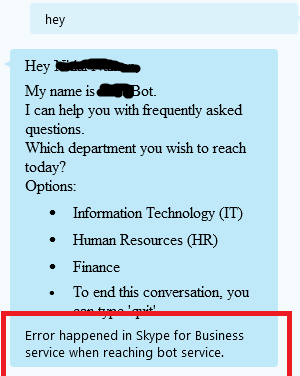
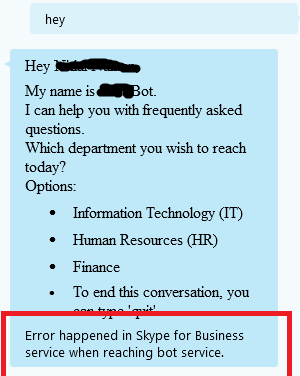
Error happened in Skype for Business service when reaching bot service -
Error messages are seen on Skype for business when bot replies to skype messages
 ctshivakumar
All 18 comments
ctshivakumar
on 4 Jan 2018
Is the bot working in any other channel?
 JasonSowers
on 4 Jan 2018
JasonSowers
on 4 Jan 2018
yes, it works in webchat. we get this error only the first time when user starts conversation with bot.
ctshivakumar
on 7 Jan 2018
Hello,
Me too for Skype for Business. When I say "Hi", I get this response "Error happened in Skype for Business service when reaching bot service."
And Yes, it work in webchat and MS Teams
 Tomiku
on 16 Jan 2018
Tomiku
on 16 Jan 2018
Same issue here, works well in other channels but not on S4B. This started to happen after an endpoint url change.
 slvnperron
on 19 Jan 2018
slvnperron
on 19 Jan 2018
Same here, it started to happen after changing the endpoint url. It works on other channels. But in S4B it only answers "Error happened in Skype for Business service when reaching bot service.", in every message I send.
If i check the issues in the Bot Service, it shows:
There was an error sending this message to your bot: HTTP status code GatewayTimeout
It seems it's still trying to reach the old endpoint (one that doesn't exist anymore)
 piffarettig
on 24 Jan 2018
piffarettig
on 24 Jan 2018
Any findings on this yet. The message sent from Skype For Business reaches my bot but the bot doesn't reply back. The bot wrks well in WebChat.
 vijaysaimutyala
on 20 Apr 2018
vijaysaimutyala
on 20 Apr 2018
@vijaysaimutyala Same issue here.
Example request:
````
POST /api/skype HTTP/1.1
Host: localhost:3333
User-Agent: SFBUserAgent (Microsoft-BotFramework/3.1 +https://botframework.com/ua)
Content-Length: 558
Authorization: Bearer eyJ0eXAiOiJKV1QiLCJhbGciOiJSUzI1NiIsImtpZCI6Ild5TTVTdThTMDFLVUJUSWdpZjVzSWlEVF9MOCIsIng1dCI6Ild5TTVTdThTMDFLVUJUSWdpZjVzSWlEVF9MOCJ9.eyJzZXJ2aWNldXJsIjoiaHR0cHM6Ly93ZWJwb29sZGI0MHIwNC5pbmZyYS5seW5jLmNvbS9wbGF0Zm9ybXNlcnZpY2UvdGd0LTkyOWY2NzI0ZGMwZDUxYmVhM2I0MDYyOTg1ZmJmY2JhL2JvdGZyYW1ld29yayIsImlzcyI6Imh0dHBzOi8vYXBpLmJvdGZyYW1ld29yay5jb20iLCJhdWQiOiI4MmJlODAzYy02NjYwLTQ3YmQtODFiZi0wZWE0MTBmYTY0ZDciLCJleHAiOjE1MjQ0NzE5MTQsIm5iZiI6MTUyNDQ3MTMxNH0.B6Ynlbg970ebWi-u3RDaoiwiApwSPVnx0LRF7MWvFIASxC4IIm0t7ky86Pyn0spy3oRtRBFcYnGPNot26SlTJcIC7XN4hVCgBk_Vpfz8pPqV_gYVu9IxTIcvurVUacaNgL1qRLX4LxZjCowLDSqGdn0pfEfm6qO3mDXfWU1raTeA_kF2Us1Wsue0OgAdOszW8w1Ah23qctQ9HJXlcZUdc-I-18Uh72C7YaBxSiPwktyd0XrFNCJ6o_Bzb3FMjW6HzTmlsxAmOHX5iAu-dTy3_eqEk4pLFrAolSH5we8pGvO_CigYWkqpSTKF8lEZaTGuVlTp5mlco7FH7leGuX5j_g
Content-Type: application/json; charset=utf-8
X-Correlating-Operationid: eyJ0eXAiOiJKV1QiLCJhbGciOiJIUzI1NiJ9.eyJvcGVyYXRpb25JRCI6Il9FblJ6bGNJQUVFQyIsImlzcyI6Imh0dHA6Ly9ib3RmcmFtZXdvcmsuY29tIiwiZXhwIjoxNTI0NDc0OTE0LCJuYmYiOjE1MjQ0NzEzMTR9.nOaCdQPzCaF_ed70HwtEeiCmIAHkIPDe-kjeBxakLq4
X-Forwarded-For: 52.112.209.62
X-Forwarded-Proto: https
X-Original-Host: foobot.eu.ngrok.io
{
"type": "endOfConversation",
"id": "3c7a19cb-4be2-4ec1-bad7-0cfb06137193",
"timestamp": "2018-04-23T08:15:14.1228196Z",
"serviceUrl": "https://webpooldb40r04.infra.lync.com/platformservice/tgt-929f6724dc0d51bea3b4062985fbfcba/botframework",
"channelId": "skypeforbusiness",
"from": {
"id": "sip:[email protected]"
},
"conversation": {
"isGroup": true,
"id": "YTNhYjIyMDcjc2lwOmR2YWdib3Rza3lwZUBkdmFnY2hhdGJvdC5vbm1pY3Jvc29mdC5jb20="
},
"recipient": {
"id": "sip:[email protected]",
"name": "sip:[email protected]"
}
}
````
Example response:
````
HTTP/1.1 403 Forbidden
X-Powered-By: Express
Vary: X-HTTP-Method-Override
Date: Mon, 23 Apr 2018 08:15:13 GMT
Connection: keep-alive
Content-Length: 0
`````
Microsoft App Id and Password are not the isssue. For testing, i have also pretty much disabled any code in botbuilder/lib/ChatConnector.js that could thrown a 403 so i am at a loss for where this response is coming from. Bot works fine in WebChat and Teams.
 serialoverflow
on 23 Apr 2018
serialoverflow
on 23 Apr 2018
@serialoverflow I was using the Python SDK which is under development. Once I switched to REST api things are fine.
I suggest that you check the place in your code where you create your response to be sent to your bot. I made a change this morning to fetch the first name of the user. I had a syntax error just before the place where the response to the bot is getting ready. The program did not reach this part of code and same error is thrown on SFB. So have a look at your code if you messed up with something accidentally.
vijaysaimutyala
on 23 Apr 2018
I am not writing a custom client. The problem is with Skype or with my bot, but as i said, the webchat and Teams clients work fine with the bot.
serialoverflow
on 23 Apr 2018
@serialoverflow Yes. I had the same issue. WebChat was working fine but not Skype.
vijaysaimutyala
on 23 Apr 2018
I see this error as well.
 shantdashjian
on 8 Jun 2018
shantdashjian
on 8 Jun 2018
Same issue here, updated the endpoint URL and it stopped working for Skype for business, other channels are working as expected
 ogarules
on 9 Jun 2018
ogarules
on 9 Jun 2018
Same issue here:
26/06/2018 16:05:15 | There was an error sending this message to your bot: HTTP status code GatewayTimeout
-- | --
 jjgriff93
on 26 Jun 2018
jjgriff93
on 26 Jun 2018
I'm having this same issue on and off, did anyone find a work around for this?
 nhadro
on 20 Sep 2018
nhadro
on 20 Sep 2018
I'm having this same issue on and off, did anyone find a work around for this?
Yes, I got it working with Set-CsOnlineApplicationEndpoint . In my case I udpated the endpoint on the channels connector on Azure, but I found out that you need to run that command in order for skype for business to work again, it may take up to 24 hours to reflect on the skype tenant, it wont get fixed immediately.
ogarules
on 20 Sep 2018
Were you having that issue off and on or was your bot not working at all? My issue seems to occur intermittently. We ran the "New-CsOnlineApplicationEndpoint" about a month ago, but maybe running that Set command is what is needed.
nhadro
on 21 Sep 2018
Thank you for opening an issue against the Bot Framework SDK v3. As part of the Bot Framework v4 release, we’ve moved all v3 work to a new repo located at https://github.com/microsoft/botbuilder-v3. We will continue to support and offer maintenance updates to v3 via this new repo.
From now on, https://github.com/microsoft/botbuilder repo will be used as hub, with pointers to all the different SDK languages, tools and samples repos.
As part of this restructuring, we are closing all tickets in this repo.
For defects or feature requests, please create a new issue in the new Bot Framework v3 repo found here:
https://github.com/microsoft/botbuilder-v3/issues
For Azure Bot Service Channel specific defects or feature requests (e.g. Facebook, Twilio, Teams, Slack, etc.), please create a new issue in the new Bot Framework Channel repo found here:
https://github.com/microsoft/botframework-services/issues
For product behavior, how-to, or general understanding questions, please use Stackoverflow.
https://stackoverflow.com/search?q=bot+framework
Thank you.
The Bot Framework Team
JasonSowers
on 2 Oct 2018
Related issues
 Arimov
·
3Comments
Arimov
·
3Comments
 Prybe
·
3Comments
Prybe
·
3Comments
 vaditya04
·
3Comments
vaditya04
·
3Comments
 Vigneshramkumar
·
3Comments
Vigneshramkumar
·
3Comments
 hailiang-wang
·
3Comments
hailiang-wang
·
3Comments
Most helpful comment
Same issue here, works well in other channels but not on S4B. This started to happen after an endpoint url change.