Botframework-sdk: [QnA Maker] How to customize the "No match found!" message?
Bot Info
- App ID: 8dd6a32f-bb28-4d73-8cc5-a58427ff1696
- SDK Platform: .NET
- SDK Version: QnAmaker
- Active Channels: WebChat, Microsoft Teams
- Deployment Environment: Azure Bot Service
Issue Description
I am trying to change the default message that is being sent when the bot can't find a match in the Knowledge Base. I searched online and found an article that said you need to change a line in the BasicQnAMakerDialog.cs file. When i change the code in that file, nothing happens.
Code Example
using System;
using System.Configuration;
using System.Linq;
using System.Threading.Tasks;
using System.Threading;
using Microsoft.Bot.Connector;
using Microsoft.Bot.Builder.Dialogs;

using Microsoft.Bot.Builder.CognitiveServices.QnAMaker;

namespace Microsoft.Bot.Sample.QnABot
{
    // For more information about this template visit http://aka.ms/azurebots-csharp-qnamaker
    [Serializable]
    public class BasicQnAMakerDialog : QnAMakerDialog
    {
        // Go to https://qnamaker.ai and feed data, train & publish your QnA Knowledgebase.
        public BasicQnAMakerDialog() : base(new QnAMakerService(new QnAMakerAttribute(Utils.GetAppSetting("QnASubscriptionKey"), Utils.GetAppSetting("QnAKnowledgebaseId"), 'No good match in FAQ.', 0.5)))
        {}
Reproduction Steps
- Type something random (for example: "gjksfgfs")
- Send it to the bot
- The bot replies with: "No match found!"
Expected Behavior
I expect the bot to reply: "No good match in FAQ"
Actual Results
The bot replies with "No match found!"
 iantje31
All 18 comments
Hi @iantje31,
You can override RespondFromQnAMakerResultAsync in your dialog to customize the response from QnAMaker
protected override async Task RespondFromQnAMakerResultAsync(IDialogContext context, IMessageActivity message, QnAMakerResults result)
        {
            var answer = result.Answers.First().Answer;
            Activity reply = ((Activity)context.Activity).CreateReply();
            if (reply.Text.equals("Not Match Found!))
                 reply.Text = "No good match in FAQ";
            await context.PostAsync(reply);
        }
Or even better you can also change the default message when calling the constructor like this:
public BasicQnAMakerDialog() : base(new QnAMakerService(new QnAMakerAttribute(ConfigurationManager.AppSettings["QnASubscriptionKey"], ConfigurationManager.AppSettings["QnAKnowledgebaseId"], "No good match in FAQ")))
Regards,
Francisco
 FranciscoPonceGomez
on 7 Nov 2017
FranciscoPonceGomez
on 7 Nov 2017
@FranciscoPonceGomez Thank you for your reply! I changed the code to the following:
using System;
using System.Configuration;
using System.Linq;
using System.Threading.Tasks;
using System.Threading;
using Microsoft.Bot.Connector;
using Microsoft.Bot.Builder.Dialogs;

using Microsoft.Bot.Builder.CognitiveServices.QnAMaker;

namespace Microsoft.Bot.Sample.QnABot
{
    // For more information about this template visit http://aka.ms/azurebots-csharp-qnamaker
    [Serializable]
    public class BasicQnAMakerDialog : QnAMakerDialog
    {
        // Go to https://qnamaker.ai and feed data, train & publish your QnA Knowledgebase.
        public BasicQnAMakerDialog() : base(new QnAMakerService(new QnAMakerAttribute(Utils.GetAppSetting("QnASubscriptionKey"), Utils.GetAppSetting("QnAKnowledgebaseId"), 'No good match in FAQ.', 0.5)))
        {}
protected override async Task RespondFromQnAMakerResultAsync(IDialogContext context, IMessageActivity message, QnAMakerResults result)
        {
            var answer = result.Answers.First().Answer;
            Activity reply = ((Activity)context.Activity).CreateReply();
            if (reply.Text.equals("Not Match Found!))
                 reply.Text = "No good match in FAQ";
            await context.PostAsync(reply);
        }
    }
}
After i asked something that isn't a part of the knowledge base, i still get the message "No match found!"
After that i tried changing the code to this:
using System;
using System.Configuration;
using System.Linq;
using System.Threading.Tasks;
using System.Threading;
using Microsoft.Bot.Connector;
using Microsoft.Bot.Builder.Dialogs;

using Microsoft.Bot.Builder.CognitiveServices.QnAMaker;

namespace Microsoft.Bot.Sample.QnABot
{
    // For more information about this template visit http://aka.ms/azurebots-csharp-qnamaker
    [Serializable]
    public class BasicQnAMakerDialog : QnAMakerDialog
    {
        // Go to https://qnamaker.ai and feed data, train & publish your QnA Knowledgebase.
        public BasicQnAMakerDialog() : base(new QnAMakerService(new QnAMakerAttribute(ConfigurationManager.AppSettings["QnASubscriptionKey"], ConfigurationManager.AppSettings["QnAKnowledgebaseId"], "No good match in FAQ")))
        {}
    protected override async Task RespondFromQnAMakerResultAsync(IDialogContext context, IMessageActivity message, QnAMakerResults result)
        {
            var answer = result.Answers.First().Answer;
            Activity reply = ((Activity)context.Activity).CreateReply();
            if (reply.Text.equals("No Match Found!))
                 reply.Text = "No good match in FAQ";
            await context.PostAsync(reply);
        }
    }
}
I tried to send the message again and still got: "No match found!"
iantje31
on 7 Nov 2017
Hi @iantje31,
The second options works just fine for me in local:
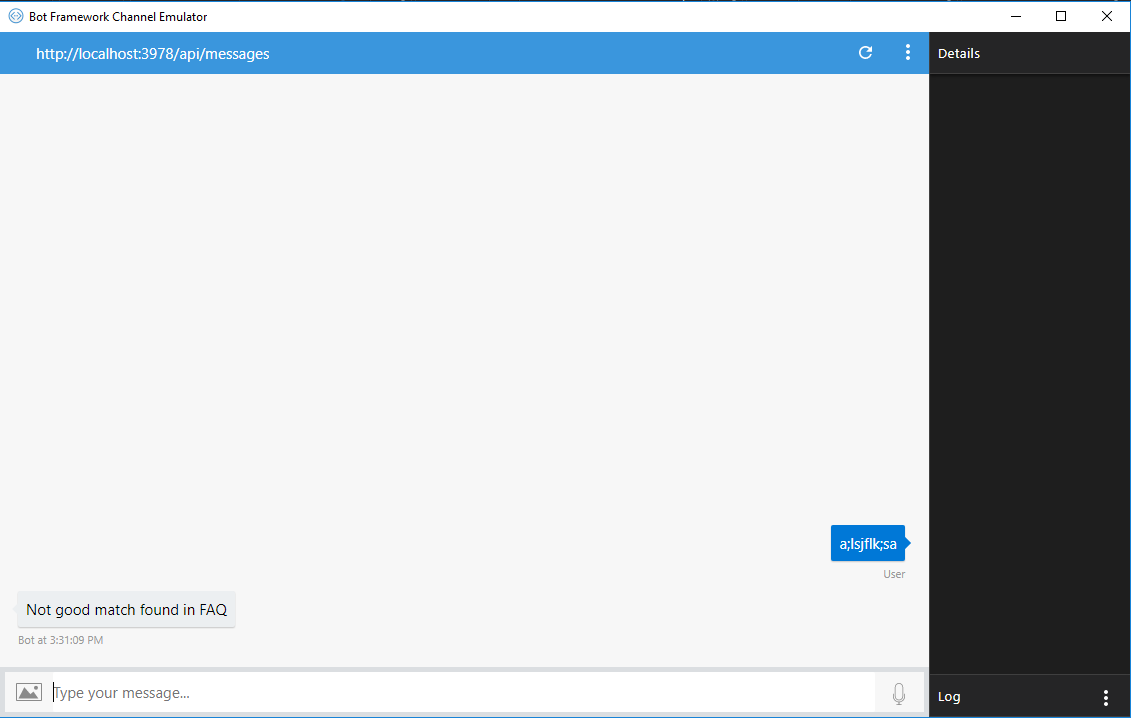
The QnAMakerDialog constructor accepts a threshold and a default message as optional parameters. This is the exact code that I have used:
    [Serializable]
    [QnAMakerSettings]
    public class SimpleQnADialog : QnAMakerDialog
    {
        [Serializable]
        public class QnAMakerSettingsAttribute : QnAMakerAttribute
        {
            public QnAMakerSettingsAttribute()
                : base(ConfigurationManager.AppSettings["QnASubscriptionKey"], ConfigurationManager.AppSettings["QnAKbId"], "Not good match found in FAQ", 0.5)
            {
            }
        }
    }
Please, bear in mind that if you are testing the final endpoint you need to redeploy your bot again.
Regards,
Francisco
FranciscoPonceGomez
on 8 Nov 2017
@FranciscoPonceGomez thank you for your very quick response!
I changed the dialog file to exactly what you have in the Azure Bot Service. But the result is still the same:

What do you mean exactly with redeploying? Do i need to create a new App Service Plan in Azure?
iantje31
on 8 Nov 2017
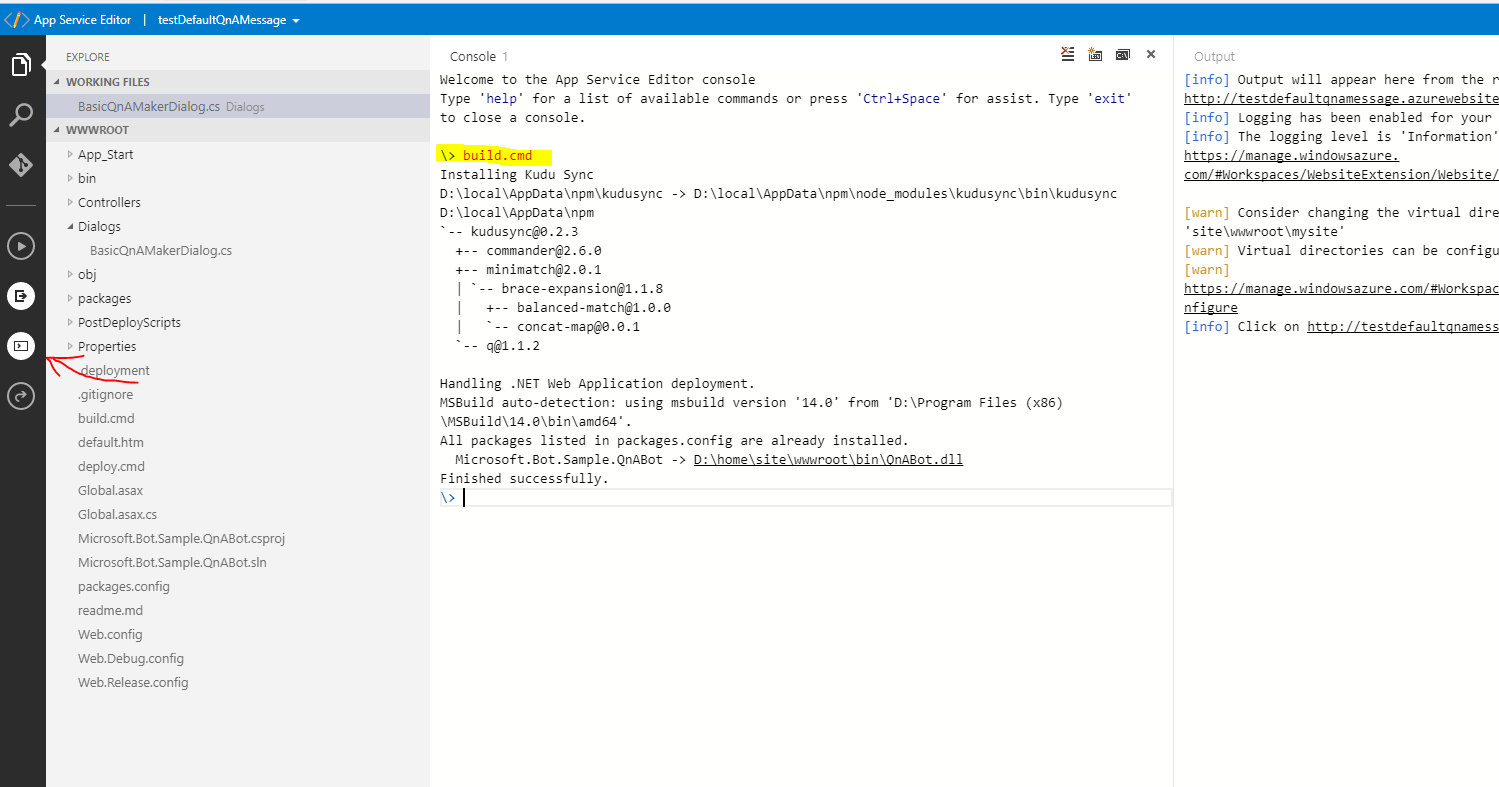
I am assuming that you are using ABS and making your changes in the online code editor, right?
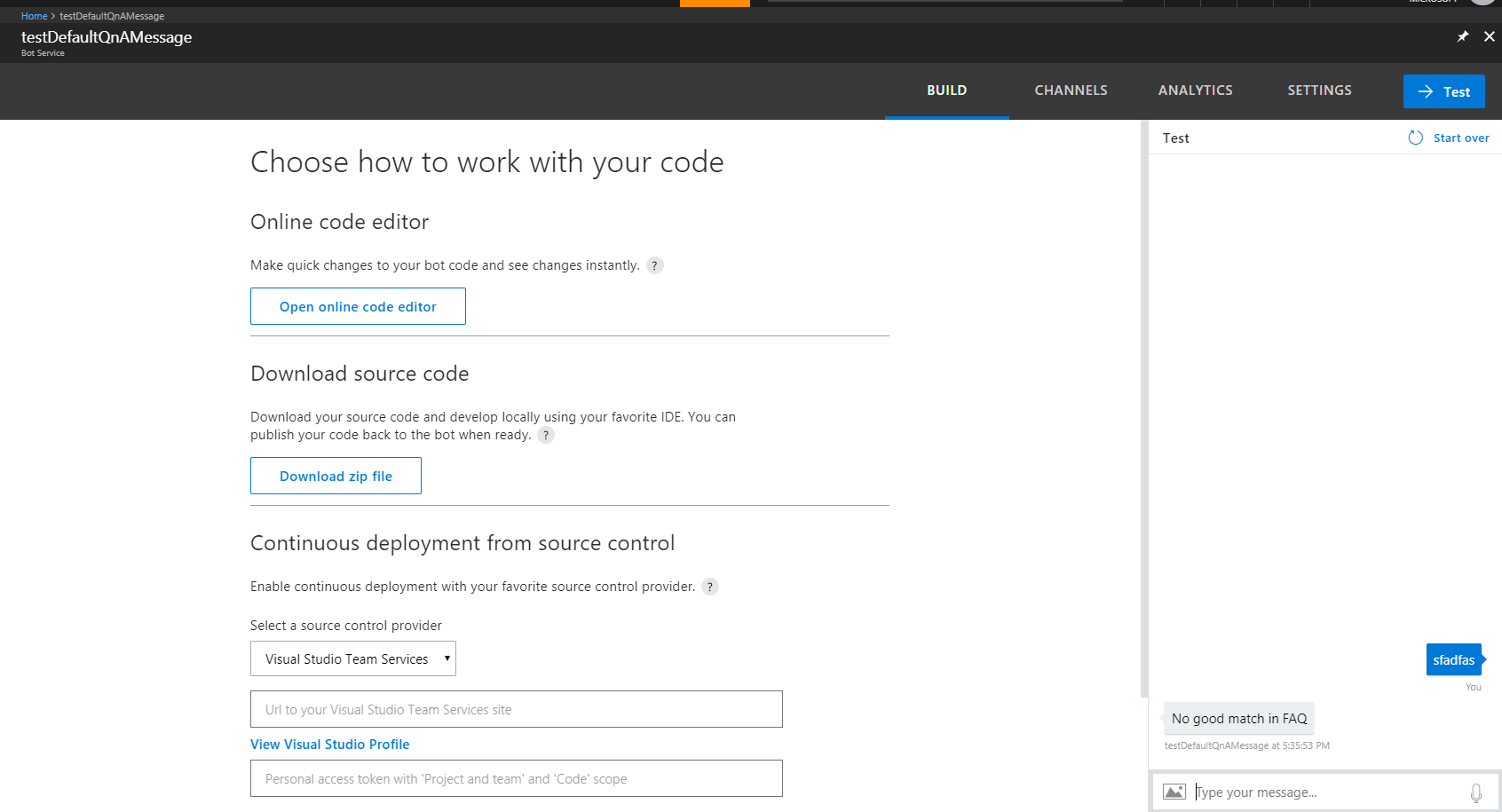
In that case, any change you make in the editor need to be redeployed. To do that, click the console icon on the left vertical menu, type "build.cmd" in the console and hit enter. This action should build and deploy your code. Now you can go back to the test window and try again.
Regards,
Francisco
FranciscoPonceGomez
on 8 Nov 2017
@FranciscoPonceGomez it worked on the webchat! But when i type the same message in Microsoft Teams, the answer still is "No match found!" What can be the issue there?
iantje31
on 8 Nov 2017
Hi @iantje31,
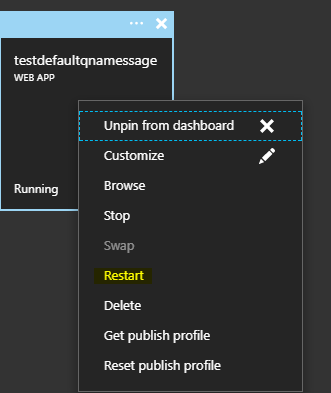
Try restarting the web service in Azure:
FranciscoPonceGomez
on 8 Nov 2017
Hi @FranciscoPonceGomez
I tried restarting the service in Azure, but the issue still occurs.
But after i made a new account on my enterprise E3 trail subscription and added the bot again the issue seems resolved. Is there any way to delete and add the bot again on an excisting account?
iantje31
on 8 Nov 2017
Hi @iantje31,
When you delete your bot, you will lose any updates you have made in your code. It is normally advisable to use Continuous Integration. In the "build" section of your bot service, you have the option to download your bot's code into a .zip file to open it later with Visual Studio, or add it to VSTS.
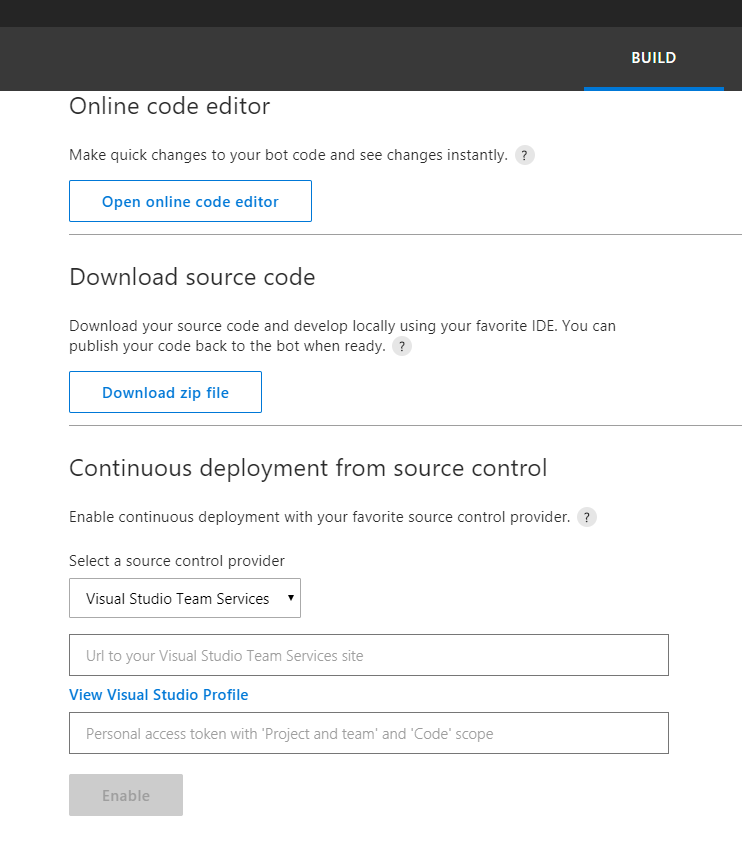
It is normally easier and faster to modify your code locally, test with the Bot Framework Emulator and when you are satisfied with the results, deploy to Azure.
Let me know if that works for you.
Francisco
FranciscoPonceGomez
on 9 Nov 2017
Hi @FranciscoPonceGomez ,
I indeed think it works better if i test the bot using the bot emulator before deploying it to Azure.
I was looking for a way to remove the bot from my Microsoft Teams 1:1 chats. Because when i create a new account in my Office 365 subscription and log in to teams with it, the new message is shown.
When i use my own account the old message appears.
iantje31
on 9 Nov 2017
Hi @iantje31,
Type "/deleteprofile" without "" and send the message. Restart MS Teams.
That should do the trick. Let me know if that worked.
Regards,
Francisco
FranciscoPonceGomez
on 17 Nov 2017
Hi @FranciscoPonceGomez,
That worked! :) Thanks a lot for your help! You guys are doing great with helping people!
Regards,
Ian
iantje31
on 17 Nov 2017
Awesome! You are welcome!
FranciscoPonceGomez
on 18 Nov 2017
How do I Transfer conversation from QnaMaker service to LUISDialog back again.
Problem statement (
LuisDialog --> QnaMakerDialog (works fine)
LuisDialog <--- QnaMaker (Once in QnaMaker Dialog, it does not route to LUISDialog)
Real Scenario:-
Hi - Invokes [Greeting] intent from LuisDialog.
weather today in Boston - Invokes [GetWeather] intent from LuisDialog.
How do i enroll myself-> Routes from LUISDailog [GetEnrolled] to QnaMakerDialog
After this User says (Hi, hello) which is the LUIS [Greeting] intent, seems it does not route from QnaMaker Dailog to LUISIntent.
Please advise, what's the best approach for the second route back from QnaMaker Dialog back to LuisDialog.
 perappr
on 2 Apr 2018
perappr
on 2 Apr 2018
I'm having the same issue iantje31 initially had. I'm working locally and the Bot Emulator stills displays
"No match found!"
 JorgeCupi
on 6 Apr 2018
JorgeCupi
on 6 Apr 2018
@FranciscoPonceGomez when i type build.cmd i get this: do you have any idea why i am getting this?
Installing Kudu Sync
An error has occurred during web site deployment.
'npm' is not recognized as an internal or external command,
operable program or batch file.
 youssefGirgeis
on 18 May 2018
youssefGirgeis
on 18 May 2018
I'm looking to do the same thing, except that instead of a text, the default message can be a hero card instead. Is this possible?
 Rykimaruh
on 20 Nov 2018
Rykimaruh
on 20 Nov 2018
Hi @FranciscoPonceGomez
I tried same thing what you have mentioned but still, it's not reflecting(Default No Answer) and i'm using Nodejs SDK4, can you Pls help me out.
Regards
Nagarjuna
 nagarjuna950
on 11 Jun 2020
nagarjuna950
on 11 Jun 2020
Related issues
 akakoychenko
·
3Comments
akakoychenko
·
3Comments
 peterbozso
·
3Comments
peterbozso
·
3Comments
 stijnherreman
·
3Comments
stijnherreman
·
3Comments
 RaoVenka
·
3Comments
RaoVenka
·
3Comments
 kenyeung128
·
3Comments
kenyeung128
·
3Comments