Botframework-sdk: [Channel Configuration] Unable to save Messenger channel config. Failed to register with Facebook?
- App ID: 2dfb3ddf-41b0-4090-b3f7-c2ad22718405
- SDK Platform: Node.js
- SDK Version: 3.10.8
- Skype, Web, Facevook
- Deployment Environment: Auzure Bot Service, Azure App Service
Issue Description
Cannot Save Facebook Channel Configuration
Reproduction Steps
- Goto Azure Portal
- Select Bot App
- Channels
- Facebook Messenger
- Add Configurations (Facebook Page ID,Facebook App ID,Facebook App Secret,Page Access Token)
- Save
Expected Behavior
Save and Enable Facebook Channel
Actual Results
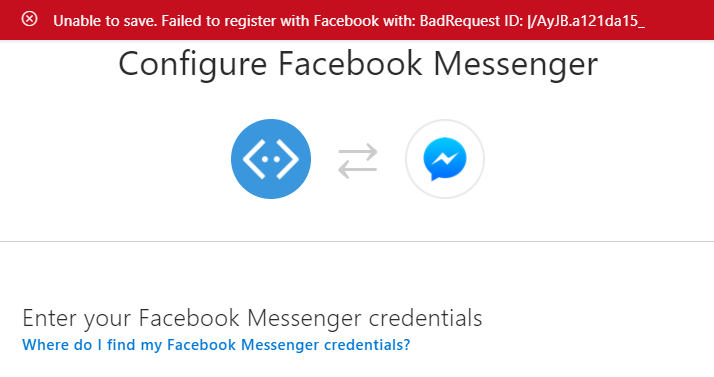
Unable to save. Failed to register with Facebook with: BadRequest ID: |/AyJB.a121da27_
#
 cmnisal
All 11 comments
I tried with a New Page its also the Same Error
cmnisal
on 8 Nov 2017
Did you follow these instructions?
 JasonSowers
on 14 Nov 2017
JasonSowers
on 14 Nov 2017
Hi everyone! @JasonSowers, @cmnisal, @fanidamj, I have the same issue #3562, it was closed(don't know why!) and the issue still in there! I really don't know what to do.
Best regards.
 Rigo85
on 24 Nov 2017
Rigo85
on 24 Nov 2017
@mgbennet can you take a look at this please?
JasonSowers
on 27 Nov 2017
I double this,in my case it gives me a forbidden id error
Unable to save. Failed to register with Facebook with: Forbidden ID: |A/2Fb.b109c71_
I am on node.js as well with 3.9.1 as the bot framework version on windows 10 64 bit
 slidenerd
on 23 Mar 2018
slidenerd
on 23 Mar 2018
Same for me. My exact error code is:
"Unable to save. Failed to register with Facebook with: Forbidden ID: |Qmgtp.d42561bf_"
What is more important it used to work for exactly same credentials and I can't even re-save it. Any ideas?
 krystiangw
on 23 Mar 2018
krystiangw
on 23 Mar 2018
I cannot delete my app on facebook for any reason as the bot was live for 6+ months and i ll be wiping out my analytics and stuff, I tried the webhook thing a couple of times,
- Remove existing webhook subscriptions
- Get a new page access token
- Update this on my heroku server
- Paste the page id, app id, facebook secret and facebook page access token, get the callback url and verify token
paste those into the facebook webhook setup and at this point try to save everything on the azure portal where it keeps giving me the forbidden id error. I tested through my emulator connected with my live heroku server and through webchat and those are working perfectly
slidenerd
on 23 Mar 2018

Could this be the source of the problem? My bot was running 2.9 but now it seems Graph API has gone up to 2.12, since the botframework doesn't directly let you input any graph API urls, i assume it is building these urls behind the scenes
slidenerd
on 23 Mar 2018
@cmnisal Are you still experiencing issues when configuring Facebook?
 EricDahlvang
on 26 Mar 2018
EricDahlvang
on 26 Mar 2018
I created support case for the issue and it was resolved on March 24th 2018.
Case no 118032317874099
The issue reason was:
Facebook started blocking calls to one of their api's that we were using to validate credentials. Fix was to call an approved api that is not blocked.
I can confirm it was solved for my account.
krystiangw
on 26 Mar 2018
@cmnisal please open a new issue if you are still experiencing problems with Facebook configuration
EricDahlvang
on 26 Mar 2018
Related issues
 mattlanham
·
3Comments
mattlanham
·
3Comments
 peterbozso
·
3Comments
peterbozso
·
3Comments
 jschristophe
·
3Comments
jschristophe
·
3Comments
 somprabhsharma
·
3Comments
somprabhsharma
·
3Comments
 hailiang-wang
·
3Comments
hailiang-wang
·
3Comments