Botframework-sdk: [Skype for Business] Bot responses appear in Times font on Windows
Bot Info
This issue applies to all SFB bots built on the Tangowork platform, but we'll provide the bot info for one of our test environments:
- Bot handle: bobsheetz
- App ID: 0046d486-6b93-49b0-9047-02c6dd535994
- SDK Platform: Node.js
- SDK Version: 3.11.0
- Active Channels: Skype, Skype for Business, Slack
- Deployment Environment: EC2 on AWS
Issue Description
We are implementing a Skype for Business chatbot at the head office of an 80,000-employee organization.
All bot responses appear in the Times font. This affects Windows only, not Mac.
Code Example
We've tried sending as text, markdown, and XML, with the same results.
// Markdown code

session.send(new Message(session).textFormat('markdown').text('test'));

// Plain text code

session.send(new Message(session).textFormat('plain').text('<b>test</b>'));

// XML code

session.send(new Message(session).textFormat('xml').text('<b>test</b>'));
Reproduction Steps
- Get a bot to respond to your input on Skype for Business, Windows 7 or Windows Server 2012 R2
- Notice the font of the utterance vs the font of the response
Expected Behavior
- We expect the font of the response to match the font of the utterance.
- We expect the font of the response to look the same as a message sent from any other user
- We expect that the only situation a unique font should be used is if we were actually sending font information (which we are not)
Actual Results
The font of the response is in Times / Times New Roman. It does not match the utterance. No font information was sent by the bot: it's just plain text.
This issue may not bother developers, but it is a BIG DEAL for people working in design / communications / PR.
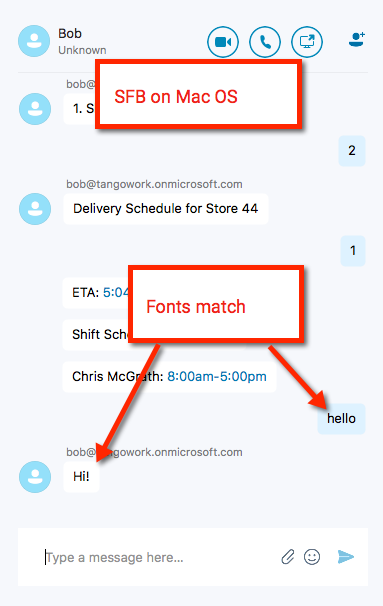
This issue does not affect SFB on Mac or iOS.
See screenshots:


 tangochris
All 15 comments
This is well outside the scope of this forum as it is a Skype for business issue. I pinged the S4B team, but there is nothing the bot framework team can do for this. Maybe they can offer some help.
 JasonSowers
on 24 Oct 2017
JasonSowers
on 24 Oct 2017
Please contact Tangowork support for questions about Tangowork bots.
 nwhitmont
on 25 Oct 2017
nwhitmont
on 25 Oct 2017
@nwhitmont I am Tangowork. I was just trying to say that this issue affects a dozen of our bots, not just one, but I gave you a single App ID.
The issue is either:
- Bot Framework is sending font information / formatting instructions, when none has been specified in code OR
- Skype for Business is messed up somehow, in which case it would be helpful if you could forward this to the SFB team, as I don't have access to them.
This is affecting other people's Skype for Business bots too: see these screenshots from #3119 and #2943:
Bot response in Times font:

Another bot response in Times font:

tangochris
on 25 Oct 2017
@intranetchris any resolution on your end? We are seeing the same issues from PC to Mac, along with other SFB formatting inconsistencies between platforms using markdown and/or html.
 amehta3000
on 12 Dec 2017
amehta3000
on 12 Dec 2017
@amehta3000 No, no resolution. We're just resigned to waiting for SFB to be replaced by Teams.
If you can figure out how to contact the SFB team, let me know. I can't find any similar forum for reporting bugs.
tangochris
on 12 Dec 2017
Any resolution on Bot responses appear in Times font ? We are seeing the same issues in skype for business bot.
 ctshivakumar
on 4 Jan 2018
ctshivakumar
on 4 Jan 2018
+1, Facing the same issue.
 mmalaiarasan-conga
on 4 Jan 2018
mmalaiarasan-conga
on 4 Jan 2018
+1 Facing the same issue , any links or update related to this issue pls ?
 gongbf
on 15 Jan 2018
gongbf
on 15 Jan 2018
@nwhitmont Hi sir , my bot is build on Azure bot service and I have this issue too . Could you pls provide a way to contact S4B support channel or do you have any ideas about it ?
gongbf
on 15 Jan 2018
+1 Same here. We're using MS Bot framework for different channels and the problem only appears with Skype for Business.
 mrgorzny
on 2 Feb 2018
mrgorzny
on 2 Feb 2018
Has anyone on this thread tried manually setting the font using html? http://blog.greenl.ee/2012/01/29/sending-formatted-ims-ucma-application/
 EricDahlvang
on 5 Apr 2018
EricDahlvang
on 5 Apr 2018
You can, but is doesn't work cross platform. Will render in a PC, but OSX
won't necc recognize it or vice versa. Bot framework still recommends using
Markdown as it wasn't intentionally designed for HTML support like that.
On Wed, Apr 4, 2018 at 5:17 PM, Eric Dahlvang notifications@github.com
wrote:
Has anyone on this thread tried manually setting the font using html?
http://blog.greenl.ee/2012/01/29/sending-formatted-ims-ucma-application/—
You are receiving this because you were mentioned.
Reply to this email directly, view it on GitHub
https://github.com/Microsoft/BotBuilder/issues/3647#issuecomment-378784382,
or mute the thread
https://github.com/notifications/unsubscribe-auth/AAJP-S6dHEU7NnL3SHdWarD23vy4HVucks5tlWKdgaJpZM4QBKqs
.
--
Ameet Mehta
redrickshaw.co
m: 415.336.4032
amehta3000
on 5 Apr 2018
@EricDahlvang We tried. We found we can get HTML to work on Windows, but it messes up Mac: either the HTML itself is output, or nothing is output at all.
To me, what is strangest is that the Times font is uniquely applied to bots. I don't understand why the formatting rules that are applied to normal user-to-user conversation are not also applied to bots.
tangochris
on 5 Apr 2018
we are also facing the same issue. It seems like MS has kept Times/Times New Roman font as the default. It looks odd and affects UX
 tinakashyap
on 19 Jul 2018
tinakashyap
on 19 Jul 2018
Thank you for opening an issue against the Bot Framework SDK v3. As part of the Bot Framework v4 release, we’ve moved all v3 work to a new repo located at https://github.com/microsoft/botbuilder-v3. We will continue to support and offer maintenance updates to v3 via this new repo.
From now on, https://github.com/microsoft/botbuilder repo will be used as hub, with pointers to all the different SDK languages, tools and samples repos.
As part of this restructuring, we are closing all tickets in this repo.
For defects or feature requests, please create a new issue in the new Bot Framework v3 repo found here:
https://github.com/microsoft/botbuilder-v3/issues
For Azure Bot Service Channel specific defects or feature requests (e.g. Facebook, Twilio, Teams, Slack, etc.), please create a new issue in the new Bot Framework Channel repo found here:
https://github.com/microsoft/botframework-services/issues
For product behavior, how-to, or general understanding questions, please use Stackoverflow.
https://stackoverflow.com/search?q=bot+framework
Thank you.
The Bot Framework Team
 sgellock
on 2 Oct 2018
sgellock
on 2 Oct 2018
Related issues
 verdysh
·
3Comments
verdysh
·
3Comments
 vaditya04
·
3Comments
vaditya04
·
3Comments
 kenyeung128
·
3Comments
kenyeung128
·
3Comments
 stijnherreman
·
3Comments
stijnherreman
·
3Comments
 hailiang-wang
·
3Comments
hailiang-wang
·
3Comments
Most helpful comment
@nwhitmont I am Tangowork. I was just trying to say that this issue affects a dozen of our bots, not just one, but I gave you a single App ID.
The issue is either:
This is affecting other people's Skype for Business bots too: see these screenshots from #3119 and #2943:
Bot response in Times font:
Another bot response in Times font: