Botframework-sdk: [Skype] Can not receive attachment?
Bot Info
- SDK Platform: .NET
- SDK Version: 3.8.0.0
- Active Channels: Skype
- Deployment Environment: Azure App Service
Issue Description
When I sent a attachment to bot, in my bot I want to get the contents of the attachment.
I used the following code to get it. But has been returning 500 errors.
Code Example
public virtual async Task MessageReceivedAsync(IDialogContext context, IAwaitable<IMessageActivity> argument)
        {
            var message = await argument;

            if (message.Attachments != null && message.Attachments.Any())
            {
                using (var connectorClient = new ConnectorClient(new Uri(message.ServiceUrl)))
                {
                    var token = await (connectorClient.Credentials as MicrosoftAppCredentials).GetTokenAsync();
                    var uri = new Uri(message.Attachments[0].ContentUrl);
                    using (var httpClient = new HttpClient())
                    {
                        await context.PostAsync(message.Attachments[0].ContentUrl);
                        await context.PostAsync(uri.Host);
                        //if (uri.Host.EndsWith("skype.com") && uri.Scheme == "https")
                        //{
                        httpClient.DefaultRequestHeaders.Authorization = new AuthenticationHeaderValue("Bearer", token);
                        httpClient.DefaultRequestHeaders.Accept.Add(new MediaTypeWithQualityHeaderValue("application/octet-stream"));
                        //}

                        try
                        {
                            var data = await httpClient.GetByteArrayAsync(uri);
                            await context.PostAsync(data.Length.ToString());
                        }
                        catch(Exception ex)
                        {
                            if (ex.InnerException!= null)
                            {
                                await context.PostAsync(ex.Message + ":" + ex.InnerException.Message);
                            }
                            else
                            {
                                await context.PostAsync(ex.Message);
                            }
                        }
                    }
                }
            }

            context.Wait(this.MessageReceivedAsync);
        }
Code Description
- await context.PostAsync(message.Attachments[0].ContentUrl); output: https://smba.trafficmanager.net/apis/v3/attachments/0-sa-d1-abd6e64b01d2f5e06ef698e7f05a8bb2/views/original
- await context.PostAsync(uri.Host); output: smba.trafficmanager.net
- var data = await httpClient.GetByteArrayAsync(uri); throw exception: Response status code does not indicate success: 500 (Internal Server Error).
Does anyone have an idea of how I can work around this?
 ZhengKevin25
All 16 comments
Hi @ZhengKevin25,
There is a note in the sample at https://github.com/Microsoft/BotBuilder-Samples/tree/master/CSharp/core-ReceiveAttachment that states:
Note: The Skype and Microsoft Teams attachment URLs are secured by JwtToken; you should set the JwtToken of your bot as the authorization header for the HTTP GET request your bot initiates to fetch content. Below is the sample code that temporarily works around this issue and set the JwtToken on the HTTP request. You should be careful when you send the bot's JwtToken to a third party server and should always make sure to send it to trusted parties
...
// Skype & MS Teams attachment URLs are secured by a JwtToken, so we need to pass the token from our bot.
            if ((message.ChannelId.Equals("skype", StringComparison.InvariantCultureIgnoreCase) || message.ChannelId.Equals("msteams", StringComparison.InvariantCultureIgnoreCase))
                && new Uri(attachment.ContentUrl).Host.EndsWith("skype.com"))
            {
                var token = await new MicrosoftAppCredentials().GetTokenAsync();
                httpClient.DefaultRequestHeaders.Authorization = new AuthenticationHeaderValue("Bearer", token);
            }
...
So it looks like you may have to add a little more handling for attachments with Skype and Teams.
Sincerely,
IoTGirl
 IoTGirl
on 19 Oct 2017
IoTGirl
on 19 Oct 2017
Hi @IoTGirl
I have set the JwtToken of my bot as the authorization header for the HTTP GET request.
But still returned 500 error. And I don't know why I use skype as channel, but the return to my
Uri(attachment.ContentUrl).Host is smba.trafficmanager.net not like xxx.skype.com
ZhengKevin25
on 19 Oct 2017
Hi @ZhengKevin25 ,
The 500 indicates an Internal Server error, correct? I am afraid that might be pretty difficult to diagnose. If it is your server, can you see the error on the server side?
Sincerely,
IoTGirl
IoTGirl
on 19 Oct 2017
Hi @IoTGirl
I tested in the dev.botframework.com is OK
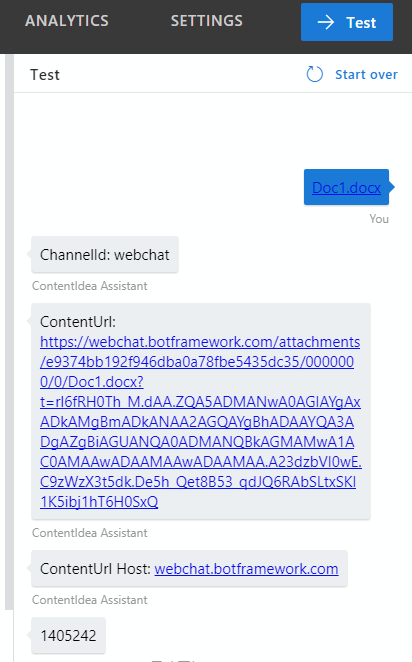
but with skype will be 500 error
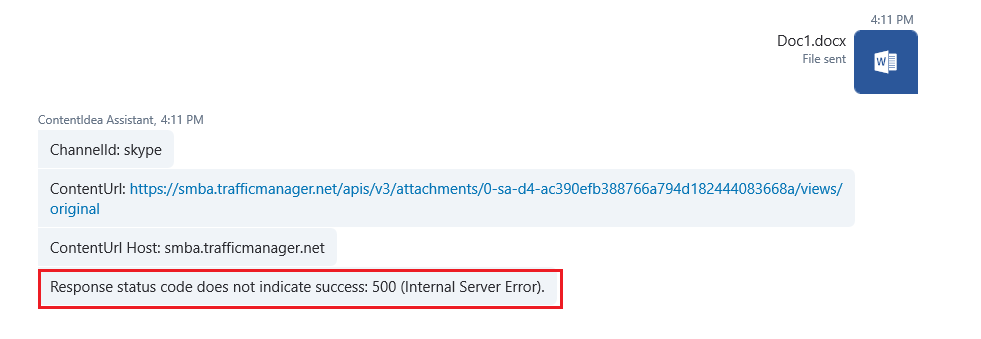
ZhengKevin25
on 19 Oct 2017
@ZhengKevin25 Thank you for reporting. I will need your bot id and approximate date/ time when the problem was observed. Thank you!
 konstlut
on 19 Oct 2017
konstlut
on 19 Oct 2017
@konstlut Thank you for your attention.
Bot Id: PorticoBot
MicrosoftAppId: efa92abe-387b-4232-90e2-e8ecc4e74b2d
approximate date/time : 2017/10/20 9:20:00 (BJT)

ZhengKevin25
on 20 Oct 2017
I’m seeing the same issue here with Skype. Any ideas?
 julioct
on 20 Oct 2017
julioct
on 20 Oct 2017
@konstlut Do you have any ideas?
ZhengKevin25
on 22 Oct 2017
I'm seeing something very similar, however I'm using Teams instead of Skype.
Using VS2017 Enterprise I was able to attach a debugger to my bot and when I attach a PDF what I noticed is that the Attachment has a NULL ContentUrl, Name, ThumnailUrl and an empty Properties. However, the ContentType is "text/html" and the Content is some html which contains the name of my bot. It seems to me that the attachment is not the file I attached to the channel but the mention of the bot itself (and no, there are no other attachments associated with the message, just the one).
Interestingly, I can still retrieve the JWT however without a ContentUrl it's not particularly useful. Am I doing something wrong or is this a bug with Teams/Bot Framework?
Also, the attached PDF does appear under the Files tab in my Teams channel.
EDIT: I should also mention that when I use the emulator, it seems to work as expected: The ContentUrl is valid and I can download the file no problem. I use ngrok which gives me a slightly different URL than what the original poster here sees.
 mveroukis
on 24 Oct 2017
mveroukis
on 24 Oct 2017
I can now confirm that I get the same as the original poster while using Skype (using Bot Framework 3.11.0). What I reported above for Teams may be a separate issue and I'll create a new issue to track that.
Using Skype, I too get a 500 Internal error when attempting to Get the url from the attachment. I too set the bearer token and if I were doing that wrong, I'd still expect an error other than 500.
I don't set the Accept header, although it doesn't appear to help in this case.
EDIT: When I use the wrong bearer token I get a 401 error. When I use the correct token, I get 500.
mveroukis
on 31 Oct 2017
We also experience the same problem with Node.js bot using Skype. The same code used to work until a few days ago. Now, we receive a 500 internal error.
 kounoupaki
on 1 Nov 2017
kounoupaki
on 1 Nov 2017
I face the same problem using Node.JS. I use the Bearer JWToken to make a GET request to get the content of the attachment but receive a 500 internal server error. To be more specific, the response body is empty and the status code is 500.
 nickgkan
on 2 Nov 2017
nickgkan
on 2 Nov 2017
Same problem here - accessing https://smba.trafficmanager.net/df-apis/v3/attachments/0-neu-d5-<omitted>/views/original with Bearer token, using Postman and getting 500 Internal Server Error...
 msimecek
on 6 Nov 2017
msimecek
on 6 Nov 2017
I am having the same issue in the Skype Windows 10 app. However, when I use https://web.skype.com/en/ (same user, same bot) the attachment works fine. Also works in Slack, and messenger.
I really need this fixed, as my users often try to use the attachment in skype. Anyone?
 gcsonka
on 5 Dec 2017
gcsonka
on 5 Dec 2017
I believe the underlying problem causing this has been resolved. I'd like to close this GitHub issue. Are any of you still experiencing this problem?
 EricDahlvang
on 16 Feb 2018
EricDahlvang
on 16 Feb 2018
Initially I followed the guidelines given in
https://github.com/Microsoft/BotBuilder-Samples/tree/master/CSharp/core-ReceiveAttachment
and everything worked fine ..... until it stopped working. :(
Inspecting the values that came in
attachment.ContentUrl
note that the word skype did not come but
Remove that portion of the code and everything started working again
The code is as follows
if (message.Attachments! = null && message.Attachments.Any ())
try
{
foreach (var attachment in message.Attachments)
{
Trace.TraceInformation ($ "message.ChannelId: {message.ChannelId}. Attachment.ContentUrl: {attachment.ContentUrl}");
using (HttpClient httpClient = new HttpClient ())
{
// The URLs of Skype & MS Teams attachments are protected by a JwtToken, so we must pass the bot token of our bot.
if ((message.ChannelId.Equals ("skype", StringComparison.InvariantCultureIgnoreCase) ||
message.ChannelId.Equals ("msteams", StringComparison.InvariantCultureIgnoreCase))
/ * new Uri (attachment.ContentUrl) .Host.EndsWith ("skype.com") */)
{
var token = await new MicrosoftAppCredentials (). GetTokenAsync ();
Trace.TraceInformation ($ "token: {token}");

httpClient.DefaultRequestHeaders.Authorization = new AuthenticationHeaderValue ("Bearer", token);
}

var responseMessage = wait for httpClient.GetAsync (attachment.ContentUrl);
 gfazzola
on 24 Feb 2018
gfazzola
on 24 Feb 2018
Related issues
 Arimov
·
3Comments
Arimov
·
3Comments
 stijnherreman
·
3Comments
stijnherreman
·
3Comments
 RaoVenka
·
3Comments
RaoVenka
·
3Comments
 jschristophe
·
3Comments
jschristophe
·
3Comments
 Vigneshramkumar
·
3Comments
Vigneshramkumar
·
3Comments
Most helpful comment
Same problem here - accessing
https://smba.trafficmanager.net/df-apis/v3/attachments/0-neu-d5-<omitted>/views/originalwith Bearer token, using Postman and getting 500 Internal Server Error...