Botframework-sdk: [Question] Custom data in Direct Line
Bot Info
- SDK Platform: .NET
- Active Channels: Direct Line
Issue Description
There is a corporate site. I want users to communicate with the bot from there. This will only be available to authenticated users. It is necessary that the bot recognizes the user. To do this, I need to somehow pass the parameters (user's id on the site) to the bot.
Initially, I used the web chat channel. Web chat control added to the site via iframe:
<iframe src='https://webchat.botframework.com/embed/...?s=...'></iframe>
I tried adding the parameter as follows:
<iframe src='https://webchat.botframework.com/embed/...?s=...&myData=123'></iframe>
In MessagesController I tried to obtain and pass on this parameter:
StateClient stateClient = activity.GetStateClient();
BotData userData = await stateClient.BotState.GetUserDataAsync(activity.ChannelId, activity.From.Id);
foreach(var kv in Request.GetQueryNameValuePairs())
    userData.SetProperty<string>(kv.Key, kv.Value);

await stateClient.BotState.SetUserDataAsync(activity.ChannelId, activity.From.Id, userData);
In the dialogue I tried to get it:
StateClient stateClient = context.Activity.GetStateClient();
BotData userData = await stateClient.BotState.GetUserDataAsync(context.Activity.ChannelId, context.Activity.From.Id);
var myData = userData.GetProperty<string>("myData");
But the result is a null.
After unsuccessful attempts, I began to look for additional information on how to do this. Found the information that this can be done through a Direct Line channel. On dev.botframework.com I added Direct Line channel and replaced the insertion of code in the HTML page:
<!DOCTYPE html>
<html>
  <head>
    <link href="https://cdn.botframework.com/botframework-webchat/latest/botchat.css" rel="stylesheet" />
  </head>
  <body>
    <div id="bot"/>
    <script src="https://cdn.botframework.com/botframework-webchat/latest/botchat.js"></script>
    <script>
      BotChat.App({
        directLine: { secret: "..."},
        user: { id: 'userid' },
        bot: { id: 'botid' },
        resize: 'detect'
      }, document.getElementById("bot"));
    </script>
  </body>
</html>
I'm updating the page, messages go back and forth.
Now a few questions:
- I do not understand what is needed (and whether it is necessary) to transmit something to 'userid' and 'botid', because with default values it works?
- How do I pass my own settings and how do I get them on the server side of the bot?
PS. I know that my English is terrible, sorry :(
 verdysh
All 5 comments
I found the ability to pass parameters:
BotChat.App({
        directLine: { secret: "..."},
        user: { id: 'userid', myData1='qqq', myData2='222' },
        bot: { id: 'botid' },
        resize: 'detect'
      }, document.getElementById("bot"));
On server side:
var myData1 = message.From.Properties["myData1"];
Normal people do that? :)
verdysh
on 19 Sep 2017
This is a totally valid way to do this, there are other options too. One may be the back channel. As you were trying to set data using the data bags (userdata) are you using the default state client or a custom state client? There is a solution for this as well, but it is dependent on the state client type you are using.
 JasonSowers
on 19 Sep 2017
JasonSowers
on 19 Sep 2017
@JasonSowers, thanks again for the answer!
As you were trying to set data using the data bags (userdata) are you using the default state client or a custom state client?
I'm not sure I understand what "default state client" and "custom state client" mean. You mean how I getting stateClient in this code:
StateClient stateClient = activity.GetStateClient();
BotData userData = await stateClient.BotState.GetUserDataAsync(activity.ChannelId, activity.From.Id);
foreach(var kv in Request.GetQueryNameValuePairs())
    userData.SetProperty<string>(kv.Key, kv.Value);

await stateClient.BotState.SetUserDataAsync(activity.ChannelId, activity.From.Id, userData);
?
Here is a more complete version of the code:
[BotAuthentication]
public class MessagesController : ApiController
{
    /// <summary>
    /// POST: api/Messages
    /// Receive a message from a user and reply to it
    /// </summary>
    public async Task<HttpResponseMessage> Post([FromBody]Activity activity)
    {
        StateClient stateClient = activity.GetStateClient();
        BotData userData = await stateClient.BotState.GetUserDataAsync(activity.ChannelId, activity.From.Id);
        foreach(var kv in Request.GetQueryNameValuePairs())
            userData.SetProperty<string>(kv.Key, kv.Value);

        await stateClient.BotState.SetUserDataAsync(activity.ChannelId, activity.From.Id, userData);
If I misunderstood, could you clarify the question?
verdysh
on 20 Sep 2017
If you don't understand what I am asking about the state client, you are using the default 👍 . This should answer your other question. Let me know if there are any more questions you have.
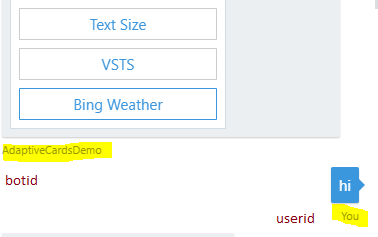
user: { id: 'userid'},  //this is what the display name of the user will be in the webchat control
bot: { id: 'botid' },    // this is what the display name of the bot will be in the webchat control
JasonSowers
on 20 Sep 2017
@JasonSowers, thank you!
PS. There are many more questions, I will create new issues :)
verdysh
on 21 Sep 2017
Related issues
 RaoVenka
·
3Comments
RaoVenka
·
3Comments
 Prybe
·
3Comments
Prybe
·
3Comments
 stijnherreman
·
3Comments
stijnherreman
·
3Comments
 somprabhsharma
·
3Comments
somprabhsharma
·
3Comments
 daveta
·
3Comments
daveta
·
3Comments