Botframework-sdk: [Question] Sending a Slack Private Message using C# Bot Framework
I've seen quite a few examples for the NodeJS Bot Framework which suggest simply the removal of the ConversationID field of a message activity and pointing the recipient address at the user's ID to initiate a private message .
Unfortunately the C# framework doesn't seem to be as lenient and removing the ConversationID when trying to initiate a new reply activity object (bot to user) throws a Null Pointer Exception.
It seems that in an older version there may have been a Message object in the past where this was possible however now it does not seem to exist anymore (I hope I'm wrong?). If I'm not, how can I instigate my bot to private message a user?
Example scenario: User posts something in #general chat on Slack. Bot picks up on this. Identifies user. Private messages user.
It's the instigating of conversation back from the Bot as a private message rather than spamming everyone in #general that I need.
Thanks!
 karam94
All 8 comments
@karam94 you mind sharing your C# code so we can take a look?
 JasonSowers
on 12 Jun 2017
JasonSowers
on 12 Jun 2017
@karam94 you can easily start a new private conversation between your bot and a Slack user in C# by a few steps:
- createDirectConversationAsync
- CreateMessageActivity, linking to this conversation
- SendToConversationAsync
Parameters
You need some parameters. For Slack, the ID of the bot and the user are made like this:
- the bot ID is a concatenation of its Slack's Bot_id, a ':' and Slack's Team_id
- the user ID is a concatenation of its Slack's id, a ':' and Slack's Team_id
The advantage of Slack is the possibility to get all the necessary parameters to start a conversation by only knowing a few information and requesting their API. For example you can start a conversation by knowing only:
- Bot Slack's username
- User email address or Slack's username
Then you can use Slack's API to get what the bot really needs.
How to get info from Slack?
public class SlackService
{
    internal static async Task<SlackMembersRootObject> GetSlackUsersList(string slackApiToken, CancellationToken ct)
    {
        using (var client = new HttpClient())
        {
            using (var response = await client.GetAsync($"https://slack.com/api/users.list?token=" + $"{slackApiToken}", ct).ConfigureAwait(false))
            {
                var jsonString = await response.Content.ReadAsStringAsync().ConfigureAwait(false);
                var rootObject = Newtonsoft.Json.JsonConvert.DeserializeObject<SlackMembersRootObject>(jsonString);
                return rootObject;
            }
        }
    }
}

public static async Task StartSlackDirectMessage(string msAppId, string msAppPassword, string slackApiToken, string message, string botSlackUsername, string botName, string destEmailAddress, string destName, string lang, CancellationToken ct)
{
    // Getting Slack user (and bot) list
    var slackUsersList = await SlackService.GetSlackUsersList(slackApiToken, CancellationToken.None);

    // Get Bot SlackId by searching its "username", you can also search by other criteria
    var slackBotUser = slackUsersList.Members.FirstOrDefault(x => x.Name == botSlackUsername);
    if (slackBotUser == null)
    {
        throw new Exception($"Slack API : no bot found for name '{botSlackUsername}'");
    }

    // Get User SlackId by email address
    var slackTargetedUser = slackUsersList.Members.FirstOrDefault(x => x.Profile.Email == destEmailAddress);
    if (slackTargetedUser != null)
    {
        // if found, starting the conversation by passing the right IDs
        await StartDirectMessage(msAppId, msAppPassword, "https://slack.botframework.com/", "slack", $"{slackBotUser.Profile.Bot_id}:{slackBotUser.Team_id}", botName, $"{slackTargetedUser.Id}:{slackTargetedUser.Team_id}", destName, message, lang, ct);
    }
    else
    {
        throw new Exception($"Slack API : no user found for email '{destEmailAddress}'");
    }
}
Focus on "how to start your conversation"
The following code is generic to all channels to start a conversation (and is called in my method above for Slack for example)
private static async Task StartDirectMessage(string msAppId, string msAppPassword, string connectorClientUrl, string channelId, string fromId, string fromName, string recipientId, string recipientName, string message, string locale, CancellationToken token)
{
    // Init connector
    MicrosoftAppCredentials.TrustServiceUrl(connectorClientUrl, DateTime.Now.AddDays(7));
    var account = new MicrosoftAppCredentials(msAppId, msAppPassword);
    var connector = new ConnectorClient(new Uri(connectorClientUrl), account);

    // Init conversation members
    ChannelAccount channelFrom = new ChannelAccount(fromId, fromName);
    ChannelAccount channelTo = new ChannelAccount(recipientId, recipientName);

    // Create Conversation
    var conversation = await connector.Conversations.CreateDirectConversationAsync(channelFrom, channelTo);

    // Create message Activity and send it to Conversation
    IMessageActivity newMessage = Activity.CreateMessageActivity();
    newMessage.Type = ActivityTypes.Message;
    newMessage.From = channelFrom;
    newMessage.Recipient = channelTo;

    newMessage.Locale = (locale ?? "en-US");
    newMessage.ChannelId = channelId;
    newMessage.Conversation = new ConversationAccount(id: conversation.Id);
    newMessage.Text = message;
    await connector.Conversations.SendToConversationAsync((Activity)newMessage);
}
Note: I previously sent quite the same answer on StackOverflow: https://stackoverflow.com/questions/44353520/is-there-a-way-to-start-formflow-dialog-on-conversationupdate-event
 nrobert
on 13 Jun 2017
nrobert
on 13 Jun 2017
guys is it still relevant in v 4.4 or there's now more easy way?
 Unders0n
on 29 May 2019
Unders0n
on 29 May 2019
@Unders0n This is Slack specific, so not likely to be incorporated directly into the SDK. The code to accomplish this with V4.4 will be very similar to what @nrobert has shared above.
 EricDahlvang
on 29 May 2019
EricDahlvang
on 29 May 2019
@EricDahlvang, suppose we know userId and lets remove this part from problem, next question would be to write in DM and i think this question could be generic to all messengers with group chat, for example i have found this article for Skype Teams https://docs.microsoft.com/en-us/microsoftteams/platform/concepts/bots/bot-conversations/bots-conv-proactive , but whole example is not very clear. For example i can't get what is "client" in
var response = client.Conversations.CreateOrGetDirectConversation(activity.Recipient, activity.From, activity.GetTenantId());
Is it generic of Skype specific stuff and i should stick to old example mentioned in this thread?
Unders0n
on 29 May 2019
Client is the connector client:
var client = new ConnectorClient(new Uri(activity.ServiceUrl));
EricDahlvang
on 29 May 2019
Ok some updates for those who trying to do same thing in 4.4+:
1) client.Conversations.CreateOrGetDirectConversation seems to be only available in Teams, we have CreateDirectConversation but that not worked for me
2) old aproach with creating "fake message" mentioned here worked to send simple activity
3) if you want to start proactive message from dialog, old aproach meant here: https://stackoverflow.com/questions/44353520/is-there-a-way-to-start-formflow-dialog-on-conversationupdate-event is not working anymore cos lots of signatures changed in v4, but i found that this simple solution worked:
var fakemessage = <...creating fake message as it was>
activity.Conversation = fakeMess.Conversation;
 await dc.BeginDialogAsync(typeof(T).Name);
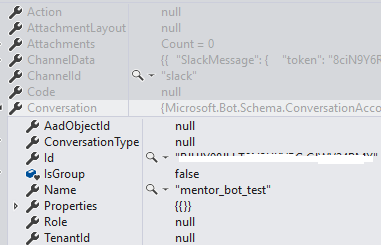
4)now faced problem : i want to ignore all communication in group chats and property in Activity class not seems to work correctly (testing in slack group, just sending some text):
Unders0n
on 30 May 2019
@Unders0n Closed issues are not monitored by the Bot Framework Support team. Please open a new issue, and someone from the team will assist you with these questions.
EricDahlvang
on 30 May 2019
Related issues
 maba4891
·
3Comments
maba4891
·
3Comments
 arpan14
·
3Comments
arpan14
·
3Comments
 akakoychenko
·
3Comments
akakoychenko
·
3Comments
 Vigneshramkumar
·
3Comments
Vigneshramkumar
·
3Comments
 clearab
·
3Comments
clearab
·
3Comments
Most helpful comment
@karam94 you can easily start a new private conversation between your bot and a Slack user in C# by a few steps:
Parameters
You need some parameters. For Slack, the ID of the bot and the user are made like this:
The advantage of Slack is the possibility to get all the necessary parameters to start a conversation by only knowing a few information and requesting their API. For example you can start a conversation by knowing only:
Then you can use Slack's API to get what the bot really needs.
How to get info from Slack?
Focus on "how to start your conversation"
The following code is generic to all channels to start a conversation (and is called in my method above for Slack for example)
Note: I previously sent quite the same answer on StackOverflow: https://stackoverflow.com/questions/44353520/is-there-a-way-to-start-formflow-dialog-on-conversationupdate-event