Botframework-sdk: HeroCard: can not break line in HeroCard.text
How can i break line in text of HeroCard ? I try by "\n" or by "\n\n" , but nothing helps
 astrung
All 27 comments
Which channel are you using? Do you see the same behavior in the Emulator?
 danmarshall
on 17 Oct 2016
danmarshall
on 17 Oct 2016
@astrung HeroCard text support markdown paragraphs. So try it with "\n" for a simple break line or "\n\n" to create a new paragraph.
Here you can see the documentation:
https://docs.botframework.com/en-us/csharp/builder/sdkreference/activities.html
 reyesrico
on 18 Oct 2016
reyesrico
on 18 Oct 2016
On bot facebook and emulator channel, it doesn't work
astrung
on 18 Oct 2016
No one help me :( ? I am still waiting .
Example:
var card = new builder.HeroCard()
     .title("name")
          .subtitle("address")
          .text("Product:"+ myValue +"\n\n"+"Language:" + Array.join(", "))
astrung
on 24 Oct 2016
Can you try string builder...
StringBuilder str = new StringBuilder();
str.AppendLine("Welcome");
str.AppendLine();
str.AppendLine("to ");
and assign this to hero card....
 ravipulluri
on 24 Oct 2016
ravipulluri
on 24 Oct 2016
How can i find StringBuilder in node js library ?
astrung
on 26 Oct 2016
can you check this https://www.npmjs.com/package/stringbuilder
ravipulluri
on 26 Oct 2016
I thought your solution is in .Net
Best Regards,
Ravi Pulluri.
Sent from my Windows Phone
From: astrungmailto:[email protected]
Sent: 10/26/2016 9:37 AM
To: Microsoft/BotBuildermailto:[email protected]
Cc: Ravi Pullurimailto:[email protected]; Commentmailto:[email protected]
Subject: Re: [Microsoft/BotBuilder] HeroCard: can not break line in HeroCard.text (#1439)
How can i find StringBuilder in node js library ?
—
You are receiving this because you commented.
Reply to this email directly, view it on GitHubhttps://github.com/Microsoft/BotBuilder/issues/1439#issuecomment-256244486, or mute the threadhttps://github.com/notifications/unsubscribe-auth/AAY_W1TWZ6QK_h5HG_YnfzEp2Cw0ugGYks5q3tHlgaJpZM4KXuqT.
ravipulluri
on 26 Oct 2016
Bot framework channel is broken when send my card in nodejs with stringbuilder library:
    var StringBuilder = require('stringbuilder');
    var str = new StringBuilder();
    str.appendLine("Welcome");
    str.appendLine();
    str.appendLine("to ");
    var card = new builder.HeroCard()
      .text(str)
You are mixing two systems.
Technically the herocard attachment _replaces_ the text with a rich card. You should fill out the title, subtitle, etc fields the way that you want.
 tomlm
on 5 Nov 2016
tomlm
on 5 Nov 2016
Closing due to age. We just released a much improved emulator and the markdown should work. If not, please let us know.
 chrimc62
on 27 Nov 2016
chrimc62
on 27 Nov 2016
Hi,
I am having the same problem. Markup works for the normal messages sent back to the user, but doesn't work for the text on a HeroCard. StringBuilder also doesn't work.
This is using the emulator.
Thanks,
Pieter
 pvanaarde
on 15 May 2017
pvanaarde
on 15 May 2017
@chrimc62 "\n" or "\n\n" does not work on webchat still.
 mohit-jcc
on 4 Jul 2017
mohit-jcc
on 4 Jul 2017
Does the Cortana channel not support the markdown text format?
 swatibhartiya
on 6 Jul 2017
swatibhartiya
on 6 Jul 2017
If you need advanced card formatting options, use Adaptive Cards instead of the Hero Card template.
 nwhitmont
on 7 Jul 2017
nwhitmont
on 7 Jul 2017
We are fixing the breaks in WebChat and Adaptive Cards.
reyesrico
on 10 Jul 2017
duplicate of #2583
nwhitmont
on 11 Jul 2017
@nwhitmont prod is now being pushed. Can you please verify if it is solved?
reyesrico
on 20 Jul 2017
@reyesrico Ill take a look
 JasonSowers
on 20 Jul 2017
JasonSowers
on 20 Jul 2017
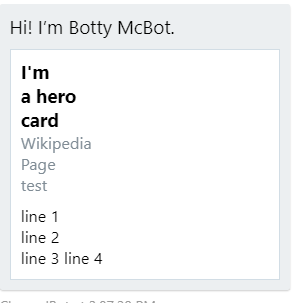
I was able to confirm this is working in web chat with the following code:
                HeroCard plCard = new HeroCard()
                    {
                         Title = $"I'm \r\r a hero \n\r card",
                         Subtitle = $" Wikipedia \r\r Page \n\r test",
                         Text = "line 1 \r\r line 2 \n\r line 3 \r line 4"
                     };
This snippet was rendered as this in emulator:
JasonSowers
on 21 Jul 2017
Hi @JasonSowers - does it work with \n\n ?
danmarshall
on 21 Jul 2017
Nice catch @danmarshall I'm 99.99% sure i intended to use \n\n instead of \r\r
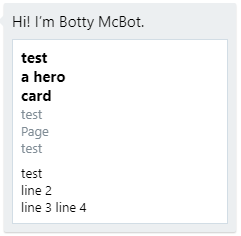
using this code:
                            HeroCard plCard = new HeroCard()
                            {
                                Title = $"test \n\n a hero \n\r card",
                                Subtitle = $" test \n\n Page \n\r test",
                                Text = "test \n\n line 2 \n\r line 3 \r line 4"
                            };
I got this result:
JasonSowers
on 21 Jul 2017
can any one tell,how can i display list of text in adaptive card?
 renukatelang
on 6 Mar 2018
renukatelang
on 6 Mar 2018
For hero card text wrap is not possible?
In Emulator its worked but in fb the same is not working kindly can you guys provide any solution for this
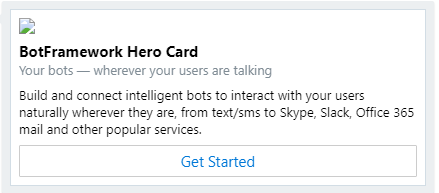 ===> Emulator screenshot
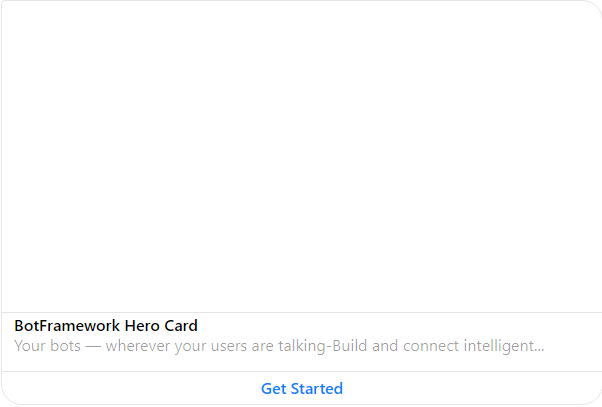 ===> Fb screenshot
 pankajGODB
on 28 Jun 2018
pankajGODB
on 28 Jun 2018
Yes we can add
On 3:43PM, Thu, 28 Jun 2018 Pankaj, notifications@github.com wrote:
For hero card text wrap is not possible?
In Emulator its worked but in fb the same is not working kindly can you
guys provide any solution for this[image: heroemulator]
https://user-images.githubusercontent.com/30646163/42028449-ed50c3fa-7ae9-11e8-8e8d-743d5903ea08.png
===> Emulator screenshot
[image: herofb]
https://user-images.githubusercontent.com/30646163/42028450-ed85c88e-7ae9-11e8-80a7-704e10dbe534.png
===> Fb screenshot—
You are receiving this because you commented.
Reply to this email directly, view it on GitHub
https://github.com/Microsoft/BotBuilder/issues/1439#issuecomment-400985813,
or mute the thread
https://github.com/notifications/unsubscribe-auth/AjAEpVoM_SeXk5FdRnM29DGNYWK4_Tlpks5uBKxigaJpZM4KXuqT
.
renukatelang
on 28 Jun 2018
@renukatelang Can you help me how can we solve this.
Below is the code which i used but its not working
var card = new builder.HeroCard(session)
                        .title('BotFramework Hero Card')
                        .subtitle('Your bots — wherever your users are talking')
                        .text('Build and connect intelligent bots to interact with your users naturally wherever they are, from text/sms to Skype, Slack, Office 365 mail and other popular services.')
                        .images([
                            builder.CardImage.create(session, 'https://sec.ch9.ms/ch9/7ff5/e07cfef0-aa3b-40bb-9baa-7c9ef8ff7ff5/buildreactionbotframework_960.jpg')
                        ])
                        .buttons([
                            builder.CardAction.imBack(session, 'GetMessage', 'Get Started')
                        ]);
                        var msg = new builder.Message(session).addAttachment(card);
                         session.send(msg);
pankajGODB
on 28 Jun 2018
In Hero card button is not showing suddenly today(27/07/2018) Morning till 11:00 am(5.30 GMT) its was working but now text in hero card button showing as dot marked. Below is the screen

Can anyone let me now what has changed for herocard?
pankajGODB
on 27 Jul 2018
Related issues
 peterbozso
·
3Comments
peterbozso
·
3Comments
 mattlanham
·
3Comments
mattlanham
·
3Comments
 hailiang-wang
·
3Comments
hailiang-wang
·
3Comments
 somprabhsharma
·
3Comments
somprabhsharma
·
3Comments
 arpan14
·
3Comments
arpan14
·
3Comments
Most helpful comment
Hi,
I am having the same problem. Markup works for the normal messages sent back to the user, but doesn't work for the text on a HeroCard. StringBuilder also doesn't work.
This is using the emulator.
Thanks,
Pieter