Botframework-sdk: Bot Framework Nodejs unable to connect bot after deployment on azure
I have deployed my nodejs bot to azure with proper appId and password configuration. The URL to the site works but when I test my bot connection (see below), I get this message....
"NotFound. The resource you are looking for has been removed, had its name changed, or is temporarily unavailable."
When I try to reach my /api/messages end point on localhost, I get the same error.
When connecting my bot to webchat, I get the following error...
POST https://webchat.botframework.com/api/conversations/Kxf4zWQrE6f/messages 500 (Internal Server Error)
I have no clue what went wrong. I have followed the docs very carfully. Any help would be greatly appreicated.
Below are my server codes..
var builder = require('botbuilder');
var restify = require('restify');
var request = require('request');
//Server setup
var server = restify.createServer();
server.listen(process.env.port || process.env.PORT || 3978, function() {
console.log('%s listening to %s', server.name, server.url);
});
//Get secrets from server environment
var connector = new builder.ChatConnector({
appId: process.env.MICROSOFT_APP_ID,
appPassword: process.env.MICROSOFT_APP_PASSWORD
});
//Create chat bot
var bot = new builder.UniversalBot(connector);
//Handle bot framework messages
server.post('/api/messages', connector.listen());
server.get(/.*/, restify.serveStatic({
'directory': '.',
'default': 'index.html'
}));
//LUIS Model
var model = process.env.model || 'https://api.projectoxford.ai/luis/v1/application?xxxxxxx';
var recognizer = new builder.LuisRecognizer(model);
var dialog = new builder.IntentDialog({ recognizers: [recognizer]});

 santhonydo
All 18 comments
I deployed on heroku and the test connection was accepted. However, it doesn't seem to hit my bot.dialog function (can't wake my bot).
santhonydo
on 2 Sep 2016
Can you share your botid so that we can diagnose? Offhand either we can't find the server endpoint. Any possibility you cleared the default port (process.env.PORT) in the Azure console and so it's trying 3978?
 jameslew
on 3 Sep 2016
jameslew
on 3 Sep 2016
Hi @santhonydo - can you tell me your bot endpoint? is it http://pharmbot.azurewebsites.net/ ?
 danmarshall
on 7 Sep 2016
danmarshall
on 7 Sep 2016
@santhonydo did you add a "start" script to you package.json file? Heroku won't automatically start your bot. You have to configure it to start node for you
 Stevenic
on 12 Sep 2016
Stevenic
on 12 Sep 2016
Here's a sample:
{
"name": "test",
"version": "1.0.0",
"description": "",
"main": "app.js",
"scripts": {
"start": "node app.js", "test": "echo \"Error: no test specified\" && exit 1"
},
"author": "",
"license": "ISC",
"dependencies": {
"async": "^1.5.2",
"chrono-node": "^1.1.3",
"node-uuid": "^1.4.7",
"request": "^2.69.0",
"sprintf-js": "^1.0.3",
"restify": "^4.1.1"
}
}
Hi @santhonydo, was this sufficient to get your app running? Or do you need additional assistance?
 dandriscoll
on 18 Sep 2016
dandriscoll
on 18 Sep 2016
Hi all. Sorry for late reply. For some reasons all my notifications have been going to my junk mail. Thank you for all the suggestions. Looks like I was missing package json for my bot. Got it to work. Thanks so much for all the advice!
santhonydo
on 18 Sep 2016
Thanks @santhonydo!
dandriscoll
on 18 Sep 2016
After deploying my node js bot on heroku server successfully
On opening bot url in browser its just showing below error
{"code":"ResourceNotFound","message":"/ does not exist"}
 ankur-bansal2016
on 21 Sep 2016
ankur-bansal2016
on 21 Sep 2016
Hi guys,
Im getting this error

When trying to test my connection to the bot...I have appended /api/messages correctly as far as i can i don't see the error. @dandriscoll @santhonydo
 ghstshdw
on 4 Oct 2016
ghstshdw
on 4 Oct 2016
I'm having the same problem...
 pedrohma
on 1 Nov 2016
pedrohma
on 1 Nov 2016
The problem may be that in code you are not necessarily exposing /api/messages:
var bot = new builder.UniversalBot(connector);
server.post('/api/messages', connector.listen());
I had the same problem when configuring the bot to use the URL of the application, and not the URL of the application plus /api/messages .
 robintel
on 10 Nov 2016
robintel
on 10 Nov 2016
Even, I get the same issue. How do I access the Bot I have built over the browser and give URL to someone to test. Everytime , I need to login in azure and see it in Web chat
I get the below error when accessed through the browser
https://{mydomain}.azurewebsites.net/ .
{"code":"ResourceNotFound","message":"/ does not exist"}
https://{mydomain}.azurewebsites.net/webchat?s={direct_line_secret_key}
{"code":"ResourceNotFound","message":"/webchat does not exist"}
 nikhilabhiman
on 1 Jan 2018
nikhilabhiman
on 1 Jan 2018
@nikhilabhiman
You can provide testers with this url:
https://webchat.botframework.com/embed/{YourBotHandle}?s={YourWebchatSecret}
You can find the Webchat Secret in the WebChat channel's configuration page on the Channels tab under Bot Management. You can also find the iframe embed code here.
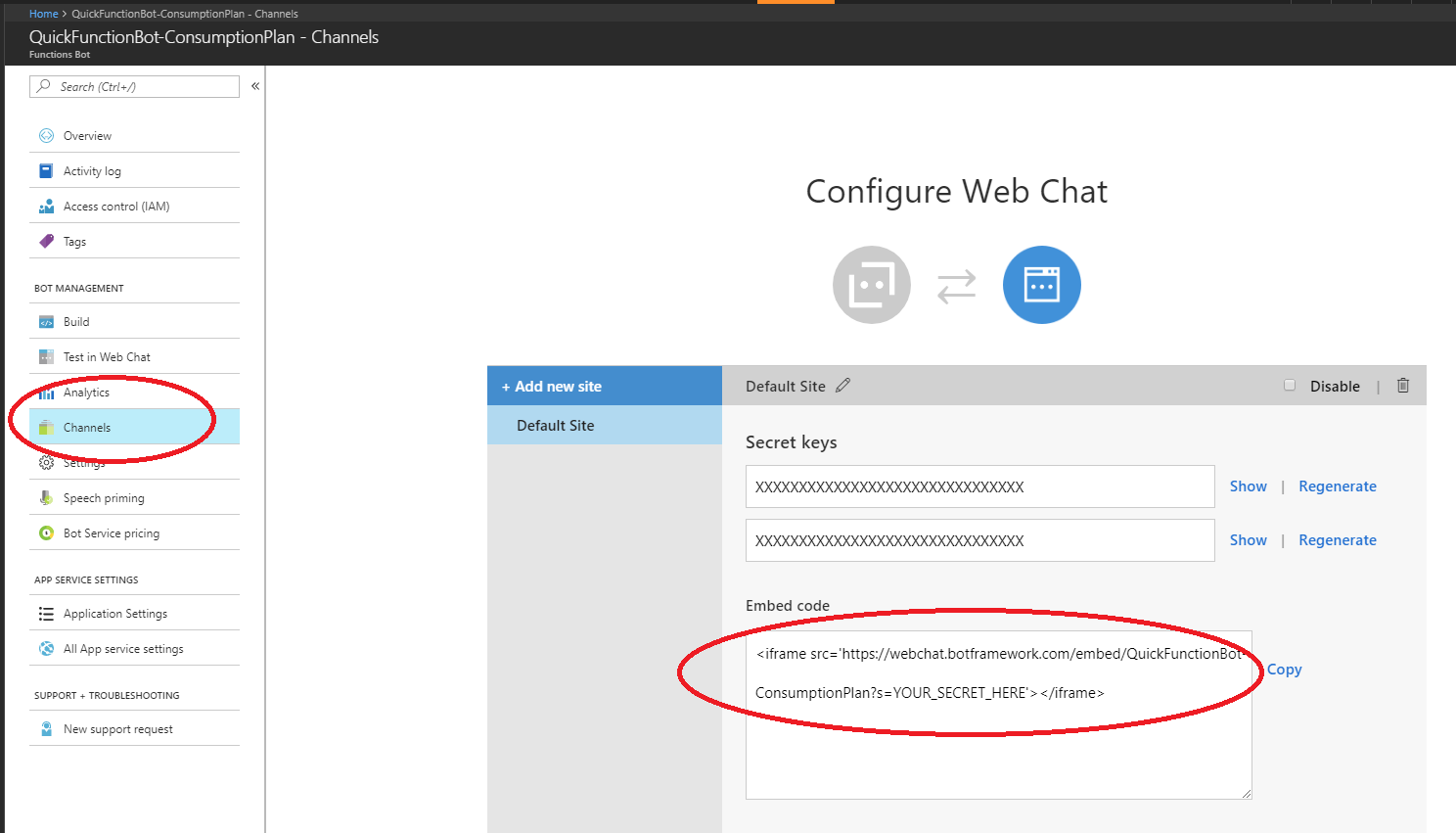
For the iframe, you would need to host this on a page on your site.
Please note, this is a closed issue. Please open a new issue, or ask on Stack Overflow for future questions.
 EricDahlvang
on 2 Jan 2018
EricDahlvang
on 2 Jan 2018
@EricDahlvang : Thanks, I did the same. That helped me.
nikhilabhiman
on 2 Jan 2018
@santhonydo what exact package where u missing in package json when u solved it
 vishmonne
on 17 Dec 2018
vishmonne
on 17 Dec 2018
@EricDahlvang is this really the best idea to be giving your secret away?
 xtianus79
on 19 May 2020
xtianus79
on 19 May 2020
@xtianus79 No, exposing the secret is not 'the best idea' for all production bots. In a production environment, the secret should be exchanged for a token and the secret should not be shared.
EricDahlvang
on 19 May 2020
Related issues
 hailiang-wang
·
3Comments
hailiang-wang
·
3Comments
 jschristophe
·
3Comments
jschristophe
·
3Comments
 Arimov
·
3Comments
Arimov
·
3Comments
 daveta
·
3Comments
daveta
·
3Comments
 vaditya04
·
3Comments
vaditya04
·
3Comments
Most helpful comment
The problem may be that in code you are not necessarily exposing /api/messages:
I had the same problem when configuring the bot to use the URL of the application, and not the URL of the application plus /api/messages .