Botframework-emulator: When using a manually specified user id, bot emulator switches to user id r_[somenumber] after initial messages
Version
4.8.1
Describe the bug
I set the emulator to use a custom user ID. It starts the conversation using that ID but after the initial messages from the bot it changes the user id to something like r_[somenumber].
To Reproduce
Steps to reproduce the behavior:
- Go to emulator settings
- Enable "Use your own user ID to communicate with the bot
- Copy
dl_e9360b03-412d-4597-8046-be40264fdc51@demo_companyin theUser IDfield - Click save
- Restart conversation with the bot
- Inspect conversationUpdate to see that it adds member with id
dl_e9360b03-412d-4597-8046-be40264fdc51@demo_companyto conversation - See that bot answers with some intro message.
recipient.idshould bedl_e9360b03-412d-4597-8046-be40264fdc51@demo_company - Send a message to the bot.
from.idshould bedl_e9360b03-412d-4597-8046-be40264fdc51@demo_companybut in my case it wasr_1589199908. This breaks my bot logic.
Expected behavior
I expect the user ID to be the one I configured and I expect the user ID stay the same during the conversation.
Screenshots


Additional context
conversationUpdate:
{
  "channelId": "emulator",
  "conversation": {
    "id": "73bcb540-9382-11ea-8641-f9e1905c9a85|livechat"
  },
  "from": {
    "id": "dl_e9360b03-412d-4597-8046-be40264fdc51@demo_company",
    "name": "User",
    "role": "user"
  },
  "id": "73ce1a60-9382-11ea-a0f0-e59eeb591f47",
  "localTimestamp": "2020-05-11T14:25:08+02:00",
  "membersAdded": [
    {
      "id": "35afd9d0-9382-11ea-8641-f9e1905c9a85",
      "name": "Bot"
    },
    {
      "id": "dl_e9360b03-412d-4597-8046-be40264fdc51@demo_company",
      "name": "User"
    }
  ],
  "membersRemoved": [],
  "recipient": {
    "id": "35afd9d0-9382-11ea-8641-f9e1905c9a85",
    "name": "Bot",
    "role": "bot"
  },
  "serviceUrl": "http://localhost:53051",
  "timestamp": "2020-05-11T12:25:08.614Z",
  "type": "conversationUpdate"
}
message from bot: "How can I help you?"
{
  "attachments": [],
  "channelId": "emulator",
  "conversation": {
    "id": "73bcb540-9382-11ea-8641-f9e1905c9a85|livechat"
  },
  "entities": [],
  "from": {
    "id": "35afd9d0-9382-11ea-8641-f9e1905c9a85",
    "name": "Bot",
    "role": "bot"
  },
  "id": "79fb3800-9382-11ea-a0f0-e59eeb591f47",
  "inputHint": "expectingInput",
  "localTimestamp": "2020-05-11T14:25:18+02:00",
  "recipient": {
    "id": "dl_e9360b03-412d-4597-8046-be40264fdc51@demo_company",
    "role": "user"
  },
  "replyToId": "73ce1a60-9382-11ea-a0f0-e59eeb591f47",
  "serviceUrl": "http://localhost:53051",
  "speak": "Waar kan ik je mee helpen?",
  "text": "Waar kan ik je mee helpen?",
  "timestamp": "2020-05-11T12:25:18.976Z",
  "type": "message"
}
question containing issue: question from user to bot, where emulator seems to have wrong from.id
{
  "channelData": {
    "clientActivityID": "1589199932491y4w38xfucw",
    "clientTimestamp": "2020-05-11T12:25:32.491Z"
  },
  "channelId": "emulator",
  "conversation": {
    "id": "73bcb540-9382-11ea-8641-f9e1905c9a85|livechat"
  },
  "entities": [
    {
      "requiresBotState": true,
      "supportsListening": true,
      "supportsTts": true,
      "type": "ClientCapabilities"
    }
  ],
  "from": {
    "id": "r_1589199908",
    "name": "User",
    "role": "user"
  },
  "id": "820a8320-9382-11ea-a0f0-e59eeb591f47",
  "localTimestamp": "2020-05-11T14:25:32+02:00",
  "recipient": {
    "id": "35afd9d0-9382-11ea-8641-f9e1905c9a85",
    "name": "Bot",
    "role": "bot"
  },
  "serviceUrl": "http://localhost:53051",
  "text": "waar werk ik?",
  "textFormat": "plain",
  "timestamp": "2020-05-11T12:25:32.498Z",
  "type": "message"
}
[bug]
 hansmbakker
All 10 comments
This bug appeared in a previous release and it was due to the ID from the Emulator side not being passed properly to the Web Chat control, which results in Web Chat generating a random id -- r_<guid> -- for the activities.
I'll have to take a look and see if I can repro the issue.
 tonyanziano
on 11 May 2020
tonyanziano
on 11 May 2020
@tonyanziano Any update?
 cleemullins
on 13 May 2020
cleemullins
on 13 May 2020
@hansmbakker after looking at your repro steps, my understanding is that you:
- already have a conversation with the bot started
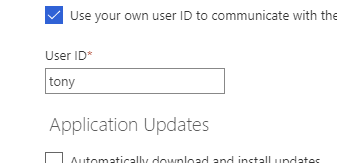
- go into settings and set your custom user ID
- go back to the started conversation and restart it
If the above are true, this is by design and not a bug. The custom user ID is only set for the initial conversation with the bot.
When you hit the "Restart conversation" button, please make sure you have the right option selected before restarting:
1. Restart conversation - New User ID

This option will override the current user ID -- no matter what (even if custom ID is set) -- and assign a new GUID to the user ID.
2. Restart conversation - Same User ID
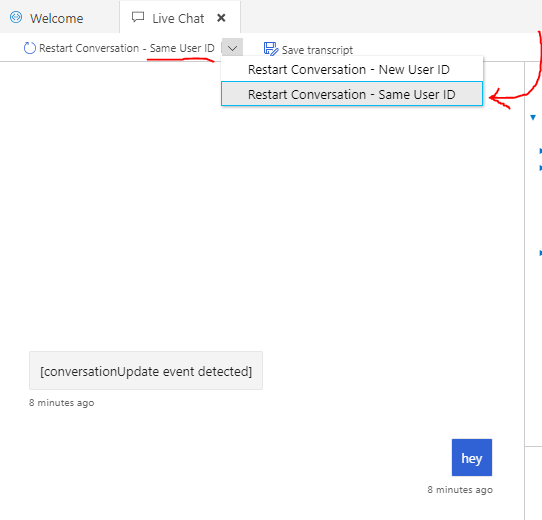
This option will preserve the current user ID and carry it into the next conversation. If you want to preserve your custom user ID, use this option when restarting the conversation.
It is currently impossible to carry the custom user ID into an already ongoing conversation. If you set a new custom ID in the middle of conversation, you have to open a new chat tab with a brand new conversation to see it used.
- Set user ID in settings
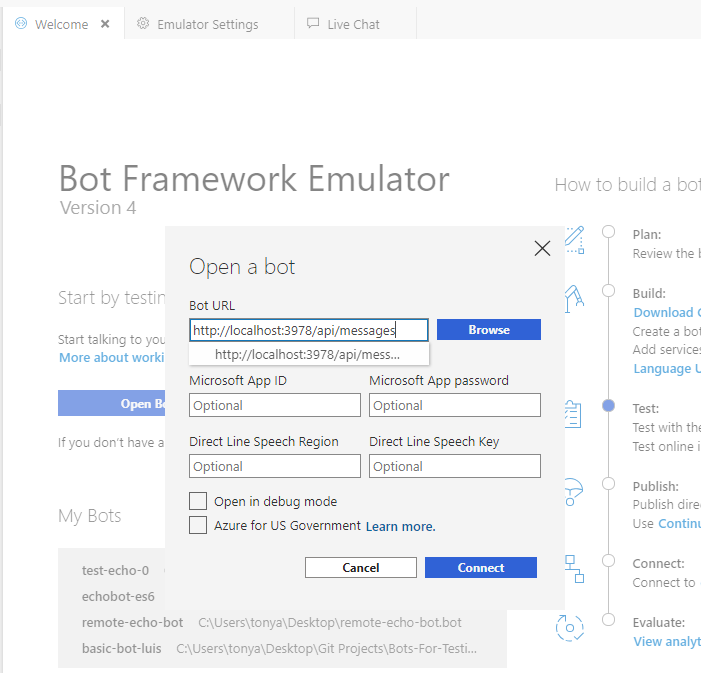
- Open a bot from the home page
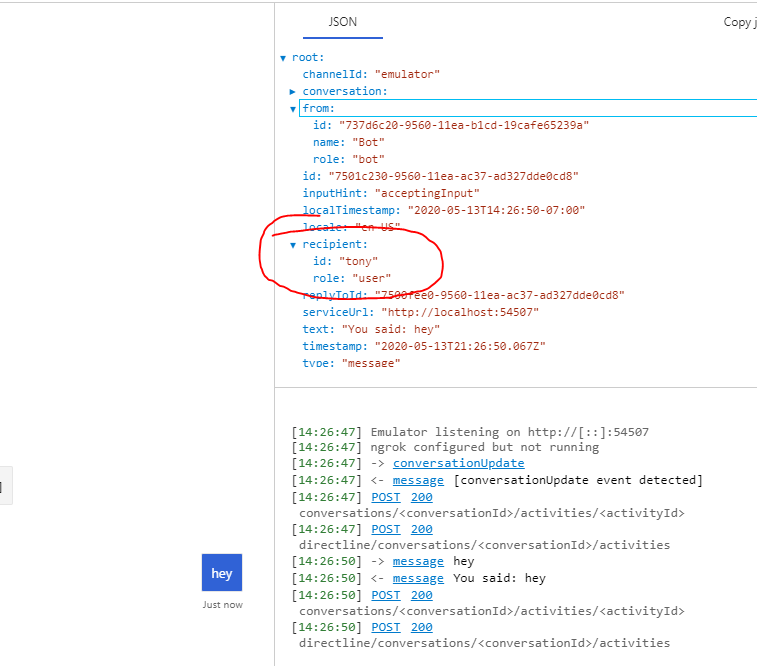
- See your user ID used in the conversation
tonyanziano
on 13 May 2020
I just thought about this some more, and although what I said above is still true, you should still not be seeing a GUID with the pattern r_<guid>.
I was unable to reproduce that behavior.
tonyanziano
on 14 May 2020
Hi @tonyanziano,
- the pattern I saw was not
r_<guid>butr_<integer>(you can see it in the json marked as "question containing issue" - I did
restart conversation - new user id - I did not try changing the user id of an existing conversation. The issue is, that the emulator seemed to change the users id from
<custom id>tor_<integer>after a few messages in the conversation
hansmbakker
on 14 May 2020
So the ID changed midway through the conversation?
Example:
- Activity 1 - userId = customId
- Activity 2 - userId = customId
- Activity 3 - userId = r_12345
- .... Activities 4+
- Activity n - userId = r_12345
tonyanziano
on 14 May 2020
Yes, I believe so
hansmbakker
on 14 May 2020
Ok I'll try to investigate a little further and see if I can see anything weird going on.
tonyanziano
on 14 May 2020
Hey @hansmbakker ,
We just released a new version -- v4.9.0 -- of the Emulator on Thursday. Can you try this scenario out with the newest version and see if you still run into this issue?
If so, is there any way you can provide me with a minimalized version of your bot code that reproduces this issue? That way I could debug it locally and figure out what's going on.
tonyanziano
on 18 May 2020
Assuming this has been addressed in 4.9.0, closing this issue due to lack of activity.
 gabog
on 29 May 2020
gabog
on 29 May 2020
Related issues
 ravriel
·
3Comments
ravriel
·
3Comments
 weewey
·
6Comments
weewey
·
6Comments
 giorgobiani
·
3Comments
giorgobiani
·
3Comments
 Kumar2608
·
4Comments
Kumar2608
·
4Comments
 cwhitten
·
5Comments
cwhitten
·
5Comments