Botframework-emulator: Not able to connect to bot with vpn connection
Hi All,
Getting the below error while connect to bot with VPN
The bot's Microsoft App ID or Microsoft App Password is incorrect.
 Rajendrakumarnune
All 32 comments
@Rajendrakumarnune can you please add the steps to reproduce the issue? How are you connecting the bot to the Emulator? Have you entered your app credentials correctly? Does it connect to the bot as expected when not connected to a VPN?
 anusharavindrar
on 28 Jan 2020
anusharavindrar
on 28 Jan 2020
Yes I have entered correctly and bot is connecting with out vpn
Rajendrakumarnune
on 29 Jan 2020
I am getting issue with VPN only
Rajendrakumarnune
on 29 Jan 2020
@Rajendrakumarnune what version of the Emulator are you testing on? Can you attach a screenshot of the error you are getting? Are you able to access the Azure portal and the resources while connected to a VPN? Also, can you make use of Fiddler and attach the Fiddler trace from the moment you try to connect the bot to the Emulator up until you get the error?
anusharavindrar
on 29 Jan 2020
I am attaching the bot emulator version and I am not able fiddler response because git hub not accepting tha .saz format.
I am working behind Corporate company and I am using bot emulator and bot application is c#.
I am thinking is there any proxy issue if it is how to set proxy for the bot emulator.
if it is not proxy issue please provide the solution for this.

Rajendrakumarnune
on 30 Jan 2020
Yes,I am able to login to azure portal while connected to VPN.
Rajendrakumarnune
on 30 Jan 2020
@Rajendrakumarnune my follow-up question would have been the same - if you are on a corporate network or behind a proxy? It is difficult to narrow down on the issue without looking into the network trace. Can you try to upload the Fiddler trace within a .zip file and share or email me the .saz file(email id is on my Github profile)?
anusharavindrar
on 30 Jan 2020
Please find the attached fiddler file
bottraffic.zip
Rajendrakumarnune
on 31 Jan 2020
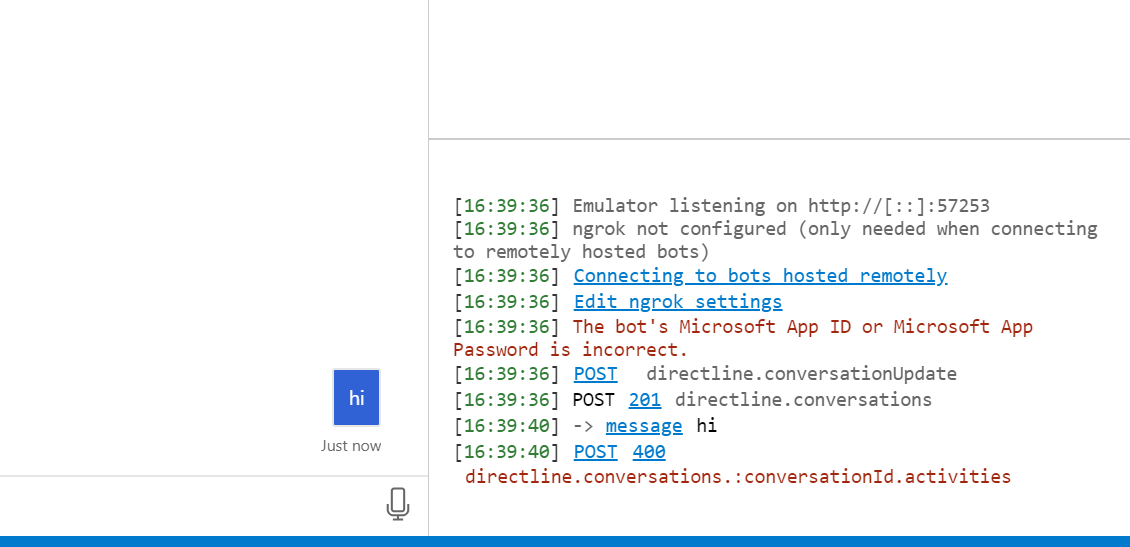
Please find the error below
Rajendrakumarnune
on 31 Jan 2020
any update on this?
Rajendrakumarnune
on 3 Feb 2020
I have raised the ticket for this issue with my network team, he is saying "we are not getting any hits form your IP address so please configure externally for this bot emulator so that traffic will goes through the proxy".
I have used environmental variable to set the proxy but it didn't work.
so how to set proxy for the bot emulator.
Please help me on this.
Rajendrakumarnune
on 3 Feb 2020
@Rajendrakumarnune thanks for the fiddler trace. I will check the trace and update the thread with my findings. You can set the HTTPS_PROXY environment variable with the address of your proxy and restart the Emulator after setting the variable, and then try using the Emulator to connect to your bot.
Ex: set HTTPS_PROXY=http://[proxy-address][:port]
anusharavindrar
on 3 Feb 2020
I took a look at the Fiddler trace and it looks like the body of the 400 response is:
{"error":{"code":"ServiceError","message":"response.text is not a function"}}
I believe this is coming from the following line in the code:
So it would seem the request to your bot is not going through and returning a network response object like it should.
I would try configuring the HTTPS_PROXY environment variable as mentioned above by @anusharavindrar, and trying to contact your bot again.
If that doesn't work, we can make some modifications to the source code and have you use a custom build to try and debug this further.
 tonyanziano
on 3 Feb 2020
tonyanziano
on 3 Feb 2020
I have tried with environment variable but it didn't work.
Please help me in other way.
Rajendrakumarnune
on 3 Feb 2020
I haven't tried any custom build.
Rajendrakumarnune
on 3 Feb 2020
@Rajendrakumarnune I will make a custom build for you to try once I make the changes to the Emulator code that should help surface the error.
tonyanziano
on 3 Feb 2020
@Rajendrakumarnune how are you configuring the environment variables HTTP_PROXY, HTTPS_PROXY, NO_PROXY ?
anusharavindrar
on 3 Feb 2020
I have followed below steps
- From start search, type env
- Click on Environment Variable under Advanced tab.
- Under "User Variable , click new and fill the following info and click OK –
• Variable_name : http_proxy | variable_value : http://[proxy]:[port]
• Variable_name : https_proxy | variable_value : http://[proxy]:[port]
I have not configured any NO_PROXY .
When I add environment variable Bot emulator is getting below the error and it's not connecting.

Rajendrakumarnune
on 3 Feb 2020
Please provide custom build.
Rajendrakumarnune
on 3 Feb 2020
Any update on this.
Rajendrakumarnune
on 5 Feb 2020
Hi @Rajendrakumarnune ,
Why don't you send me an email at [email protected] and I will send you a .zip containing the custom Mac build for you to try.
I believe the file is too large to upload to GitHub.
tonyanziano
on 5 Feb 2020
I have send mail to you.
Rajendrakumarnune
on 6 Feb 2020
I am getting the below message in log file.
{
"message": "\"The bot's Microsoft App ID or Microsoft App Password is incorrect.\""
}
Rajendrakumarnune
on 7 Feb 2020
when I remove APP ID and Password I am able to connect.
Rajendrakumarnune
on 7 Feb 2020
@Rajendrakumarnune is your bot local?
If it is, are you sure your bot code is configured to accept an App ID & Password?
Usually that logic would look like this:
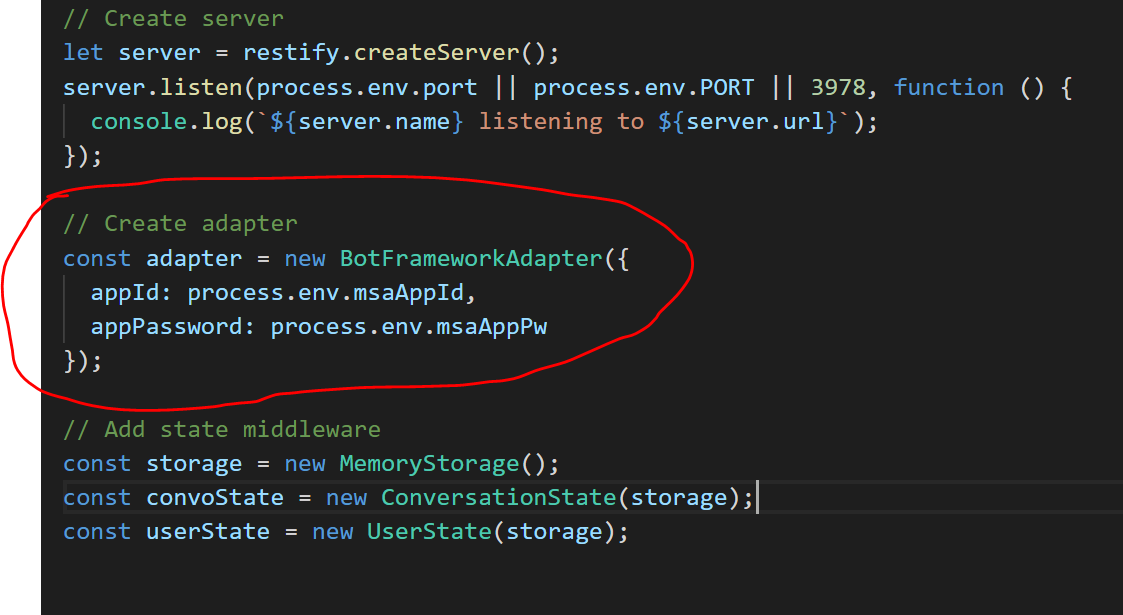
These environment variables need to be set when you start your bot for it to accept the credentials.
If your bot is configured to consume the credentials through environment variables like in the above code snippet, but the environment variables are not set properly, then trying to connect to the bot using the credentials in the Emulator will throw a 401 Unauthorized.
Because essentially you are trying to enter credentials into a bot that is not expecting any.
tonyanziano
on 7 Feb 2020
Hi,
My bot is running locally ,when I configure APP ID and Password from Emulator and application it is not working and when I remove it from the both it is working.
Rajendrakumarnune
on 8 Feb 2020
@Rajendrakumarnune, reiterating @tonyanziano's question, is your bot code configured to consume the app credentials through the environment variables?
anusharavindrar
on 12 Feb 2020
No I just configured in Emulator and application
Rajendrakumarnune
on 19 Feb 2020
@Rajendrakumarnune this is by design.
If you have not configured your bot to consume the App ID & Password through environment variables or some other method, and you try to enter them through the Emulator, then you will not be able to connect to your bot.
In order to connect to your bot, you need to be in one of the two following scenarios:
- Your bot code is configured to consume the App ID & Password, and you provided the correct credentials through the Emulator
- Your bot code is not configured to consume the App ID & Password, and you did not provide the correct credentials through the Emulator
tonyanziano
on 19 Feb 2020
I have configured app id and password from the configuration file and it is working with out VPN but it is not working with VPN.
Rajendrakumarnune
on 19 Feb 2020
@Rajendrakumarnune you mentioned in an earlier comment that your bot is running locally.
So just to clarify:
- Your bot is running locally
- Your bot code is configured to run with an App ID & Password
- When not connected to a VPN you can connect to your bot both with and without credentials.
- When connected to a VPN you cannot connect to your bot with credentials, but you can without credentials?
I'm not sure why being on a VPN would affect the connection to your bot if you are running locally as the network requests should be local to your machine and not passing through the VPN.
tonyanziano
on 20 Feb 2020
Yes correct,Bot is not working only with VPN
Rajendrakumarnune
on 11 Mar 2020
Related issues
 mark-szabo
·
6Comments
mark-szabo
·
6Comments
 textminer
·
5Comments
textminer
·
5Comments
 Revolyze
·
4Comments
Revolyze
·
4Comments
 ravriel
·
3Comments
ravriel
·
3Comments
 wlopez-enkoding
·
5Comments
wlopez-enkoding
·
5Comments