Botframework-emulator: "Restart to Update..." doesn't restart or update Emulator
Version
4.4.0
OS:
- Windows 10 Enterprise
- Version 1809
- OS Build 17763.523
Describe the bug
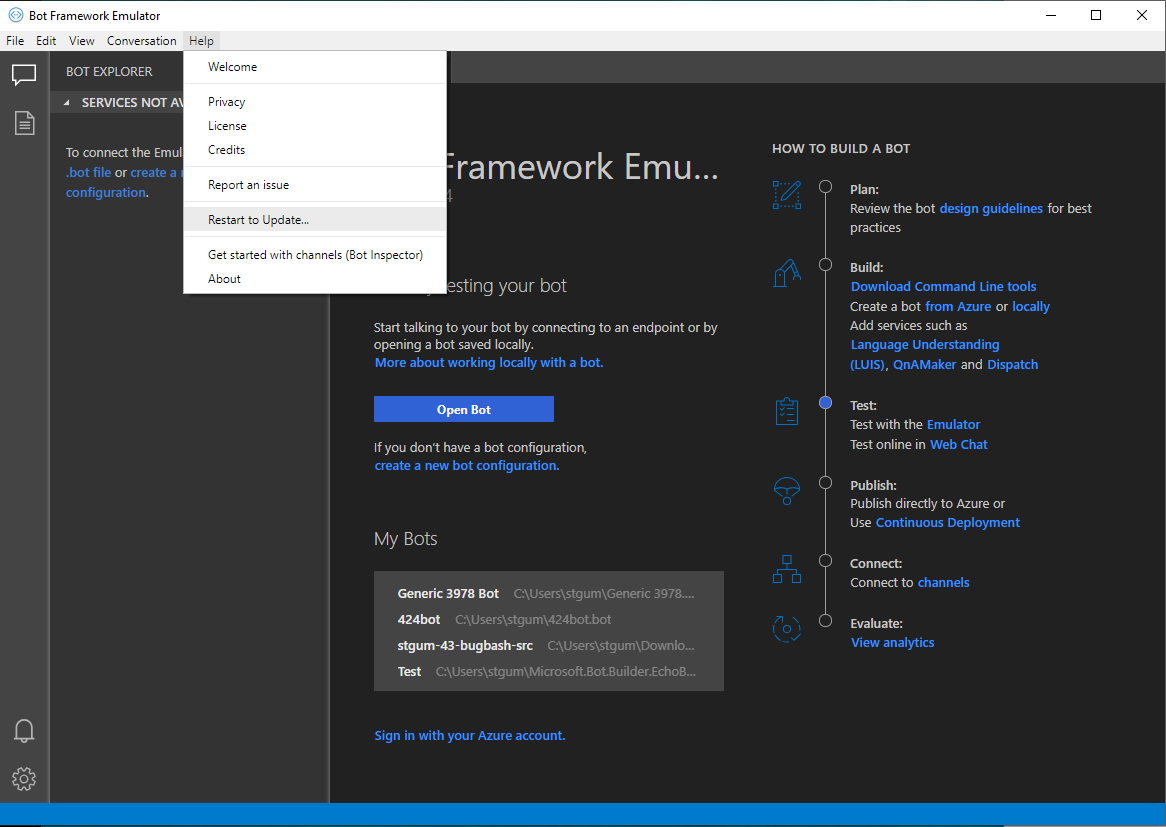
The Restart to Update... button in the Help menu closes the instance of the Emulator but doesn't complete the update.
Checking the version of the emulator before and after the attempt to restart the update via Help > About yields the version 4.4.0.
Expected behavior
Expected the emulator to restart and the restarted instance to have the version number 4.4.1.
Screenshots
Additional context
Repro'd on @corinagum's machine
[bug]
 stevengum
>All comments
After investigating for a day or so I'm still not sure what the cause of the issue is. However, I did figure out that it seems to be a permissions issue.
It looks like the update.exe that is installed requires admin permissions to run, and so if you run the Emulator as an administrator, or if you launch it from a terminal that is running as administrator, then the update will properly install and restart the app on quit.
 tonyanziano
on 10 May 2019
tonyanziano
on 10 May 2019
Related issues
 Spydernaz
·
5Comments
Spydernaz
·
5Comments
 giorgobiani
·
3Comments
giorgobiani
·
3Comments
 cwhitten
·
5Comments
cwhitten
·
5Comments
 madenwala
·
6Comments
madenwala
·
6Comments
 hpksp
·
5Comments
hpksp
·
5Comments
Most helpful comment
After investigating for a day or so I'm still not sure what the cause of the issue is. However, I did figure out that it seems to be a permissions issue.
It looks like the update.exe that is installed requires admin permissions to run, and so if you run the Emulator as an administrator, or if you launch it from a terminal that is running as administrator, then the update will properly install and restart the app on quit.