Botframework-emulator: Could not use emulator software because [500] Internal Server Error
Hi, Im not sure this is a new bug or this issue causes by my computer. At this time, I could nt use emulator software to test the bot. Please check if this is new issue.
Thanks
 binhpht
All 28 comments
I was having the same problem, updating the emulator to the new version 3.5.31 solved the Internal Server Error, but the bot does not handle the messages sent through this channel. The other channels are working fine, only the emulator produces this problem.
 LeonBirk
on 2 Aug 2017
LeonBirk
on 2 Aug 2017
@binhpht What version of the emulator are you running? (can be found on the About dialog)
Can you please copy/paste your emulator log here?
 eanders-MS
on 2 Aug 2017
eanders-MS
on 2 Aug 2017
I am having the same problem, since 3-4 hours ago.
v.3.5.31 gives 500.
on the bot side,
ERROR: ChatConnector: receive - invalid signing key or OpenId metadata document.
 pomarc
on 2 Aug 2017
pomarc
on 2 Aug 2017
@pomarc, @binhpht Please ensure you are using version v3.5 or greater of the BotBuilder SDK. More details here: https://blog.botframework.com/2017/05/07/Bot-Framework-Auth-Change/
eanders-MS
on 2 Aug 2017
Im using bot builder 3.8. It still error now @nwhitmont
binhpht
on 3 Aug 2017
@eanders-MS Hey, the log like this
08:58:38] Application is up to date.
[09:01:57] -> POST Request to 'http://127.0.0.1:3979/api/messages' failed: [500] Internal Server Error
[09:01:57] -> POST Request to 'http://127.0.0.1:3979/api/messages' failed: [500] Internal Server Error
binhpht
on 3 Aug 2017
Hi,
I'have the same issue. Do you have news?
My botbuilder version is 3.8.4
ERROR: ChatConnector: receive - invalid signing key or OpenId metadata document.
 vonhan
on 3 Aug 2017
vonhan
on 3 Aug 2017
Does anyone can fix this, the issue hasnt solve now
binhpht
on 3 Aug 2017
Does your bot work with other channels (i.e. Skype, Telegram, etc)? I'd like to know if this is emulator-specific, or on the SDK side.
eanders-MS
on 3 Aug 2017
I am also getting this error after upgrading to new version of the emulator. Any fix available?
 ramil
on 4 Aug 2017
ramil
on 4 Aug 2017
@ramil, is your bot using v3.5 or later of the BotBuilder SDK?
@binhpht, @pomarc, what is the MSA AppId of your bot?
eanders-MS
on 4 Aug 2017
@eanders-MS my add is MICROSOFT_APP_ID=0383eb89-956b-4b56-a5ec-055108339657 and it works with other channel apart from Emulator.
Thanks.
binhpht
on 4 Aug 2017
@eanders-MS I am using "botbuilder": "^3.8.2", my app_id=236c7927-d88d-458c-a62f-fe321fc43faa it works beautifully with fb, skype, telegram, slack.
with direct line and web I have a little glitch: the default dialog is started twice, but I think it's unrelated.
pomarc
on 4 Aug 2017
Hi Eric,
My bot version is below. Any luck?
"botbuilder": "^3.8.4",
On Fri, Aug 4, 2017 at 4:19 AM, pomarc notifications@github.com wrote:
@eanders-MS https://github.com/eanders-ms I am using "botbuilder":
"^3.8.2", my app_id=236c7927-d88d-458c-a62f-fe321fc43faa it works
beautifully with fb, skype, telegram, slack.
with direct line and web I have a little glitch: the default dialog is
started twice, but I think it's unrelated.—
You are receiving this because you were mentioned.
Reply to this email directly, view it on GitHub
https://github.com/Microsoft/BotFramework-Emulator/issues/262#issuecomment-320188157,
or mute the thread
https://github.com/notifications/unsubscribe-auth/AAMg77W5zGJhiWnpEbxV04il9qSrc6rXks5sUtQsgaJpZM4OrCIg
.
--
Thanks and regards,
Ramilo Segarra
ramil
on 4 Aug 2017
I would be grateful if someone on this issue could capture additional information about the error. The error likely contains a message that isn't getting logged to the output window. You should be able to get the error by capturing it in a Fiddler trace. Alternatively, you could clone the Emulator repo, and build/run from source. If someone chooses to take this approach, you'll want to set a breakpoint on around line 61 in ./src/server/botFrameworkAuthentication.ts. Thanks!
eanders-MS
on 4 Aug 2017
@eanders-MS
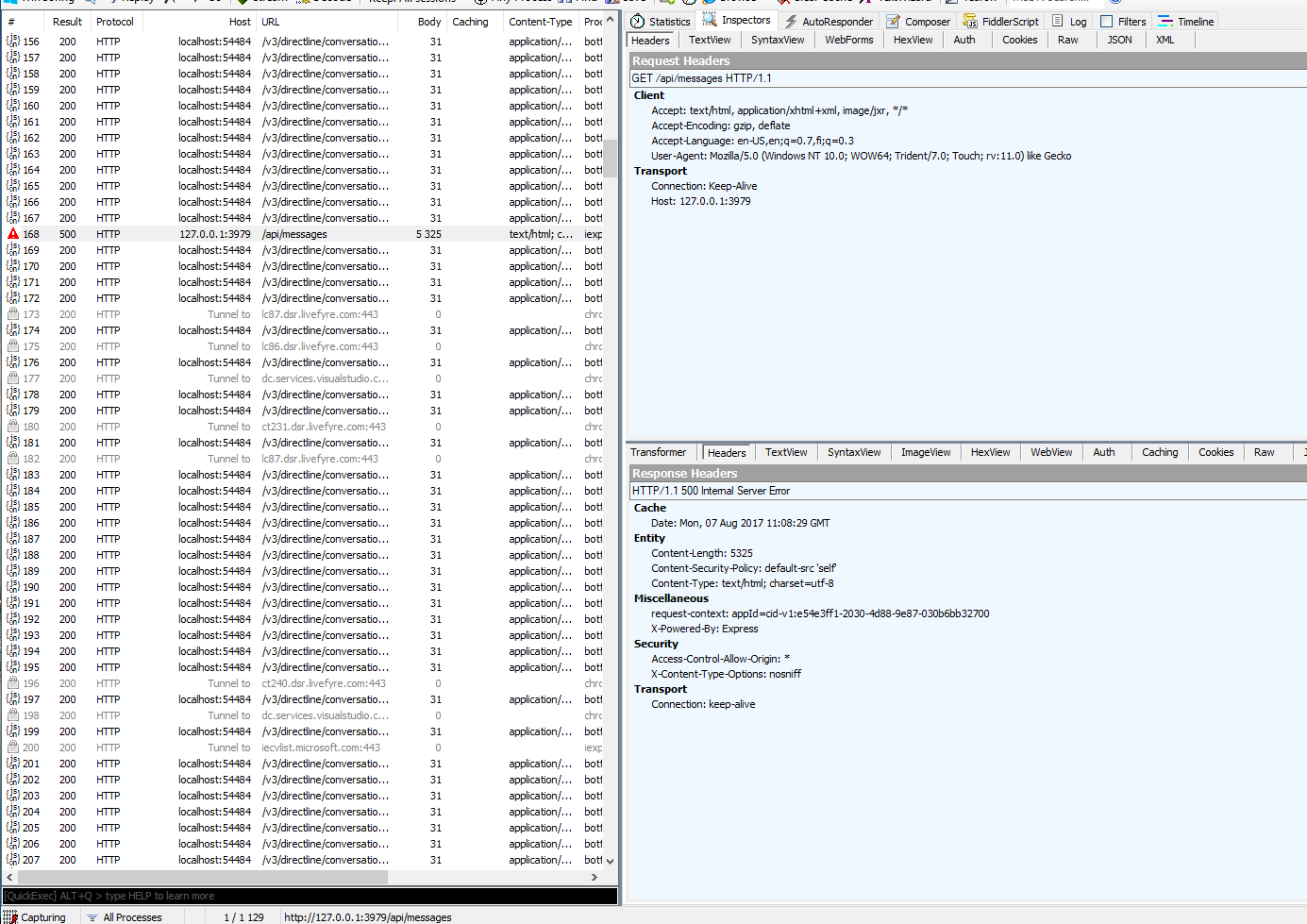
Hey, I dont know which the tab you want to see show I send you this common pic.
binhpht
on 7 Aug 2017
Hi All,
You can downgrade to a lower version of the emulator if you want to continue with your testing. According to the release note there is an update with the auth end point. That code must have affected this. If any who has the time to debug that would be great so we can use the new version. Thanks.
3.5.31
Notable Fixes and Improvements
Updated to use v31 auth endpoint. More about that here: https://blog.botframework.com/2017/05/07/Bot-Framework-Auth-Change/
ramil
on 7 Aug 2017
Hi @ramil,
I confirm it, thanks a lot! I used botframework-emulator 3.5.31, I have substituted it with 3.5.29 version and now all works.
Previously (botframework-emulator 3.5.31) from console debug I received:
ERROR: ChatConnector: receive - invalid signing key or OpenId metadata document.
vonhan
on 7 Aug 2017
Everyone: The authentication endpoint used by version 3.5.29 of the emulator will soon stop working entirely.
@vonHan, What version of the BotBuilder SDK are you using? Please check to ensure you're on 3.5 or later.
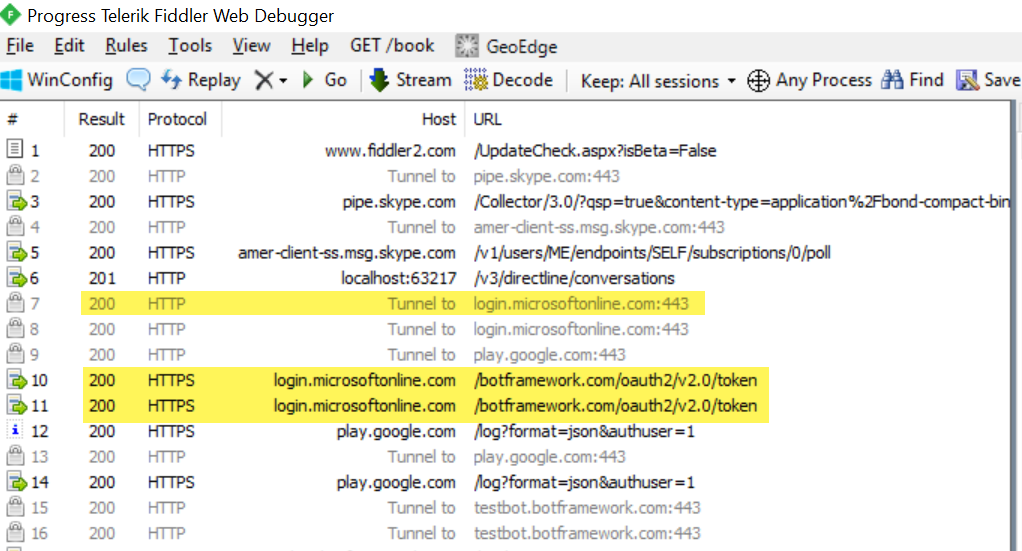
@binhpht, Thank you for the Fiddler screenshot! What I'd be interested in seeing appears higher up in the capture list. Look for calls to host login.microsoftonline.com that resulted in anything other than a 200 response. Examples:
eanders-MS
on 7 Aug 2017
Ok, I was I able to reproduce this with botbuilder (NodeJS) v3.8.3, but could not repro with v3.9.0. @binhpht and others, can you try updating to 3.9.0?
eanders-MS
on 7 Aug 2017
@eanders-MS: thanks for info. I'm using "botbuilder": "^3.8.4"
vonhan
on 8 Aug 2017
I just now ran into the same problem. I was testing using the emulator (on a Mac), came back a little later, and it stopped working (with ERROR: ChatConnector: receive - invalid signing key or OpenId metadata document.) I updated botbuilder to v3.9.0. Now it works!
 dan-cohn
on 9 Aug 2017
dan-cohn
on 9 Aug 2017
thanks, I will update bot version in next week so I hope this problem will be resolve.
binhpht
on 9 Aug 2017
No need to Update the Bot Version. If you are running the script in local system then comment the
app id and app password for connector . Keep it blank on Emulator and script .
-----------var connector = new builder.ChatConnector({});-----------
Then it will work fine.
 Sjtsharma
on 23 Aug 2017
Sjtsharma
on 23 Aug 2017
I am facing the same issue with the latest version of BotBuilder (3.14.1.1) + Emulator(v3.5.35) whereas it works perfectly with 3.13 using same emulator. It throws the following error while trying to connect to bot application with bot emulator -
Log
[17:46:26] -> POST Request to 'http://localhost:2828/api/messages' failed: [500] Internal Server Error
Here are the details -
{
"type": "conversationUpdate",
"membersAdded": [
{
"id": "ag0kfb0d88g3",
"name": "Bot"
}
],
"id": "dlnn55h2ek13",
"channelId": "emulator",
"timestamp": "2018-03-30T12:16:23.818Z",
"localTimestamp": "2018-03-30T17:46:23+05:30",
"recipient": {
"id": "ag0kfb0d88g3",
"name": "Bot"
},
"conversation": {
"id": "5bnlfjedecnc"
},
"from": {
"id": "default-user",
"name": "User"
},
"serviceUrl": "http://localhost:58411"
}
Log
Please do let me know if any further logs required.
 PreranaPolekar
on 30 Mar 2018
PreranaPolekar
on 30 Mar 2018
Any update on this, i see from the link here https://stackoverflow.com/questions/49322023/published-c-sharp-bot-runs-into-internal-server-error-after-some-time/49325318#49325318 that there was a bug with 3.14.0.7 and update was published but i am facing the same issue(running the bot on emulator gives 500 Internal Server Error) with the updated version [3.14.1.1]. Any one facing the same issue ?
PreranaPolekar
on 10 Apr 2018
Uninstalling and re-installing same latest version of Bot.Builder[3.14.1.1] and Bot.Connector[3.14.1.1] worked in my case.
Happy Coding :)
PreranaPolekar
on 10 Apr 2018
I have same issue
 soso-maitha
on 16 Jul 2018
soso-maitha
on 16 Jul 2018
Related issues
 Spydernaz
·
5Comments
Spydernaz
·
5Comments
 wlopez-enkoding
·
5Comments
wlopez-enkoding
·
5Comments
 iMicknl
·
6Comments
iMicknl
·
6Comments
 Kumar2608
·
3Comments
Kumar2608
·
3Comments
 giorigor
·
4Comments
giorigor
·
4Comments
Most helpful comment
No need to Update the Bot Version. If you are running the script in local system then comment the
app id and app password for connector . Keep it blank on Emulator and script .
-----------var connector = new builder.ChatConnector({});-----------
Then it will work fine.