Botbuilder-samples: Context data confict - Unexpected switch language in Multilingual bot
Sample information
- Sample type: [Samples]
- Sample language: [Node.js - botbuilder SDK v 4.5.0]
- Sample name:
Describe the bug
I am developing a Multilingual bot that is connected with the Direct Line channel to out client application.
When the bot receives messages from more than one user with different languages (For example french and English), for some reasons, the bot switch the language for one the users.
In this conversation User 1 is talking to the bot in English:
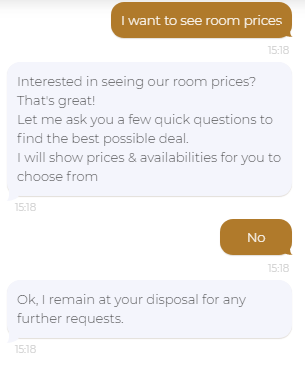
In an other conversation and at the same time User B is talking to the bot in French:
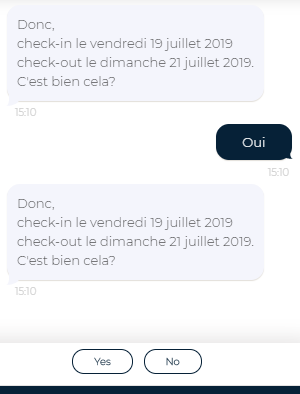
The bot display again the same confirm prompt but with switched language of the buttons (prompt's choices).
I am saving the languagePreference property in the userState, I also tried to store it in the conversationState but I still have the same issue. I debugged the problem locally and I didn't notice a strange behaviour.
Additional context
For the confirm prompt I am customizing its confirmChoices depending on the user's locale. I was thinking that this could cause the issue.
 montacerdk
All 10 comments
@stevkan , please investigate
 CoHealer
on 24 Jul 2019
CoHealer
on 24 Jul 2019
@montacerdk, are you able to post your code that is relevant to this so I can see your implementation?
 stevkan
on 30 Jul 2019
stevkan
on 30 Jul 2019
@stevkan, I am using i18next module in order to load translations, using the t() function by passing the user locale (en, fr, es, ...).
This function makeConfirmPrompt is used by all confirm prompts in the project. I am updating the confirm prompt choices dependending on the locale.
exports.makeConfirmPrompt = async (confirmPrompt, locale, promptText) => {
  confirmPrompt.confirmChoices = [
    t(locale, "confirm_yes"),
    t(locale, "confirm_no")
  ];
  return MessageFactory.text(promptText, "", "blockInput");
};
  async step1(step) {
    // Some code
  }
  async step2(step) {
    // Some code
  }
  async confirmBooking(step) {
    const locale = await this.localeProp.get(step.context);
    const promptText = t(locale, "confirm_booking");
    const promptOptions = await makeConfirmPrompt(
      confirmPrompt,
      locale,
      promptText
    );
    return await step.prompt(CONFIRM_PROMPT, promptOptions);
  }
Which channel(s) are you noticing this issue? If web chat, is this the embedded web chat (i.e. from the "Web Chat" channel) or is this a BotFramework-WebChat implementation? Also, how are you determining the user's locale? From the bot, browser, or some other method?
stevkan
on 1 Aug 2019
We are implementing the bot in a widget into our application via Direct Line channel.
The bot determines the user's locale using Text Analytics API.
After getting the the locale, we are updating localeProp in the conversationState.
montacerdk
on 1 Aug 2019
Hi @montacerdk, apologies for the delay. Can you verify that you'rer producing a unique token, conversation id, and user id for both users?
stevkan
on 9 Aug 2019
@montacerdk, just rounding back to this. Are you still needing help? If so, can you verify the above items?
stevkan
on 13 Aug 2019
Hi @stevkan, sorry for the late reply.
I still can't fix the issue. I don't know if it is a problem with the i18next module or the from the botbuilder sdk.
I debugged the issue locally, using ngrok to connect the local project with the staging enivrement on Azure. The conversation IDs and are unique for each user but I still got the same conflict of sessions.
montacerdk
on 14 Aug 2019
@montacerdk, sorry for the long wait. I believe there is a bug related to the ConfirmPrompt and how it is handling options passed into it, which I am looking into.
In the mean time, I've put together this code sample that should help you. As the ConfirmPrompt outputs a suggested action, the potential work around is to send a suggested action with updated cardAction values to reflect the user's locale.
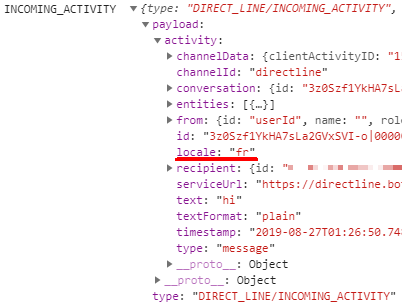
First, you mentioned you are using Direct Line to connect a client application. I don't know how your project is structured, so this part may or may not be of help. However, DirectLineJS offers the ability to post activities to the bot. In this way, if useful, you could capture the activity before it is sent, update the activity.locale, and then pass it on.
I'm using Web Chat as my client which has Direct Line built into it. In my case, I'm specifying locale as an attribute which is read in by the bot.
window.ReactDOM.render(
  <ReactWebChat
    directLine={ directLine }
    locale={'fr'}
  />,
  document.getElementById( 'webchat' )
);
In this sample, I use the activity.locale by passing it into i18next to get a matching response. This response I use to update cardActions before it is added to the suggested action. You'll notice that I have simplified the process slightly be removing the need to build a prompt. i18nextProcessor.js is used solely for acquiring the necessary values based on locale.
In i18nextProcessor.js, I use .init() to configure the i18next service. Some things to note:
lngspecifies the initial locale to use if none is provided.fallbackLngspecifies the locale to use if theactivity.localeis not recognized or loaded by i18next.resourcesare the matched responses. I was experiencing some issues specifying the path to a file, so I opted for this setup.
.changeLanguage() reads the passed in locale to set the current language. .t() then returns the associated key/value pair. I would recommend you research all of the above options for completeness.
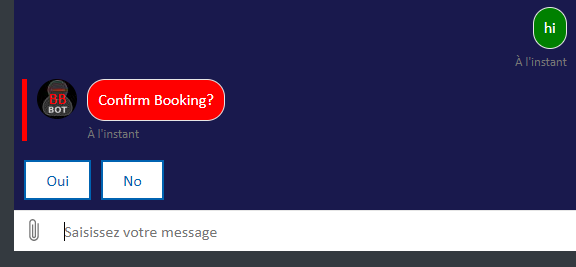
The image at the bottom shows the browser with a French locale, hence the French labels. The dialog is purposely _not_ in French tho I could set that up, as well.
Hope of help! Please let me know if you have any questions.
mainDialog.js
[...other modules...]
const { GetTextByLocale } = require( '../scripts/i18nextProcessor' )

[...]
async confirmBookingStep ( stepContext ) {
  const updatedLocale = await GetTextByLocale( stepContext.context.activity.locale)
  const promptText = "Confirm Booking?";
  const cardActions = [
    {
      type: ActionTypes.PostBack,
      title: updatedLocale.respondYes,
      value: updatedLocale.locale
    },
    {
      type: ActionTypes.PostBack,
      title: updatedLocale.respondNo,
      value: updatedLocale.locale
    }
  ]

  const reply = MessageFactory.suggestedActions( cardActions, promptText )
  await stepContext.context.sendActivity( reply );
  return { status: DialogTurnStatus.waiting };
}
i18nextProcessor.js
const i18next = require( 'i18next' )

i18next
  .init( {
    lng: 'en',
    resources: {
      en: {
        translation: {
          'respondYes': 'Yes',
          'respondNo': 'No',
          'locale': 'en'
        }
      },
      es: {
        translation: {
          'respondYes': 'Sí',
          'respondNo': 'No',
          'locale': 'es'
        }
      },
      fr: {
        translation: {
          'respondYes': 'Oui',
          'respondNo': 'No',
          'locale': 'fr'
        }
      }
    },
    fallbackLng: 'en',
    saveMissing: true
  } );


let response = {}
const GetTextByLocale = async ( locale ) => {
  try {
    if ( !locale ) {
      return;
    } else {
      await i18next.changeLanguage( locale, ( err ) => {
        if ( err ) return console.log( 'Something went wrong loading', err );
      } )
      response[ 'respondYes' ] = i18next.t( 'respondYes' );
      response[ 'respondNo' ] = i18next.t( 'respondNo' );
      response[ 'locale' ] = i18next.t( 'locale' );
      return response;
    }
  } catch ( error ) {
    console.log( error )
  }
};

exports.GetTextByLocale = GetTextByLocale;

stevkan
on 27 Aug 2019
@montacerdk, here's an update. At the moment, locale must be passed in all lower case and as culture + locale (i.e. 'fr-fr' or 'en-us'). One you adjust how the locale is being passed in, the ConfirmPrompt should test should reflect the user's locale/language.
There is a PR (#1121) that has been submitted that addresses this. It will also allow developers to pass in just the culture (i.e. 'fr' or 'en').
Side note, the defaultLocale value passed into ConfirmPrompt is only read _if_ no locale is specified in the activity. If you are looking to customize the ConfirmPrompt, then I would suggest the option present above (i.e. provide button text in a language other than the user's). Understanding how locale is currently utilized (and should be once the PR referenced below is merged), you may not need to use i18next.
I'm closing this issue as resolved. Please feel free to reopen if the issue persists or to open a new issue if you encounter other problems.
Hope of help!
stevkan
on 28 Aug 2019
Related issues
 v-kydela
·
4Comments
v-kydela
·
4Comments
 EricDahlvang
·
9Comments
EricDahlvang
·
9Comments
 jackiebecker
·
5Comments
jackiebecker
·
5Comments
 CKGrafico
·
3Comments
CKGrafico
·
3Comments
 cleemullins
·
5Comments
cleemullins
·
5Comments
Most helpful comment
@montacerdk, here's an update. At the moment, locale must be passed in all lower case and as culture + locale (i.e. 'fr-fr' or 'en-us'). One you adjust how the locale is being passed in, the ConfirmPrompt should test should reflect the user's locale/language.
There is a PR (#1121) that has been submitted that addresses this. It will also allow developers to pass in just the culture (i.e. 'fr' or 'en').
Side note, the defaultLocale value passed into ConfirmPrompt is only read _if_ no locale is specified in the activity. If you are looking to customize the ConfirmPrompt, then I would suggest the option present above (i.e. provide button text in a language other than the user's). Understanding how locale is currently utilized (and should be once the PR referenced below is merged), you may not need to use i18next.
I'm closing this issue as resolved. Please feel free to reopen if the issue persists or to open a new issue if you encounter other problems.
Hope of help!