Botbuilder-js: DialogContextError in botbuilder-dialogs
Github issues should be used for bugs and feature requests. Use Stack Overflow for general "how-to" questions.
Versions
package version of the SDK: ^4.7.0
node.js version: v12.13.1
browser version: Chrome 87
os: Windows 10
bot written in Typescript 3.9.7
Describe the bug
The user is stuck in a weird dialog state and cannot interact with the bot anymore, receiving only the "Sorry, it looks like something went wrong." error message. The implemented interruption logic (CancelDialog) is not working either. User's last successful conversation with the bot ended the current dialog, so the user is not stuck in a previous conversation.
Here are some useful stack traces from the logs:


And the actual stringified error here:

Analyzing the stack trace, here's the error that's being thrown in the /botbuilder-dialogs/lib/dialogContext.js:
throw new dialogContextError_1.DialogContextError(DialogContext.continueDialog(): Can't continue dialog. A dialog with an id of '${instance.id}' wasn't found., this);
Here is the code for the dialogBot.ts where the error is being thrown (in turn method) and mainDialog.ts where a dialog is started based on the detected skill of the bot.
https://github.com/StefaniaMan314/botbuilder
To Reproduce
Every time the user tries to start a new conversation with the bot a DialogContextError is being thrown and the dialog cannot be started.
Expected behavior
The dialog to start is found in the dialog context or in its parent dialog context.
Screenshots
Here's a screenshot of the user's conversations and the bot's responses:

Additional context
The odd thing is that this is happening only for a few users (3) across the org (from a total of ~5000 users). This is an unprecedented issue.
Here are several ways we tried to solve this, but none of them worked:
- Clearing state DB entries for this user
- Uninstalling and installing back the bot in Teams
- Clearing Teams cache on the user's machine
Any help is greatly appreciated. Thank you!
 StefaniaMan314
All 15 comments
@StefaniaMan314 Can you please include the code for the dialogs in question? Can you also please include the code where you instantiate the dialogs and add them to the dialog stacks?
You may also want to attempt updating your version of the SDK, especially if you're set up with a development environment. We follow semver, so there shouldn't be any breaking changes.
 mdrichardson
on 18 Jan 2021
mdrichardson
on 18 Jan 2021
@mdrichardson I added two files in the description of the bug. Thanks!
StefaniaMan314
on 19 Jan 2021
@StefaniaMan314 Based on the error message and stack trace, I believe the issue is related to this line. Can you verify that all of the dialogs that can possibly be called by that line are added here and that they all have unique ids?
If so, please send the log output around those stack traces; it looks like you have decent logging set up that may help track this down. Also, if you can include the code for the compiled MainDialog.js, we can verify which line it's breaking on.
mdrichardson
on 19 Jan 2021
@mdrichardson Hi, I checked the exact line you mentioned to see if the dialogs are added correctly (they are) and they do have unique ids as you can see here:
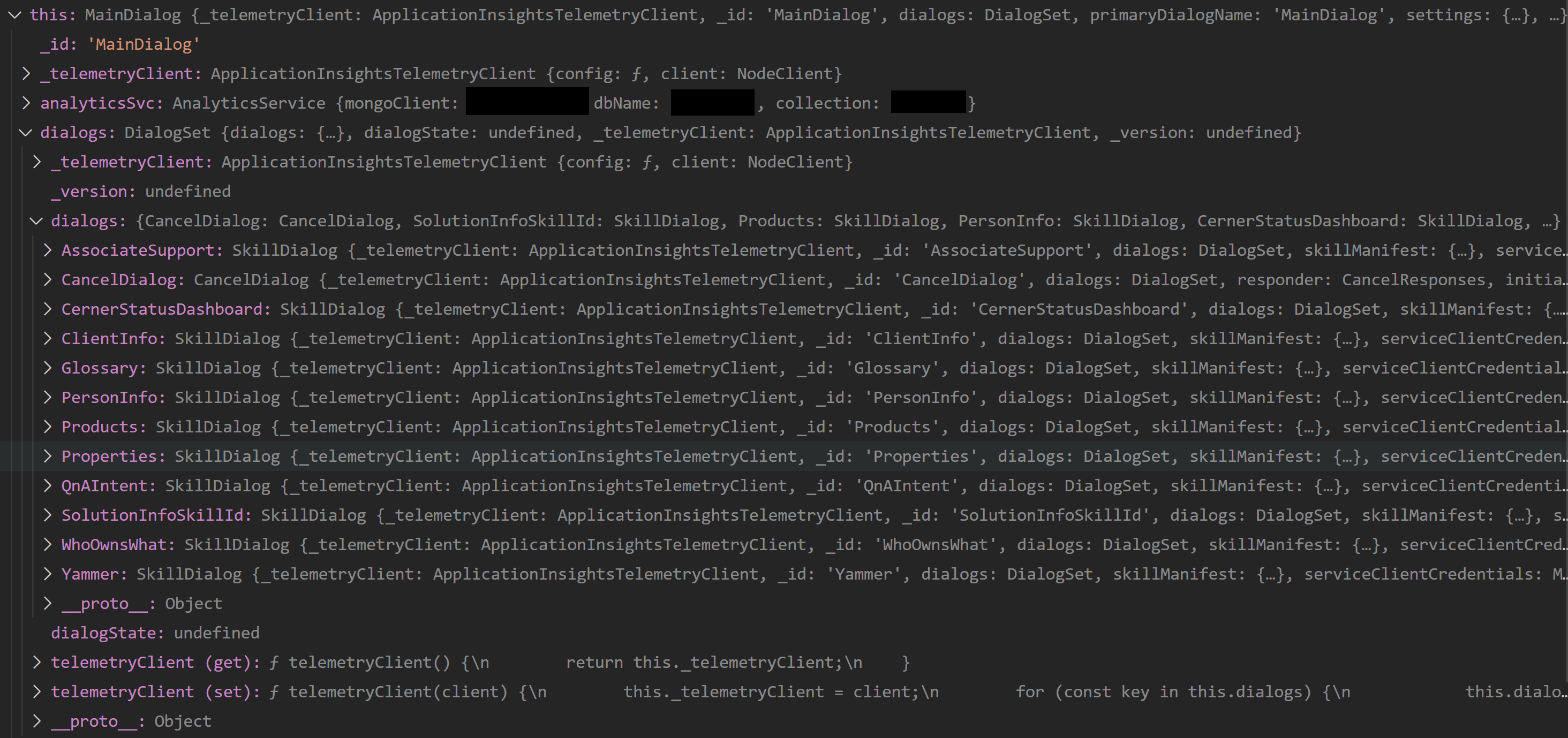
The thing is that the flow does not reach that line for the user. The DialogContext error is thrown here https://github.com/StefaniaMan314/botbuilder/blob/7bb952398e8cad0b56a9413e519668f37c6163c3/dialogBot.ts#L117 inside dialogBot.ts, before the execution reaches onEvent in mainDialog.ts.
Here are some logs from user's last interaction with the bot: https://github.com/StefaniaMan314/botbuilder/blob/main/botErrorLog.txt
And here is the compiled MainDialog.js file: https://github.com/StefaniaMan314/botbuilder/blob/main/mainDialog.js
Let me know your thoughts, thanks!
StefaniaMan314
on 20 Jan 2021
@StefaniaMan314 I'm still digging through this, but are you sure the error is thrown on that line and in dialogBot? I'm not seeing that in any of your stack traces. If it is thrown on that line, there should be an error starting with Error during user authentication... that would be very helpful to have for troubleshooting.
mdrichardson
on 20 Jan 2021
@mdrichardson Oh, my bad! I got the wrong line. The error's thrown at this line https://github.com/StefaniaMan314/botbuilder/blob/7bb952398e8cad0b56a9413e519668f37c6163c3/dialogBot.ts#L144 and you can see this in the logs as well: https://github.com/StefaniaMan314/botbuilder/blob/a35baabc4ecbb6b44801362644950240943caf9f/botErrorLog.txt#L199. Sorry for the confusion!
StefaniaMan314
on 21 Jan 2021
I think the issue is that you're calling dc.continueDialog() inside the dialog that you'd like to continue. Generally, the dc you label here is labeled innerDc. This is because it uses MainDialog's inner dialog context. As you can see in the error log line, MainDialog doesn't have any dialogs in its dialogStack.
It's a little difficult to pinpoint, for sure, what's going on because I don't have all the code to debug and your dialog routing is a little unconventional.
As for fixed, I'd recommend:
- Implementing a dialogStack check, similar to what you have here or just ending the
MainDialog. If there's others on the stack, they should continue. - Update to the latest SDK release and refactor your code to handle dialogs to be more in line with how Core Bot does it.
- Use
botframework-solutionsas little as possible. It's really more of a separate package and can be difficult to implement with Botbuilder docs and Samples.
I also notice that in dialogBot, you only save conversationState once, when a proactive message is sent. It should really be saved after every turn to ensure a user maintains the correct position in your dialog flow.
mdrichardson
on 21 Jan 2021
I'll go ahead and implement the dialogStack check you mentioned, sounds like a really good idea. Concerning the SDK version, we're using ^4.7.0, which means it takes the latest version, right?
Thanks for looking into this and for your suggestions!
StefaniaMan314
on 22 Jan 2021
Concerning the SDK version, we're using ^4.7.0, which means it takes the latest version, right?
Yes. We follow semver, so there shouldn't be breaking changes between minor version changes (4.7 -> 4.11); breaking changes should only occur for major version changes (3.x -> 4.x).
Let me know how it goes with the dialogStack check. If you're able to share your full code, I may be able to help you debug, too.
mdrichardson
on 22 Jan 2021
Hi @mdrichardson, I looked into how I could implement the dialogStack check and I'm kind of confused. You mentioned that the issue might be calling dc.continueDialog(), but this in inside onEvent function, which gets called only if the user performs an action on the displayed AC. Since no AC is displayed and the user only gets the "Sorry, it looks like something went wrong." message, the code never reaches this step. So it won't help checking the dialogStack here. Instead, I added a couple of checks in the route() and in the onInterruptDialog() methods. However, I'm not sure if this is going to help either. Let me know if you have any other suggestions where we can add those checks.
The only time we're directly checking for the dialogStack inside the activeDialog is in dialogBot.ts, inside sendProactiveTimeoutMessage method, which assures that the conversation is ended if the user is inactive, so he doesn't get stuck in a dialog. Should we implement something more like this? If so, where should we add this check?
As for the full code, I'm not able to share it here since the company does not allow it. dialogBot.ts and mainDialog.ts are most probably the files where the error happens, so I'm hoping they'll be enough to track it down. Thanks!
StefaniaMan314
on 26 Jan 2021
According to your stack trace, there's definitely errors occurring in the onEvent block:
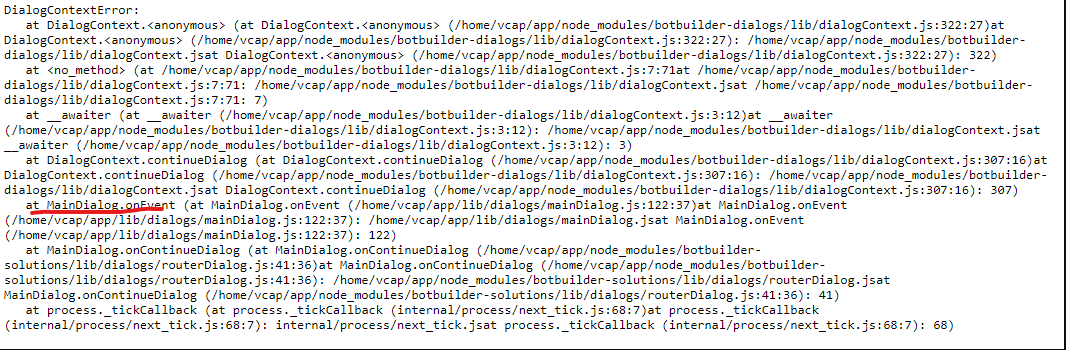
Without being able to debug your full code and reproduce the results, I'm afraid that there isn't much more help that I can provide. I'd recommend adding a significant amount of additional logging so that you can see the entire flow that that the user takes, if you can't reproduce it locally and follow it around with breakpoints, step in, step over, etc. I can say that this is not an issue that I've seen before, so it's very unlikely a bug in the SDK.
What exactly is going on in the onEvent code? I see that you're checking for a tokenResponse event. Are you doing SSO with a skill? Maybe you can describe the flow of the user's interaction and that might help me pinpoint some issues?
mdrichardson
on 26 Jan 2021
onEvent is triggered when the user performs an action submitted from an AC (for example clicking a button). The main thing that's happening here is that dc.continueDialog() is being called, and if the status of the dialog turn result is complete, it calls the complete() method that clears the skill status.
You can ignore the TokenResponseEventName check, as I debugged the code and it never passes this condition . It must be a reminiscent code from an older version of the project.
I will add more logs across the project to identify bot state elements such as the conversationId that could help me track the user's interaction in our state database and understand what's happening. Thanks!
StefaniaMan314
on 27 Jan 2021
Hey @mdrichardson, we're recently facing this issue for more users. We found this article about resetting the conversation. Do you think implementing something like this will solve our problem?
StefaniaMan314
on 28 Jan 2021
That might alleviate the current symptom, but given that more users are experiencing this, there's an issue with the code that will likely continue.
mdrichardson
on 28 Jan 2021
We found a way to clear the conversationId in our botstate db. The issue was solved for the users, we can close this, thanks!
StefaniaMan314
on 2 Feb 2021
Related issues
 juharris
·
3Comments
juharris
·
3Comments
 ctstone
·
8Comments
ctstone
·
8Comments
 atishayv
·
6Comments
atishayv
·
6Comments
 Weirwolf
·
9Comments
Weirwolf
·
9Comments
 luspac
·
9Comments
luspac
·
9Comments