Botbuilder-dotnet: QnAMakerOptions doesn't reset filters values
Version
4.3.2
Describe the bug
We are working with a bot using QnAMaker class from Microsoft.Bot.Builder.AI.QnA
StrictFilters from QnAMakerOptions doesn't work with an empty value after using it with a filter
To Reproduce
Call GetAnswersAsync using an QnAMakerOptions without any StrictFilter
var options1 = new QnAMakerOptions
{
    Top = 10,
    ScoreThreshold = 0.6f,
};
var response = await _services.QnAServices[QnAMakerKey].GetAnswersAsync(turnContext, options1);
if (response != null && response.Length > 0)
{
    await turnContext.SendActivityAsync($"QnA Results: {response.Length}");
}
Now, make another call with a StrictFilter
var options2 = new QnAMakerOptions
{
    Top = 10,
    ScoreThreshold = 0.6f,
    StrictFilters = new Metadata[] { new Metadata() { Name = "Topic", Value = "sharepoint" } },
};
var response2 = await _services.QnAServices[QnAMakerKey].GetAnswersAsync(turnContext, options2);
if (response2 != null && response2.Length > 0)
{
    await turnContext.SendActivityAsync($"QnA Results: {response2.Length}");
}
Repeat the first call without and StrictFilter
var options3 = new QnAMakerOptions
{
    Top = 10,
    ScoreThreshold = 0.6f,
};
var response3 = await _services.QnAServices[QnAMakerKey].GetAnswersAsync(turnContext, options3);
if (response3 != null && response3.Length > 0)
{
    await turnContext.SendActivityAsync($"QnA Results: {response3.Length}");
}
Expected behavior
From the third call, I expected to have the same results we had on the first one, but for any reason the StrictFilters didn't reset its values well.
Screenshots

[bug]
 adiazcan
All 16 comments
A solution could be to modify HydrateOptions function to always set the value from StrictFilters, not only when it has values
removing this section
if (queryOptions.StrictFilters?.Length > 0)
{
    hydratedOptions.StrictFilters = queryOptions.StrictFilters;
}
to this one, works for me
hydratedOptions.StrictFilters = queryOptions.StrictFilters;
adiazcan
on 17 Apr 2019
@adiazcan ah indeed, StrictFilters should only stick around for multiple calls when passed into the constructor of QnAMaker and actually reset if StrictFilters set on just .GetAnswersAsync()
I can check if this unwanted behavior happens on the js side as well and push fix(es)
 Zerryth
on 17 Apr 2019
Zerryth
on 17 Apr 2019
@Zerryth I think the stick feature also work using .GetAnswerAsync() because we are not using the constructor way, only .GetAnswerAsync().
I have a fix modifiying the HydrateOptions functions, I remove the If null and always set the value from the passed options. I can send a PR with this change.
adiazcan
on 18 Apr 2019
@Zerryth - Let me know what to do with this.
- Is this a bug to be fixed in 4.4?
- What does the JS SDK do here?
- What is the "Right" thing to do here..
 cleemullins
on 19 Apr 2019
cleemullins
on 19 Apr 2019
@adiazcan I'm actually not able to repro your issue, and just looking at the dotnet SDK code, it doesn't look like it should behave the way that you describe.
                var strictFiltersOptions = new QnAMakerOptions()
                {
                    Top = 10,
                    StrictFilters = new Metadata[]
                    {
                        new Metadata()
                        {
                            Name = "movie",
                            Value = "disney"
                        }
                    }
                };

                var noStrictFiltersOptions = new QnAMakerOptions()
                {
                    Top = 10
                };

                // Check QnA Maker model
                var response = await _services.QnAServices[QnAMakerKey].GetAnswersAsync(turnContext, noStrictFiltersOptions);
                var response2 = await _services.QnAServices[QnAMakerKey].GetAnswersAsync(turnContext, strictFiltersOptions);
                var response3 = await _services.QnAServices[QnAMakerKey].GetAnswersAsync(turnContext, noStrictFiltersOptions);
Above you can see the code to call .GenerateAnswersAsync() first without any StrictFilters, 2nd _with_ StrictFilters, then finally 3rd without StrictFilters once again.
And you can see the results below:
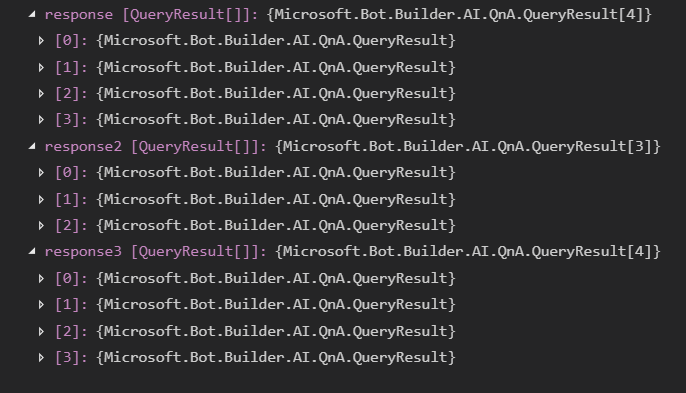
Notice how it first returns 4 answers without any filters, then 3 answers when the StrictFilter is set to filter by{ Name = "movie", Value = "disney" }, then once again 4 answers when querying without filters
Here's a shot of how I built my KB real quickly to test the StrictFilters:
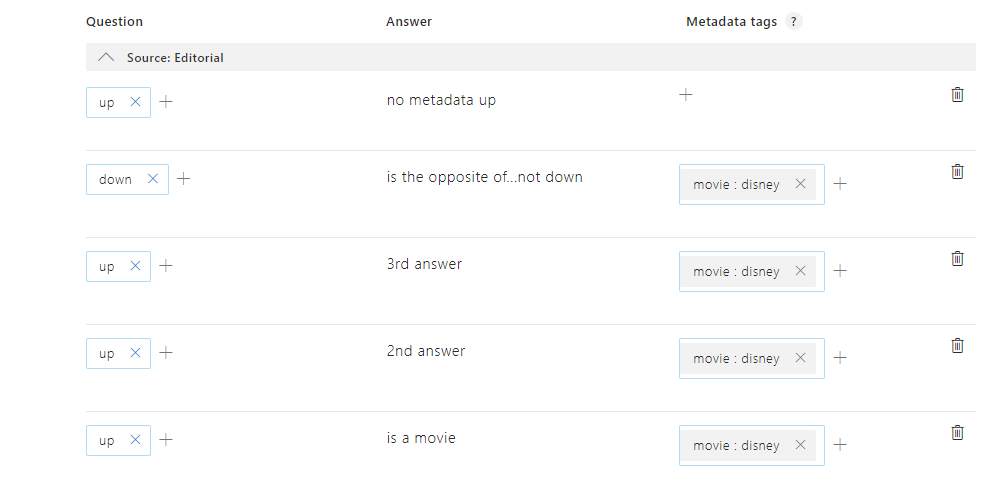
Also, we definitely do not want to remove the if null check, since we _only_ want to fill in options that are actually passed in by the user when we call .GenerateAnswer(). Without the null check, it will overwrite any options that were set in the QnAMaker via constructor with default values, even if the user didn't specify in .GenerateAnswer() to reset that option
For example if I create a QnAMaker instance and in the constructor I wanted to always return top 10 results, I can set Top = 10
But if I wanted to pass in to .GenerateAnswer() StrictFilters, I can do that, but without the null check, it will also set Top = 1 (default) instead of keeping it at 10 as intended.
Zerryth
on 20 Apr 2019
That being said, it's unclear of how you got the results you did.
There has been chatter about various issues happening with the QnA service itself...
So if you try again, does the issue of "sticky" strict filters still persist for you?
Zerryth
on 20 Apr 2019
Chris has already closed the issue, but I did get confirmation from the QnA team that I wanted to put out here. There was in fact a bug introduced in their latest roll out, causing an issue with strictfilters. They fixed the bug on 4/19. They say to
"please try now. You don't need to restart your app service to get the fix. It was automatically rolled out to all services"
Zerryth
on 22 Apr 2019
@Zerryth I have the same behavior right now, I can share with you my KB and you can test it with the following test branch https://github.com/adiazcan/botbuilder-dotnet/tree/test/qnafilter/TestQnaBot
adiazcan
on 23 Apr 2019
I have the same issue and I think it is caused by the code in https://github.com/microsoft/botbuilder-dotnet/blob/867ec4780022674f50cfb721d95ea29a581fca6a/libraries/Microsoft.Bot.Builder.AI.QnA/QnAMaker.cs#L130-L158
I guess it is caused because in C#, object types are passed by reference (and not passed by value) at https://github.com/microsoft/botbuilder-dotnet/blob/867ec4780022674f50cfb721d95ea29a581fca6a/libraries/Microsoft.Bot.Builder.AI.QnA/QnAMaker.cs#L132:
hydratedOptionsbecomes the same object as_options(not just the same value)- behavior of
hydratedOptions.StrictFilters:
hydratedOptions.StrictFiltersis only changed whenqueryOptions.StrictFiltersis sethydratedOptions.StrictFiltersis not changed whenqueryOptions.StrictFiltersis not set
- this means that
_options.StrictFiltersis only changed whenqueryOptions.StrictFiltersis set_options.StrictFiltersis not changed whenqueryOptions.StrictFiltersis not set
hydratedOptions, and therefore_optionsis used at https://github.com/microsoft/botbuilder-dotnet/blob/867ec4780022674f50cfb721d95ea29a581fca6a/libraries/Microsoft.Bot.Builder.AI.QnA/QnAMaker.cs#L119
 hansmbakker
on 7 May 2019
hansmbakker
on 7 May 2019
Chris has already closed the issue, but I did get confirmation from the QnA team that I wanted to put out here. There was in fact a bug introduced in their latest roll out, causing an issue with strictfilters. They fixed the bug on 4/19. They say to
"please try now. You don't need to restart your app service to get the fix. It was automatically rolled out to all services"
@cleemullins @Zerryth can you please reopen this issue?
I believe this issue is in the SDK and not in QnA Maker. I used a developer proxy to capture the REST traffic and saw that the filter was set in the REST request to QnA Maker even though I did not specify it myself for that call to GenerateAnswerAsync. Also I saw that the filter was set in the _options.StrictFilters class variable of QnaMaker as a leftover from an earlier request.
hansmbakker
on 7 May 2019
ah, I'm not sure why I wasn't able to repro it myself, but I did encounter a similar situation while porting QnAMaker in the Python SDK that's in Preview 2.
Mentally noted I should go back to dotnet to try once again reproing/fixing
Zerryth
on 7 May 2019
Also, this is really an issue since it is not possible to reset the StrictFilters property to become empty.
Since HydrateOptions checks whether StrictFilters?.Length > 0, you cannot pass an empty array to make it empty.
The only workaround I see is by throwing away the old instance of QnaMaker and generate a new QnaMaker object instance.
hansmbakker
on 7 May 2019
Thank you for reopening!
hansmbakker
on 7 May 2019
Ok, had time to get a repro properly this time.

^ last one should be 4
Still unsure how I wasn't able to repro it properly last time...
But regardless, should have a fix sometime before EoD :)
Zerryth
on 7 May 2019
Ok, had time to get a repro properly this time.
^ last one should be 4Still unsure how I wasn't able to repro it properly last time...
But regardless, should have a fix sometime before EoD :)
@Zerryth you can test with my code at https://github.com/adiazcan/botbuilder-dotnet/tree/test/qnafilter/TestQnaBot
adiazcan
on 12 May 2019
The PR for this has been merged. The fix will start showing up on our daily build server tonight, and be shipped in the 4.5 cycle currently planned around July 15.
cleemullins
on 16 May 2019
Related issues
 brandonh-msft
·
4Comments
brandonh-msft
·
4Comments
 v-kydela
·
4Comments
v-kydela
·
4Comments
 MarceloRGonc
·
6Comments
MarceloRGonc
·
6Comments
 cmayomsft
·
6Comments
cmayomsft
·
6Comments
 drub0y
·
3Comments
drub0y
·
3Comments
Most helpful comment
The PR for this has been merged. The fix will start showing up on our daily build server tonight, and be shipped in the 4.5 cycle currently planned around July 15.