Botbuilder-dotnet: CloudStorageAccount Type Registered in Two Different Namespaces
Github issues should be used for bugs and feature requests. Use Stack Overflow for general "how-to" questions.
Version
4.3.1
Describe the bug
After updating the Microsoft.Bot.Builder.Azure library from v4.2.2 to v4.3.1, Visual Studio is reporting an error related to the _CloudStorageAccount_ type.
Error CS0433 The type 'CloudStorageAccount' exists in both 'Microsoft.Azure.Storage.Common, Version=9.4.2.0, Culture=neutral, PublicKeyToken=31bf3856ad364e35' and 'Microsoft.WindowsAzure.Storage, Version=9.3.2.0, Culture=neutral, PublicKeyToken=31bf3856ad364e35'
Oddly enough though, if I try to add a using directive for Microsoft.Azure.Storage.Common or explicity reference that when instantiating an object of _CloudStorageAccount_ type, Visual Studio doesn't see that type in that namespace.
To Reproduce
Steps to reproduce the behavior:
- Install version 4.3.1. of the Microsoft.Bot.Builder.Azure library. Issue occurs regardless of whether or not the WindowsAzure.Storage library is installed. Anywhere in your code where you're using the CloudStorageAccount type will generate the error shown above.
[bug]
 torynfarr
All 13 comments
It looks like the problem is still present in Microsoft.Bot.Builder.Azure version 4.3.2 as well.
torynfarr
on 13 Mar 2019
I got the same error message in an application not related to Microsoft.Bot.Builder.Azure. Seems to be something with the Azure libraries stepping on each others' toes.
 mfalkvidd
on 13 Mar 2019
mfalkvidd
on 13 Mar 2019
I saw this earlier, perhaps it's related?
 jwiley84
on 13 Mar 2019
jwiley84
on 13 Mar 2019
Hi @torynfarr, I am able to repro this issue on my end, I am investigating the root cause and will get back to you.
Gabo
 gabog
on 18 Mar 2019
gabog
on 18 Mar 2019
Hi @torynfarr, it seems that the issue is caused with some conflicts in the AspNetCore references. Can you try the following and let me know if this solves your problem:
Edit your bot csproj using notepad and change Microsoft.AspNetCore.All by Microsoft.AspNetCore.App

Delete the call to logging.AddAzureWebAppDiagnostics(); from Program.cs

That should clear your conflict, let me know how it goes.
Gabo
gabog
on 18 Mar 2019
Gabo,
Thanks for digging into this. Unfortunately, changing _PackageReference Include="Microsoft.AspNetCore.All"_ to _PackageReference Include="Microsoft.AspNetCore.App"_ in my bot's csproj file (and then updating _Microsoft.Bot.Builder.Azure_ to version 4.3.2 (and commenting out the line you mentioned in Program.cs) didn't seem to have any impact.
I'm still seeing the error:
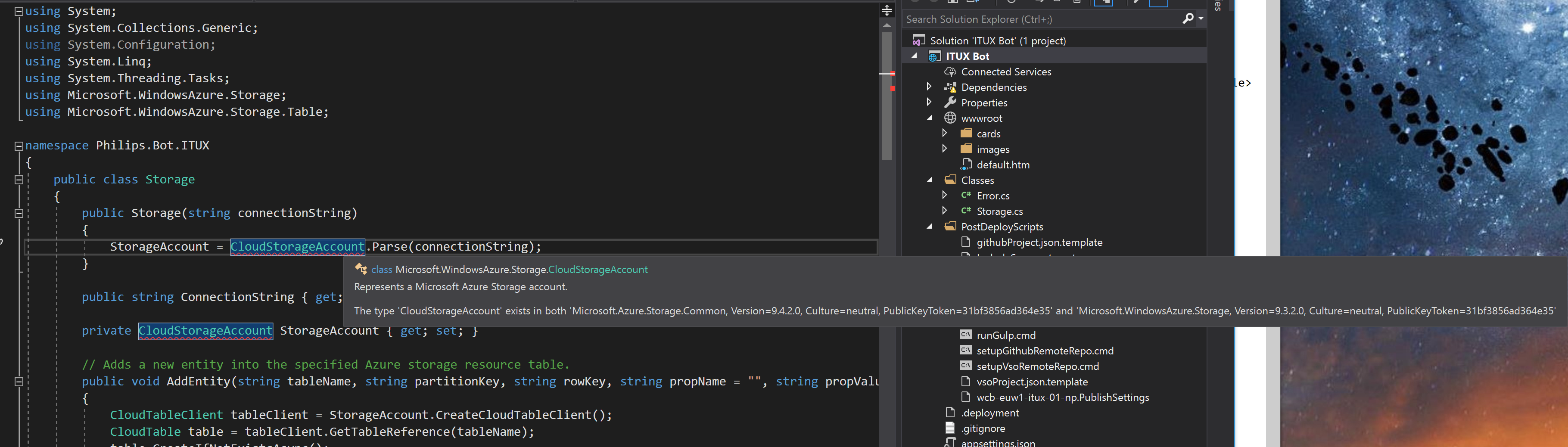
What's interesting... is if I try to add the using directive _Microsoft.Azure.Storage.Common_ (with the intention of removing the using directive for _Microsoft.WindowsAzure.Storage_ and uninstalling the corresponding library)... I only see three namespaces within _Microsoft.Azure_:
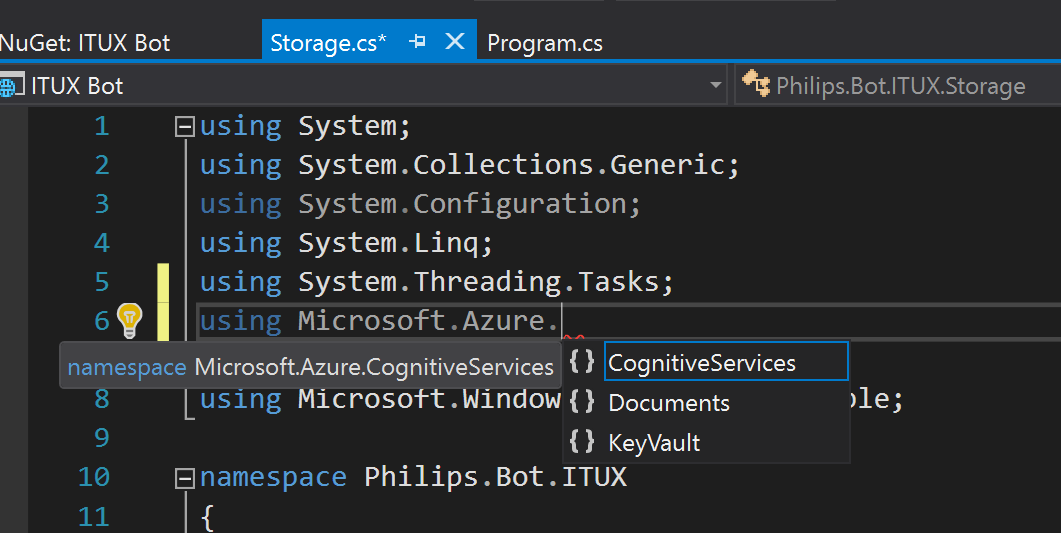
Judging from the error _"The type 'CloudStorageAccount' exists in both 'Microsoft.Azure.Storage.Common, Version=9.4.2.0, Culture=neutral, PublicKeyToken=31bf3856ad364e35' and 'Microsoft.WindowsAzure.Storage, Version=9.3.2.0"_ shouldn't I be seeing a _Storage_ namespace within _Microsoft.Azure_?
torynfarr
on 19 Mar 2019
I should l also mention, the moment I downgrade the _Microsoft.Bot.Builder.Azure_ library to version 4.2.2, the error with _CloudStorageAccount_ goes away.
torynfarr
on 19 Mar 2019
Hi @torynfarr, can you send a screenshot of your web project references and SDK after the change? Does it look as follows:
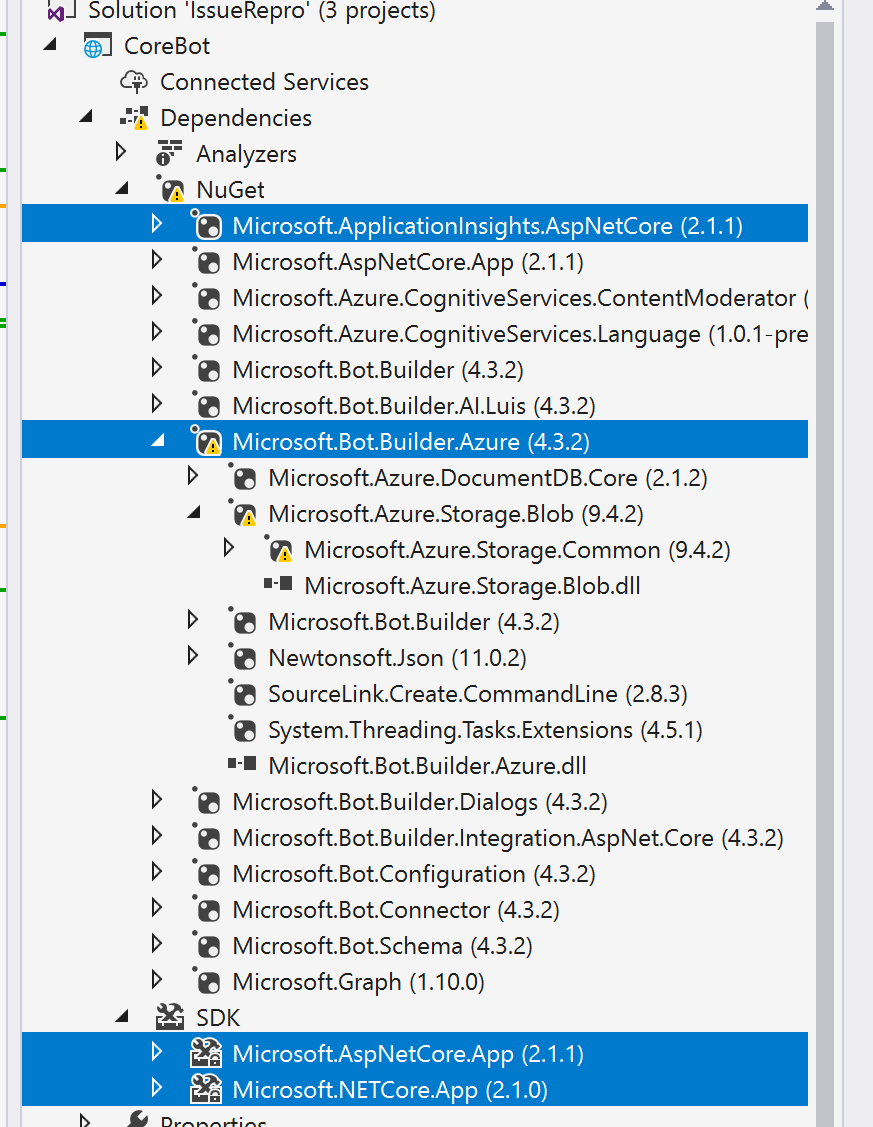
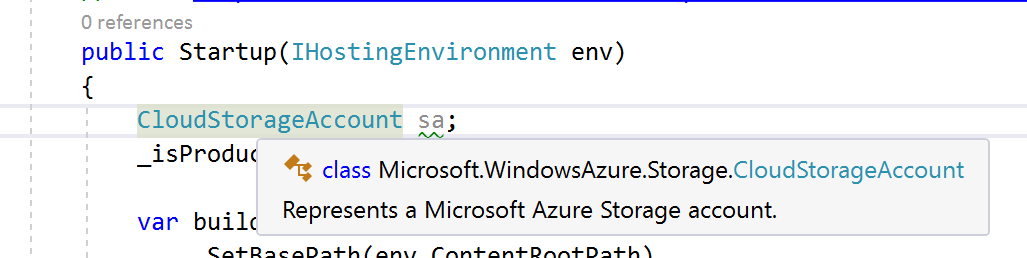
The CloudStorageAccount type should be in the Microsoft.WindowsAzure.Storage namespace after the change (not the one you are trying to reference in your screenshot):
Also if you have time, try these steps on an empty project out of the botbuilder v4 template (just to make sure you don't have other dependencies down the stack that may be pulling in the old version of azure storage.
Let me know how it goes.
gabog
on 19 Mar 2019
Sure thing. Here are the references / dependencies after updating the _Microsoft.Bot.Builder.Azure_ library to version 4.3.2 and making the changes you mentioned to the csproj and program.cs files.
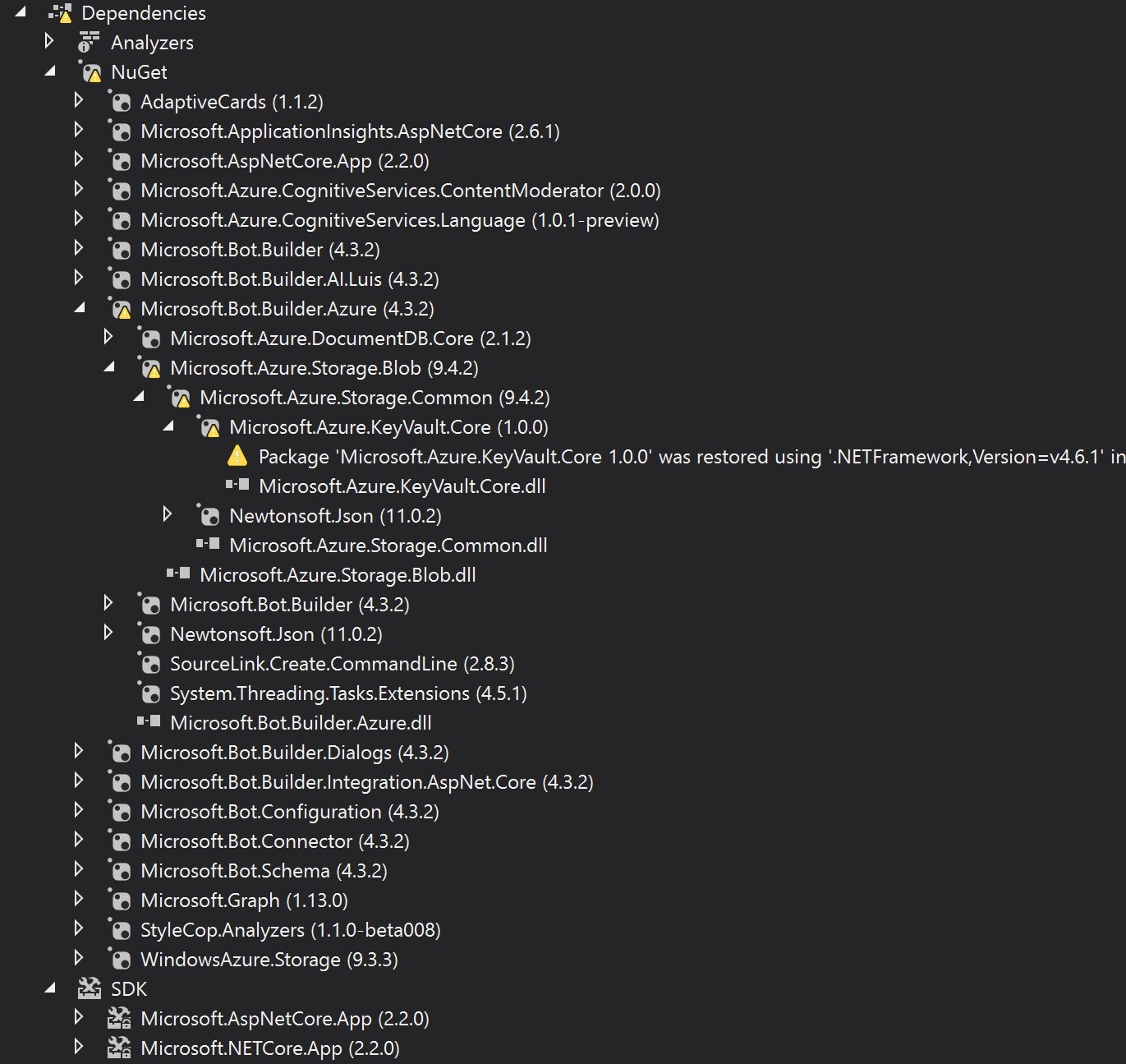
I'll also include the contents of my csproj file:
<Project Sdk="Microsoft.NET.Sdk.Web">

  <PropertyGroup>
    <TargetFramework>netcoreapp2.2</TargetFramework>
    <CodeAnalysisRuleSet>BasicBot.ruleset</CodeAnalysisRuleSet>
    <StartupObject></StartupObject>
    <Company>Philips</Company>
    <Product>ITUX Bot</Product>
    <Authors>Service Desk & Process Automation</Authors>
    <PackageId>ITUX Bot</PackageId>
    <AssemblyName>ITUXBot</AssemblyName>
    <RootNamespace>ITUXBot</RootNamespace>
  </PropertyGroup>

  <PropertyGroup Condition="'$(Configuration)|$(Platform)'=='Debug|AnyCPU'">
    <DocumentationFile>C:\Users\toryn\REDACTED PATH\BasicBot.xml</DocumentationFile>
    <NoWarn>1701;1702;1591;1584;1658;1572</NoWarn>
  </PropertyGroup>

  <ItemGroup>
    <Compile Remove="images\**" />
    <Content Remove="images\**" />
    <EmbeddedResource Remove="images\**" />
    <None Remove="images\**" />
  </ItemGroup>

  <ItemGroup>
    <Content Include="BasicBot.bot">
      <CopyToOutputDirectory>Never</CopyToOutputDirectory>
    </Content>
  </ItemGroup>

  <ItemGroup>
    <PackageReference Include="AdaptiveCards" Version="1.1.2" />
    <PackageReference Include="Microsoft.ApplicationInsights.AspNetCore" Version="2.6.1" />
    <PackageReference Include="Microsoft.AspNetCore.App" />
    <PackageReference Include="Microsoft.Azure.CognitiveServices.ContentModerator" Version="2.0.0" />
    <PackageReference Include="Microsoft.Azure.CognitiveServices.Language" Version="1.0.1-preview" />
    <PackageReference Include="Microsoft.Bot.Builder" Version="4.3.2" />
    <PackageReference Include="Microsoft.Bot.Builder.AI.Luis" Version="4.3.2" />
    <PackageReference Include="Microsoft.Bot.Builder.Azure" Version="4.3.2" />
    <PackageReference Include="Microsoft.Bot.Builder.Dialogs" Version="4.3.2" />
    <PackageReference Include="Microsoft.Bot.Builder.Integration.AspNet.Core" Version="4.3.2" />
    <PackageReference Include="Microsoft.Bot.Configuration" Version="4.3.2" />
    <PackageReference Include="Microsoft.Bot.Connector" Version="4.3.2" />
    <PackageReference Include="Microsoft.Bot.Schema" Version="4.3.2" />
    <PackageReference Include="Microsoft.Graph" Version="1.13.0" />
    <PackageReference Include="StyleCop.Analyzers" Version="1.1.0-beta008">
      <PrivateAssets>all</PrivateAssets>
      <IncludeAssets>runtime; build; native; contentfiles; analyzers</IncludeAssets>
    </PackageReference>
    <PackageReference Include="WindowsAzure.Storage" Version="9.3.3" />
  </ItemGroup>

  <ItemGroup>
    <WCFMetadata Include="Connected Services" />
  </ItemGroup>

    <Import Project="PostDeployScripts\IncludeSources.targets" Condition="Exists('PostDeployScripts\IncludeSources.targets')" />
    <Import Project="..\PostDeployScripts\IncludeSources.targets" Condition="Exists('..\PostDeployScripts\IncludeSources.targets')" />
    <ProjectExtensions><VisualStudio><UserProperties /></VisualStudio></ProjectExtensions>
</Project>
As soon as I have time, I'll try updating the packages in a fresh download of the BasicBot template and see what happens.
torynfarr
on 19 Mar 2019
Cool, please also try removing the reference you have to WindowsAzure.Storage Version="9.3.3", in BF 4.3 we upgraded to 9.4 (and you are getting that one by referencing Microsoft.Bot.Builder.Azure)
Some more details here: https://www.nuget.org/packages/WindowsAzure.Storage/9.3.3
Also, not sure if you saw my previous comment but the CloudStorageAccount type should be in the Microsoft.WindowsAzure.Storage. If you need other storage related libraries, make use you get the 9.4 ones.
Gabo
gabog
on 19 Mar 2019
Gabo,
Okay, I got rid of the error with the _CloudStorageAccount_ type, but what you mentioned there is a little bit confusing :) If _Microsoft.WindowsAzure.Storage_ 9.3.3 should be removed because it's been split up into separate libraries, I should no longer be trying to use it for the _CloudStorageAccount_ type (and there is no 9.4 version of it). It took some poking around, but I found that _CloudStorageAccount_ and other table storage related types and methods which were previously in _Microsoft.WindowsAzure.Storage_ are now in _Microsoft.Azure.Cosmos.Table_ version 1.0.0. I installed that library and added a using directive to it in my storage class where I'm instantiating a _CloudStorageAccount_ and all is well!
One last question though: what are the implications of leaving the _logging.AddAzureWebAppDiagnostics();_ line commented out in the Program.cs file? Will I lose any logging capability that I had previously?
torynfarr
on 19 Mar 2019
Hi @torynfarr, glad it helped and you got it working, we have a PR where we will update the SDK template to incorporate the changes you had to manually make into the BotBuilder SDK template (it'll go out once the PR is merged).
Regarding your logging question, you can still use any logging provider you need as described in Logging in ASP.NET Core.
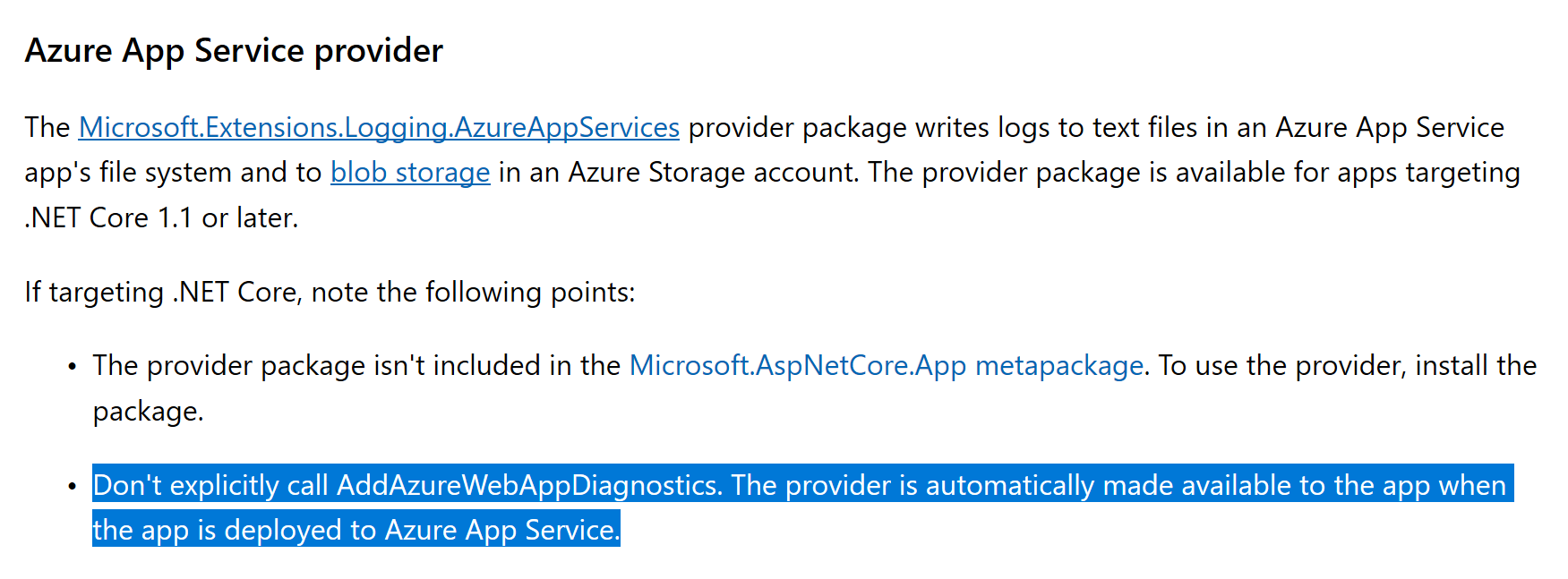
For Azure App Service logging (that's what AddAzureWebAppDiagnostics was doing), you'll need to explicitly add a reference to Microsoft.Extensions.Logging.AzureAppServices to your project as documented here
Screenshot
gabog
on 19 Mar 2019
Microsoft.Azure.Cosmos.Table
This solution works for me, replace Microsoft.WindowsAzure.Storage with Microsoft.Azure.Cosmos.Table and fix the namespace usage, then everything works!
 xinfli
on 19 Jun 2019
xinfli
on 19 Jun 2019
Related issues
 drub0y
·
3Comments
drub0y
·
5Comments
drub0y
·
3Comments
drub0y
·
5Comments
 EricDahlvang
·
4Comments
EricDahlvang
·
4Comments
 MarekLani
·
4Comments
MarekLani
·
4Comments
 markbeau
·
6Comments
markbeau
·
6Comments
Most helpful comment
Hi @torynfarr, glad it helped and you got it working, we have a PR where we will update the SDK template to incorporate the changes you had to manually make into the BotBuilder SDK template (it'll go out once the PR is merged).
Regarding your logging question, you can still use any logging provider you need as described in Logging in ASP.NET Core.
For Azure App Service logging (that's what AddAzureWebAppDiagnostics was doing), you'll need to explicitly add a reference to Microsoft.Extensions.Logging.AzureAppServices to your project as documented here
Screenshot
