Botbuilder-dotnet: LuisRecognizer should expose full LUIS response
Is your feature request related to a problem? Please describe.
When using LuisRecognizer to process results from Luis, certain data fields seem to be 'dropped' compared to the full Json response that you'd get from Luis. Specifically, this applies to the resolutions collection for Luis's DateTimeV2 entity type.
Luis will return something like for a DateTimeV2 entity:
"entities": [
    {
      "entity": "saturday",
      "type": "builtin.datetimeV2.date",
      "startIndex": 30,
      "endIndex": 37,
      "resolution": {
        "values": [
          {
            "timex": "XXXX-WXX-6",
            "type": "date",
            "value": "2019-01-26"
          },
          {
            "timex": "XXXX-WXX-6",
            "type": "date",
            "value": "2019-02-02"
          }
        ]
      }
    }
  ]
The resolution array is not exposed to my bot code via LuisRecognizer. This data is important in order to decide which date is the one I want to use.
There may be other areas where data is dropped from the Luis response, but DateTimeV2 resolution collection is the area that has affected me.
I'm using LuisRecognizer because the docs point me in that direction: https://docs.microsoft.com/en-us/azure/bot-service/bot-builder-howto-v4-luis?view=azure-bot-service-4.0&tabs=cs
Describe the solution you'd like
I'd like LuisRecognizer to expose the full response from Luis, including all resolutions and any other data points that Luis returns.
I appreciate that in the case of DateTimeV2, the resolutions that Luis provides may not be that useful in all scenarios because Luis has no awareness of my bot's business logic and cannot determine which date is the one I want to use. However, the BotBuilder SDK does not have that knowledge either and I want it to expose all the data which is available to me and let me decide how I want to use (or not use) the data Luis provides rather than just dropping it.
Describe alternatives you've considered
I've looked at Bot Builder SDK sample 40 and I'm aware of the https://github.com/Microsoft/recognizers-text library. This is a good solution and helps me handle Timex values in my bot, but is not well documented or easy to find in the context of building a bot.
This library still does not address the core issue which is that the LuisRecognizer does not expose all the data that Luis provides and therefore removes the option of me as a developer making business logic decisions based on that data.
In the past, I've elected to not use LuisRecognizer at all and 'hand-crank' my own Luis interface in order to get the full DateTimeV2 resolution data.
Additional context
None.
[enhancement]
 martinkearn
All 8 comments
@martinkearn The answer and solution to your problem is in the link you pasted before:
https://docs.microsoft.com/en-us/azure/bot-service/bot-builder-howto-v4-luis?view=azure-bot-service-4.0&tabs=js
The constructor of the LuisRecognizer class has the following signature:
constructor(application: LuisApplication, options?: LuisPredictionOptions, includeApiResults?: boolean);
Do you see the third parameter? When true, it tells the recognizer to expose the LUIS info you need. So, when constructing the LuisRecognizer instance, make sure to pass the third parameter as true:
this.luisRecognizer = new LuisRecognizer(application, luisPredictionOptions, true);
Then, you will be able to get the full data:
const results = await this.luisRecognizer.recognize(turnContext);
var entityData = results.luisResult.entities;
 hinojosachapel
on 15 Feb 2019
hinojosachapel
on 15 Feb 2019
What I've seen is that when setting includeApiResults to true, in the RecognizerResult.Entities.Properties is included a property called "luisResult" that is the LuisResult object. But unfortunately, it doesn't have all the properties of the original LUIS response that you can get from the endpoint.
private async Task<RecognizerResult> RecognizeInternalAsync(ITurnContext turnContext, Dictionary<string, string> telemetryProperties, Dictionary<string, double> telemetryMetrics, CancellationToken cancellationToken)
{
    \\ ...
    if (_includeApiResults)
    {
        recognizerResult.Properties.Add("luisResult", luisResult);
    }
 bpz
on 27 Mar 2019
bpz
on 27 Mar 2019
Hello @martinkearn ,
I was trying to reproduce this issue using the TestBot and I can successfully get the data you are looking for in the LuisRecognizer result (RecognizerResult).

As @hinojosachapel mentioned above, you just need to set includeApiResults as true.
Let me know if this solves your issue.
Thanks
 munozemilio
on 1 Apr 2019
munozemilio
on 1 Apr 2019
Hi @munozemilio
At least my issue was resolved, in AdditionalProporties I can see the resolution param. Thank you!
My workaround was setting IncludeInstanceData to false:
var recognizer = new LuisRecognizer(app, new LuisPredictionOptions { IncludeAllIntents = true, IncludeInstanceData = false });
In this way, when recognizing:
var result = await luisService.RecognizeAsync(step.Context, cancellationToken);
In result.Entities there is just one element per entity and instead of the entity detected, it is showing the normalized value.
When using IncludeInstanceData = false or IncludeInstanceData = null the first element of Entities is the "$instance" element, that doesn't include any resolution field and where the entity showed is the text inserted in conversation instead of the normalized.
bpz
on 5 Apr 2019
LUISGen Command Line Tool
https://github.com/Microsoft/botbuilder-tools/blob/master/packages/LUISGen/src/npm/readme.md
Just run below command with an exported *.json file
Step1 : Luisgen LuisDevExporetd.json -cs LuisInfo -o
Step 2: replace General.cs file content with LuisInfo.cs content
Issue Resolved !!! 👍
 kartik10091965
on 25 Apr 2019
kartik10091965
on 25 Apr 2019
@hinojosachapel the syntax your're using is incorrect and or out of date. could be either one
var entityData = recognizerResult.Entities["To"].ToString();
that would get you inside of the Entity but it is regardless of setting the api to true or false it gives you the same data and you can't access the other parameters anyway. Apparently this is a known issue they are looking to fix for the next release.
 xtianus79
on 30 May 2019
xtianus79
on 30 May 2019
@xtianus79
the syntax your're using is incorrect and or out of date. could be either one
Yes, you are right!, if you read my examples in C# language. I'm sorry, when I first read this issue I was not aware this is the dotnet repository, so I wrote in TypeScript language. 😂 Please, take a look at this C# code:
/// <param name="includeApiResults">(Optional) TRUE to include raw LUIS API response.</param>
public LuisRecognizer(LuisApplication application, LuisPredictionOptions predictionOptions = null, bool includeApiResults = false, HttpClientHandler clientHandler = null)
The solution works for both languages.
Regards.
hinojosachapel
on 30 May 2019
Hi.
I noticed this seems to be an issue for most people as even if you set includeApiResults to be true, the Recognizer Result would still be displaying just timex, type and value.
I figured a workaround by editing DateTimeSpec and LuisUtil within Microsoft.Bot.Builder.AI.LUIS. You can see the changes in the Recognizer Result from the images attached.
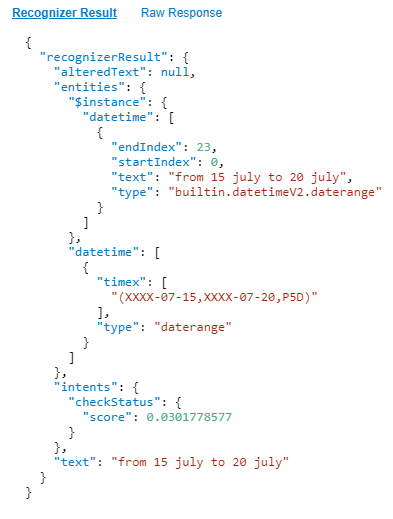
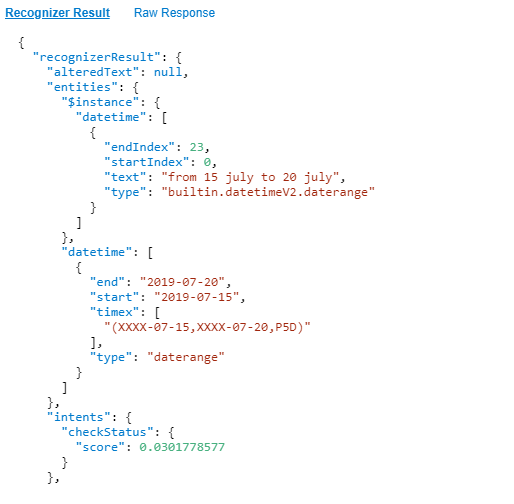
From here I can extract the required Start and End date using Linq.
I hope this might be useful for people that are facing similar problems as me.
 shan-sherif
on 9 Dec 2019
shan-sherif
on 9 Dec 2019
Related issues
 drub0y
·
3Comments
drub0y
·
3Comments
 nrandell
·
6Comments
nrandell
·
6Comments
 EricDahlvang
·
4Comments
EricDahlvang
·
4Comments
 tiagodenoronha
·
6Comments
drub0y
·
5Comments
tiagodenoronha
·
6Comments
drub0y
·
5Comments