Bot-docs: (node:1) UnhandledPromiseRejectionWarning: Error: Authorization has been denied for this request.
I am trying to send the message to the user using the Microsoft bot framework in teams without any trigger from the user with the help of the cron scheduler (node package) the error obtained is the following
(node:1) UnhandledPromiseRejectionWarning: Error: Authorization has been denied for this request.
at new RestError (/app/node_modules/@azure/ms-rest-js/dist/msRest.node.js:1397:28)
at /app/node_modules/@azure/ms-rest-js/dist/msRest.node.js:1849:37
at runMicrotasks (
at processTicksAndRejections (internal/process/task_queues.js:97:5)
at async BotFrameworkAdapter.sendActivities (/app/node_modules/botbuilder/lib/botFrameworkAdapter.js:554:40)
at async /app/proactiveBot.js:2615:17
(node:1) UnhandledPromiseRejectionWarning: Unhandled promise rejection. This error originated either by throwing inside of an async function without a catch block, or by rejecting a promise which was not handled with .catch(). To terminate the node process on unhandled promise rejection, use the CLI flag --unhandled-rejections=strict (see https://nodejs.org/api/cli.html#cli_unhandled_rejections_mode). (rejection id: 1)
without changing or restarting the code it is getting solved but after sometimes the same issue is arising this error is coming only when i try to send the message to the teams without any trigger from the teams otherwise the proactive message are working correctly.
 praveenkumar197
All 20 comments
@praveenkumar197 are you following any specific sample? Can you also elaborate more on what you are trying to do? What type of authentication mechanism you are using? Are you trying to send proactive notification to users without the user having to send a message to bot? If yes, then please have a look at a previously asked issue related to the same.
 anusharr
on 12 Mar 2020
anusharr
on 12 Mar 2020
@praveenkumar197 are you still working on this? Do you still need help?
anusharr
on 18 Mar 2020
I have a similar problem. I persist conversation references in a database and when I want o send the user a notification because of an event, I get the same error.
This happens when I deploy a new version of the bot. Once the bot interacts with any other user. I can send the pro active messages to any user independently if they have interacted with the bot since the new deployment.
here is my error:
@azure\ms-rest-js\dist\msRest.node.js:1397:28)\n at D:\home\site\wwwroot\node_modules\@azure\ms-rest-js\dist\msRest.node.js:1849:37\n at process._tickCallback (internal/process/next_tick.js:68:7
bot builder version: ~4.7.0
 floushee
on 20 Mar 2020
floushee
on 20 Mar 2020
I got it fixed by running this function before I send my pro active message:
MicrosoftAppCredentials.trustServiceUrl(turnContext.activity.serviceUrl);
floushee
on 20 Mar 2020
Closing the issue due to no response. Please feel free to reopen if you still have issues.
anusharr
on 20 Mar 2020
@floushee I've got the same scenario as what you've described. Where did you end up putting that extra call? I've added it in the first place I've got access to the turnContext but still have the same behaviour of it failing with the above error unless I send the bot a message first.
Here's where I've added it:
public async sendReminders(adapter: BotFrameworkAdapter): Promise<void> {
  const conversationReferences = await this.conversationRepository.getAll();
  for (const conversationReference of conversationReferences) {
    await adapter.continueConversation(conversationReference.data, async turnContext => {
      MicrosoftAppCredentials.trustServiceUrl(turnContext.activity.serviceUrl);
      await turnContext.sendActivity('test');
  }
}
 lukiffer
on 11 Jun 2020
lukiffer
on 11 Jun 2020
@dmvtech Could this issue be reopened? I'm happy to open another and reference this one, but it seems silly given that I'd be opening it with practically the exact same synopsis. Will gladly pick up where the OP left off.
lukiffer
on 11 Jun 2020
Hi @lukiffer
This is what I am doing:
When i startup the application:
// bot password was created in the Azure portal
const adapter = new BotFrameworkAdapter({
        appId: config.botAppId,
        appPassword: config.botAppPassword
    });
In my bot:
// will be triggered if the user installs the Teams app
this.onConversationUpdate(async (context, next) => {
            logger.debug('bot event triggered: onConversationUpdate');
            this.addConversationReference(context.activity);
            await next();
        });

private addConversationReference(activity) {
        const { backend } = this;
        const conversationReference = TurnContext.getConversationReference(activity);
        const userId = conversationReference.user.aadObjectId;
        if (userId) {
            backend.updateUser(userId, conversationReference);
        }
    }
When I want to send a pro-active message:
// this code will be triggered by a REST request
const user = await backend.getUser(targetId);
await adapter.continueConversation(user.conversationReference, async (turnContext) => {

                MicrosoftAppCredentials.trustServiceUrl(turnContext.activity.serviceUrl);

                await turnContext.sendActivity({
                    attachments: [card]
                });
            });
There is so much error potential and often you get really bad error messages from Microsoft. In my case, when you deploy the bot Application and configure it with HTTPS, you need a valid certificate for your bot e.g. https://your-bot.yourdomain.com otherwise you get a "Authorization has been denied for this request." error as well.
floushee
on 11 Jun 2020
@floushee thanks for the detailed snippets. I've got functionally equivalent code on my end am still having the same issue.
A couple things I've noticed in investigating since:
- You have a
const adapter = new BotFrameworkAdapter(...)whereas on my side I've got that happening in the constructor of the class - In this related issue comment, I noticed that
MicrosoftAppCredentials.trustServiceUrl(...)is suggested to be called outside of theadapter.continueConversationhandler.
I'll look into these and if either of them work I'll try to isolate the cause and update this thread. Meanwhile if anyone from MSFT has some input, I'd be happy to take that as well.
lukiffer
on 12 Jun 2020
OK, so after some additional debugging, it looks like the serviceUrl is properly trusted and it's attempting to send the proactive message, but that endpoint is actually returning a 401. The HTTP response is included in the exception thrown, and though I can reproduce the error and the solution, I'm not sure how to inspect the request during a successful scenario in order to compare the two.
Here's a trimmed version of the response – I have the raw response saved if something in it would be helpful, but am omitting the majority of it for brevity:
{
  "statusCode": 401,
  "request": {
    "streamResponseBody": false,
    "url": "https://smba.trafficmanager.net/apac/v3/conversations/.../activities/...",
    "method": "POST",
    "headers": {
      "_headersMap": {
        "cookie": {
          "name": "cookie",
          "value": ""
        }
      }
    },
    "body": "...",
    "withCredentials": false
  },
  "response": {
    "body": "{\"message\":\"Authorization has been denied for this request.\"}",
    "status": 401
  },
  "body": {
    "message": "Authorization has been denied for this request."
  }
}
I'm not sure how many of these observations are significant, but thought I'd point them out in case there's a quick solve someone could point me to:
withCredentialsisfalsecookieheader is set empty- The value for
appIdthat's passed to the constructor ofBotFrameworkAdapteris in the body, but the value forappPasswordis no where in the request payload.
lukiffer
on 12 Jun 2020
With some additional debugging, I've uncovered a before-and-after difference in the turnContext that's returned by adapter.continueConversation(...). Before a message is sent to the bot, it appears that it hasn't actually gotten an access token, and when calling sendActivity() it doesn't remedy this. After having sent the bot a message, the turnContext returned appears to have an OAuth token (as well as the token and device code endpoints configured) and the bot behaves as expected.
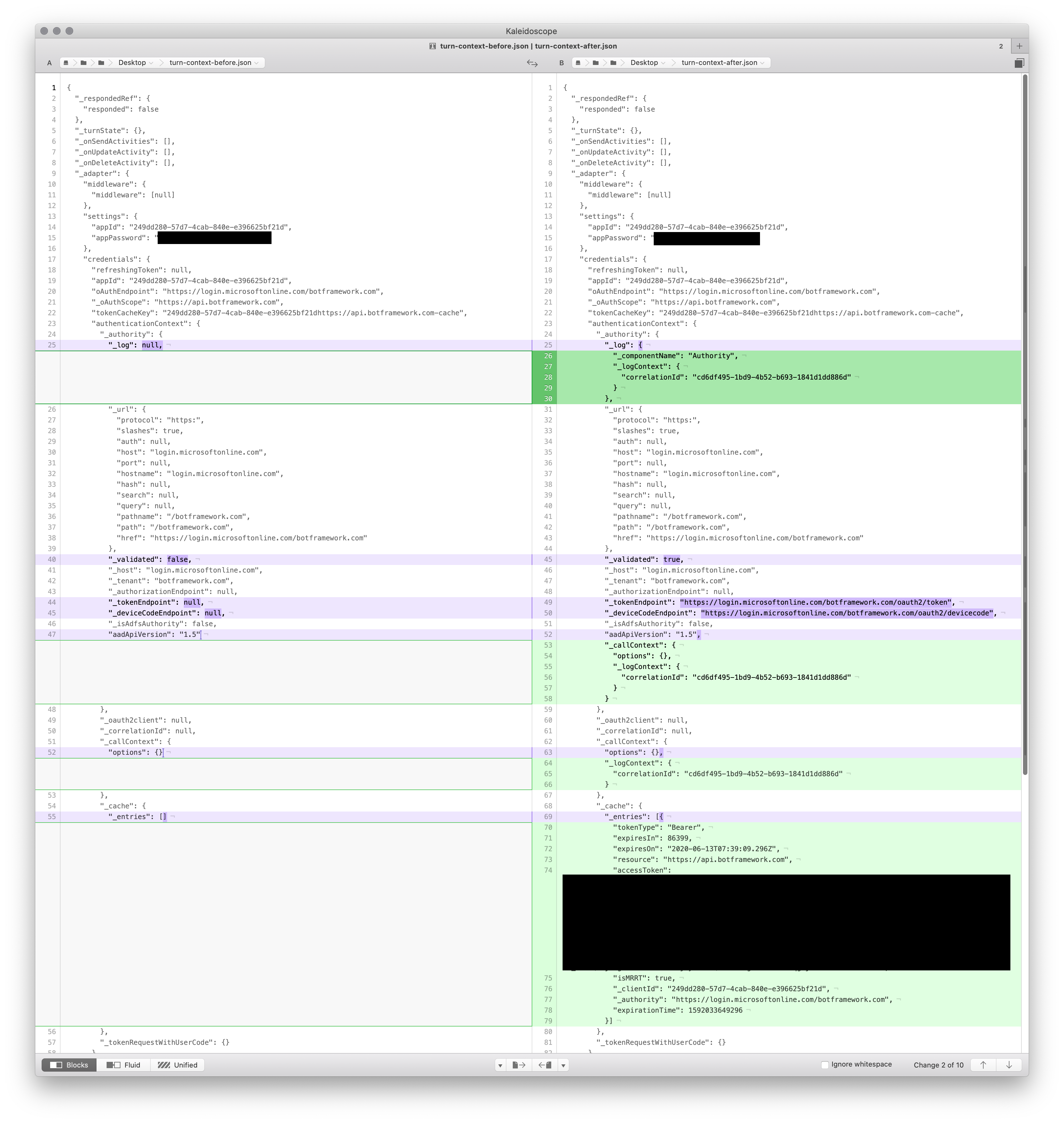
@anusharavindrar What needs to be done prior to calling sendActivity() to go fetch a token?
lukiffer
on 12 Jun 2020
@lukiffer, is your issue resolved?
anusharr
on 7 Sep 2020
@anusharavindrar no, please note the above scenario regarding turnContext when calling adapter.continueConversation() and the corresponding question. We're at present effectively unable to send proactive messages unless a user has sent a message to the bot during the current app runtime (e.g. on an application cold start, pull a conversation reference from a datastore and proactively send a message).
lukiffer
on 7 Sep 2020
@lukiffer - It seems the adapter is relying on some saved credential information. What version of the SDK are you using?
The turn context sends activities through the adapter which sends activities through a connector client. It seems your adapter is relying on some cached credentials from incoming activities in order to send outgoing activities. Try creating a connector client yourself and send activities through that instead of the turn context (which used to be the way proactive messages always had to be sent). If that doesn't work, try sending your own requests manually with the REST API.
 v-kydela
on 22 Sep 2020
v-kydela
on 22 Sep 2020
@lukiffer - Are you still working on this?
v-kydela
on 23 Sep 2020
@v-kydela We're no longer actively working on this project so it's not a high priority for us, but a resolution to this issue would impact our choice for future bot integrations and would like to see a resolution.
We've open sourced the above-referenced project: https://github.com/quantum-sec/hg-bot
From its package.json the relevant versions are:
    "botbuilder": "~4.7.0",
    "botframework-connector": "^4.9.2",
We'll try to carve out some time to test creation/use of a ConnectorClient and post an update of our findings.
lukiffer
on 24 Sep 2020
@lukiffer - Have you tried using a connector client yet?
v-kydela
on 29 Sep 2020
@lukiffer - Do you still need help?
v-kydela
on 3 Oct 2020
I am closing this issue due to inactivity. We are still happy to provide help if you need any, though it may be a good idea to make a new post if that's the case. Please have a look at this to find out the best places to ask for help, and consider asking questions on Stack Overflow.
v-kydela
on 5 Oct 2020
For those who are still suffering because of it. I tried approach suggested by @v-kydela and it worked. After further investigation I came up with the hack:
const adapter = new BotFrameworkAdapter({
  appId: process.env.BotId,
  appPassword: process.env.BotPassword
});

const credentials = new MicrosoftAppCredentials(process.env.BotId, process.env.BotPassword);
adapter.credentials = credentials;
proactive messages work after restarting the app. Of course instead of patching BotFrameworkAdapter you can use connector client:
const client = new ConnectorClient(credentials, {
  baseUri: serviceUrl
})
 marekmierzwa
on 25 Nov 2020
marekmierzwa
on 25 Nov 2020
Related issues
 amthomas46
·
4Comments
amthomas46
·
4Comments
 emgrol
·
4Comments
emgrol
·
4Comments
 blueelvis
·
6Comments
blueelvis
·
6Comments
 Anand-Moghe
·
4Comments
Anand-Moghe
·
4Comments
 pkirch
·
4Comments
pkirch
·
4Comments
Most helpful comment
I got it fixed by running this function before I send my pro active message:
MicrosoftAppCredentials.trustServiceUrl(turnContext.activity.serviceUrl);