Bot-docs: onTurnError: TypeError: Only absolute URLs are supported
onTurnError
It was initially a scaffold echo bot.
QnA code to call QnA maker service were added, but now after the bot echos back, I get the following: "Oops. Something went wrong".
The emulator returns: [onTurnError]: TypeError: Only absolute URLs are supported
What could cause this error?
 ebbimola
All 23 comments
@ebbimola Which article were you following when you received this error message?
 JonathanFingold
on 30 Aug 2019
JonathanFingold
on 30 Aug 2019
That will be "Use QnA Maker in your bot to answer questions"
ebbimola
on 30 Aug 2019
const dotenv = require('dotenv');
const path = require('path');
const restify = require('restify');

const { BotFrameworkAdapter } = require('botbuilder');

const { MyBot } = require('./bot');

const ENV_FILE = path.join(__dirname, '.env');
dotenv.config({ path: ENV_FILE });

// Create HTTP server
const server = restify.createServer();
server.listen(process.env.port || process.env.PORT || 3978, () => {
    console.log(`\n${ server.name } listening to ${ server.url }`);
    console.log(`\nGet Bot Framework Emulator: https://aka.ms/botframework-emulator`);
    console.log(`\nTo test your bot, see: https://aka.ms/debug-with-emulator`);
});

// Create adapter.
const adapter = new BotFrameworkAdapter({
    appId: process.env.MicrosoftAppId,
    appPassword: process.env.MicrosoftAppPassword
});

// Map knowledge base endpoint values from .env file into the required format for `QnAMaker`.
const configuration = {
    knowledgeBaseId: process.env.QnAKnowledgebaseId,
    endpointKey: process.env.QnAAuthKey,
    host: process.env.QnAEndpointHostName
 };

// Catch-all for errors.
adapter.onTurnError = async (context, error) => {
    // This check writes out errors to console log .vs. app insights.
    console.error(`\n [onTurnError]: ${ error }`);
    // Send a message to the user
    await context.sendActivity(`Oops. Something went wrong! this Damn thing....`);
};

// Create the main dialog.
const myBot = new MyBot(configuration, {});

// Listen for incoming requests.
server.post('/api/messages', (req, res) => {
    adapter.processActivity(req, res, async (context) => {
        // Route to main dialog.
        await myBot.run(context);
    });
});
Your host name should look something like this:
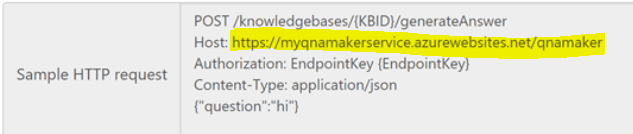
Use the complete name, starting with https:// and ending with /qnamaker.
JonathanFingold
on 30 Aug 2019
@jonathanFingold my .env file has the full url as shown below
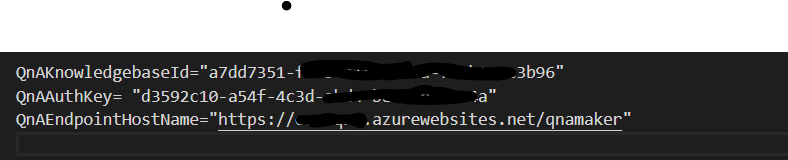
the error persist...
ebbimola
on 31 Aug 2019
I'm seeing if I reproduce with your code from a echo bot. In the meantime, can you clone and try with the QnA sample, I just confirmed that this one worked for me.
 dmvtech
on 3 Sep 2019
dmvtech
on 3 Sep 2019
@ebbimola Can you share your bot code too? What does the Debug Console show for errors?
dmvtech
on 3 Sep 2019
// Copyright (c) Microsoft Corporation. All rights reserved.
// Licensed under the MIT License.

const dotenv = require('dotenv');
const path = require('path');
const restify = require('restify');
// Import required bot services.
// See https://aka.ms/bot-services to learn more about the different parts of a bot.
const { BotFrameworkAdapter } = require('botbuilder');
// This bot's main dialog.
const { MyBot } = require('./bot');
// Import required bot configuration.
const ENV_FILE = path.join(__dirname, '.env');
dotenv.config({ path: ENV_FILE });
// Create HTTP server
const server = restify.createServer();
server.listen(process.env.port || process.env.PORT || 3978, () => {
    console.log(`\n${server.name} listening to ${server.url}`);
    console.log(`\nGet Bot Framework Emulator: https://aka.ms/botframework-emulator`);
    console.log(`\nTo test your bot, see: https://aka.ms/debug-with-emulator`);
});
// Create adapter.
// See https://aka.ms/about-bot-adapter to learn more about how bots work.
const adapter = new BotFrameworkAdapter({
    appId: process.env.MicrosoftAppId,
    appPassword: process.env.MicrosoftAppPassword
});
// Map knowledge base endpoint values from .env file into the required format for QnAMaker.
const configuration = {
    knowledgeBaseId: process.env.QnAKnowledgebaseId,
    endpointKey: process.env.QnAAuthKey,
    host: process.env.QnAEndpointHostName
};
// Catch-all for errors.
adapter.onTurnError = async (context, error) => {
    // This check writes out errors to console log .vs. app insights.
    console.error(`\n [onTurnError]: ${error}`);
    // Send a message to the user
    await context.sendActivity(`Oops. Something went wrong! this Damn thing....`);
};
// Create the main dialog.
const myBot = new MyBot(configuration, {});
// Listen for incoming requests.
server.post('/api/messages', (req, res) => {
    adapter.processActivity(req, res, async (context) => {
        // Route to main dialog.
        await myBot.run(context);
    });
});
I get the below error in the console...

ebbimola
on 4 Sep 2019
@ebbimola That code is from your index.js, yes? You should also have code in a bot (for example bot.js or bots\echobot.js). If it's easier, you can put your bot in a repo so I can see the whole thing.
dmvtech
on 4 Sep 2019
Also, is this a typo?
`onst dotenv = require('dotenv');
Should be:
const dotenv = require('dotenv');
My assumption is that it is just a GitHub rendering issue.
dmvtech
on 4 Sep 2019
@dmvtech I am sorry it was an oversight, and yes theres bot.js and also typo most have been when I was copying the code.
ebbimola
on 4 Sep 2019
Can you share the bot.js code?
dmvtech
on 5 Sep 2019
const { ActivityHandler } = require('botbuilder');


class MyBot extends ActivityHandler {
    constructor(configuration, qnaOptions) {
       super();
       if (!configuration) throw new Error('[QnaMakerBot]: Missing parameter. configuration is required');
       // now create a qnaMaker connector.
       this.qnaMaker = new QnAMaker(configuration, qnaOptions);
       this.onMessage(async (context, next) => {
            await context.sendActivity(`You said '${ context.activity.text }'`);
            // send user input to QnA Maker.
            const qnaResults = await this.qnaMaker.getAnswers(context);

            // If an answer was received from QnA Maker, send the answer back to the user.
            if (qnaResults[0]) {
                await context.sendActivity(`QnAMaker returned response: ' ${ qnaResults[0].answer}`);
            }

 else {
                // If no answers were returned from QnA Maker, reply with help.
                await context.sendActivity('No QnA Maker response was returned.'
                    + 'This example uses a QnA Maker Knowledge Base that focuses on smart light bulbs. '
                    + `Ask the bot questions like "Why won't it turn on?" or "I need help."`);
            }
            await next();
         });

this.onMembersAdded(async (context, next) => {
                const membersAdded = context.activity.membersAdded;
                for (let cnt = 0; cnt < membersAdded.length; ++cnt) {
                    if (membersAdded[cnt].id !== context.activity.recipient.id) {
                        await context.sendActivity('Hello and welcome!');
                    }
                }
                // By calling next() you ensure that the next BotHandler is run.
                await next();
            });
    }
}

module.exports.MyBot = MyBot;
const { QnAMaker } = require('botbuilder-ai');
I'm not able to reproduce the error using your code.
Have you tried creating another QnA KB and testing against that?
May I email you my keys/endpoint and have you test with that?
dmvtech
on 10 Sep 2019
I sent you an email.
dmvtech
on 10 Sep 2019
@dmvtech thanks, yes I have created another QnA and it worked with my keys and endpoint.
ebbimola
on 11 Sep 2019
Thanks @ebbimola. That shows that there is something wrong with that KB. You could test by using the POSTMAN or CURL commands that it gives you after publishing.
To clarify for me; is that (another QnA KB) a solution for you or just a test? (i.e. are you going to be using the other QnA KB as your production one).
dmvtech
on 11 Sep 2019
I'm going to close this as you have a work around. If you still have issues, please let me know.
dmvtech
on 13 Sep 2019
I have the exact same error.
Only in the local testing with the emulator the code works.
When I pushed it in git hub and it was deployed in azure it worked in web chat today in the morning.
now I have the error above.
 MaxMueller0815
on 26 Oct 2019
MaxMueller0815
on 26 Oct 2019
@MaxMueller0815 I just wanted to check. You are still having this issue as of October 28th?
dmvtech
on 28 Oct 2019
Thanks for asking
I already tried different other samples. I cannot remember which one was causing this error.
If i find out i will update my post!
MaxMueller0815
on 28 Oct 2019
I had the same error too and found the reason. Its the .env file, the last line of the hostname is not commented out properly. Remove the line "// This is a URL ending in /qnamaker". And it should work. Hope this helps.
 nandaguruswamy
on 31 Dec 2019
nandaguruswamy
on 31 Dec 2019
Related issues
 montacerdk
·
5Comments
montacerdk
·
5Comments
 pkirch
·
4Comments
pkirch
·
4Comments
 ceuk
·
4Comments
ceuk
·
4Comments
 MisinformedDNA
·
4Comments
MisinformedDNA
·
4Comments
 hansmbakker
·
7Comments
hansmbakker
·
7Comments
Most helpful comment
I had the same error too and found the reason. Its the .env file, the last line of the hostname is not commented out properly. Remove the line "// This is a URL ending in /qnamaker". And it should work. Hope this helps.