System information. For client/server mode post info for both machines.
Your borg version (borg -V).
1.1.10 installed from brew caskroom
sneak@nostromo:~$ sha1sum $(which borg)
02810c769ea25f4400141e0f56dc0337f4cdd8fe  /Users/sneak/Library/Homebrew/bin/borg
Operating system (distribution) and version.
macOS 10.15.1 Catalina
Hardware / network configuration, and filesystems used.
not there yet
How much data is handled by borg?
none
Full borg commandline that lead to the problem (leave away excludes and passwords)
borg init --help
Describe the problem you're observing.
Takes about six seconds to print help text. I run it and it just sits there for over five seconds before doing anything.
Include any warning/errors/backtraces from the system logs
sneak@nostromo:~$ time borg init --help
usage: borg init [-h] [--critical] [--error] [--warning] [--info] [--debug]
                 [--debug-topic TOPIC] [-p] [--log-json] [--lock-wait SECONDS]
                 [--show-version] [--show-rc] [--umask M] [--remote-path PATH]
                 [--remote-ratelimit RATE] [--consider-part-files]
                 [--debug-profile FILE] [--rsh RSH] -e MODE [--append-only]
                 [--storage-quota QUOTA] [--make-parent-dirs]
                 [REPOSITORY]

Initialize an empty repository

positional arguments:
  REPOSITORY            repository to create

optional arguments:
  -e MODE, --encryption MODE
                        select encryption key mode **(required)**
  --append-only         create an append-only mode repository
  --storage-quota QUOTA
                        Set storage quota of the new repository (e.g. 5G,
                        1.5T). Default: no quota.
  --make-parent-dirs    create the parent directories of the repository
                        directory, if they are missing.

Common options:
  -h, --help            show this help message and exit
  --critical            work on log level CRITICAL
  --error               work on log level ERROR
  --warning             work on log level WARNING (default)
  --info, -v, --verbose
                        work on log level INFO
  --debug               enable debug output, work on log level DEBUG
  --debug-topic TOPIC   enable TOPIC debugging (can be specified multiple
                        times). The logger path is borg.debug.<TOPIC> if TOPIC
                        is not fully qualified.
  -p, --progress        show progress information
  --log-json            Output one JSON object per log line instead of
                        formatted text.
  --lock-wait SECONDS   wait at most SECONDS for acquiring a repository/cache
                        lock (default: 1).
  --show-version        show/log the borg version
  --show-rc             show/log the return code (rc)
  --umask M             set umask to M (local and remote, default: 0077)
  --remote-path PATH    use PATH as borg executable on the remote (default:
                        "borg")
  --remote-ratelimit RATE
                        set remote network upload rate limit in kiByte/s
                        (default: 0=unlimited)
  --consider-part-files
                        treat part files like normal files (e.g. to
                        list/extract them)
  --debug-profile FILE  Write execution profile in Borg format into FILE. For
                        local use a Python-compatible file can be generated by
                        suffixing FILE with ".pyprof".
  --rsh RSH             Use this command to connect to the 'borg serve'
                        process (default: 'ssh')

This command initializes an empty repository. A repository is a filesystem
directory containing the deduplicated data from zero or more archives.

Encryption can be enabled at repository init time. It cannot be changed later.

It is not recommended to work without encryption. Repository encryption protects
you e.g. against the case that an attacker has access to your backup repository.

But be careful with the key / the passphrase:

If you want "passphrase-only" security, use one of the repokey modes. The
key will be stored inside the repository (in its "config" file). In above
mentioned attack scenario, the attacker will have the key (but not the
passphrase).

If you want "passphrase and having-the-key" security, use one of the keyfile
modes. The key will be stored in your home directory (in .config/borg/keys).
In the attack scenario, the attacker who has just access to your repo won't
have the key (and also not the passphrase).

Make a backup copy of the key file (keyfile mode) or repo config file
(repokey mode) and keep it at a safe place, so you still have the key in
case it gets corrupted or lost. Also keep the passphrase at a safe place.
The backup that is encrypted with that key won't help you with that, of course.

Make sure you use a good passphrase. Not too short, not too simple. The real
encryption / decryption key is encrypted with / locked by your passphrase.
If an attacker gets your key, he can't unlock and use it without knowing the
passphrase.

Be careful with special or non-ascii characters in your passphrase:

- Borg processes the passphrase as unicode (and encodes it as utf-8),
  so it does not have problems dealing with even the strangest characters.
- BUT: that does not necessarily apply to your OS / VM / keyboard configuration.

So better use a long passphrase made from simple ascii chars than one that
includes non-ascii stuff or characters that are hard/impossible to enter on
a different keyboard layout.

You can change your passphrase for existing repos at any time, it won't affect
the encryption/decryption key or other secrets.

Encryption modes
++++++++++++++++

+----------+---------------+------------------------+--------------------------+
| Hash/MAC | Not encrypted | Not encrypted,         | Encrypted (AEAD w/ AES)  |
|          | no auth       | but authenticated      | and authenticated        |
+----------+---------------+------------------------+--------------------------+
| SHA-256  | none          | authenticated          | repokey                  |
|          |               |                        | keyfile                  |
+----------+---------------+------------------------+--------------------------+
| BLAKE2b  | n/a           | authenticated-blake2   | repokey-blake2           |
|          |               |                        | keyfile-blake2           |
+----------+---------------+------------------------+--------------------------+

Marked modes are new in Borg 1.1 and are not backwards-compatible with Borg 1.0.x.

On modern Intel/AMD CPUs (except very cheap ones), AES is usually
hardware-accelerated.
BLAKE2b is faster than SHA256 on Intel/AMD 64-bit CPUs
(except AMD Ryzen and future CPUs with SHA extensions),
which makes authenticated-blake2 faster than none and authenticated.

On modern ARM CPUs, NEON provides hardware acceleration for SHA256 making it faster
than BLAKE2b-256 there. NEON accelerates AES as well.

Hardware acceleration is always used automatically when available.

repokey and keyfile use AES-CTR-256 for encryption and HMAC-SHA256 for
authentication in an encrypt-then-MAC (EtM) construction. The chunk ID hash
is HMAC-SHA256 as well (with a separate key).
These modes are compatible with Borg 1.0.x.

repokey-blake2 and keyfile-blake2 are also authenticated encryption modes,
but use BLAKE2b-256 instead of HMAC-SHA256 for authentication. The chunk ID
hash is a keyed BLAKE2b-256 hash.
These modes are new and not compatible with Borg 1.0.x.

authenticated mode uses no encryption, but authenticates repository contents
through the same HMAC-SHA256 hash as the repokey and keyfile modes (it uses it
as the chunk ID hash). The key is stored like repokey.
This mode is new and not compatible with Borg 1.0.x.

authenticated-blake2 is like authenticated, but uses the keyed BLAKE2b-256 hash
from the other blake2 modes.
This mode is new and not compatible with Borg 1.0.x.

none mode uses no encryption and no authentication. It uses SHA256 as chunk
ID hash. Not recommended, rather consider using an authenticated or
authenticated/encrypted mode. This mode has possible denial-of-service issues
when running borg create on contents controlled by an attacker.
Use it only for new repositories where no encryption is wanted and when compatibility
with 1.0.x is important. If compatibility with 1.0.x is not important, use
authenticated-blake2 or authenticated instead.
This mode is compatible with Borg 1.0.x.

real    0m5.845s
user    0m0.403s
sys 0m0.105s
sneak@nostromo:~$
Hitting ^C during the delay causes this:
sneak@nostromo:~$ borg init --help
^CTraceback (most recent call last):
  File "PyInstaller-3.2.1-py3.5.egg/PyInstaller/loader/rthooks/pyi_rth_pkgres.py", line 11, in <module>
  File "<frozen importlib._bootstrap>", line 968, in _find_and_load
  File "<frozen importlib._bootstrap>", line 957, in _find_and_load_unlocked
  File "<frozen importlib._bootstrap>", line 664, in _load_unlocked
  File "<frozen importlib._bootstrap>", line 634, in _load_backward_compatible
  File "/Users/vagrant/.pyenv/versions/3.5.7/envs/borg-env/lib/python3.5/site-packages/PyInstaller-3.2.1-py3.5.egg/PyInstaller/loader/pyimod03_importers.py", line 389, in load_module
  File "pkg_resources/__init__.py", line 33, in <module>
  File "<frozen importlib._bootstrap>", line 968, in _find_and_load
  File "<frozen importlib._bootstrap>", line 957, in _find_and_load_unlocked
  File "<frozen importlib._bootstrap>", line 664, in _load_unlocked
  File "<frozen importlib._bootstrap>", line 634, in _load_backward_compatible
  File "/Users/vagrant/.pyenv/versions/3.5.7/envs/borg-env/lib/python3.5/site-packages/PyInstaller-3.2.1-py3.5.egg/PyInstaller/loader/pyimod03_importers.py", line 389, in load_module
  File "platform.py", line 117, in <module>
  File "<frozen importlib._bootstrap>", line 968, in _find_and_load
  File "<frozen importlib._bootstrap>", line 957, in _find_and_load_unlocked
  File "<frozen importlib._bootstrap>", line 664, in _load_unlocked
  File "<frozen importlib._bootstrap>", line 634, in _load_backward_compatible
  File "/Users/vagrant/.pyenv/versions/3.5.7/envs/borg-env/lib/python3.5/site-packages/PyInstaller-3.2.1-py3.5.egg/PyInstaller/loader/pyimod03_importers.py", line 389, in load_module
  File "subprocess.py", line 128, in <module>
  File "<frozen importlib._bootstrap>", line 968, in _find_and_load
  File "<frozen importlib._bootstrap>", line 957, in _find_and_load_unlocked
  File "<frozen importlib._bootstrap>", line 664, in _load_unlocked
  File "<frozen importlib._bootstrap>", line 634, in _load_backward_compatible
  File "/Users/vagrant/.pyenv/versions/3.5.7/envs/borg-env/lib/python3.5/site-packages/PyInstaller-3.2.1-py3.5.egg/PyInstaller/loader/pyimod03_importers.py", line 573, in load_module
KeyboardInterrupt
Failed to execute script pyi_rth_pkgres
sneak@nostromo:~$
 sneak
sneak
All 14 comments
This happens only at 1st run.
1st run
real 0m11.163s
user 0m2.411s
sys 0m2.011s
2nd run
real 0m0.485s
user 0m0.431s
sys 0m0.049s
 infectormp
on 27 Nov 2019
infectormp
on 27 Nov 2019
Happens every single time for me.
sneak
on 27 Nov 2019
That might depend on how you installed borg.
If that is based on the "fat binary" made by pyinstaller, each invocation will extract borg + all libraries + python from the fat binary file. If the tmp directory is on a hard disk or ssd, that might be slower than on a ramdisk.
The fastest way is to have a borg package made for your platform, requiring the needed libraries and python stuff via package dependencies. That way, it won't need to do the extraction step after installation.
 ThomasWaldmann
on 28 Nov 2019
ThomasWaldmann
on 28 Nov 2019
OTOH, once after you did the first steps with borg and automated/scripted stuff, some seconds more or less won't matter.
ThomasWaldmann
on 28 Nov 2019
This is a macOS issue that started with 10.15 (Catalina). It seems like it's unpacking and checking every single library file, which takes those 10 seconds OP is seeing. You would also see network traffic from the syspolicyd process and log messages, like the ones below.
That's because pyinstaller will always use a random path to unpack and then macOS will sign them once again.
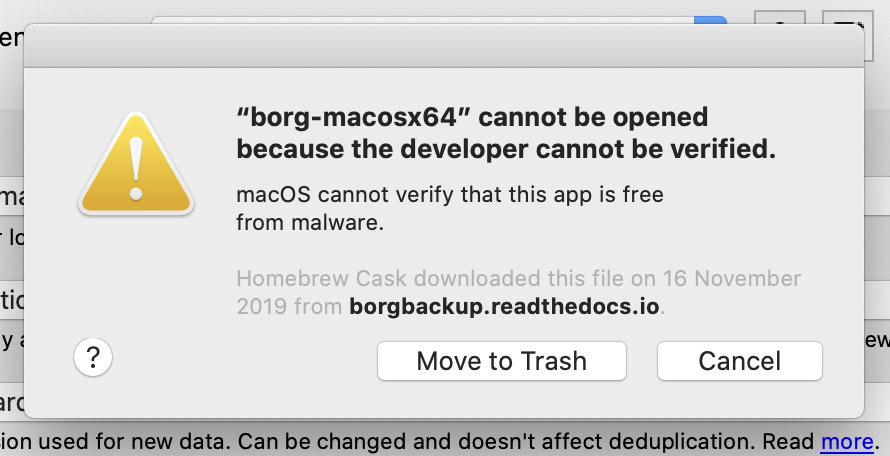
I tried a few things this afternoon, but couldn't get it to work quickly. Will keep looking. In some extreme cases, you could also see a message like this:
default 16:48:42.665631+0800    syspolicyd  temporarySigning type=1 matchFlags=0x0 path=/var/folders/g0/6wysw4qn6kl38gkv58jgkkfc0000gp/T/_MEIL9ei0M/borg.compress.so
default 16:48:42.787729+0800    syspolicyd  temporarySigning type=1 matchFlags=0x0 path=/var/folders/g0/6wysw4qn6kl38gkv58jgkkfc0000gp/T/_MEIL9ei0M/liblz4.1.dylib
default 16:48:42.924282+0800    syspolicyd  temporarySigning type=1 matchFlags=0x0 path=/var/folders/g0/6wysw4qn6kl38gkv58jgkkfc0000gp/T/_MEIL9ei0M/unicodedata.so
default 16:48:43.332184+0800    syspolicyd  temporarySigning type=1 matchFlags=0x0 path=/var/folders/g0/6wysw4qn6kl38gkv58jgkkfc0000gp/T/_MEIL9ei0M/borg.platform.posix.so
default 16:48:43.449249+0800    syspolicyd  temporarySigning type=1 matchFlags=0x0 path=/var/folders/g0/6wysw4qn6kl38gkv58jgkkfc0000gp/T/_MEIL9ei0M/borg.platform.darwin.so
 m3nu
on 1 Dec 2019
m3nu
on 1 Dec 2019
Why is it saying it was downloaded from borgbackup.readthedocs.io? That is our docs site, there are no binaries there to download.
ThomasWaldmann
on 1 Dec 2019
Maybe Homebrew sets the website to whatever they have in their recipe.
I'll see if there are any changes to this situation. The current situation is really stupid. Yesterday I tried pretty much everything from notarizing the binary (which works) to signing it or signing all the packaged libs or signing a DMG or PKG file around it. No change in the startup delay.
Of course it works fine from pip because all the libs are known and in place for that case. Maybe pyinstaller comes up with a fix. Like using a persistent temporary path to unpack.
m3nu
on 2 Dec 2019
The way forward is probably to consider other Python packaging tools that don't extract and re-execute Borg. I'm currently looking at Nuitka and Pyoxidizer. Both produce a single bin that's directly executed without any unpacking step.
Didn't get either one working yet. Nuitka is more mature, but uses its own Python compiler, which may not work for Borg. Pyoxidizer is more promising, but under heavy development with the current 0.4 version having some blocking bugs for our case. Will stay on it.
m3nu
on 14 Dec 2019
Maybe this issue from docker-compose will help: https://github.com/docker/compose/issues/6956
Seems like you can avoid this by telling PyInstaller to make a folder with binary and all libraries. So it will only be scanned once.
 yqmmm
on 18 Jan 2020
yqmmm
on 18 Jan 2020
That would make sense. Will try this next week. Thanks for following up!
m3nu
on 18 Jan 2020
I tried to package Borg "folder style" and then signed and notarized it together with Vorta. Instant startup and no more check. Example test app here:
https://files.qmax.us/vorta/Vorta-0.6.24-testing-signed-borg.dmg
You can find the signed borg build in Contents/Resources/borg-dir
To codesign I used this command:
find $APP_BUNDLE.app/Contents/Resources/borg-dir -type f \( -name \*.so -or -name \*.dylib -or -name borg.exe \) \
  -exec codesign --verbose --force --sign "$CERTIFICATE_NAME" \
  --entitlements $ENTITLEMENTS_PLIST --timestamp --deep --options runtime {} \;
I also tried different packagers, but didn't have success thus far. Folder-style seems to work well so far, but you get more than just one binary, but a folder (obviously).
m3nu
on 28 Feb 2020
As a workaround, the 5 second delay went away for me by enabling Terminal as a Developer Tool in Security & Privacy.
Remember that if you try this you are disabling parts of the MacOS sandboxing.
 unilynx
on 22 May 2020
unilynx
on 22 May 2020
Duplicate of #5185
m3nu
on 16 Aug 2020
Closing as duplicate. Hopefully the new formula will fix it soon. \o/
ThomasWaldmann
on 16 Aug 2020
Related issues
 enkore
·
5Comments
enkore
·
5Comments
 auanasgheps
·
5Comments
auanasgheps
·
5Comments
 tconstans
·
5Comments
tconstans
·
5Comments
 rugk
·
4Comments
rugk
·
4Comments
 unlandm
·
4Comments
unlandm
·
4Comments
Most helpful comment
This is a macOS issue that started with 10.15 (Catalina). It seems like it's unpacking and checking every single library file, which takes those 10 seconds OP is seeing. You would also see network traffic from the
syspolicydprocess and log messages, like the ones below.That's because pyinstaller will always use a random path to unpack and then macOS will sign them once again.
I tried a few things this afternoon, but couldn't get it to work quickly. Will keep looking. In some extreme cases, you could also see a message like this: