Bootstrap: Support 'gpuAcceleration' option override for Popper.js
Popper.js uses translate3d call to position blocks by default (gpuAcceleration=true).
If gpuAcceleration is set to false Popper.js will use top/bottom/left/right properties.
The problem with a translate3d call is that it produces blurry fonts if browser's (Chrome 70) zoom level is not 100%.
Reason of blurring: scaling may result to decimal points in a block offset. For example 101px block with 125% zoom level will have 126.25px width => blurry font in Chrome, but 104px block will result to 130px => not blurry.
The workaround is to override 'gpuAcceleration' option of Popper.js and set it to false.
This option can be set in the constructor of Popper.js, but Bootstrap v4.2.1 hides Popper.js object instantiation and does not allow to adjust it.
Proposal:
Support gpuAcceleration option override in Bootstrap.
This can be done for this option only or using a more general way for any other option of Popper.js. This will be possible if Bootstrap allows providing custom defaults for Popper.js options in some way.
PS.
The workaround I use today: I use a patched Popper.js with 'gpuAcceleration' set to 'false' by default and removed "will-change" CSS style (this one may also cause blurring).
 mfursov
All 14 comments
That's something you can do with:
Popper.Defaults.modifiers.computeStyle.gpuAcceleration = false
Only if you do not use our bundle file
 Johann-S
on 2 Jan 2019
Johann-S
on 2 Jan 2019
Hi I'm the author of Popper.js
Unfortunately browsers don't seem to expose any API to retrieve the zoom level of the page, so it's impossible to deploy a proper fix for this quirk.
I'm open to PRs that try to alleviate or fix the problem all together on Popper.js though.
 FezVrasta
on 7 Jan 2019
FezVrasta
on 7 Jan 2019
Would it be an idea to have gpuAcceleration=false as default so developers have to actively make a decision to enable it with its potential consequences?
 Ruffio
on 7 Jan 2019
Ruffio
on 7 Jan 2019
Without gpuAcceleration the performances greatly degrade, the number of users that make use of browser zoom aren't that much, and the blur effect isn't much evident on the modern devices that use high DPI screens, so I think it's a good default.
FezVrasta
on 7 Jan 2019
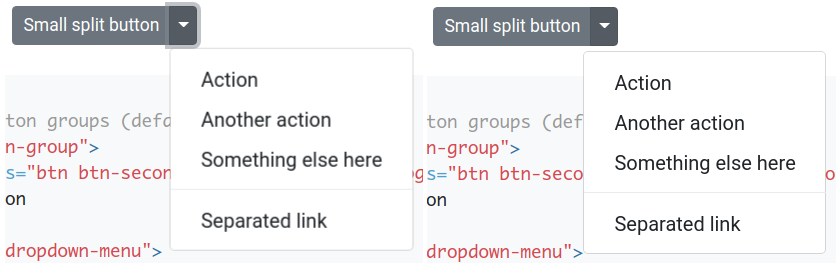
Example to demo the issue with bootstrap official web site & zoom = 125%
mfursov
on 7 Jan 2019
Once I know how to fix this issue on my website I fix it (using external Popper.js library) and move forward.
The problem is that every developer must spend some time to find this problem, understand the root cause and provide a fix.
Regardless of which solution Bootstrap will (or won't) introduce itself I believe it would be very kind to make developers know about the issue and give them a hint about the fix/workaround.
Ps. I've never thought I will ever use non-default zoom in a browser by myself. But now having 11-inch screen with FHD resolution I have zoom "On" by default :)
mfursov
on 7 Jan 2019
I think Bootstrap should provide a way to disable the option rather than relying on the workaround suggested by @Johann-S, that workaround doesn't work in all the environments and will probably stop working all together in popper.js@v2
Something like a data-popper-gpuacceleration="off" on the body tag of the page maybe.
FezVrasta
on 7 Jan 2019
The issue was reported to Chrome's team 4 of years ago: https://bugs.chromium.org/p/chromium/issues/detail?id=573146
Resolution: won't fix.
Looks like we have to use workarounds and do not rely on quick fix available in Chrome.
mfursov
on 7 Jan 2019
In Bootstrap we don't support browser zooming, but I agree with @FezVrasta we should provide a way to disable gpuAcceleration.
Johann-S
on 8 Jan 2019
Popper.js has a reason not to have gpuAcceleration=off by default. May be this mode (gpuAcceleration=off) could be a reasonable choice for the Bootstrap bundle?
Bootstrap uses Popper.js in a very limited way: tooltips or dropdowns usually do not have performance issues. Having gpuAcceleration=off by default in the Bootstrap bundle may fix the issue for the majority of Bootstrap users with no need to update even a single line of code.
mfursov
on 8 Jan 2019
@mfursov tooltips and dropdown can have performance issues if positioned outside their natural context (like it happens with most of them actually).
Considering that Bootstrap doesn't even support browser zooming, I can't see why the default should be changed
FezVrasta
on 8 Jan 2019
@FezVrasta for example for this case (without gpuAcceleration I can use transform transitions on tooltips/popovers).
 max-ci
on 8 Jan 2019
max-ci
on 8 Jan 2019
That's a different issue, the solution I did propose was to provide an additional wrapper to let the user add their own custom CSS transformations. But I don't think anybody every addressed it
FezVrasta
on 8 Jan 2019
Majority of people that I know of have Windows 10 set at least to 125%, some even to 150%. Therefore I do not really get the statement:
In Bootstrap we don't support browser zooming
and
the number of users that make use of browser zoom aren't that much
Any solution to that would be awesome as in the current state Popper is rather useless - better slow than blurry ;).
BTW: If I am not mistaken then Bootstrap 3 does not blur the content and I do not find the dropdown slow at all.
EDIT: I find this video highly relevant to the discussion in this thread ;):
 oldrich-s
on 27 Feb 2019
oldrich-s
on 27 Feb 2019
Related issues
 ghost
·
3Comments
ghost
·
3Comments
 steve-32a
·
3Comments
steve-32a
·
3Comments
 devfrey
·
3Comments
devfrey
·
3Comments
 ziyi2
·
3Comments
ziyi2
·
3Comments
 cvrebert
·
3Comments
cvrebert
·
3Comments