Bootstrap: Floating label example has misaligned label due to change of height of inputs
I was thinking of using the floating label on my website, but it appears to have been changed :-(
4.0 (https://getbootstrap.com/docs/4.0/examples/floating-labels/):

4.1 (https://getbootstrap.com/docs/4.1/examples/floating-labels/):

Actually I think that the changes happened when 4.1.3 was released and a fixed height of 38px was introduced as it goes from 50px (calculated) to 38px (set):


 Ruffio
All 7 comments
Thanks!
To recap the other issue, this is because we added fixed height to .form-control in v4.1.3. Will need to override it here.
 mdo
on 1 Aug 2018
mdo
on 1 Aug 2018
Keeping the standard 38px for input heights, I have come to that these adjustments work nicely:
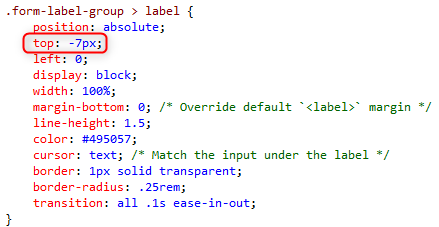
and:

That results to:
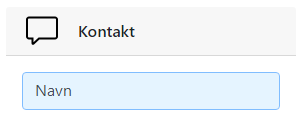
and:
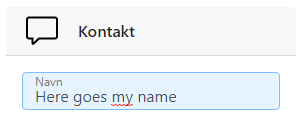
Use it for inspiration :-)
Please also consider to support/implement floating label for textarea. If 'expanding' the css to also cover textarea, the alignment with the above values are a little bit off, but only a little:

Ruffio
on 2 Aug 2018
How do we get back the 50px (calculated) for floating labels?
 fessor10
on 4 Aug 2018
fessor10
on 4 Aug 2018
Ideally we shouldn't require a fixed/specific height but the code should adjust accordingly to the height of the input/textarea
Ruffio
on 6 Aug 2018
Yeah, i removed the height entirely and got what i wanted. I think i agree with you about not having fixed/specific height
fessor10
on 6 Aug 2018
See the PR where we added the height for why: #26820. We need to account for it here by providing a new height.
mdo
on 7 Aug 2018
@mdo will the fix/adjustment be a part of 4.2?
Ruffio
on 16 Aug 2018
Related issues
 alvarotrigo
·
3Comments
alvarotrigo
·
3Comments
 vinorodrigues
·
3Comments
vinorodrigues
·
3Comments
 iklementiev
·
3Comments
iklementiev
·
3Comments
 fohlsom
·
3Comments
fohlsom
·
3Comments
 MrCsabaToth
·
3Comments
MrCsabaToth
·
3Comments