Bootstrap: Printing in IE11 and Firefox is blank after page 1
Printing in IE11 is broken after the first page, displaying no content.
Chrome:

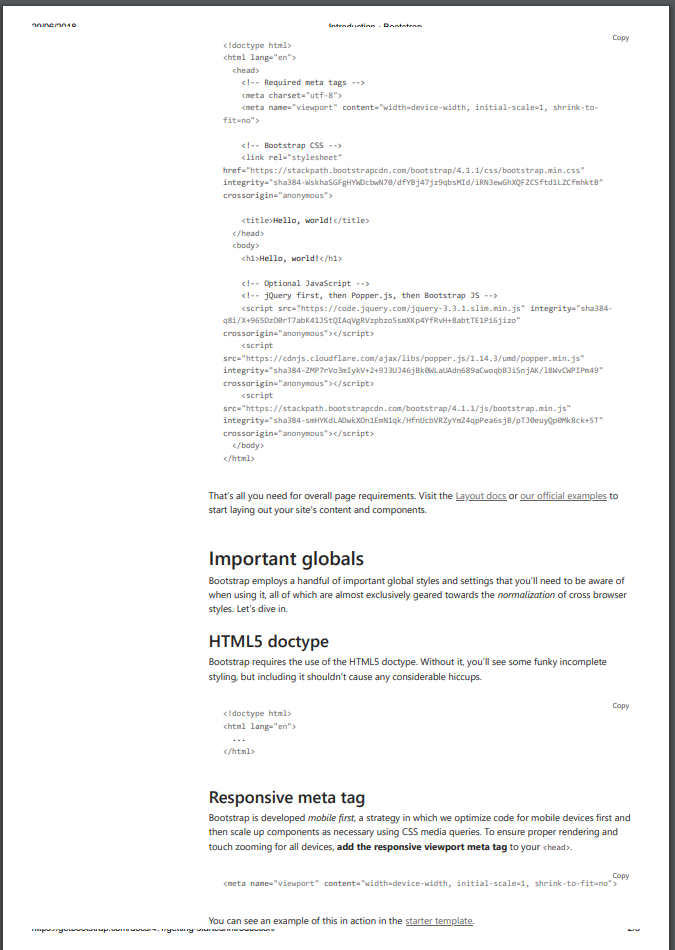
IE11:


 DM2489
All 10 comments
I came here to post the same issue, as our users reported not being able to print using IE. In addition to Internet Explorer, I also have this issue in Firefox 60 on Mac OSX: I can reproduce it on my end by trying to print https://getbootstrap.com/docs/4.1/getting-started/introduction/
 stephenhillier
on 29 Jun 2018
stephenhillier
on 29 Jun 2018
I can confirm that this issue is also present in Firefox on Windows.
Will this be investigated soon?
DM2489
on 2 Jul 2018
I think this issue is linked to https://github.com/twbs/bootstrap/issues/23489.~~
setting display: block; for print css does not dix this in IE or Firefox.
DM2489
on 2 Jul 2018
Anyone?
DM2489
on 20 Jul 2018
I have the same problem. Reproducable with the bootstrap examples page.
 perryflynn
on 29 Jul 2018
perryflynn
on 29 Jul 2018
@mdo Can this be looked into, pretty please?
DM2489
on 1 Aug 2018
This is still an issue. Can someone assist please?
DM2489
on 3 Dec 2018
I'm having the same issue! It is caused by display: flex;
So you'll need to add d-print-block to all your flex elements, or add something like this in an @ print media selector:
  .row,
  .any-custom-class-that-uses-flex {
    display: block !important;
  }
 ytsurk
on 7 Dec 2018
ytsurk
on 7 Dec 2018
I'm having the same issue! It is caused by
display: flex;So you'll need to add d-print-block to all your flex elements, or add something like this in an @ print media selector:
  .row,
  .any-custom-class-that-uses-flex {
    display: block !important;
  }
Too bad that it breaks anything else inside the div...
 daniele-athome
on 16 Aug 2019
daniele-athome
on 16 Aug 2019
This is a browser bug. Unfortunately there is no general way to solve. There are some workarounds, those are incompletely but may help for some cases.
Also please see:
https://bugzilla.mozilla.org/show_bug.cgi?id=939897
Sorry but closing this since we can't fix.
 ysds
on 17 Mar 2020
ysds
on 17 Mar 2020
Related issues
 steve-32a
·
3Comments
steve-32a
·
3Comments
 cvrebert
·
3Comments
cvrebert
·
3Comments
 knownasilya
·
3Comments
knownasilya
·
3Comments
 matsava
·
3Comments
matsava
·
3Comments
 devdelimited
·
3Comments
devdelimited
·
3Comments
Most helpful comment
I'm having the same issue! It is caused by
display: flex;So you'll need to add d-print-block to all your flex elements, or add something like this in an @ print media selector: