Bootstrap: I need to double click to open dropdowns.
Hi guys!
_You can test the issue here: http://dev.3818.com.ar/muq-bug-dropdown/_
Recently I had some problems with Popper JS, dropdowns and other elements did not work. I have solved it using the file bootstrap.bundle.min.js of version 4.0.0 of Bootstrap (apparently it has Popper JS included).
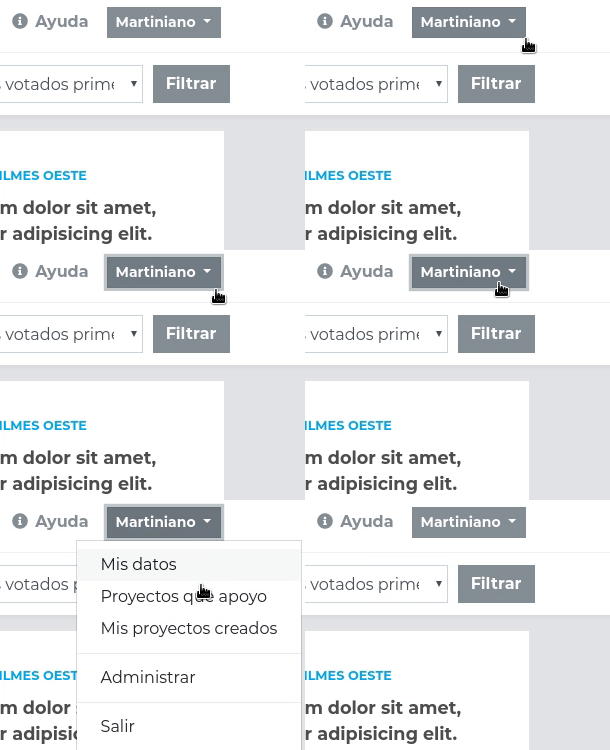
However, dropdowns have a strange behavior.
When I make the first click in the dropdown, bootstrap adds two attributes.
x-placement="bottom-start"
style="position: absolute; transform: translate3d(0px, 38px, 0px); top: 0px; left: 0px; will-change: transform;"
Then, when I make the second click, I can display the contents of the dropdown.
Details:
Before first click:
<div _ngcontent-c2="" aria-labelledby="dropdownMenuButton" class="dropdown-menu">
After first click:
<div _ngcontent-c2="" aria-labelledby="dropdownMenuButton" class="dropdown-menu" x-placement="bottom-start" style="position: absolute; transform: translate3d(0px, 31px, 0px); top: 0px; left: 0px; will-change: transform;">
After second click:
<div _ngcontent-c2="" aria-labelledby="dropdownMenuButton" class="dropdown-menu show" x-placement="bottom-start" style="position: absolute; transform: translate3d(0px, 31px, 0px); top: 0px; left: 0px; will-change: transform;">
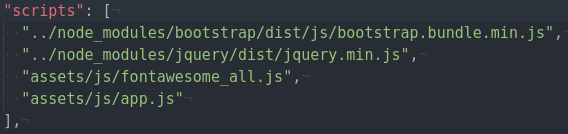
Scripts section inside angular-cli.json
The issue was tested in:
- Chrome 64.0.3282.119 (Official build) (64 bits)
- Firefox [Quantum] 58.0 (64-bit)
- Yandex 17.11.1.1087 beta (64-bit)
- Vivaldi 1.13.1008.44 (Stable channel) (64 bits)
Project details:
- Bootstrap 4.0.0
- bootstrap bundle js
- Angular 2 (All other styles work well. All my sass works well too.)
Others:
- OS: Archlinux
 lucasromerodb
All 7 comments
Bug reports must include a live demo of the problem. Per our contributing guidelines, please create a reduced test case via CodePen or JS Bin and report back with your link, Bootstrap version, and specific browser and OS details.
 Johann-S
on 30 Jan 2018
Johann-S
on 30 Jan 2018
Maybe you can add your solution @lucasromerodb ?
Johann-S
on 30 Jan 2018
@Johann-S Sure.
Delete all JS calls from index.html and call it in angular-cli.json
I have noticed this solution when reporting the error.
Now the dropdowns work well.
lucasromerodb
on 30 Jan 2018
That's a pretty vague solution
 flashadvocate
on 26 Mar 2018
flashadvocate
on 26 Mar 2018
@flashadvocate Yep, it doesn't work for me
 blue995
on 28 Mar 2018
blue995
on 28 Mar 2018
Again...without a live reduced test case showing the problem, there's little we can do in order to track down potential causes... (hmm, I was replying to a recent comment, but the comment now seems to have disappeared...sorry for the noise)
 patrickhlauke
on 2 May 2018
patrickhlauke
on 2 May 2018
i face the same issue with latest versions, here is my codepen
- jQuery version : 3.3.1
- Bootstrap version : 4.3.1
when i refresh the page first time it only focus the button, not open the dropdown-menu, after first click you can open this as it was before.
 mehulRojasara
on 22 Mar 2019
mehulRojasara
on 22 Mar 2019
Related issues
 leomao10
·
3Comments
leomao10
·
3Comments
 devfrey
·
3Comments
devfrey
·
3Comments
 eddywashere
·
3Comments
eddywashere
·
3Comments
 cvrebert
·
3Comments
cvrebert
·
3Comments
 steve-32a
·
3Comments
steve-32a
·
3Comments