Bootstrap: Two btn-blocks in a btn-group
I have master from a couple days ago.
<div class="btn-group ">
    <input type="submit" name="save" value="Activate Order" class="btn btn-block btn-lg btn-outline-success" id="submit-id-save">
    <input type="button" name="cancel" value="Cancel Order" class="btn btn-block btn-lg btn-outline-danger" id="button-id-cancel">
</div>
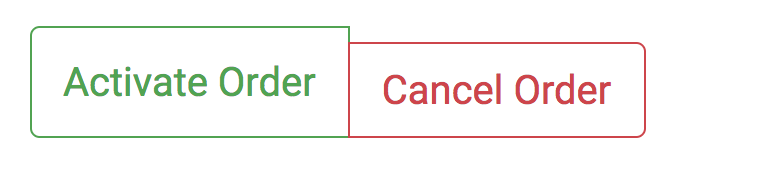
Interestingly, removing .btn-block on the second of the buttons seems to solve the display issue. No permutation I tried of .btn-blocks gives the desired full-width button group though. That functionality isn't listed in the docs though, so I can live without it. =)
Feel free to just close this issue if the above doesn't seem like a bug.
 alexlenail
All 7 comments
Bug reports must include a live demo of the problem. Per our contributing guidelines, please create a reduced test case via CodePen or JS Bin and report back with your link, Bootstrap version, and specific browser and OS details.
 Johann-S
on 10 Oct 2017
Johann-S
on 10 Oct 2017
Here is a codepen:
https://codepen.io/andresgalante/pen/dVewRV
We used to have the class .btn-group-justified on v3 to achieve what you want to do, but it was removed on v4: https://getbootstrap.com/docs/4.0/migration/#button-group
@mdo Should we bring it back?
 andresgalante
on 10 Oct 2017
andresgalante
on 10 Oct 2017
@zfrenchee @andresgalante - I'm not quite sure why .btn-block is needed in this use case? In the CodePen, I took out both .btn-block classes and the element seems to behave the same. If I am reading the documentation correctly, .btn-block should be used when you want the button(s) to span the full width of the parent.
I've made an updated CodePen where I put the buttons in a .container and even applying .btn-block to either button or the .btn-group itself does not result in the .btn-group stretching to the parent container's width.
@andresgalante - is that what you're suggesting with bringing .btn-group-justified back to address this use case? I think so based on what the v3 docs show as an example: https://getbootstrap.com/docs/3.3/components/#btn-groups-justified
 Joyrex
on 10 Oct 2017
Joyrex
on 10 Oct 2017
Hi @Joyrex I just put the code pen together to show what @zfrenchee is talking about.
In case you wonder how to get a justified btn-group I've just updated the codepen with an example:
andresgalante
on 10 Oct 2017
.btn-block isn't meant to be used in a .btn-group—you're using classes that are odds with one another. Button block is full-width buttons that vertically stack with a margin-based spacer for subsequent buttons (which is why that second one is knocked down). Button groups are meant to align buttons to in one horizontal group.
@andresgalante Yes, we should bring it back, but perhaps we explore what it looks like as flex utilities instead of something limited to a component modifier? That way it could work on navs, too.
 mdo
on 18 Oct 2017
mdo
on 18 Oct 2017
@mdo let me look into that... I'll try abstracting this:
http://getbootstrap.com/docs/4.0/components/navs/#fill-and-justify
Into a a utility that can work both is navs and btn-group
andresgalante
on 30 Oct 2017
Closing since we're no button block bug to fix here. Flex utilities should help a la the nav component.
mdo
on 4 Jan 2018
Related issues
 ghost
·
3Comments
ghost
·
3Comments
 kamov
·
3Comments
kamov
·
3Comments
 iklementiev
·
3Comments
iklementiev
·
3Comments
 devfrey
·
3Comments
devfrey
·
3Comments
 fohlsom
·
3Comments
fohlsom
·
3Comments
Most helpful comment
Here is a codepen:
https://codepen.io/andresgalante/pen/dVewRV
We used to have the class
.btn-group-justifiedon v3 to achieve what you want to do, but it was removed on v4: https://getbootstrap.com/docs/4.0/migration/#button-group@mdo Should we bring it back?