Bootstrap: Big dropdowns are unusable when used inside an `overflow:scroll` container, due to being constrained inside it
Problem
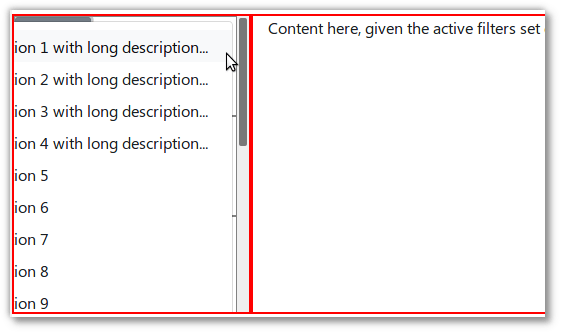
When using a Bootstrap (4.0.0beta) Dropdown in an element that is a child of an overflow:scroll element, the dropdown is "stuck" inside the container, making it unusable if the dropdown contents are too big horizontally/vertically:
Contrarily, a vanilla HTML <select> will merrily bleed out of the overflow:scroll element as necessary:
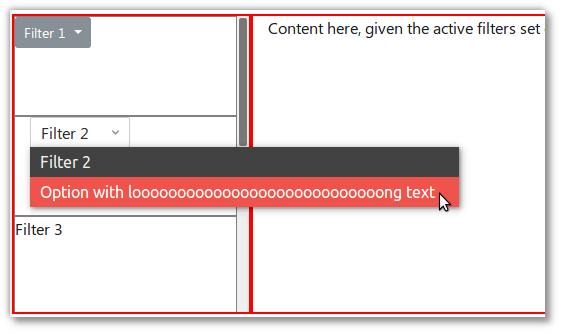
See demo at JSFiddle/ronj/t6z6Lnfb.
Use case
A few words on the use case justifying this combination, as shown in the JSFiddle which mimics a webapp I'm working on:
- In the left sidebar live a set of filters. It may contain several filters that will consume undetermined vertical space, thus lives in an
overflow-y:scrolldiv. Each filter has a dropdown which lets users modify filter options. - In the right pane lives the content, filtered by the filters in the left sidebar.
→ As a user,
- I do need that
overflow-y:scrollsidebar scrolling behavior (because the list of filters is of undetermined and potentially large height, depending on the number of filters) - But filter dropdowns (which can be large, both in width due to length of options and height due to count of options) should be able "escape out of" / not be constrained by the sidebar.
And as shown in the demo/screenshots, vanilla HTML <select> don't suffer from this problem, but it's not always practical/possible to revert back to using them, e.g. due to using features specific to Bootstrap Dropdown, or for consistent styling.
Details
Bootstrap version: 4.0.0-beta
OS/Browser: Ubuntu 16.04.3 / {Chrome 63, Firefox 58}
This issue is a follow-up to SO / Letting a bootstrap b-dropdown escape out of an overflow:scroll container, but noticing regular <select> are not affected, it starts to look like a bug, thus this issue. Sorry for the noise if I'm missing something obvious / if there's a workaround / if this is a known problem tracked in an existing issue.
Thanks 🙂.
 ronjouch
All 13 comments
Try this:
$(document).on('show.bs.dropdown', '.scrolled-heighted-box', function(e) {
        var dropdown = $(e.target).find('.dropdown-menu');

            dropdown.appendTo('body');
        $(this).on('hidden.bs.dropdown', function () {
            dropdown.appendTo(e.target);
        })
    });
I use this for table responsive.
 danijelGombac
on 4 Oct 2017
danijelGombac
on 4 Oct 2017
@danijelGombac works in the jsFiddle, thanks 👍👍👍! I'm using Bootstrap from Vue.js with bootstrap-vue though, so I guess I have a bit of fiddling to do, but it looks doable.
Still looks like desirable-by default behavior to me, so leaving the issue open.
ronjouch
on 4 Oct 2017
Curious if this is doable with Popper @Johann-S? Previously we have been constrained by the manual placement of dropdowns in the DOM.
 mdo
on 5 Oct 2017
mdo
on 5 Oct 2017
Yep we can add a container option the same used for Tooltips/Popovers and the Dropdown will be append inside this other container and will be positioned correctly
 Johann-S
on 5 Oct 2017
Johann-S
on 5 Oct 2017
Yep we can add a container option the same used for Tooltips/Popovers and the Dropdown will be append inside this other container and will be positioned correctly
@Johann-S @mdo thanks for the fast feedback 🙂! A proper fix in vanilla Bootstrap would be awesome, because even though the re-parenting trick works for vanilla Bootstrap, turns out my "I guess it's doable in bootstrap-vue with a bit of fiddling" comment at https://github.com/twbs/bootstrap/issues/24251#issuecomment-334274330 was wrong: re-parenting is a no-no for downstream reactive bindings like bootstrap-vue. Quoting @tmorehouse at https://github.com/bootstrap-vue/bootstrap-vue/issues/1163#issuecomment-334291378 ,
Re-parenting live reactive components (such as the components inside a dropdown) is not the greatest thing to do with Vue, as it can start complaining that the parent element has changed, cause a re-render (back to the original spot, and cause elements to be "stuck" where ever they weer re-parented if for some reason the original container or component gets removed from the document (i.e. v-if, a route change, etc).
The biggest issue is the latter (i.e. dropdown menus that get stuck open on a page when their parent component goes away). While you can try and use beforeDestroy/destroyed hooks to move the content back to where it was supposed to be, it doesn't always work (as the place where it is supposed to be in the DOM no longer exists.. Which can also lead to application memory leaks if event listeners have references to those DOM elements (so they may get removed from DOM, but are still in memory because someone else has a reference to it).
@tmorehouse anything to comment on that container option proposed in twbs/bootstrap PR#24257? I see our b-popover / b-tooltip components do expose it and guess a similar property should be portable to b-dropdown too, right?
ronjouch
on 5 Oct 2017
@ronjouch regarding b-popover/b-tooltips, dynamically creatd _new DOM elements_ are appended to the DOM (body by default, or the optional container) when the tip/popover opens. b-dropdown is different in that reactive content (i.e. the dropdown items which most likely have event listeners) are created by components outside of the dropdown component scope (even through they are children)
We could try a re-parenting option, but it would require a new "dumb" wrapper element around the .dropdown-menu that Vue.JS doesn't monitor. The only issue is that anything that dynamically changes in the dropdown component (i.e button text, enabling/disabling split button, variants, changing props, etc) that would cause Vue to re-render the component would most likely create _new_ elements, leaving the old re-parented sub-items duplicatedand "stranded" in the DOM.
 tmorehouse
on 5 Oct 2017
tmorehouse
on 5 Oct 2017
An usually unknown behavior of DOM and CSS is that an overflow: scroll element doesn't implicitly means that nothing can actually overflow from its boundaries.

https://codepen.io/FezVrasta/pen/GOoRxM
The only situation when an overflow: scroll element becomes completely "un-overflowable" is when it, or one of its children, also have a position different from static

https://codepen.io/FezVrasta/pen/KyVKRb
This behavior can be leveraged to make a popper overflow its scrolling parent.
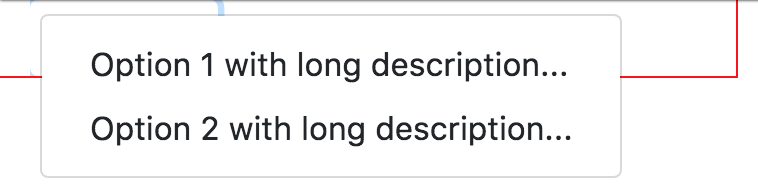
https://codepen.io/FezVrasta/pen/pdgoMX
In our specific case, the .dropdown wrapper has position: relative, and it forces the dropdown to always get hidden by any overflow: scroll parent
As side note, Popper.js is not completely optimized for this specific use case, some work is needed to update the algorithm used to detect the bounding parent elements.
 FezVrasta
on 2 Nov 2017
FezVrasta
on 2 Nov 2017
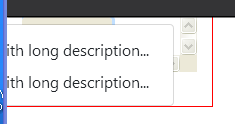
@FezVrasta this appears to be a bit buggy in Firefox, and doesn't handle when the dropdown is wider than the container. It is still partially off screen.
When setting the column to col-2:
tmorehouse
on 5 Nov 2017
@tmorehouse the problem with col-2 is because Popper.js is not yet optimized for this use case.
About Firefox, it looks like it's only the outline property that acts weirdly, other styling is fine.
If this approach is something that Bootstrap wants to adopt I can work on Popper.js to make it work better to fit this need.
FezVrasta
on 5 Nov 2017
@FezVrasta, @Johann-S @mdo @ronjouch For Bootstrap-Vue we have just added an option (via PR https://github.com/bootstrap-vue/bootstrap-vue/pull/1440) to change the modifiers.preventOverflow.boundariesElement (i.e. from the default of scrollParent to viewport or window), and if anything other than scrollParent is set, we add the CSS position: static to the outer wrapper around the dropdown button(s) (i.e. the div.dropdown).
Popper.js reference: https://popper.js.org/popper-documentation.html#modifiers..preventOverflow
This appears to work well from our tests so far, while still preserving the default behavior when scrollParent is set as the boundariesElement _and does not require re-parenting the_ .dropdown-menu.
Before (with boundariesElement at default, and no position: static, which is the current behavior):
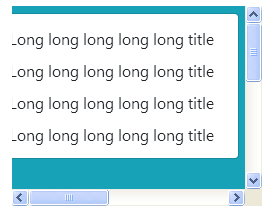
Now (with the boundary set to viewport or window, and position: static):
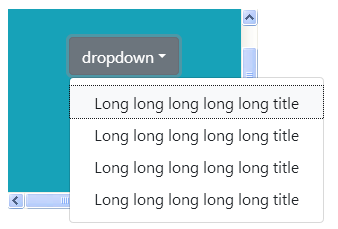
Which renders the following if boundary is set to something other than 'scrollParent':
<div class="dropdown" style="position: static">
  <button class="dropdown-toggle">Dropdown</button>
  <div class="dropdown-menu">
    <!-- dropdown items here -->
  </div>
</div>
seems nice @tmorehouse I'll give it a look :+1:
Johann-S
on 8 Dec 2017
@Johann-S We have also done something similar for popover/tooltip (without the use of position: static, but with the boundariesElement option), which allows the popover/tooltip placement to work when the trigger element is inside an element with overflow: scroll). position: static wasn't needed in the tooltip/popover case as the tooltip/popover is typically appended to the body. PR https://github.com/bootstrap-vue/bootstrap-vue/pull/1439
Basically we have added a boundary config property in the tooltip class (defaults to 'scrollParent'), which the user can override. The boundary value is passed directly to the Popper config modifiers.preventOverflow.boundariesElement
tmorehouse
on 8 Dec 2017
@Johann-S I could create a couple of PRs that would address this issue for dropdowns and for tooltips/popover (would just be a few lines of code in the tooltip class, and a few lines in the dropdown plugin).
Update: PR's created #24976 and #24978
tmorehouse
on 8 Dec 2017
Related issues
 devdelimited
·
3Comments
devdelimited
·
3Comments
 IamManchanda
·
3Comments
IamManchanda
·
3Comments
 fohlsom
·
3Comments
fohlsom
·
3Comments
 vinorodrigues
·
3Comments
vinorodrigues
·
3Comments
 cvrebert
·
3Comments
cvrebert
·
3Comments
Most helpful comment
Try this:
I use this for table responsive.