Bootstrap: Multiple client side validation feedback
I've provided a sample in JS Bin here
In the sample you can see I've copy/pasted the Custom Styles for Forms Validation.
Now the only change I made is in the Zip form input element. I've changed the type to number (type="number") and I've added additional client-side validation. the min and max attributes on top of the required attribute.
<input type="number" class="form-control" id="validationCustom05" placeholder="Zip" required min="1000" max="9999">
After I enter an invalid number (e.g. 1) and hit the submit form button the invalid-feedback will be rendered. However the message displayed is generic, opposed to the browser which can display context aware messages.
For example, for the required attribute, the browser shows the following message when the form is empty (the message may vary depending on the browser):
"Please fill out this form"
But when, for example, you would enter 1 in the ZIP field, the browser would show:
"Value must be greater than or equal to 1000"
Since we have the min attribute on 1000. So it's context aware.
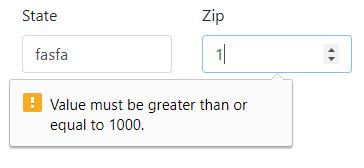
Now this isn't the case with Bootstrap's custom styling, it's not aware which kind of validation has occurred. Is there a reason this feature is not in Bootstrap? Will this be implemented in future releases? If the developer wants client-side validation with custom styling and the same behavior as the browser's default, does the developer need to implement it?
 QuantumHive
>All comments
This is covered under https://getbootstrap.com/docs/4.0/components/forms/#browser-defaults. There are no plans to change the core behaviors of our custom styles for form validation, and you can use the browser defaults to get your custom messaging.
 mdo
on 5 Sep 2017
mdo
on 5 Sep 2017
Related issues
 kamov
·
3Comments
kamov
·
3Comments
 vinorodrigues
·
3Comments
vinorodrigues
·
3Comments
 cvrebert
·
3Comments
cvrebert
·
3Comments
 matsava
·
3Comments
matsava
·
3Comments
 iklementiev
·
3Comments
iklementiev
·
3Comments